Model federation evaluation for router drift and misroutes
Model federation evaluation should test routing rules, fallback paths, and edge cases so teams catch misroutes and silent regressions before users do.
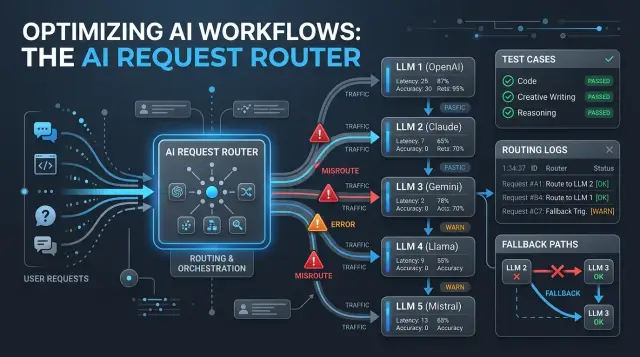
Table of Contents
Why model scores miss router failures
A router can break a good system even when every model looks strong on paper. If it sends a billing dispute to a fast low-cost model instead of one that can handle policy nuance, the answer might sound fine and still be wrong. Users do not care which component failed. They only see a bad reply.
That is why average model scores can mislead a team. A dashboard might show answer quality holding at 92 percent while a small slice of requests gets routed badly and causes real damage. Those misses often hit the cases people remember: refunds, legal wording, security questions, and urgent support tickets. One bad route in twenty can do more harm than a small drop in overall model quality.
Fallback logic makes this worse. Teams often treat fallback as a safety net, but it can change behavior more than a model swap. If the router times out, sends the request to a backup model, and that model gives a shorter, less careful answer, the problem is not the base model. The problem is the path the request took.
Consider a simple support message: "My invoice is wrong and I need this fixed before renewal." If the router reads that as a general FAQ, the system might return a canned billing article. If it picks up urgency and account risk, it may send the case to a stronger model or a human queue. Same user, same model pool, completely different outcome.
Teams often blame the model because that is what they measure. They compare Model A with Model B, score the answers, and stop there. But the router needs its own tests. It decides which prompts get extra care, which get speed, and which quietly end up in the wrong lane.
A few warning signs show up again and again: complaints cluster around certain request types, fallback traffic rises after a small config change, model scores stay flat while user satisfaction drops, or manual review shows more correct answers coming from the wrong route. If you only score the final answer, router drift can hide for weeks.
What the router actually decides
A router does more than pick a model. It reads the request and the limits around it. It sorts the task, checks risk, looks at budget, and weighs response time. Some teams also factor in customer tier, tool access, language, or whether the answer can trigger an action.
In most systems, the decision has several layers. The router can choose a model, a prompt path, and a fallback rule. A routine question may go to a fast model with a short system prompt. A sensitive question may go to a stronger model with tighter instructions, extra checks, or a rule that blocks the reply unless confidence stays high.
It also decides what happens when the first path fails. If a model times out, the router might retry once. If the answer looks weak, it may send the same request to a better model. If the request looks risky or tool output conflicts with the prompt, it may stop the flow and hand it to a person. That changes the user experience as much as model quality does.
Small threshold changes can move far more traffic than most teams expect. Lower the confidence bar a bit and thousands of routine requests may stay on the low-cost path instead of escalating. Shorten the timeout and more requests may skip retries and fail fast. Raise the risk score for account issues and a large share of support tickets may jump to the expensive path overnight.
That is why evaluation has to test decision logic, not just models in isolation. When the router changes, cost, speed, and error patterns can change even if every model keeps the same raw score. The user feels the route, not the benchmark.
Pick outcomes before you write cases
A test case without a clear expected outcome tells you very little. You need to decide what the router should do before you run anything.
Start with the request type, not the model. A user asks for a refund, reports a security issue, or wants a short factual answer. Each type should have one expected route. If more than one route is acceptable, write that down in advance. Otherwise, teams start arguing after the run, and weak routing choices slip through.
For each case, define four things: the expected route, the failure you want to catch, whether a wrong route can still pass if the user gets a good answer, and a simple pass rule with a yes or no result.
That third point matters more than it seems. Sometimes the router picks the "wrong" model, but the user still gets the right answer in normal time. You may decide that case passes. In other cases, the wrong route should fail even if the text looks good.
Requests that need tools are the clearest example. If the router sends one to a plain chat model and the answer sounds confident but skips the account lookup, that is a miss. The user asked for something specific, and the system guessed instead of checking.
Cost and speed need rules too. If the router sends a simple greeting to the most expensive model, the answer may be perfect, but the route still failed. If a hard reasoning task goes to the cheapest model and needs two retries to recover, that failed too. Users feel those mistakes as delay, inconsistency, or extra back and forth.
Keep pass rules blunt. "Correct route or approved fallback, correct answer, under 5 seconds, no policy breach" is far better than "mostly fine." Clear rules make regressions obvious and stop teams from explaining away misses after a release.
Build cases that force hard choices
Most routers look smart when every prompt points to one obvious model. They fail in the gray area: requests that are almost simple, almost complex, or just incomplete enough to confuse the route.
A good evaluation needs both clean cases and uncomfortable ones. Easy requests confirm that the system still handles the basics. Borderline requests show whether the router can tell the difference between "good enough for the low-cost path" and "send this to a stronger path before it turns into a bad answer."
Messy inputs matter even more. Real users leave out fields, paste broken text, mix two tasks in one message, or ask for one thing while implying another. If your test set only uses tidy prompts, routing tests will miss the cases that cause the worst failures in production.
A support example makes this obvious. Compare "Reset my password" with "I can sign in on web but not on iPhone after changing my email, and billing also looks wrong." Both are support messages. They should not go to the same path. One is short and routine. The other has account state, platform context, and a second issue buried in the same note.
Near duplicates are especially useful because they expose silent regressions. Change one detail and the route should change too. A request about "refund status" may fit a cheap classifier path, while "refund status for charge after disputed renewal" may need a stronger model or a workflow with stricter checks. If both cases land in the same place after a router update, you learned something real.
Use real history whenever you can. Old incidents, support logs, and prompts that caused rework are better than invented examples because they carry the mess people actually send. Keep the wording rough. Do not clean it up so much that the test becomes easier than production.
It also helps to keep a small set of rare, expensive failures in every run. They may show up only once a month, but one bad route can create a legal issue, lose a customer, or trigger hours of manual cleanup. Those cases deserve a permanent spot in the suite.
If the router never faces close calls in testing, you are not really testing the router. You are only checking whether obvious requests still look obvious.
Metrics that catch silent regressions
A router can drift for weeks before anyone notices. Users still get acceptable answers, so the problem hides in cost, delay, and odd route choices that only become visible later.
The first fix is simple: split one metric into two. Answer quality tells you whether the user got something useful. Route accuracy tells you whether the router picked the model, tool, or fallback path you expected. Those numbers should sit side by side, not inside one blended score.
If you only grade the final answer, you miss a common failure mode: the wrong path still produces a decent reply. A billing request might land on a general model instead of a workflow with account checks. The text looks fine, but the route changed, the safety step never ran, and the next edge case may fail.
A practical scorecard usually tracks route accuracy by case type, answer quality by case type, fallback and retry rates, cost per case, latency per case, and route share by destination over time.
Fallback and retry rates deserve extra attention. When those numbers rise for only one request type, the router often lost confidence after a prompt edit, a threshold change, or a new rule. The overall pass rate may stay flat while the system burns more tokens and adds two or three seconds.
Compare the same fixed test cases across versions. For each case, track answer score, chosen route, total cost, and total delay. If version B answers just as well as version A but sends 30 percent more cases to an expensive model, that is a regression. If it adds a retry before reaching the same final answer, that is a regression too.
Route share shifts help catch broad drift. After a prompt or rule update, one model may suddenly handle far more traffic than before. Sometimes that is the goal. Often it is an accident. Set expected ranges for each destination and alert when a release pushes traffic outside them.
One of the best alerts is also one of the quietest: "answer passed, route changed." Review those cases first. They often reveal the bugs that stay cheap in testing and get expensive in production.
Run the evaluation in stages
Full system tests can hide router drift because a strong model may still give a decent answer after the request takes the wrong path. That is why staged evaluation works better.
Start with a frozen baseline. Lock the prompts, router rules, thresholds, and model versions for the first run. If you keep changing the setup while building the suite, you never get a clean reference point.
Then test the router by itself. Feed it the same inputs you plan to use later, but score only the route decision. That tells you whether it picked the expected model, an allowed model group, or the wrong path entirely.
After that, run the same cases through the full system. Now you can compare two layers at once: route choice and final answer. If the answer gets worse while the route stays correct, the problem is probably in the prompt, tool use, or model behavior. If the route changes first, you found a routing issue.
A simple sequence works well:
- Run the frozen baseline and save every result.
- Test route decisions alone on the case set.
- Run the full system with the same cases.
- Change one variable and rerun.
- Compare each result with the baseline, not just the latest run.
Change one variable at a time. If you update a routing rule, swap a model, and edit prompts in the same release, you lose the cause of any regression. Small isolated changes feel slow, but they save hours of false debugging.
When cases fail, read the traces before you edit the suite. Teams often rewrite a case too quickly and end up hiding a real misroute. Keep the original case unless it is clearly wrong. Review the request, route decision, model output, cost, and latency together.
That last part matters. Store route choice, final answer, cost, and latency in one record for every run. A route that still gets the right answer but doubles cost or adds two seconds is already drifting in the wrong direction.
A simple support triage example
Imagine a SaaS support inbox with one router in front of three paths. Routine billing questions go to a fast low-cost model. Messages with refund threats, chargeback language, or legal pressure go to a stronger guarded path. Anything unclear goes to human review.
That sounds simple until a customer writes like a real person. People mix requests, emotions, and threats in one note. A router that only catches the first intent will look fine on average and still fail on the messages that matter most.
Here are four cases worth testing:
- "I was charged twice. Can you fix it?" should go to the standard billing path.
- "Refund me today or I will contact my bank and my lawyer" should go to the guarded path.
- "Please cancel my plan. Also, if this charge stays, I will file a chargeback" should count as high risk even though it starts like a normal cancellation.
- "I need to close the account. The extra fee is not acceptable, and I may report this if nobody answers" should not get a casual billing reply.
The third message is where many routers break. They see "cancel my plan" first, send it to the low-cost model, and miss the chargeback threat later in the text. If you only grade answer quality, that miss can slip through because the cheaper path may still produce a polite reply.
A good test checks the route, the risk label, and the final response. If the system falls back after a timeout or rate limit, it should keep the case on the guarded path or hand it to a person. It should never turn a risky message into "Sure, I can help you cancel that" and ignore the threat.
That is why support triage tests need long mixed-intent messages, not just clean prompts. In practice, these are not rare edge cases. They are the messages that tell you whether the router is safe enough for production.
Mistakes that hide regressions
A router can get worse while the dashboard still looks calm. Teams see the same suite pass week after week and assume the system is stable. Often the suite just stopped asking hard questions.
One common mistake is keeping old easy cases for too long. After a few releases, the router has already learned the obvious patterns, so the suite turns into a memory check. That does not mean routing improved. It usually means the test set got stale. Bring in recent failures, close calls, and cases that triggered fallbacks in production.
Another mistake is grading only the final answer. In LLM routing, the path matters as much as the output. If the router sends a simple refund request to the biggest model, the customer may still get a fine answer, but you pay more and wait longer. If it sends a risky policy question to a lightweight model and only recovers on retry, the final text may look acceptable while the original route was still wrong.
Teams also hide regressions when they drop disputed cases after a prompt rewrite changes the expected label. Those cases are often the most useful ones because they expose brittle rules and fuzzy boundaries between models. Keep them, review them by hand, and write down why each route should win. If the label really changed, record the reason instead of deleting the case.
Clean test inputs create another false sense of safety. Real users send typo filled messages, pasted logs, half sentences, mixed requests, and copied email threads. A router that looks smart on polished text can fail fast on messy input. If your suite does not include noise, it will miss the failures users actually see.
Low volume errors deserve human review too. A rare misroute may hit a legal complaint, a security issue, or an angry enterprise customer. One of those can matter more than hundreds of correct FAQ answers.
A healthier suite uses fresh production cases, noisy inputs that look like real user messages, route labels with notes instead of bare pass or fail tags, and manual review for rare but costly mistakes.
If the suite never surprises you, trust it less.
Quick checks before each release
Do not rely only on a full benchmark run. Before each release, run a small set of risky cases that usually break first. Pick cases with close intent boundaries, mixed languages, vague prompts, and requests that tend to trigger the wrong model when the router drifts.
Then check route share, not just pass rate. Split traffic by intent, language, and customer tier, and compare the new build with the last stable one. If billing questions suddenly move to a slower model, or Spanish requests start landing on the fallback path more often, that shift matters even if answer quality still looks fine in aggregate.
Fallbacks and retries need their own check. A small rise can signal prompt damage, bad thresholds, or a broken model handoff long before users complain. Teams often miss this because the final answer still arrives, but it takes two extra hops and costs more.
Numbers alone are not enough. Read a small sample of failures by hand before release. Ten to twenty cases is often enough to spot patterns like polite refusals, wrong language choice, or a router that sends simple tasks to the most expensive model.
Set a rollback rule before you need it. Keep it simple. Roll back if route share moves outside the allowed band for a major intent, if fallback or retry rate jumps past a fixed threshold, or if manual review finds repeated misroutes in the same group of cases.
This check does not take long, and it prevents the worst kind of release: one that looks fine on a dashboard but quietly gets worse for real users. Lean teams feel the benefit first because they cannot afford a week of hidden routing mistakes.
Next steps for a safer router
Routers usually become risky in small, quiet ways. One prompt edit, one cheaper model, or one new fallback rule can send requests down the wrong path. That is why evaluation should stay close to real routing decisions, not just model scorecards.
Write down the actual routes your system can take: answer directly, ask a follow-up, send to a stronger model, send to a lower-cost model, hand off to a person, or refuse. Then build twenty hard cases that sit near the edges. Good cases are messy on purpose. They include vague requests, missing context, safety edge cases, and tasks that look cheap at first but get expensive after one more turn.
Use production mistakes as fuel. Every time a user reports a bad handoff, freeze that example and add it to the suite. If a support ticket went to the coding route, or a harmless question got blocked, keep that case. A test set built from real failures usually catches routing problems faster than a neat benchmark.
Whenever the team changes something that can shift traffic, review the router traces. That includes model swaps, router prompt edits, policy changes, pricing rules, cost caps, fallback logic, and timeout behavior. Do not stop at the final answer. Check why the router chose that path, which model it picked, whether it retried, how long it took, and what the user actually saw.
If you need an outside review, Oleg Sotnikov at oleg.is does this kind of Fractional CTO and AI advisory work for startups and smaller teams. A second set of eyes can help when you are changing model routing, cutting costs, or adding AI workflows to an existing product.
A practical first milestone is simple: one route map, twenty hard cases, and a rule that every bad handoff becomes a permanent test.