Model access control in a company: who tests and approves
Model access control helps teams decide who may try new AI providers, move data across boundaries, and approve production use without guesswork.
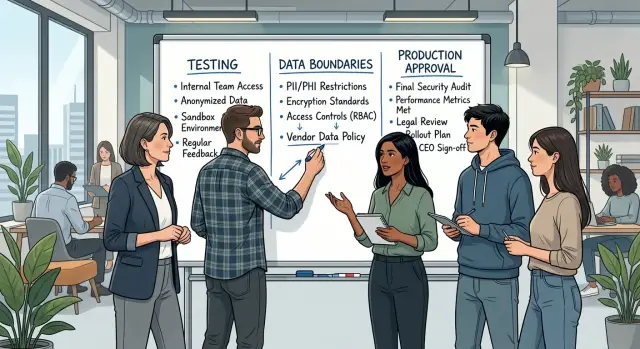
Table of Contents
What this policy solves
When anyone in the company can turn on a new model or connect a new AI provider, small shortcuts turn into real problems.
A developer pastes customer text into a trial account because it's quick. A product manager hooks a promising model into an internal workflow before anyone checks logging, retention, or contract terms. Then a good demo gets treated like approval to ship.
None of that sounds huge on its own. Together, it creates unclear data handling, surprise costs, uneven output quality, and no shared record of who approved what.
Most teams also mix up three different decisions. One is who can test a new provider. Another is who can move data across boundaries, such as from internal systems into a third-party model. The third is who can approve production use. When those blur together, test access quietly becomes data access, and data access quietly becomes deployment authority.
That is the gap this policy closes.
Test access should stay narrow. Someone may need a sandbox account, sample prompts, and fake or scrubbed data to compare providers. That does not mean they should send customer records, wire the model into a live process, or make it available across the company. Testing answers one question: is this worth deeper review? Production asks a different one: can we trust it with real work under clear rules?
A good policy speeds teams up because it removes guesswork. People know where they can experiment, what data they can use, and when they need approval. That is much better than cleaning up after someone crossed a line by accident.
This matters even more in startups. Small teams share tools, move fast, and often skip formal checkpoints. A lightweight policy keeps that speed but adds guardrails where they matter. People can try new models without turning every test into a hidden production launch.
Start with three clear access levels
Most teams give broad access too early. Someone gets an API token, tries a model with real customer text, and a test quietly becomes normal use. Clear access levels stop that drift.
Use three levels and tie each one to actions people can actually take.
- Sandbox use. People can try new providers with fake, public, or fully scrubbed data. They can compare quality, latency, and cost. An engineering lead or AI lead can approve this.
- Limited business use. People can run controlled internal tests with low-risk business data under written rules. They cannot connect the model to customer-facing flows or long-term storage without review. A data owner and technical lead should approve this together.
- Production use. People can place a model in a live workflow, app, or automation that changes customer output, staff decisions, or company records. Only the CTO, founder, or a fractional CTO with written authority should approve it.
These levels work because they match real behavior. Sandbox means learning. Limited business use means a guarded pilot. Production means the company depends on the result, so the approval bar must be higher.
Keep role names simple. Use titles your team already has, such as engineering lead, data owner, and CTO. If one person wears two hats in a small company, write that down instead of inventing a committee that does not exist.
A small startup might handle it like this: the lead engineer grants sandbox access, the founder and operations manager approve limited business use for internal support drafts, and the fractional CTO signs off before anything reaches customers. It takes a few minutes to explain, and nobody has to guess who says yes.
One extra rule helps a lot: nobody jumps levels by habit. Each move needs fresh approval because the risk changes when the data and audience change.
Who should test new providers
Give first access to a small review group, not the whole company. Three to five people is usually enough. That group should include someone who understands technical fit, someone who knows the business use case, and someone who watches data and compliance risk.
If everyone can try any new model on day one, teams send the wrong data, spend money too fast, and compare tools with no shared method.
A practical review group often includes:
- a senior engineer or technical lead
- a product manager or process owner
- a data, security, or operations reviewer
- one backup tester in case the main owner is away
Testers need clear boundaries. Public documentation, fake data, sample prompts, and scrubbed examples are usually fine if the company approved them. Raw customer records, private contracts, source code from sensitive systems, secrets, and internal finance data should stay out unless someone grants a written exception.
Keep the test window short. Two weeks is enough for most first trials. Set a small budget cap and limit the number of models under review at one time. If a team compares six providers at once, nobody learns much. Two or three is usually enough.
Ask every tester to record results in one shared place. A simple template works: use case, prompts used, data type, output quality, latency, cost, logging behavior, and any failure that made the team uneasy. One shared record is better than ten scattered chat threads.
A small startup can keep this light. A founder, one engineer, and one operations lead can run the first test, use only synthetic data, cap spend at a few hundred dollars, and write notes on one internal page. That is enough to support a testing policy without slowing the team down.
If the first trial looks promising, move it to formal review for broader access. Until then, testing stays with the small group.
Rules for moving data across boundaries
Most access policies fail when nobody defines what data can leave one system and what must stay put. A team may think it is only testing a model, but one copy-paste can move customer records, product plans, or source code into the wrong place.
Start by sorting your data into a few plain categories. Most teams deal with four kinds of information:
- public material, such as published marketing text or docs
- internal business documents, such as roadmaps, meeting notes, and pricing drafts
- customer data, such as names, emails, support logs, and account details
- source code and technical assets, such as repos, configs, API schemas, and database structure
Then give each category a simple rule. Can it stay inside one approved tool? Can it move to another approved tool? Or can it never leave your controlled environment? Keep the labels blunt. If people need a long debate to classify a file, the rule is too fuzzy.
Customer data should get the strictest rule in most companies. Do not let staff paste it into a new provider, sync it through browser extensions, or upload it for experiments unless a named owner approves that exact use. The owner should be a real person, not "the team."
Internal documents need more care than many teams expect. Strategy decks, investor updates, hiring plans, and incident notes can cause real damage if they spread outside approved tools. In many companies, redacted versions are the safest choice for limited testing.
Source code needs its own rule. Some code is harmless test material. Some includes secrets, private logic, or customer-specific workflows. Keep production code, secrets, and infrastructure files inside approved environments unless the owner signs off on export.
Any export, sync, or bulk copy across boundaries needs a named owner. Put that owner next to the dataset or repo in your internal docs. When someone wants to move data, they should know exactly who can approve it, who can reject it, and what version they may use.
Who approves production use
Production approval should not sit with one person alone. A model that works in a demo can still fail on uptime, cost, privacy, or customer harm once real traffic starts.
For most teams, four approvals are enough. In a small startup, one person may cover two roles, but one person should not approve all of them.
Approval roles
- The engineering owner approves reliability. They check latency, error rate, fallback behavior, monitoring, and whether the team can turn the model off quickly.
- The budget owner approves cost. They confirm expected monthly spend, usage limits, and what happens if traffic doubles.
- The legal or privacy owner approves data and contract risk. They review what data leaves the company, retention terms, and any rules tied to customer records.
- The product owner approves user impact. They decide whether the output reaches customers directly and how much review it needs before release.
If the model writes content customers will see, the bar should be higher. The same goes for outputs that affect pricing, approvals, support replies, or anything that can change a customer decision.
Before launch, ask for a short written reason for approval. One page is enough. It should say what the model does, what data it touches, why this provider was chosen, what could go wrong, and who accepted each risk.
A rollback plan also needs an owner before launch day. That plan can be simple: switch traffic back to the old workflow, disable the feature flag, or move the task to human review for 48 hours. What matters is speed and clarity, not paperwork.
This is where teams often get sloppy. They treat production approval as a technical check and miss the cost spike or privacy issue. A simple approval process works better when each risk has a named owner and a written yes.
A process your team can actually follow
This only works if people can follow it in a few minutes. If the path is vague or slow, teams will test tools on their own and skip review.
Keep the flow short, with named owners and a clear stop at each step.
- Write down the business task in one or two sentences. Say what the model should do, who will use the result, and what success looks like. "Summarize support tickets in under 30 seconds" is clear. "Try some AI" is not.
- Pick one model and test it with safe sample data. Use fake records, public text, or redacted examples. This answers a basic question: does the model help enough to justify more work?
- Review data movement before anyone asks for wider access. Check what data enters the model, where prompts and outputs are stored, who can see logs, and whether anything crosses company or regional boundaries.
- Approve a pilot with limits. Set a small user group, a short test period, and a simple rule for what data stays out. Name the person who owns the pilot and the person who can stop it.
- Approve production only after the pilot shows real results. Look at accuracy, cost, failure cases, and support burden. If the team cannot explain these in plain language, wait.
This flow keeps testing open without turning production into a free-for-all. It also helps teams separate curiosity from real business use, which saves money and avoids messy cleanup later.
If you want one extra rule, make it this: nobody gets broader access just because a demo looked good. Teams should earn production use with a short record of what they tested, what data they touched, and what happened. That record can fit on one page.
Example: a small team trying a new model
A product manager at a small SaaS company wants a new support assistant. The goal is simple: help agents draft replies faster, suggest help articles, and cut time spent on repeat questions.
The team does not start with live customer data. The product manager can request a test, but cannot connect a new provider alone. An engineer gets temporary access to evaluate two providers in a safe sandbox.
To keep the test clean, the engineer uses mock support tickets. Some are easy, like password resets. Some are messy, with vague complaints or angry wording. That matters because many models look good on neat examples and fall apart on real support language.
During the test, the engineer compares both providers on a few checks:
- response quality on common tickets
- failure rate on confusing prompts
- cost per 1,000 ticket drafts
- logging and data retention settings
The team also sets one hard rule: no customer exports leave the company until someone approves the data boundary. That means no CSV dump from the help desk, no copied conversation archive, and no agent pasting live tickets into the new tool. It slows the first week a little, but it avoids the usual mistake of testing with production data.
One provider writes better answers, but it costs more and keeps logs longer than the team wants. The other is cheaper and easier to control, but its replies need more editing. The engineer summarizes that trade-off in a short note instead of a long report.
The CTO reviews the note, checks expected monthly cost, reads sample outputs, and confirms where data will go. After that, the CTO approves a small pilot for five support agents with redacted tickets only.
That kind of approval process is boring by design. Good. Boring is what keeps a quick experiment from turning into a data leak.
Common mistakes that create risk
The fastest way to weaken a policy is to treat a new AI tool like a harmless add-on. Teams do this when a model looks cheap, easy to try, or useful for one small task. Then someone uploads support logs, sales notes, or source code before anyone checks where the data goes.
Broad access is often the first mistake. If everyone can test any provider with the same company account, you lose track of who sent what, which settings they used, and whether the provider kept prompts for training. Start small. A short trial with named testers is a little slower for a day and much safer over time.
Another problem appears when one person handles the whole chain: test the provider, buy it, and approve it for production. That may feel efficient, but it removes the only real check many small companies have. Even a five-person startup should split those jobs between at least two people.
Real customer data in early trials creates the biggest mess. Teams often say they will upload "just a few examples" to see if the model performs better. A few examples can still contain names, contracts, health details, or private product plans. Early testing should use fake, masked, or old internal data that no longer matters.
Ownership also gets blurry when a model touches several teams. Support may use it for summaries, engineering may connect it to internal tools, and legal may assume someone else checked the terms. When nobody owns the model, nobody fixes gaps like missing logs, expired approvals, or slow scope creep.
Common warning signs are easy to spot:
- a shared login for multiple testers
- a paid subscription started on a personal card
- prompt logs with live customer records
- no named owner after the trial ends
- production use that began through a "temporary" experiment
Most of these mistakes come from speed and convenience, not bad intent. A clear rule helps: if a model can see company data or affect customer output, one person should request access, one person should review it, and one person should own it after launch.
Quick checks before you grant access
Most access problems start before anyone sends a prompt. A team gets excited, someone opens an account, and only later asks who can use it with real company data. A short check prevents that.
This is less about paperwork and more about naming people, setting limits, and making reversal easy. If you cannot answer these points in a few minutes, the team is not ready for access yet.
Four things to confirm
- Name the tester group. Write down who can try the new provider, who owns the test, and when access ends. "Engineering team" is too vague. "Anna and Vik can test until May 15" is clear.
- Write allowed data types in plain language. Say "marketing copy and fake customer records are allowed" or "no contracts, no support tickets, no production database exports." If people need a lawyer to read it, it will fail in practice.
- Assign one production approver. This can be a CTO, security lead, or founder in a small company. Shared approval often means nobody checks the risk carefully.
- Prepare the exit path before first use. Access should have logs so you can see who used the model and what system called it. You also need a rollback plan: how to turn it off, switch traffic back, and remove saved credentials if the test goes badly.
A small team can keep all of this on one page. The goal is speed with limits.
One practical test works well: ask a new team member to read the note and explain what they can do. If they cannot tell you who may test, what data is allowed, who signs off on production, and how to shut it down, the rules are still too fuzzy.
That last part matters more than many teams expect. Clear access rules save hours later, especially when a provider changes terms, output quality drops, or someone sends the wrong data.
Keep the process usable
A policy works when people can read it in a few minutes and follow it without asking for special treatment every week. If the rules need a long meeting to explain, they are too heavy.
Put them on one page and keep the language plain. Most teams only need four things in writing: who can try new models in a test area, what kind of data they can use there, who can approve moving data across boundaries, and who can allow production use.
That page should live next to the tools people already use for requests and approvals. If it sits in a forgotten folder, people will guess, and guessing creates risk fast.
Review exceptions once a month. A short review is enough. Check why each exception exists, whether anyone still needs it, and whether the original reason still makes sense. Temporary access often becomes permanent by accident.
Update roles whenever the team or vendors change. A new engineer may need test access on day one. A contractor may need less. A provider may add new storage terms, new regions, or new enterprise controls. When that happens, old approvals are no longer safe just because they were safe before.
It also helps to name one person who owns the process. In a small company, that may be the CTO, head of engineering, or founder. In a growing startup, that owner can keep the rules simple, answer edge cases, and stop the policy from turning into paperwork.
Some teams need outside help to set this up without slowing product work. Oleg Sotnikov at oleg.is works with startups and smaller companies on Fractional CTO, infrastructure, and practical AI adoption, so this kind of approval process often fits naturally into a broader operating model.
The best version of this policy is boring. People know the rule, know who decides, and keep moving.
Frequently Asked Questions
Why shouldn’t everyone get access to new AI tools right away?
Because test access often turns into real data access faster than teams expect. Start with a small review group so you can control spend, compare providers the same way, and stop people from pasting company data into random tools.
What’s the difference between sandbox, limited business use, and production use?
Sandbox use means people try a model with fake, public, or fully scrubbed data. Limited business use allows a controlled pilot with low-risk company data under written rules. Production use means the model affects live work, customer output, or company records, so senior approval should gate it.
Who should test a new AI provider first?
Start with three to five people who cover technical fit, business value, and data risk. In a small company, that often means one engineer, one product or operations owner, and one person who checks privacy or process rules.
What data should we allow in early tests?
Use fake records, public material, and scrubbed examples first. That gives you enough to check quality, speed, and cost without exposing customer details, private plans, or sensitive code.
Can we use customer data during a trial?
No, not by default. A named data owner should approve that exact use first, and the team should know where prompts, outputs, and logs will go before anyone uploads real records.
Who should approve data moving across tool boundaries?
Put one real owner on each dataset or repo and make that person approve any export, sync, or bulk copy. If nobody knows who owns the data, people will guess, and that usually ends badly.
Who should sign off before a model goes into production?
Four people usually cover it: the engineering owner for reliability, the budget owner for spend, the legal or privacy owner for data risk, and the product owner for user impact. One person may cover two roles in a small startup, but one person should not approve everything alone.
What should a good pilot look like?
Keep it small and time-boxed. Pick a narrow use case, limit the users, block sensitive data, set a budget cap, and name one person who owns the pilot and one person who can stop it fast if things go wrong.
What warning signs show our access policy is failing?
Watch for shared logins, personal cards paying for company tools, prompt logs that contain live customer records, and “temporary” tests that never end. Those signs mean the team has lost track of ownership and scope.
How do we keep this policy lightweight in a startup?
Keep the policy on one page and write it in plain language. If a new team member can read it and explain who may test, what data they may use, who approves production, and how to turn a tool off, the process is lean enough.