Mobile token storage: what to keep in Keychain or Keystore
Mobile token storage gets messy fast. Learn what belongs in Keychain or Keystore, what stays out, and how to rotate app credentials cleanly.
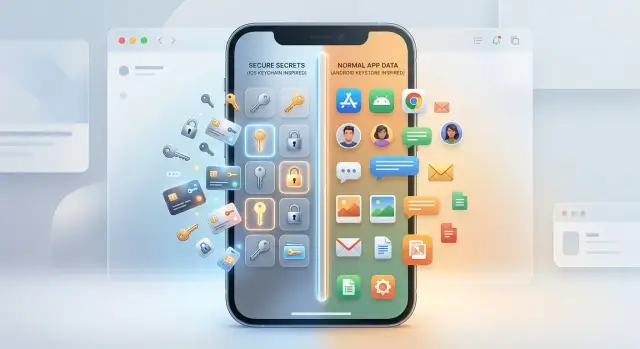
Table of Contents
Why local token storage matters
A mobile session token is the app's proof that you already signed in. After the first login, the app sends that token with later requests so the server does not ask for your password every time. That is what makes an app feel smooth. You open it, tap once, and your account is still there.
That same convenience creates risk. If someone steals the token, they often do not need your password at all. They can call the API as if they were you, read private data, place orders, change settings, or keep a session alive until the server blocks it. In many apps, a stolen token is enough to act as the user for hours, days, or longer.
This is why mobile token storage matters. A token stored in plain app storage, debug logs, clipboard history, or an unprotected local database is easier to copy than most teams expect. A rooted phone, a bad backup, a shared device, or another app with too much access can turn a small storage mistake into a full account takeover.
Keychain on iOS and Keystore on Android give you a safer place for secrets. They are built to keep sensitive data behind OS-level protection instead of leaving it in regular app files. Plain storage still has a place for harmless data like UI state, cached screens, or feature flags. It is a poor place for anything that can open an authenticated session.
The goal is simple: keep users signed in without keeping more secret material than you need. A good app remembers enough to restore a session safely, but not enough to hand over the account if local data leaks. That usually means treating tokens like cash in a wallet. Keep only what you need, protect it well, and replace it before it becomes a long-term problem.
A small example makes the risk clear. If a note-taking app stores its session token in a plain preferences file, anyone who copies that file may be able to sync, read, and delete the user's notes. If the app stores the secret in Keychain or Keystore instead, stealing it gets much harder.
What belongs in Keychain or Keystore
Use Keychain on iPhone and Keystore on Android for secrets that must survive an app restart and stay tied to the device. In mobile token storage, that usually means the small pieces that can reopen a session safely, not every auth value your app ever touches.
A refresh token belongs here if your app needs to keep a user signed in after they close the app. It is small, long-lived, and sensitive. If someone copies it, they can often mint fresh access tokens for days or weeks. That makes it a much better fit for secure storage than a normal app database or shared preferences.
Private keys created on the device also belong here. If your app uses client certificates, device binding, or signs requests locally, generate the private key inside the secure store and keep it there. The app should use the key, not export it and move it around.
Another good fit is a small secret that unwraps something else. For example, your app might keep an encrypted blob on disk and store only the unwrapping secret in Keychain or Keystore. That keeps the protected value small and limits what sits in the secure store.
Keep each stored value narrow and tied to one account. If a user can switch between work and personal accounts, save separate entries for each one. Add clear labels and account IDs so your app deletes or replaces the right secret during logout, re-login, or account removal.
A simple rule works well:
- Store refresh tokens that must outlive app restarts.
- Store private keys generated on the device.
- Store one small wrapping secret, if you use encrypted local blobs.
- Store values per account, not as one shared app secret.
Size matters more than many teams expect. Keychain and Keystore are best for small secrets, not bulky session objects or cached API data. If the value is compact, sensitive, and hard to replace, it likely belongs there.
One example: a banking app signs the user in, keeps the short-lived access token in memory, stores the refresh token in secure storage, and generates a device key for proof of possession. After a restart, the app reads the refresh token, asks the server for a new access token, and keeps going without exposing the long-lived secret in plain local storage.
What should stay out
Keychain and Keystore should hold a small set of secrets, not everything your app knows. Treat them like a locked wallet, not a storage closet. The more extra data you put there, the more damage a debug build, backup leak, or shared device can cause.
Do not keep a user's raw password after login. Your app should exchange it for a session credential, then discard it. If the app needs to keep the user signed in, a refresh token should do that job. A saved password creates a bigger problem if the phone is compromised, and it often breaks later when the user changes it.
Access tokens also do not need long-term storage in many apps. They usually expire fast, so keep them in memory when you can and load a fresh one with the refresh token after restart. That cuts down the time a stolen token stays useful.
Full user profiles should stay out too. Names, avatars, settings, feature flags, and large permission payloads are usually not secrets in the same way a token is. A shopping app might cache order history or profile details in normal app storage and fetch newer data after sign-in. That keeps secure storage small and focused.
Logs, request dumps, and big blobs are another common mistake. Developers add them for troubleshooting, then forget that headers, cookies, email addresses, and token fragments often slip into those files. One debug log with an Authorization header can undo a careful mobile token storage plan.
Use a simple filter before you save anything there:
- Is it a secret, or just app data?
- Does the app still need it after a restart?
- Can a short-lived copy stay in memory instead?
- Is it small enough to store as a single secret?
- Would a leak let someone start a new session?
If the answer is no to most of those, keep it out. Secure storage works best when it holds only the few items that prove identity and nothing else.
A simple storage pattern that works
Most apps stay safer when they treat access and refresh tokens very differently. Keep the access token short-lived and hold it only in memory. Keep the refresh token in Keychain on iOS or in Keystore-backed secure storage on Android.
That split does two useful things. It limits how long a stolen access token can work, and it keeps the longer-lived credential behind the phone's secure storage layer. For mobile token storage, this is usually the cleanest default.
When the user logs in, the server returns an access token and a refresh token. The app loads the access token into its session manager and uses it for API calls. The app writes only the refresh token to secure storage.
Do not save the access token in shared preferences, local files, SQLite, or logs. If the app restarts, read the refresh token from secure storage, ask the server for a fresh access token, and continue. That extra request is a fair trade for less risk.
A simple flow looks like this:
- User signs in and receives both tokens.
- App keeps the access token in memory with a short expiry, often a few minutes.
- App stores the refresh token in Keychain or Keystore-backed storage.
- When the access token expires, the app reads the refresh token, calls the refresh endpoint, and gets new credentials.
- On logout or account switch, the app clears memory and deletes the stored refresh token right away.
This pattern also makes rotation easier. If the server returns a new refresh token during a refresh call, overwrite the old one at once. Do not keep a backup copy unless your server design requires a short overlap window.
A small banking or shopping app might refresh only a few times a day. That is fine. You do not need to pull the refresh token from secure storage on every request. Read it only when you need it, then keep moving.
One last detail matters more than people think: treat account switching like logout. Remove the in-memory access token, delete the stored refresh token, and then start the next login. That step prevents one user's session from leaking into another user's data.
How to rotate credentials cleanly
Rotate refresh tokens before they get close to expiry. If your app waits until the last minute, one spotty train ride or tunnel can turn a normal refresh into a logout. A safer pattern is simple: when the current refresh token still has enough life left, the app asks the server for a new access token and a new refresh token.
On the phone, write the new refresh token to Keychain or Keystore first. After that succeeds, update the access token your app uses for API calls. Only then should you mark the old refresh token as retired. That order matters. If the app drops the old token first and then crashes, the user may lose the session even though nothing was wrong with their account.
Network failures need a little patience. If the refresh request times out, keep the current refresh token and try again when the connection returns. Do not log the user out after one failed rotation attempt. Give the app a small retry window and only end the session when the server says the token expired, was revoked, or got reused.
Server rules that prevent a mess
The server should treat refresh tokens like a chain, not a pile of random secrets.
- Each successful refresh returns a new token pair.
- The server retires the previous refresh token after that success.
- If someone tries to use an older refresh token again, the server treats that as reuse.
- The server then revokes that device session and asks for a fresh sign-in.
That reuse check matters in mobile session security. If malware or a leaked backup exposes an old refresh token, reuse detection gives you one more chance to stop the session before the leak turns into a long-term breach.
Track tokens in families, one family per device session. A user might sign in on an iPhone, an Android tablet, and a work phone. If one device looks suspicious, you should revoke that family only. The other devices can stay signed in.
This approach keeps mobile token storage safer and cuts down on surprise logouts, which users hate almost as much as security bugs.
A real app example
A shopping app often shows the same session problem users complain about: they come back after two days, tap the app, and expect it to work at once. They do not care that the access token expired overnight. They care that the cart, account page, and saved addresses still open without drama.
A clean flow is simple. The app keeps the short-lived access token in memory while the app runs. It stores the refresh token in Keychain on iPhone or Keystore-backed secure storage on Android. When the user returns after two days, the first API call fails with an auth error because the access token is old.
At that point, the app should not throw the user back to the login screen right away. It should try one refresh in the background:
- Read the refresh token from secure storage.
- Send it to the server over the normal refresh endpoint.
- Receive a new access token and a new refresh token.
- Replace the old refresh token in secure storage at once.
- Retry the original request with the new access token.
If that works, the user sees no break in the session. The home screen loads, the cart count appears, and checkout still works. This is what good mobile token storage feels like in practice: quiet, boring, and reliable.
The update step matters more than many teams think. If the server rotates refresh tokens, the app must save the new one before it keeps going. If it keeps the old token by mistake, the next refresh can fail even though the last one looked fine. That bug usually shows up days later, which makes it annoying to track down.
If refresh fails because the token is missing, revoked, or expired, the app should stop trying. Clear the access token from memory, delete the refresh token from secure storage, and send the user to login. A short message is enough: "Your session expired. Please sign in again."
That pattern gives users a smooth session when refresh works, and a clean reset when it does not.
Mistakes that cause leaks
The easiest leaks usually come from ordinary app code, not fancy attacks. A team ships fast, saves a token in SharedPreferences or UserDefaults, and plans to fix it later. Later often never comes. For mobile token storage, that shortcut is one of the fastest ways to turn a normal bug into an account takeover.
Tokens also escape through places developers forget to treat as sensitive. Debug logs, network logs, analytics events, crash reports, and support screenshots can all capture them. One copied header in a bug report is enough. If your app prints access tokens or refresh tokens anywhere outside secure storage, assume someone will see them.
Long-lived refresh tokens cause a different kind of leak. If the same refresh token stays valid for months, a stolen token keeps working long after the user forgets the device or changes a password. Rotation cuts that window down. When the server issues a new refresh token, the app should replace the old one at once and stop using it.
Using one token across many devices is another quiet mistake. It sounds simple, but it makes cleanup messy. If one phone gets lost, you now have to choose between leaving the stolen session alive or signing the user out everywhere. Device-scoped refresh tokens make incident response much cleaner.
A lot of apps also forget the obvious moment: sign-out. If the user taps "sign out", the app should remove tokens from secure storage right away, clear in-memory copies, and wipe cached auth state. Otherwise, the next person who opens the app may step back into an active session.
A short leak checklist helps catch most of this:
- Store tokens only in Keychain or Keystore-backed storage
- Redact tokens from logs, traces, and crash payloads
- Rotate refresh tokens and reject old ones after use
- Issue separate refresh tokens per device
- Delete local credentials fully on sign-out
A small example shows how these bugs pile up. A shopping app stores a refresh token in plain UserDefaults, logs failed API requests, and reuses the same token on a phone and tablet. The user sells the old phone without a full wipe. Whoever gets it can open the app, refresh the session, and stay signed in for weeks. None of those mistakes looks dramatic on its own. Together, they are enough.
Quick checks before release
Release bugs often hide in edge cases, not in the happy path. A mobile app can look fine in testing and still expose a session the first time a user loses signal, restarts the app, or signs into a second account.
For mobile token storage, the last review should focus on behavior, not just where you saved a token. Keychain or Keystore can protect secrets at rest, but bad app logic can still keep the wrong user signed in or send stale credentials for hours.
Run these checks on a real device, not only in a simulator:
- Restart the app after login, after a token refresh, and after a force close. The user should stay signed in when they should, and the app should not duplicate sessions or lose track of the active account.
- Test logout and account switch carefully. After logout, the app should clear local credentials, stop background refresh, and reopen to a clean state. After an account switch, no data from the previous user should remain on screen or in cache.
- Start a request, cut the network, and let the access token expire. When the phone comes back online, the app should refresh once, retry once, and avoid loops or stacked refresh calls.
- Inspect device logs, crash logs, analytics events, and debug tools. Tokens, refresh tokens, cookies, and Authorization headers should never appear there, even in development builds.
- Try a rooted or jailbroken device if your team supports that risk check. Decide what the app should do: warn, limit access, or block sign-in. Then test device revocation and make sure a revoked device loses access on the next refresh, not days later.
A small example catches a lot: log in as User A, force close the app, reopen it, switch to User B, go offline, wait for token expiry, reconnect, then log out. If any screen shows User A's data after the switch, or if the app refreshes with the wrong token, fix that before release.
These checks take less than an hour. They can save weeks of cleanup after a leak or account mix-up.
What to do next
Turn the auth flow into a written policy, not team folklore. One page is enough if it answers a few plain questions: which tokens the app stores, where each one lives, how long each one lasts, and what happens on logout, reinstall, password reset, and device revoke.
A small table usually works better than a long document. You might decide that the refresh token goes in Keychain or Keystore, the access token stays only in memory, and user profile data never sits next to credentials. Clear rules like that keep mobile token storage from drifting into a patchwork of exceptions.
Then get the backend and mobile teams to agree on timing and behavior. If the server rotates refresh tokens on every use, the app should save the new token first and remove the old one right after. If the server can revoke a single device, the app should treat a failed refresh as a real sign out, clear storage, and send the user to login without retry loops.
Keep the next steps concrete:
- Write one storage rule for every token, secret, and session value
- Set token lifetime, rotation rules, and revoke behavior in one shared doc
- Add tests for login, refresh, logout, expired sessions, offline retry, and device revoke
- Check logs, crash reports, and debug builds so tokens never leak outside secure storage
If your app already ships, run those checks on a real device. Then do them again after reinstalling the app and after an OS update. Those two moments often expose auth bugs that never show up in happy-path testing.
A second review helps when the flow has grown messy or the team keeps patching edge cases. Oleg Sotnikov can review the auth design in a practical Fractional CTO advisory role, with deep experience in mobile security, backend architecture, and production systems. That kind of review often catches small mistakes before they turn into account leaks, broken sessions, or a week of cleanup work.


