Mobile offline queues for forms, retries, and stale edits
Mobile offline queues help apps save actions on weak connections, avoid double submits, and handle stale edits with clear retry rules.
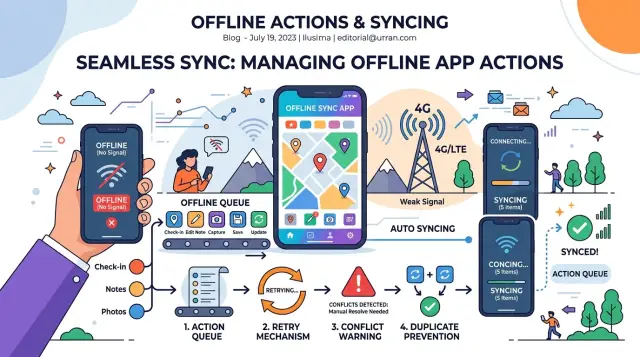
Table of Contents
Why weak connections cause bad app behavior
Weak connections break the basic promise of a mobile app: "I tapped save, so it should save once." On a strong network, that feels obvious. On a train, in a warehouse corner, or inside a concrete stairwell, the same tap can hang, fail without a clear message, then fire again when the user taps a second time.
That is how duplicate actions begin. A field worker submits the same inspection form twice because the button looked frozen. A customer pays twice because the app kept spinning and gave no clear answer. Users do not care whether the problem came from the phone, the API, or a timeout. They just see an app that acts strangely.
Old data causes a different kind of damage. Someone opens a record at 9:00, loses signal, edits it offline, and saves. At 9:05, a teammate updates the same record on another device. When the first phone reconnects, its older version can overwrite the newer one if the app accepts the late sync without checking which edit should win. Now the system keeps the wrong value, and nobody notices until the mistake costs time or money.
Weak signal makes both problems more common because requests do not fail in neat ways. A request can reach the server, succeed there, and still look broken on the phone because the response never comes back. Or it can time out, retry, and create a second copy of the same action. That messy middle is where offline queues matter.
Users lose trust fast because these bugs feel personal. When a form disappears, submits twice, or shows yesterday's notes after they just edited it, people stop relying on the app. They take screenshots, keep paper backups, or call someone to confirm every change. Once users start building workarounds, the app is already losing.
What an offline queue actually stores
An offline queue is a list of actions the app still needs to send. It is not a copy of the whole database, and it is not the same thing as the screen the user is editing. Think of it as a to-do list for the network.
That split matters. When a user taps Save, the app should first write the change to local storage so the screen updates right away. Server sync should happen after that, in the background, when the connection is good enough. If you mix those steps together, users think their work is gone when the real problem is simply that the app has not synced yet.
Each queued item should be small and clear. In most apps, one item needs the action type, the record ID, the time of the change, the data needed to replay it, and a local action ID so the app can track that exact attempt.
A simple example helps. A technician updates job record 842 in a basement with no signal. The app saves the edit on the phone at once. Then it adds a queue item like "update record 842, set status to complete, created at 10:43." When the phone reconnects, the app sends that action later.
Users also need to see the state of each queued action. Hidden queues create support tickets. Visible status keeps people calm and helps them decide what to do next. In practice, most apps only need a few simple states: saved on device, waiting to sync, syncing, synced, and failed or needs review.
That small bit of feedback prevents a lot of bad behavior. If someone sees "waiting to sync," they are less likely to tap Save three more times or edit the same record on another device and create a stale edit mess.
How to shape queue items so they stay clear
Good offline queues follow one simple rule: every queued action must be easy to identify later. If two saves look almost the same, the app will start guessing. That is where duplicate submits and messy sync bugs begin.
Give each action its own client ID when the user taps a button or changes a field. This ID belongs to the action, not the record. If a user saves the same form twice on a weak connection, the app can tell whether it is one pending action shown twice on screen or two separate actions that need different handling.
Use a stable record ID from the start, even before the server knows the record exists. If someone creates a new expense report offline, the app should create a local record ID right away and keep using it for every later edit. Do not rely on list position, screen state, or "latest draft" logic. Those shortcuts fall apart as soon as the user reopens the app or edits two drafts at once.
Most queue items need a few fields: an action_id for the exact user action, a record_id for the thing being changed, an action_type such as create, update, or delete, and a schema or app version so the sync worker can replay older items safely after the app changes.
Keep create, update, and delete separate. They may look similar in the interface, but they behave differently during sync. A create often needs the full record. An update can send only the changed fields. A delete may need only an ID and a version check. If you force them all into one generic shape, the sync worker gets harder to understand and bugs hide longer.
Store the schema version with every queue item. That small field helps more than many teams expect. If a new release renames a field or changes how dates are stored, the sync worker can spot older items and convert them before sending them.
Picture a field sales app with bad signal in a warehouse. A rep creates quote local-481, edits the price, then adds a note. The queue stores three action IDs tied to one stable record ID. Hours later, the app can still replay those actions in order without confusing one edit for another.
Set conflict rules before sync starts
If two copies of the same record can change, the app needs a rule before it syncs. Without that rule, a weak signal turns into silent data loss. A technician might edit a work order offline while someone at the office changes the same order online. Both edits make sense. Only one will survive unless you decide how conflicts work.
Some changes can merge without user input. Separate fields are the easiest case. If one person updates the contact phone number and another changes the visit time, the app can combine both edits into one record. Add-only data also fits well here, such as comments, photos, or checklist entries, because each new item can stay separate.
The app should stop and ask the user when two edits touch the same field or change the meaning of the record. Status is a common example. If the server record says "completed" and the cached record says "in progress," the app should pause. Show both values and ask the user to pick one, or open the record for review.
Use one clear way to detect that conflict. Most apps compare the value the client last saw with the value now on the server. That check usually relies on a version number, an updated_at timestamp from the server, or a content hash when exact matching matters.
Version numbers are usually easier to trust than timestamps. Device clocks drift, and weak connections can delay requests enough to make time-based checks messy. The client should send the last known version with every queued update. If the server version changed, the app should not overwrite it quietly.
Deleted records need their own rule. Cached data often brings them back by accident. If a user edits a record offline after someone else deleted it on the server, the safest default is to block the sync and show a clear message. In a few products, such as draft notes, you may allow the app to recreate the record. That should be a deliberate choice, not a side effect.
For many apps, one rule set is enough: merge separate fields, pause on same-field edits, and treat deletes as a hard stop unless restore is part of the product.
Build the retry flow step by step
A retry flow starts before the app tries to sync anything. When a user taps Save on a weak signal, the app should write the action to local storage first. If the connection drops a second later, the app still has the exact change and can send it later.
After that, mark the action as queued and show that state in plain language. A short message like "Saved on this device. Waiting to sync." works better than a spinner that never ends. People tap twice when they think nothing happened.
The sequence should stay boring:
- Create a queue item as soon as the user confirms the action.
- Keep related items in order when they affect the same record.
- When the app gets a usable connection again, send the first pending item and wait for the response before sending the next related one.
- Update the item status after every response.
- Remove only the items the server accepted.
Temporary failures should stay boring too. If the server times out or returns a short-term error, keep the item in the queue and try again later. Wait a bit longer after each failed attempt so the app does not hammer the network or drain the battery.
A workday example makes this easier to picture. A technician updates a service report in a basement with poor signal. The app saves the report locally, shows it as queued, and sends it once the phone reconnects upstairs. If the server accepts it, the app removes that item. If another worker already changed the same report, the app marks a conflict and keeps the local change visible instead of making it disappear.
That order matters. It is what makes an offline queue feel calm instead of risky.
Handle retries without creating duplicates
Retries help on weak connections, but blind retries create a mess. A user taps "Save," the phone drops the request, and the app sends it again a few seconds later. If the server treats both requests as new, you get duplicate orders, duplicate notes, or two support tickets instead of one.
The safest fix starts before the retry. Every create action needs an idempotency token, generated on the device when the user first submits the form. The app must keep that same token for every retry of that item. If the first request reached the server and only the response got lost, the server can match the token and return the original result instead of creating a second record.
This matters most for create actions. Update actions usually need a stable record ID plus a version check, but create actions need their own identity before the server assigns one.
Retry only the errors that can recover
Some failures clear up on their own. Others do not. Your app should know the difference.
Retry timeouts, connection drops, rate limits, and short-term server errors. Wait a bit longer after each failure. A simple backoff pattern like 2 seconds, then 5, then 15 is often enough. Stop after a small limit, such as three to five tries. Do not retry validation errors. If the email format is wrong or a required field is missing, the user has to fix it.
That retry limit matters. Without it, one bad queue item can spin forever, drain the battery, and block newer work behind it.
When retries stop, do not hide the failed item. Keep it visible in the app with a plain status like "Needs review" or "Couldn't send." Let the user open it, fix the data, and try again, or cancel it on purpose.
Picture a field worker submitting a job report in a basement with poor signal. The app sends the report, loses the response, and retries twice. Because the report keeps the same idempotency token, the server stores one report, not three. If the report fails because a required photo is missing, the app stops retrying and shows the problem so the worker can fix it.
A simple example from a real workday
A field technician finishes a repair in the basement of an apartment block. Signal drops to one bar, then disappears. He opens the service report, adds two photos of the panel, writes a short note about a loose connector, and asks the customer to sign on the screen.
The app does not try to force everything through a bad connection. It saves each change on the phone first. The photos, note, and signature sit in a local queue with the job ID, the time of the edit, and a request ID unique to that phone. That detail matters. If he taps "Save" twice because the screen seems stuck, the server can still treat both attempts as the same update instead of creating a duplicate report.
While he is still underground, a teammate in the office opens the same job. She adds her own note: "Customer also reported a flicker in the hallway lights." Her update reaches the server first because she has a stable connection.
Ten minutes later, the technician gets back outside and the app starts syncing. This is where the queue proves its worth. The server sees that the local draft is based on an older version of the job. Instead of silently replacing the office note, it stops that part of the sync and shows a clear conflict.
The screen should not dump a wall of text on him. It should show the two notes side by side, make the difference obvious, and let him keep one, merge both, or edit a final note before sending. The app can still upload the photos and signature because those do not conflict.
That is an ordinary workday example, but it shows the whole point. Weak connections do not have to cause lost edits, duplicate submissions, or confusing retries if the app stores changes locally, syncs in order, and asks for a decision before it overwrites someone else's work.
Mistakes that lead to double submits and stale edits
Most double submits start with a short delay. A user taps "Save," nothing seems to happen for two seconds, then taps again. If the app sends both actions, the server may create two orders, two notes, or two payments. The fix is simple in theory: lock that action right away, show that the tap registered, and send an idempotency token with the queued item so the server can reject duplicates.
Time causes another class of bugs. Many teams compare edits by device time because it feels easy. That breaks fast when one phone is five minutes off, another changes time zones, or the user restores an old backup. For stale edit conflicts, trust server versions, revision numbers, or server timestamps. Do not let the phone decide which edit wins.
Another common mistake shows up after a restart. A user fills a form on a train, loses signal, and closes the app. If the app keeps the queue only in memory, that work disappears. Good queues write pending items to durable storage, reload them on launch, and keep enough metadata to retry safely.
Error messages often make things worse. "Something went wrong" tells the user nothing. They tap again, edit again, or give up. A better message says what happened: the item is still waiting, the server rejected a field, or the app needs the user to review a conflict. Clear wording prevents panic taps.
The riskiest mistake is clearing local edits before the server confirms success. That may feel tidy in the code, but it can erase the only good copy. Keep the local change until the server accepts it. Then mark the queue item complete and update the local record with the confirmed version.
One common scenario makes this real. A sales rep updates a customer address in a parking garage with weak signal. The app shows a spinner, she taps twice, then drives away. If the app stores one queued update with a unique request ID, keeps the draft after restart, and waits for server confirmation before replacing local data, that edit stays safe. If it does not, she may return to a duplicate record or an old address.
Quick checks before you ship
A release with offline queues is not ready because the sync code worked once on your phone. It is ready when people can lose signal, tap twice, close the app, reopen it, and still end up with one clear result.
Start with the status users can see. If a form disappears after they tap send, people assume it failed and try again. Show a simple state for each item: queued, sending, failed, or needs review. That small piece of UI prevents a lot of duplicate submissions before they start.
Before launch, check a few basics. Every create action should get its own request ID, and the app should keep it across retries. The queue should survive a force close, reboot, and app update without losing item state. Users should be able to tell the difference between queued, sent, failed, and conflicted records at a glance. Conflict screens should show both versions clearly, with dates, changed fields, and an obvious next action. And the team should test on slow, flaky networks, not just office Wi-Fi.
The request ID matters more than many teams expect. If a user taps "Submit" three times in an elevator with bad signal, the server should still create one record. If the app sends the same ID again, the server can treat it as the same action, not a new one.
Recovery matters just as much. Kill the app in the middle of a send. Restart the phone. Put it in airplane mode, then bring the network back. A queue that forgets what it was doing will create stale edit conflicts, missing updates, or both.
Conflict review also needs plain language. Do not show two blobs of JSON or a vague "sync error" message. Show "Your edit" and "Server version," point out the changed fields, and let people choose what to keep.
A good test case is simple: save a customer note offline, edit it again before sync, then let another device change the same note first. If your app can explain that case clearly, retry handling is probably in decent shape. If it cannot, keep testing.
What to do next
Pick one flow where a bad sync causes real damage. Forms are a good start. Approval actions are another. If the app loses a report, creates two orders, or saves an old edit over a new one, fix that flow first before you spread queue logic across the whole product.
Keep the first version small. One queue, one item shape, one clear set of conflict rules. Teams get into trouble when they try to support every edge case at once and end up with behavior nobody can explain.
A practical plan is short: choose one high-risk action, write the retry and conflict rules in plain language, test on real phones with weak signal and app restarts, then ship to a small group first. After that, watch what fails in the logs and on devices.
Plain language matters more than most teams expect. Write rules like: "If the same form sends twice, keep one record." "If someone edits an older version, show the conflict and ask them to refresh." "If the server times out, retry up to three times with the same request ID." When the rule is easy to read, it is easier to build and test.
Use a real workday case, not a lab case. Ask someone to fill a form in a parking garage, switch between Wi–Fi and mobile data, close the app, then reopen it ten minutes later. That kind of test finds bugs fast. Desktop simulators help, but they rarely expose the odd failures people hit outside the office.
Keep score after release. Track duplicate requests, conflict prompts, retry counts, and queue age. If one action sits in the queue for 40 minutes, users will notice even if the sync eventually works.
If your team keeps getting stuck on queue design, stale edit rules, or retry behavior, a short architecture review can save weeks of rework. Oleg Sotnikov at oleg.is works as a fractional CTO and startup advisor, and this kind of app architecture problem is close to his day-to-day work.


