Mobile feature flags that do not turn into dead code
Mobile feature flags help you ship safely, but they can pile up fast. Learn rollout steps, local overrides, and cleanup habits that keep apps simple.
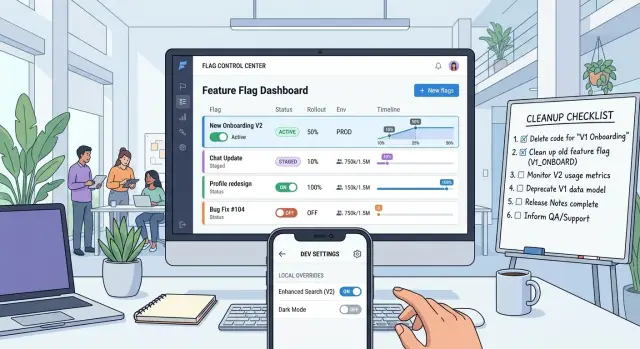
Table of Contents
Why flags turn into hidden branches
Mobile feature flags look cheap when you add them. One if statement, one remote setting, one easy rollback option. A few months later, that small choice can leave two products living inside the same app.
The trouble starts after launch. A team ships a new checkout flow, sees that it works, and moves on. The flag stays. Nobody deletes the old path because mobile releases move slower than web releases, and the team worries about edge cases, app review delays, or users who stay on older builds. That caution makes sense for a week or two. After that, it turns into clutter.
Each flag adds another branch to think about. QA now has to test the old screen and the new one. Developers have to decide which path analytics should track. Support has to guess which version a user actually saw. A few flags are enough to create a long list of app states, and many of those states barely get tested.
Mobile makes this worse because old app versions stick around. A server-side flag can keep dead code alive much longer than anyone planned. The team already treats the new path as the real product, but the app still carries the old one like a spare part nobody wants to throw away.
New teammates usually feel the pain first. They open a file and find two flows wired into production logic, with no clear sign of which one still matters. They waste time reading both. Sometimes they fix a bug in the wrong branch. Sometimes they add a third condition just to stay safe, and the mess grows.
You can spot the problem early. People stop knowing who owns a flag. QA starts asking which path they can ignore. Product says the rollout finished, but the code still supports the old flow. Developers keep adding new work inside both branches.
That is why mobile feature flags need an end date, not just a launch date. If a flag survives more than a couple of release cycles, it stops being a release tool and starts acting like hidden product logic.
Pick the right flag for the job
A flag should answer one question. If it controls rollout, safety, and experiment logic at the same time, the code gets messy fast. Good flags stay small and boring. Each one gets a single job, one owner, and one review date.
Release flags work best for short launches. Use them when a finished feature needs a gradual rollout over a few days or a couple of weeks. When the rollout reaches 100% and the app behaves well, remove the old branch. If a release flag stays in the app for months, it is no longer helping with launch risk. It has become hidden app logic.
Kill switches are different. Keep them for risky parts of the app that might need a fast shutdown in production, like a payment step, remote sync, or a heavy background task. A copy change or a new icon usually does not need that kind of escape hatch. Every kill switch creates another path to test, so keep them rare.
Experiment flags also need a finish line before the test begins. Pick the metric, decide who owns the result, and set the day when the team will choose a winner. Without that deadline, both versions stay alive longer than planned. Then every small update turns into two updates.
One flag should not control two separate product decisions. Teams do this all the time because two changes launch together. They put a new checkout screen and a new pricing rule behind the same flag, then later want to keep one and drop the other. Now one flag blocks two decisions. Split those cases early.
Most teams only need a few clear flag types: release flags for short rollouts, kill switches for risky failures, and experiment flags for time-boxed tests. If a new flag does not fit one of those jobs, stop and question it. Fewer branches mean less cleanup later, fewer release toggle mistakes, and code that still makes sense six months from now.
Set rules before you ship
Most dead flags start as small shortcuts. Someone adds a toggle to ship faster, the release goes fine, and nobody comes back to remove the branch. Half a year later, the app still carries two paths for the same feature, and nobody feels safe touching either one.
Simple rules stop that from happening. For mobile feature flags, the rule set matters more than the tool.
Start with naming. Keep the name narrow and specific. new_checkout_ios is clear. checkout_v2 is not, because nobody knows whether it covers Android, iOS, backend behavior, or all of them.
Assign one person to the flag before the code lands. That owner decides when rollout starts, watches the result, and opens the cleanup task. Shared ownership sounds fair, but it usually means nobody removes the old path.
A good flag record answers five questions: what feature it controls, which platform it affects, who owns it, when it should be removed, and what result means the rollout is done. That removal date should exist on day one. Pick a real date, not "later" or "after launch." If the team needs more time, they can move the date on purpose. That small step forces a discussion, and that discussion usually exposes flags that no longer earn their keep.
Keep the default value in one place. Put it in a single config file, a flag registry, or a shared wrapper. Do not let one screen assume "off" while another helper assumes "on." Once defaults spread across the codebase, cleanup gets slow and risky.
The finish line needs a written rule too. "We rolled it out" is too vague. A better rule is concrete: 100% of iOS users have the feature, crash rate stays normal for one release cycle, and support does not report a spike in checkout issues. When that condition is true, the owner removes the flag instead of celebrating and moving on.
If you adopt only one habit, make it this one: every new flag gets a removal ticket before the merge. That keeps temporary branches temporary.
Roll out a mobile flag step by step
A safe mobile rollout starts small. Even good code can fail on real devices, weak networks, or older app versions. Early rollout is not about growth. It is about learning whether the change behaves well outside your test phones.
Start with your own team, test users, or a tiny slice of production traffic. That group should be small enough to contain a bad release, but real enough to expose issues QA missed. If something breaks for 1% of users, you can fix it quickly. If it breaks for everyone, support gets flooded.
A simple mobile rollout strategy usually looks like this: enable the flag for internal users first, check crashes and error logs, move to a small public group such as 1% to 5%, then increase in small steps only if the numbers stay calm. After one stable release, remove the flag.
Do not rush past the observation part. Mobile has delays that web teams often forget. Some users open the app once a week. Others stay on an older version longer than expected. Give each rollout step enough time to surface crash spikes, broken analytics, slow screens, and odd user reports.
Support messages matter more than many teams admit. A dashboard can look fine while users still hit confusing states, blank screens, or lost progress. Read what support gets in the first day or two. Repeated complaints usually tell you more than a green chart.
Increase exposure in small jumps. Moving from 5% to 50% sounds efficient, but it hides when the problem started. A slower path makes rollback decisions easier. If the feature changes during rollout, pause. Do not keep widening access while the team edits logic under the same flag. That turns one test into several at once.
Once the feature is stable and fully released, delete the flag. Leaving it in place "just in case" keeps a hidden branch alive for future developers to carry, test, and remember. A rollout is not finished until the old path is gone.
Use local overrides without making code messy
Local flag overrides are useful. Testers and developers can force edge cases without waiting for remote config. They also create quiet bugs when the app hides them in random screens, scattered constants, or secret gestures.
Keep every override in one debug menu. Put it near other build details like app version, environment, and active account. If someone wants to force a flag on for a test, they should know exactly where to go.
The app should also show where each flag value comes from. A small label like "default," "remote," or "local override" saves time. Without that label, people waste minutes arguing about whether the server changed the flag or a tester forgot an old setting.
A one-tap reset matters too. Testers jump between cases all day, and old overrides stick around. "Reset all local flags" prevents strange behavior after lunch or the next morning.
Keep the code path just as clean as the debug menu. UI controls belong in the menu, and override logic belongs in one flag service. The rest of the app should ask for the current value and move on. When override checks spread across screens, presenters, and helpers, local flag overrides stop being test tools and turn into hidden branches.
A simple example shows the benefit. A tester forces a new onboarding screen on in an Android build. The debug menu shows onboarding_v2 = ON (local override). After the test, they tap reset. On the next launch, the app falls back to the remote value. Nobody has to reinstall the app, clear storage, or guess what state the app kept.
It also helps to log every override in debug builds. A short log entry with the flag name, chosen value, and source is enough. When a screenshot or bug report looks strange, that log often explains it in seconds.
Keep the override tool out of production builds. Real users should never see it, trigger it, or carry hidden local state that support cannot explain. If staff need access in production-like conditions, use a separate internal build and keep the public app clean.
A simple example from a real app
A shopping app team wants to replace its checkout screen. They do not create separate flags for layout, payments, and promo codes. They use one flag for one decision: old checkout or new checkout.
That keeps the code readable. It also makes the flag cleanup process much easier, which is where many teams go wrong.
During development, QA uses a debug menu with local flag overrides. On a test phone, they turn the new checkout on and off without waiting for a remote rollout. That lets them check basic things quickly: does the back button still work, does Apple Pay open, does the order summary match the old flow.
Product can use the same menu for a side-by-side check on one device. They place the same order twice, once with the old screen and once with the new one. Small differences show up fast when the device, account, and cart stay the same.
The team ships the app with the new checkout hidden for most users. First they open it to 10%. They watch the numbers that matter for this screen: checkout completion, payment failures, crash reports, and support messages.
If those numbers stay normal, they move to 50% in the next step. They do not leave the flag half-on for months. A flag like this is temporary, so the team gives it an end date before rollout starts.
What cleanup looks like
After one clean release with the new screen fully on, they delete the old checkout path. They also remove the flag from remote config, take it out of the debug menu, and delete any analytics split that only existed for the comparison.
This is where teams often slip. If the old path stays in the app, it becomes a hidden branch that nobody tests well.
A simple rule keeps the team honest: if users no longer need the old screen as a fallback, the code should not keep it alive. Local overrides can still help with testing, but the finished app should only keep paths the team still intends to support.
Mistakes that keep flags around
A feature flag rarely turns into dead code because of one dramatic mistake. More often, a few small shortcuts pile up over time. The team treats a flag like a temporary switch, but writes code around it as if it will live forever.
The first problem is ownership. A team adds a rollout toggle for a new onboarding screen, ships it, and moves on. Weeks later, nobody knows who should remove it, who can change the default, or whether the old path still matters. Every flag needs one owner and one removal date attached to the release work.
Another common mess starts when developers put one flag inside another. A payment screen checks a new checkout flag, then a pricing experiment flag, then a region flag. That code gets hard to read very quickly. Worse, nobody feels safe deleting any part of it. If you need more than one flag in the same flow, stop and ask whether you are testing product behavior or hiding unfinished architecture.
Spread causes a different kind of pain. The same flag gets read in five files, maybe ten. One check sits in the UI, another in view model logic, another in analytics, another in API request building. Removal now feels risky because the branch is no longer one branch. It is fragments scattered across the app. Read the flag once near the entry point, then pass a clear state down.
Data changes make things worse. Teams sometimes hide a new database field or API response behind a UI flag and assume that keeps the change contained. It does not. Once data contracts change, the old path and new path start drifting apart. The flag only hides that drift until users hit a broken edge case.
The last mistake is boring, and it causes most of the pain. Cleanup never enters the release plan. The team ships the flag, QA tests both paths once, nobody books time to delete the losing branch, and the next release starts before cleanup happens. That is how temporary code becomes permanent.
If a flag stays in the app for two release cycles without an owner, a removal ticket, and one place where the app reads it, treat it as debt and cut it out.
Quick checks before every release
Release week is when hidden branches slip through. A short review keeps mobile feature flags from turning into code that nobody trusts.
Keep the check simple enough that people will actually do it. Ten focused minutes beats a long process that everyone skips.
Start with age. Pull every active flag into one view and mark the ones that have survived more than two app releases. A flag that old needs a decision now: remove it, keep it for a clear reason, or schedule its end.
Then check ownership. Use a real name, not just a team name. If nobody owns the flag, nobody will answer basic questions about why it exists, what risk it covers, or when it should go away.
Test both paths that still matter. Open the app with the built-in default value, then test the path users get from live config. On mobile, those paths drift apart easily because users stay on older app versions for weeks.
Search the codebase for leftovers too. Old checks often survive in UI text, analytics events, test files, config wrappers, and comments. If the flag name still appears in places that no longer affect behavior, clean it up before it spreads more confusion.
Finally, create one removal task for every active flag. Make it a normal backlog item with a version, date, or trigger. "Remove after 100% rollout" is far better than "clean up later," because later usually means never.
A small example makes the risk obvious. Say you shipped a new checkout button behind a flag three releases ago. The live path works, but one old analytics event still fires from the disabled branch, one test still mocks the old value, and nobody remembers who added the flag. That is how dead code survives.
The review itself is boring, and that is exactly why it works. If a flag fails any part of it, treat that as a release issue and fix it while the change is still fresh.
What to do next
Most teams do not need a new tool. They need one short routine that stops flags from turning into permanent branches. If you already use mobile feature flags, start with a quick audit and make the result visible to the whole team.
Go through every active flag and label it with two things: why it exists and how old it is. A release flag that is three weeks old is normal. A test flag with no owner after six months is not. That simple sort usually shows the real problem fast: too many flags stay alive because nobody feels responsible for removing them.
A lightweight routine is enough. Mark each flag by type, add an owner and planned removal date, group flags by age, delete the ones that no longer change user behavior, and open cleanup tickets for anything that stays past its date.
After that, pick one rule the whole team will follow. Keep it strict and boring. Every release flag must have a removal ticket when the team creates it. Or any flag older than 90 days needs a written reason to stay. One clear rule beats a long policy nobody reads.
Put flag review into work you already do. Add five minutes in sprint planning, or add one line to your release checklist: "Which flags can we remove this cycle?" That small question prevents a lot of dead code. It also helps developers clear old local flag overrides before they spread into test builds and support work.
A real team habit might look like this: on Monday, the mobile lead reviews old flags; on Wednesday, the team closes one cleanup ticket; before release, QA checks that temporary overrides are off. It is not fancy, but it works.
If your app already has too many hidden branches, a second pair of eyes can help. Oleg Sotnikov at oleg.is works with startups and small teams on rollout rules, cleanup habits, and technical decision-making as a Fractional CTO advisor. A short review of your flags, ownership, and release process can usually show where the waste is coming from and what to simplify first.
Frequently Asked Questions
What is a mobile feature flag?
A mobile feature flag lets your app choose between two code paths at runtime, like an old checkout and a new one. It helps with rollouts and fast shutdowns, but if you leave it in place too long, it turns into hidden product logic that your team still has to read, test, and support.
When should we delete a release flag?
Remove a release flag after the feature reaches 100%, the app stays stable for a release cycle, and support does not see new problems. If you leave it there "just in case," you keep an extra branch alive for no good reason.
How many flag types do we really need?
Most teams only need three types: release flags for short rollouts, kill switches for risky failures, and experiment flags for time-boxed tests. If a new flag does not fit one of those jobs, stop and ask why you need it.
Should one flag control several product changes?
No. Give one flag one job. If the same flag controls a new screen and a new pricing rule, your team cannot keep one change and drop the other without more rework.
What rollout plan works best for mobile?
Start with internal users or test accounts, then move to a small public slice like 1% to 5%, and grow in small steps while you watch crashes, errors, analytics, and support messages. After a clean full rollout, delete the old path instead of carrying it into the next release.
Why do old app versions make flag cleanup harder?
Mobile users keep old app versions longer than web users. That means a server-side flag can keep dead code alive for weeks or months, even after your team treats the new path as the real product.
How should we handle local flag overrides?
Keep every override in one debug menu and show where the value comes from, like default, remote, or local override. Add a one-tap reset so testers can clear old state fast and avoid strange bug reports.
Where should the app read a flag?
Read the flag once near the entry point and pass a clear state down through the flow. When the same flag pops up in UI code, analytics, helpers, and API logic, removal gets slow and risky.
What are the signs that a flag turned into technical debt?
Watch for flags with no owner, no removal date, or no clear reason to stay. You should also worry when QA asks which branch still matters, developers edit both paths, or nobody knows which experience users actually saw.
What should we review before each release?
Do a quick review of every active flag before release. Check its age, owner, default value, live path, old references in code, and cleanup task. If a flag fails any of those checks, fix it while the change still feels fresh.


