Mixed ESM and CommonJS repos: migrate packages safely
Learn how to move mixed ESM and CommonJS repos one package at a time without breaking tests, scripts, or deployment tooling.
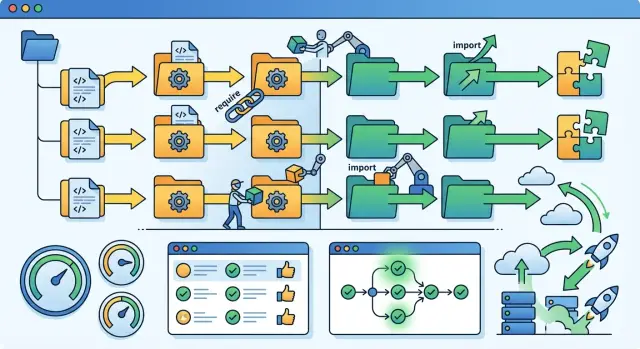
Table of Contents
Why mixed modules cause messy breakage
mixed ESM and CommonJS repos fail in annoying ways because one codebase can follow two different loading rules at the same time. Node decides how to treat a file from its extension and from the nearest package.json. Change "type": "module" in one package, and every .js file under that package starts following a different rule. Imports that worked an hour ago can suddenly throw ERR_REQUIRE_ESM, Cannot use import statement outside a module, or a default export mismatch.
The trouble spreads farther than most teams expect. You may plan to change one package, but nearby code often depends on its old behavior. A helper loaded with require() might now need import. A shared config file might work in one package and fail in the next. Even small details, like whether __dirname exists or how JSON files load, can break scripts people forgot were there.
Tests usually fail before app code fails. That happens because test runners, mocks, setup files, and coverage tools touch lots of files in unusual ways. A package can still start in local dev while Jest, Vitest, or a custom test script crashes on the first import. Many teams read that as a test problem, but the tests are often the first place that exposes a module boundary that was already shaky.
Build and deploy steps can hide old assumptions for a while. A TypeScript build may still emit files, but a release script might call node some-script.js and expect CommonJS. A Docker image may work in CI because it uses cached output, then fail in production when Node reads the source directly. The same repo can look healthy until one tiny package change reaches a forgotten script in linting, bundling, migrations, or startup.
A simple example shows the pattern. Say packages/utils switches to ESM, but packages/api still uses CommonJS tests and release scripts. The app may compile, yet the test bootstrap still calls require('../utils'), and the deploy step still loads a CommonJS config. Nothing changed in those files, but they still break. That is why these migrations feel messy: the breakage rarely stays inside the package you touched.
Map the repo before you change anything
A mixed repo breaks in small, annoying ways when you guess. One package loads fine in Node, another fails in tests, and a deploy step crashes because it still expects CommonJS. You avoid that mess by writing down what each package does today before you change even one file.
Start with a plain table. For every package, note its name, its current module type, and how other packages load it. In mixed ESM and CommonJS repos, that one page often saves hours of trial and error.
Look at the code, not just folder names. Search for require, module.exports, import, and export. A package can look modern on the surface and still hide one old helper file that keeps the whole package tied to CommonJS. Check config files too. Test setup files, CLI entry points, and build scripts often stay old longer than app code.
Check package metadata
Open each package.json and record the fields that control loading. type changes how Node reads .js files. main still matters in older tools and some scripts. exports can help you support both formats, but it can also block deep imports that tests or local scripts still use.
A short inventory should include:
- package name and current module type
- entry files used by app code, tests, and CLI scripts
package.jsonfields such astype,main, andexports- the test runner and bundler used in that package
- build or deploy commands that touch the package directly
Do not assume the whole repo uses one setup. One package may run on Vitest, another on Jest, and a third may skip a bundler and run straight in Node. Deployment tooling matters just as much. A Docker build, a release script, or a small postinstall step can fail before anyone notices a module error in the app.
Map each package at the edges: how code enters it, how other code imports it, and how tests and deployment run it. That gives you a clear picture of what can move first and what needs extra care.
Choose the first package to move
The first package matters more than people expect. If you start with a package that sits in the middle of the repo, every import path around it shifts at once. That is how a small CommonJS to ESM migration turns into a week of noisy test failures.
Start at the edge. A leaf package is usually the safest pick because few other packages import it, and its behavior is easier to check. Utility packages, small SDK wrappers, and data formatting helpers often work well. If the package has a narrow job and a small public API, you can spot breakage fast.
Skip the packages that control the repo itself. Test setup, build scripts, release automation, CLI entry points, and deployment helpers touch too many moving parts. If one of those breaks, you lose your safety net while you are still learning where mixed ESM and CommonJS repos are fragile.
A good first target has clear inputs and outputs. You want a package where you can answer simple questions: what goes in, what comes out, and who depends on it? If the package reads config files, patches globals, or loads plugins at runtime, save it for later. Those cases hide format issues until the worst moment.
Write down success before you change a file. Keep it boring and specific:
- the package builds the same way as before
- its tests pass without special flags
- one real consumer can import it and run
- CI and publish steps still work for that package
That short list keeps the migration honest. "It compiles on my machine" is not enough.
A small example: if your repo has @acme/date-utils, @acme/api, and @acme/cli, move @acme/date-utils first. It has fewer edges. @acme/cli may depend on runtime loaders, env handling, and shell scripts, so it can fail in five different places for one module change.
Pick the package with the smallest blast radius. You want one clean win, not a dramatic lesson.
Use a package-by-package migration flow
Treat each package like a small migration, not a repo-wide switch. In mixed ESM and CommonJS repos, that keeps failures narrow and easy to read. It also gives your team one rule for releases: no package moves until that package works on its own and still works for its consumers.
Start by freezing module-style changes in the package you picked. If one developer adds require() while another switches files to import, you get noise instead of signal. Keep the API steady, and change one layer at a time.
A simple flow works well:
- Pick one entry file, usually the package entry point or the file most consumers load first.
- Convert that file and update the imports it touches. If a dependency still uses CommonJS, use the interop pattern Node expects instead of forcing a full rewrite.
- Update
package.jsonfor the new format. In most cases that means checkingtype,main, andexportsso Node and your tools resolve the package the same way. - Run the package unit tests, then run the local scripts people actually use, such as dev commands, seed scripts, or CLI tasks.
- Build the package and test it from at least one real consumer before you release anything.
That last step saves a lot of pain. A package can pass its own tests and still break another package that imports it with an older path, assumes a default export, or reads a built file directly. Consumer checks catch those mistakes early.
A small example: if packages/utils moves first, switch its public entry file, fix its internal imports, set its package metadata, and then test packages/api against the new output. If api fails, stop there. Fix the boundary, or roll back only utils. Do not keep pushing the migration into more packages.
This flow feels slower on day one. It is usually faster by the second or third package, because the same test checks, import patterns, and release rules repeat with fewer surprises.
Set clear boundaries between formats
In mixed ESM and CommonJS repos, most ugly errors start at the boundary, not inside the package itself. A package can be ESM or CommonJS and still behave well. Trouble starts when files, exports, and loaders send mixed signals.
Use file extensions with one simple rule: a reader should know the module format before opening the file.
- Use .js only when the package has a clear package.json type and every file in that package follows it.
- Use .cjs for files that must stay on require(), such as older config files, small adapters, or scripts that your tools still load as CommonJS.
- Use .mjs when a file must be ESM no matter what the package default is.
That rule removes guesswork. It also makes review easier, because the boundary is visible in the filename.
Keep wrappers tiny. If an ESM package needs to call a CommonJS helper, add one small adapter file and name it plainly. Do the same in the other direction. Do not spread format conversion across many files. One obvious bridge is easy to test. Five hidden bridges turn simple import errors into a long afternoon.
Export shape matters just as much as file extension. Pick one shape and keep it stable for consumers while you migrate package by package. If callers use require("pkg") and get a function today, do not quietly switch them to a named export tomorrow. If you need an ESM wrapper, make it return the same thing on the public edge.
Default and named exports cause a lot of confusion in Node.js module formats. Many teams mix both "just in case," then forget which import style each consumer needs. That usually creates awkward code and brittle tests. Use a default export only when the package has one clear main thing. Use named exports when the package exposes several public functions. If you already shipped one style, keep it until you plan a real breaking change.
Clear boundaries feel a little strict. They save time every time you run tests, ship a build, or debug a loader error in production.
Keep tests and local scripts running
A safe migration starts with a boring habit: run the package tests before you change anything, then run them again after every small step. That gives you a clean baseline and helps you catch the exact edit that broke module loading. If you change five files at once, the error usually points everywhere except the real cause.
Test setup files often break first. Many repos still load setup code with require, while the package under test has already moved to import. That mismatch can fail before any real test starts. Check setup files, custom runners, coverage hooks, and small bootstrap files that people forget because they rarely change.
The same goes for helpers around the tests. If a helper still exports with module.exports but the tests now import named values, the failure can look like a bad mock or a missing function. Fix the helper, the mock, and the test in the same pass. Do the same for snapshots if output changes because the module shape changed.
A short checklist helps:
- Run the package test suite before the change and save the result.
- Convert one boundary at a time, then rerun the same tests.
- Review setup files, mocks, fixtures, and shared helpers for format mismatches.
- Re-record snapshots only after you confirm the runtime behavior stayed the same.
- Run the package from a consumer package, not only inside its own folder.
That last check catches a lot. A package can pass its own tests and still fail when another package imports it through the workspace, a build step, or a CLI script. In a monorepo, add one small integration test from the consumer side, even if it only imports the package and calls one function.
Local scripts need the same care. Seed scripts, migration scripts, code generation, and one-off admin commands often use a different loader path than the app itself. Run them manually. If your team has a script people use every day, keep that script working throughout the move. A migration feels small until one broken npm run command blocks everyone else.
Check scripts and deployment tooling
A package can look fine on your laptop and still fail the moment CI or production starts it. Most ESM breakage shows up at the edges: CLI commands, test runners, build steps, and release scripts that still assume CommonJS.
Start with every command that runs code directly. Check bin entries, npm scripts, worker start commands, cron jobs, seed scripts, and one-off admin tasks. If a script calls node file.js, that file now has to match the package format, and the path must still resolve the same way.
A quick audit usually catches most problems:
- compare local start commands with the commands used in CI and production
- check whether
ts-node, Babel, Jest, Vitest, or ESLint load config files withrequire() - confirm the package manager scripts do not depend on extensionless imports that break under ESM
- make sure Docker images, CI jobs, and release runners use the same Node version
- run the exact production start command by hand before you merge
Version drift causes a lot of pain. Node 18, 20, and 22 do not behave exactly the same around loaders, test runners, and package resolution. In teams that use Docker and GitLab CI, like the setups Oleg Sotnikov often builds for clients, a repo may pass locally and fail in CI simply because one runner uses a different Node image.
Test tools need extra attention. Jest often needs config changes or a different transform path. Vitest usually handles ESM more cleanly, but you still need to check setup files and mocks. ts-node can fail if a script expects CommonJS hooks. ESLint can also break if the config file format does not match the package format.
Do one final check in an environment that looks like deployment. Build the image, install dependencies the same way your pipeline does, and run the same startup command your platform uses. If production starts with node dist/index.js, do not stop at npm test. Run that exact command and watch for import, loader, and path errors.
That small habit prevents the worst kind of migration bug: code that passes tests but will not boot.
A simple example from a multi-package repo
Picture a repo with three packages: utils, web, and jobs. Both app packages still use CommonJS. The clean first move is utils, not the main app. Changing the shared package first gives you one boundary to control instead of a noisy app startup, test runner, and deploy process all changing at once.
packages/
  utils
  web
  jobs
In mixed ESM and CommonJS repos, this order keeps the blast radius small. Convert utils source files to ESM, but keep a CommonJS entry for a while. In practice, that usually means import points to dist/index.js and require points to dist/index.cjs through the package exports field. web and jobs can keep calling require("@repo/utils") while the package itself moves forward.
Moving web first looks faster on paper. It usually is not. The main app has more boot code, more scripts, and more places where one module change turns into ten unrelated errors.
After utils is stable, update one consumer package only. jobs is often a better pick than web because it has fewer moving parts. Change the imports there and watch the import shape closely. That is where many CommonJS to ESM migration mistakes start.
// old CommonJS style
const slugify = require("@repo/utils");

// possible ESM replacement
import slugify from "@repo/utils";
That change works only if the package still exposes a default export. If the old module returned an object, the new code may need import { slugify } from "@repo/utils" instead. Small mismatch, ugly error.
A short check after updating jobs saves a lot of guessing:
- run the package tests
- run the repo build
- run the exact start script used in CI
- check one deploy preview or staging job
Then stop. Do not move web on the same day just because the first package passed locally. Wait until CI stays green for a full cycle. That includes tests, packaging, and deployment tooling. With package-by-package migration, patience is part of the method. One green cycle tells you the new Node.js module formats work in real conditions, not just on your laptop.
Mistakes that trigger hard-to-read errors
Most ugly module errors start with one small mismatch between how Node loads a file and how your tools expect it to load. In mixed ESM and CommonJS repos, that mismatch often hides for a while, then shows up in tests, CI, or a deploy script at the worst time.
A common mistake is flipping "type": "module" at the repo root too early. That one change can make Node treat many .js files as ESM at once, including old scripts, test helpers, and build files you did not plan to touch yet. A safer move is to change one package at a time and keep the repo root boring until the edges are stable.
ESM also wants full file paths in imports. If you change require('./util') to import './util', Node may fail because ESM expects ./util.js or another exact file name. Bundlers sometimes hide this problem in local dev, then plain Node fails in CI. That is why these errors feel random when they are not.
Another trap is __dirname and __filename. They do not work the same way in ESM. If a package reads templates, config files, or test fixtures from disk, that code can break even when the import syntax looks fine. You need the ESM pattern with import.meta.url and file URL helpers, or the path logic will point at the wrong place.
Export changes cause some of the most confusing breakage. If you switch a module from module.exports = thing to a named ESM export, old imports may still compile but return undefined or a namespace object. The bug is small, but the stack trace usually is not.
The same thing happens when teams update source files and forget the surrounding tools. Watch for these spots:
- test runners and test setup files
- build configs like Babel, tsup, esbuild, or webpack
- CLI scripts in
package.json - deploy hooks and startup commands
- lint and coverage config files
A package can look fully migrated and still fail because Jest loads config as CommonJS, or because a release script still calls a file with the wrong extension. Check the code, then check the tools around it. That second pass catches a lot of pain.
Quick checks and next steps
Mixed ESM and CommonJS repos get safer when you treat each package move like a small release, not a repo-wide cleanup. Change one package, run its tests, then run the tests and scripts of every package that imports it. If CI turns red, you know exactly which change caused it.
Keep a short rollback note for every package you touch. Two or three lines is enough: what changed, which files define the module format, and how to revert fast. When a deploy script or test runner fails at 2 a.m., that note saves more time than a long migration doc.
A simple tracking sheet also helps. Mark which packages are fully moved, which still need wrappers, and which still need dual support because older scripts or tools depend on CommonJS. In a long package-by-package migration, temporary bridges are normal. Forgetting where they are is the part that causes slow, annoying cleanup later.
Use a short repeatable check after each package change:
- Run unit tests for the changed package.
- Run integration tests for direct dependents.
- Execute local scripts that developers use every day.
- Run the same build and deploy commands your pipeline uses.
- Record rollback steps and any temporary wrappers still in place.
Do a second pass after the repo is stable. Remove bridge files, delete duplicate entry points, and simplify build rules once older tooling no longer needs them. If you skip that pass, the repo keeps the cost of both formats for months.
For a large repo with many packages, environments, and deployment paths, outside review can save real money. An experienced Fractional CTO such as Oleg Sotnikov can review the migration plan, spot weak points in tests and tooling, and reduce rollout risk before small module errors spread into release problems.
The best stopping point is boring: green CI, working scripts, clean deploys, and a clear list of what still needs conversion.


