MinIO vs managed object storage for product files
MinIO vs managed object storage: compare ops work, traffic costs, and recovery needs so you can pick the right home for product files.
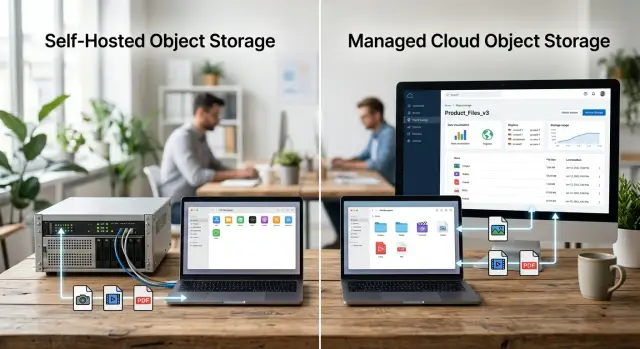
Table of Contents
Why this gets expensive fast
Storage bills rarely stay just storage for long. The first month looks simple. You compare price per GB, pick the cheaper option, and move on. The real cost shows up later in support time, alert noise, failed file jobs, and the hours someone spends figuring out why customers cannot open what they uploaded.
Product files create different kinds of traffic, and they fail in different ways. Two teams can store the same number of terabytes and have completely different day to day pain.
Most product file traffic falls into four buckets:
- uploads from users or internal teams
- downloads in the app or through shared links
- previews, thumbnails, and media processing
- exports, backups, and migration jobs
Each puts pressure on storage in a different way. Uploads need reliability. Downloads need steady speed. Previews create a lot of small requests. Exports can hammer bandwidth for an hour and slow everything else down. That is why this choice is usually less about raw capacity and more about how your app behaves every day.
Customers notice file problems at the edges first. They see missing previews before they see backend errors. They notice stuck uploads before anyone spots an unhealthy storage node. If exports fail, support tickets pile up fast because customers assume their data is gone, even when it is still there.
That is where cheap storage gets expensive. If you run MinIO yourself, someone has to own patching, monitoring, capacity checks, failed disks, access policies, and recovery drills. If you use a managed service, you pay more on the invoice, but you often buy back engineering time and a lot of sleep.
This is an operations decision, not a price check. The useful question is simple: which option creates less trouble when traffic spikes, hardware fails, or a customer needs a file right now?
What changes when you run MinIO yourself
Running MinIO means your team owns the storage layer, not just the app that writes files to it. That sounds fine when traffic is low. It feels very different when uploads slow down on a Sunday night and customers start asking where their product images went.
Day to day, someone has to keep the service healthy. That includes applying updates without breaking clients, watching disk space and network use, checking replication and backup jobs, tuning alerts, and testing restores instead of assuming backups will work.
Each task looks small on paper. Together, they create regular operations work that many teams forget to price in.
Uploads fail for boring reasons all the time. A disk fills up. A node drops out of the cluster. A certificate expires. A network rule changes and blocks traffic. If you run MinIO yourself, your team has to find the issue, fix it, and confirm that no files went missing.
That changes the real cost more than the raw storage price does. Cheap hardware or a lower monthly bill can look great in a spreadsheet. The hidden line item is support appetite: who owns alerts, who gets pulled into incidents, and how much night and weekend work your team is willing to absorb.
Small SaaS teams often underestimate this part. One engineer can set up MinIO in a day. Running it well takes much more than setup. You need monitoring, logs, backup policies, restore drills, and clear ownership when something breaks at 2 a.m.
Teams with strong operations habits can do this well. Teams without clear ownership usually feel the pain first during a spike or an outage. If nobody wants to be on call for storage, managed object storage often costs less than it first appears.
What you buy with a managed service
A managed service mostly buys time. You stop owning the storage cluster itself, which means no disk planning, no node replacement, no software upgrades, and far fewer late night alerts when something fills up or falls behind.
That matters more than many teams expect. A managed provider usually handles hardware failures, internal replication, patching, and the general health of the service behind the scenes.
You still own the parts that touch your product. Your app decides who can upload, who can read, how signed URLs work, when files expire, and what happens if a user uploads the wrong thing. If your access rules are messy, a managed service will not clean them up for you. It only removes the storage operations work.
The trade off is simple. You save hours and reduce risk, but you give up direct control. You cannot tune every layer, pick every disk, or decide how the provider handles maintenance windows and internal limits. Some teams hate that. Small teams usually feel relief.
Support still matters. A managed service is not magic if support moves slowly or the provider enforces limits that clash with your app. Watch request caps, egress pricing, object size limits, region options, and restore times for archived data. Those details shape real product file storage costs more than the headline price.
Growth is where many teams feel this first. Uploads rise, support tickets stack up, and nobody wants to debug storage replication on a Friday night. Paying more for a managed service can be the cheaper choice if it lets your engineers keep shipping product work.
Check your bandwidth pattern first
Storage costs often come from movement, not from files sitting still. A team can keep a few terabytes for a modest price, then get a nasty surprise when launch week pushes ten times more data out to customers than usual.
Start by splitting traffic into normal days and peak days. Normal days show your base load. Peak days show what happens after a product launch, a partner sync, or a month end export. That split matters because MinIO and managed storage can look close on a quiet month, then behave very differently when demand jumps.
Direction matters too. Some products mostly collect uploads, like user documents or supplier feeds. Others mostly serve downloads, like product images, catalogs, or large exports. Many do both. If most traffic stays inside your own network, self hosted object storage can be cheaper. If lots of files leave your network and go straight to users, egress charges and scaling pain can change the math fast.
Do not rely on one average file size. A system with 30 KB thumbnails and 800 MB exports is really handling two separate workloads. Small files drive request volume. Large files stress bandwidth, retries, and timeouts. One blended average hides both problems.
Before you compare monthly cost, answer a few plain questions. How much data goes out on a normal week? What happens after launches or scheduled exports? Do users upload more than they download? Which file sizes show up most often? Do files move between regions or clouds?
Cross region traffic deserves its own line item. If your app writes files in one region, a backup job copies them to another, and analytics reads them somewhere else, you pay for that movement even if the storage price looks low.
Pull 30 to 90 days of logs and graph four numbers: ingress, egress, peak hour traffic, and cross region transfer. That picture usually tells you more than any pricing calculator.
Match the choice to your recovery needs
Recovery needs often settle this decision faster than storage price. A cheap setup stops looking cheap when users cannot download files for half a day.
Start with two numbers. How many minutes or hours of new files can you lose if something breaks? How long can customers wait before uploads, downloads, or previews work again? Many teams never define these limits, so they either buy too little protection or pay for more than the business needs.
If you can recreate files from another system, a few hours of loss may be fine. If customers upload contracts, receipts, or media that exists nowhere else, even ten minutes may hurt. If your product promises constant access, restoring everything tomorrow is not good enough.
A single MinIO cluster with one backup copy is often enough for internal assets, test data, or files you can rebuild. It costs less, and it keeps the setup simple. But one backup copy usually means a wider loss window, and recovery takes real work. Your team has to restore data, verify files, and bring access back.
Cross region recovery is a different promise. You keep another copy far enough away that one outage does not take everything down. Managed services usually make that easier to buy. MinIO can do it too, but your team has to design replication, watch it, test failover, and pay for the extra storage and traffic.
Speed matters as much as file loss. If users need product images, exports, or customer uploads right away, a long restore turns into refunds, support tickets, and missed renewals. If the files support an internal workflow and people can wait until tomorrow, you have more room to save money.
Tie the plan to customer promises and revenue risk, not personal preference. When lost file access breaks trust or stops billing, pay for stronger recovery. When files are replaceable and downtime is annoying but tolerable, a lean MinIO setup can make sense.
A simple way to decide
The fastest way to choose is to write your real file workload on one page. Guessing from a price table leads to bad decisions because storage price is only one part of the bill.
Start with the files themselves. A catalog of product images behaves very differently from customer video uploads, PDF invoices, or one time ZIP exports for a migration. Average file size matters, but monthly growth matters more. A cheap month one setup can become a painful month twelve setup.
A short decision sheet is usually enough:
- List the file types you store, their usual size, and how fast they grow each month.
- Split them into hot files people open every day, cold files that mostly sit there, and exports that appear once and then age out.
- Write down who will patch servers, rotate credentials, test backups, and answer alerts at 2 a.m.
- Estimate two monthly bills: a normal month and a spike month with heavy downloads or imports.
- Pick the option your team can still run without stress a year from now.
Step three settles the choice more often than people expect. If nobody clearly owns updates, backups, and incident response, self hosted object storage will feel cheap right up to the first outage. If your team already runs Linux, observability, and backups well, MinIO may fit.
A simple rule helps. Choose MinIO when bandwidth is heavy, file access is predictable, and your team already knows how to run production services. Choose managed storage when your team is thin, traffic is uneven, or recovery speed matters more than shaving a line item off the bill.
If the answer still feels close, pick the setup that cuts night and weekend work. That cost is real even when it never appears on an invoice.
Common mistakes that skew the decision
Teams often start with the cheapest price per gigabyte. That leads to bad math. Storage space is only one part of the bill, and often not the part that hurts most.
Self hosted object storage can look cheap on paper. Then the real work arrives: disk failures, upgrades, monitoring, alerting, spare capacity, and the person who gets called when uploads fail on a Sunday. If your team is small, that labor cost can wipe out the savings quickly.
Download traffic is another trap. Many teams estimate how much data they will store, but they do not estimate how often customers will fetch it. A product with 3 TB of files and frequent downloads can spend far more on bandwidth than on storage. That is where invoices jump, especially after a launch, a partner integration, or a busy mobile release.
Backups confuse people too. A backup copy does not give you disaster recovery by itself. If a server dies, a region goes down, or someone deletes a bucket by mistake, you need to know how long restore takes and who runs it.
A simple SaaS example
Picture a 10 person SaaS company that helps online sellers manage catalogs. It stores product images for each account, plus customer exports like CSV files, PDF reports, and ZIP archives. The image library grows every week, but day to day traffic stays calm because most users look at the same product pages and only a small share of images change.
On a normal day, storage does not look scary. New uploads trickle in, old files stay put, and download volume is modest. If this team compares options only on raw storage price, MinIO can look tempting.
The math changes when exports enter the picture. At month end, several larger customers generate full catalog exports, download them twice, then ask support to rerun them after a filter mistake. A quiet system can suddenly push hundreds of gigabytes in a few hours. That spike matters more than the sleepy average.
For a team with one engineer who likes operations, MinIO can work. That person can watch disk health, set up replication, test restores, and keep alerts clean enough to catch trouble early. If export traffic mostly stays inside the same infrastructure, or customers pull large files often enough that managed egress bills sting, MinIO starts to make sense.
A team with no such engineer faces a different reality. The backend developer who already handles releases, bugs, and support now also owns storage nodes, backups, failed drives, and recovery drills. That is usually where the plan starts to crack. The software may run fine for months, then one bad change or missed backup check turns a cheap setup into a support problem.
Managed storage fits faster when time is already tight. The monthly bill may be higher, but the team buys fewer midnight problems and less routine care. For a small SaaS with uneven export spikes, that trade is often worth it.
If the company later grows into steady high bandwidth file delivery, or hires someone who enjoys running infrastructure, MinIO becomes a stronger option. Until then, the simpler choice is often the better one.
Quick checks before you commit
A storage choice can look fine on paper until something breaks at 11 p.m. or a customer starts pulling large files all at once. Before you commit, answer five dull questions. Who owns storage after hours? How big can download spikes get? Where does the backup live? How long does a full restore actually take? Do any contracts require tighter recovery?
Those answers prevent most expensive mistakes. If the honest answer to after hours ownership is no one, self hosted storage is already riskier than the spreadsheet suggests. If restore time is vague, you do not really have a recovery plan yet.
Write your backup plan in one sentence. Name the backup location, the restore steps, and the time your team expects a full recovery to take. If production files disappear at 9 a.m., saying we have backups somewhere will not calm customers or help support.
Revisit the decision every time file volume jumps or the team changes. A setup that worked for 200 GB and two engineers can become a bad fit at 20 TB or after your infrastructure lead leaves. Storage decisions age quickly.
Next steps for your team
Pick the option your team can run calmly when something breaks. MinIO makes sense when you have steady file traffic, people who already manage servers and backups, and a clear reason to control storage behavior and bandwidth costs. Managed storage is usually the better call when your team is small, operations time is tight, or product file storage is not where you want to spend attention.
Before you move anything, do a short review with real numbers. Check how much data you store now, how fast it grows, and when bandwidth spikes hit. Then write down your recovery targets in plain language: how much data can you lose, and how long can file access stay down before customers notice?
Capacity matters as much as price. A self hosted object storage setup can look cheap until the same two engineers also own updates, alerts, failed disks, replication tests, and restore drills. If nobody has time for that, managed storage costs may look higher on paper but lower in day to day work.
If the choice still feels close, get a second opinion before migrating terabytes of files. Oleg Sotnikov at oleg.is works with startups and small teams on infrastructure and Fractional CTO decisions like this, and a short review can save you from an expensive storage move you have to undo later.
Frequently Asked Questions
Is MinIO actually cheaper than managed object storage?
Not always. MinIO can cut the storage line item, but your team still pays in server time, patching, monitoring, backups, and incident response.
Managed storage often costs more on the invoice and less in engineering hours, especially when traffic spikes or something breaks after hours.
When does self-hosting MinIO make sense?
MinIO fits best when your team already runs production systems well, file traffic stays fairly predictable, and bandwidth costs matter a lot.
It also works better when you have a clear owner for updates, restores, and alerts instead of hoping someone will handle storage when trouble starts.
What hidden costs do teams miss with MinIO?
Teams usually miss labor first. Someone has to patch servers, rotate credentials, watch disk space, test restores, and fix failures at night or on weekends.
Support load also grows fast when uploads stall, previews disappear, or exports fail and customers think their data is gone.
What should I measure before I compare prices?
Check ingress, egress, peak hour traffic, and cross region transfer. Those numbers tell you far more than price per GB.
Also split normal months from spike months. A calm average can hide a painful export day or launch week.
Why do downloads and exports change the storage bill so much?
Downloads and exports move a lot of data in a short window. That can drive egress charges, timeouts, retries, and support tickets even when stored data stays flat.
A system with small thumbnails and large exports really runs two workloads, so one average file size will mislead you.
Are backups enough, or do I need disaster recovery too?
Backups give you a copy. Disaster recovery gives you a plan to restore service fast enough for your business.
If a region fails or someone deletes data by mistake, you need to know who restores files, where the copy lives, and how long users will wait.
Should a small SaaS team pick managed storage by default?
Most small teams should start with managed storage if nobody wants storage on call. You trade some control for fewer midnight problems and less routine care.
That choice usually pays off when traffic is uneven, recovery speed matters, or your engineers need to stay focused on product work.
How much operations work does MinIO add?
More than most teams expect. Setup takes a day; running it well takes steady attention every week.
You need monitoring, logs, backup checks, restore drills, spare capacity, and someone who will respond when uploads slow down or a node drops out.
Can I start with managed storage and move to MinIO later?
Yes, if you plan for it early. Keep your storage layer simple, avoid provider-specific features unless you need them, and document file flows and retention rules.
A later move still takes time, so switch only when your bandwidth pattern or team setup clearly justifies the extra work.
What is the simplest way to choose between MinIO and managed storage?
Use a simple rule. Pick MinIO when traffic is steady, bandwidth is heavy, and your team already handles servers, backups, and recovery with confidence.
Pick managed storage when your team is thin, file demand jumps around, or downtime and lost files would hurt customer trust fast.


