MFA rollout: fix shared emergency access before switch
MFA rollout fails when founders still share backup logins. Sort out break-glass access, device owners, and recovery steps before launch.
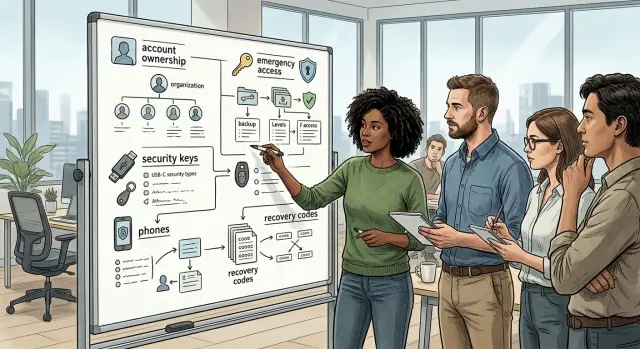
Table of Contents
Why shared emergency access causes trouble
A shared backup login feels harmless when a company is small. Two founders know the password, one inbox gets the alerts, and everyone assumes they can clean it up later. That setup often survives for months, then breaks the moment an MFA rollout starts.
The first problem is ownership. If several admin accounts depend on one phone, one SIM, or one person's device, nobody really controls access. A lost phone, dead battery, carrier issue, or founder leaving the company can block everyone at once. What looked safe was really one weak point.
Shared admin accounts also ruin accountability. When three people use the same login, audit logs stop helping. You can see that the account changed a setting or removed a user, but you cannot tell who actually did it. During a billing issue or security incident, that confusion wastes time.
Recovery usually gets worse, not better. Many teams drop backup codes into chat, a shared doc, or one person's laptop because it feels quick. Later, nobody knows which codes still work, who copied them, or whether they were exposed months ago. Before MFA, that mess stays hidden. After MFA, it turns into lockouts.
What to inventory before you turn on MFA
Most teams remember Slack and GitHub. They forget the domain registrar, the cloud billing portal, the Apple or Google developer account, and the shared inbox that resets everything else.
A clean rollout starts with one plain list. Put every account that can change money, access, DNS, email, or production settings in one sheet. If two people say, "I think I can get in," that account is not inventoried yet.
For each entry, record the account name, what it controls, who can log in today, whether people use it daily or only in emergencies, which phone or security key receives codes, and where backup codes or recovery notes live.
This sounds basic, but it exposes the usual mess fast. A founder's personal phone gets SMS codes for the cloud account. An old Gmail address still holds recovery for the company domain. The finance lead can pay invoices, but nobody knows who has the security key for billing.
Do not stop at named users. Shared admin accounts need their own row, and so do emergency accounts that should stay untouched until something goes wrong. Mark them clearly. A daily login and an emergency-only login need different rules, different devices, and different storage for recovery material.
Write down ownership in human terms, not vague team names. "Ops" is not an owner. "Maya's company-issued iPhone" is clear. So is "security key kept in the office safe" or "backup codes sealed in the founder access binder."
One startup I worked with had MFA ready in Google Workspace but had never checked who owned the registrar login for the company domain. The answer was a former contractor's email. That takes five minutes to miss and days to fix.
If your list still has blanks, stop there. MFA works best when every account has a known owner, a known recovery path, and a clear purpose.
How to separate emergency accounts from daily logins
Treat emergency access like a fire extinguisher. You want it nearby, tested, and almost never touched.
Most startups keep too many "just in case" admin logins. Cut that down quickly. For each critical system, two emergency accounts are usually enough: one main account and one reserve if the first one fails.
Name each account so nobody has to guess. "Google Workspace Emergency Admin 1" works. "superadmin" does not. The name should say which system it belongs to and why it exists.
Then draw a hard line between emergency access and normal work. Nobody should read email, check dashboards, ship code, or make routine settings changes from these accounts. Daily admin work should happen through personal accounts with their own MFA. If people use an emergency account every week, it is no longer emergency access. It is a shared admin account with a nicer label.
Approval rules should be boring and clear. Decide now who can open an emergency account and what approval they need before anyone feels rushed. In a small company, a simple two-person rule works well: one person asks for access and writes the reason, a second person approves it, and the team records both names and the start time.
Keep a short log for every use, even if the fix takes ten minutes. Write down what happened, what changed, and which systems the team touched. That log will show bad habits early.
Reset the account after every incident. Rotate the password, replace any exposed backup code, and confirm who still knows where the access method is stored. Skip that step and the emergency account slowly turns back into a shared daily login.
Who should own phones, security keys, and backup codes
Ownership needs to be explicit. Every MFA device should belong to one named person, with that person listed in your access records. If nobody can answer "whose phone is this code going to?" in five seconds, the rollout is not ready.
The most common mess is simple: one founder uses a personal phone to approve sign-ins for half the company. That feels convenient for a week. Then the phone breaks, the number changes, or that founder is asleep on a flight while someone needs urgent access.
A cleaner setup is straightforward. Each employee uses their own phone or hardware token for their own daily account. Sensitive admin accounts also need spare hardware tokens that the company owns and tracks. Backup codes should live in a proper vault with access rules, not in chat or email. Device ownership should be reviewed whenever someone changes roles, changes numbers, or plans to leave.
Spare hardware tokens matter most for admin, billing, domain, cloud, and identity accounts. Keep at least two company-held tokens for those accounts, label them, and record where they live. One can stay in a secure office location. Another can stay with a trusted custodian under a written process.
Backup codes need the same discipline. Store them in the company vault, note which account they belong to, and remove old codes after you rotate them. Chat threads are terrible for this. People lose them, forward them, or forget they exist until a lockout turns into a scramble.
Phones need a clear rule too. Personal phones are fine for a person's own login if your policy allows it. They are a bad choice for shared emergency access. For emergency accounts, use company-controlled hardware and documented custody.
Before anyone leaves, replace old devices first and test the new path before you disable the old one. That one habit prevents a lot of late-night lockouts.
Recovery steps people can follow at 2 a.m.
If someone loses a phone, gets locked out of email, or leaves the company without warning, nobody should need to guess what happens next. A shaky MFA rollout often fails after hours, when the usual admin is asleep and the only written plan says "call IT."
Write the recovery path as a short runbook with names, roles, and phone numbers. Keep it simple enough that a tired manager can follow it without making things worse.
What the runbook should say
Start with the first call. Name the on-call admin or founder who confirms the problem and checks whether this is a real lockout, a lost device, or a possible account takeover. Then name a backup approver who is not using the locked account. In a small company, that can be another founder, the finance lead, or a fractional CTO.
For high-risk systems, require two people to approve any reset before anyone changes MFA factors, recovery email, or password.
Store spare security keys and recovery codes in places that are boring and predictable. A locked office safe and a restricted password manager vault with audit logs both work. Do not keep recovery codes in the same laptop bag as the user's phone or hardware token.
Name one owner for each reset path. Someone should know who can reset email, who can open cloud access, who can work with payroll support, and who controls the company domain account. If that list lives only in one founder's head, fix it before the switch.
A short checklist helps under stress:
- Verify the person's identity through a second channel, such as a direct phone call.
- Check whether a spare security key or backup code solves the problem first.
- If not, use the approved reset path for that system.
- Record who approved it, what changed, and when normal MFA will be restored.
Then test the runbook with someone who did not write it. Ask them to recover a locked email account in a drill. If they get stuck, rewrite the steps until they can finish without extra help. That test finds weak spots faster than another policy meeting.
A rollout order that keeps admins from getting locked out
Do not turn on MFA for everyone at once. That is how small mistakes turn into a bad Monday morning, especially when founders still share inboxes, root access, or password vault entries.
A safer rollout starts with the people who can lock everyone else out. That usually means founders, one finance admin, one IT or ops owner, and anyone who controls email, domains, cloud billing, or payroll. Keep the first group small enough that you can watch every login and fix every loose end.
Before you enforce anything, clean up shared access. If two people still use the same admin login, split that account from daily work and give each person their own sign-in. Emergency accounts should stay separate, tightly limited, and documented. Daily accounts should belong to one person only.
A practical order looks like this:
- Set up the founder and admin group first, with named accounts only.
- Add two working factors to every critical account, such as a security key and an authenticator app.
- Move the highest-risk systems next: company email, finance tools, domain registrar, cloud console, password manager, and identity provider.
- Test recovery on those systems before you touch the rest of the team.
- Enforce MFA for everyone else only after the admin path works cleanly.
Two factors per critical account matter more than most teams expect. A single phone is not enough. Phones get replaced, lost, or wiped at the worst time. Give each admin a primary factor and a backup they can reach without asking a coworker for help.
Run one recovery drill before the wider switch. Pick a realistic problem: a founder loses a phone at 2 a.m., the cloud console asks for MFA, and payroll runs in six hours. Then check whether the team can recover access using the written steps, backup factors, and emergency account rules you already set.
If that drill feels messy, stop there and fix it. A clean rollout is slow at the start and much faster afterward.
A simple startup example
A five-person startup had a setup that looked practical until MFA entered the picture. Two founders shared the email admin login and the domain registrar login. If one person was asleep, traveling, or in a meeting, the other could still get in.
That felt convenient, but it hid a real problem. Nobody could tell who changed what, and a forced MFA switch would tie both accounts to whatever phone or app they picked first. One bad choice could lock both founders out of email and DNS at the same time.
The office manager had tried to make things safer by saving backup codes in a personal notes app on her phone. That helped on a normal workday, but the company did not control that device. If she lost the phone, left the company, or changed note apps, recovery would turn into guesswork.
Before the rollout, they fixed ownership first. Each founder got a separate named admin account for daily work. They kept one separate emergency account for email and one for the registrar, with long passwords stored in the company password manager.
They also bought two spare hardware keys. One stayed in a locked drawer at the office. The other went into an offsite safe. They moved backup codes out of the office manager's notes app and into the same company vault, where only the founders and one finance backup person could reach them.
Then they wrote reset steps that anyone half-awake could follow. The note said who could approve a reset, where the spare keys were, how to recover email access, how to recover registrar access, and who had to be called before anyone disabled MFA on an admin account.
Only after that did they switch the rest of the team. Payroll kept running, nobody lost access to company email, and the founders no longer had to share logins. That is what a good rollout looks like: a small change in habits before a bigger change in policy.
Mistakes that create lockouts and panic
The worst MFA rollout problems usually start before the switch. A team turns MFA on for everyone, then discovers nobody mapped which accounts are true emergency accounts and which ones people use every day. That is how founders lose access to cloud, email, and domain controls in the same hour.
Another common mistake is using one phone number across several admin logins. It feels fine in a small company because it is quick and familiar. Later, one lost phone, SIM swap, or team change can block multiple accounts at once.
Shared admin accounts make this even worse. If three people can sign in as the same admin, nobody knows who should get the code, approve the prompt, or keep the recovery details. The account works on a normal day, then fails hard when someone needs it under pressure.
Backup codes often create a quieter version of the same problem. Teams download them once, send them to one founder, and move on. Then that founder is traveling, asleep in another time zone, or changing phones when something breaks.
The tools people forget are often the ones that hurt most when they disappear. Check the accounts tied to money, identity, and outside support, especially billing portals, domain and DNS accounts, email admin panels, identity provider consoles, and vendor support portals.
These accounts may not come up every day, but they matter when service fails or renewals hit. If the billing account is locked, you can lose service. If the domain account is locked, even a small DNS fix can turn into a long outage.
Skipping a recovery drill is the mistake that turns confusion into panic. Pick one admin account, pretend the phone is gone, and follow the written recovery steps exactly as a tired person would at 2 a.m. Time it. Watch where people get stuck.
If the process depends on memory, screenshots in a private chat, or one founder answering from an airport, it is not ready. A clean rollout needs each emergency account mapped, each recovery path assigned, and each recovery step tested before the company-wide switch.
Quick checks before the company-wide switch
A calm MFA rollout depends on a few boring details that people often skip. Spend 15 minutes on them now and you avoid the 2 a.m. call later when someone loses a phone and nobody can sign in.
Start with ownership. Your email tenant, domain registrar, cloud account, password manager, code hosting, and finance tools each need one named owner in your docs. Shared responsibility usually means no real responsibility.
Then look at every emergency account. Each one should have a short written purpose, such as "use only if the main admin loses access" or "use only during an email outage." If an account has no clear reason to exist, remove it before you force MFA on everyone.
Recovery materials need separation. Two trusted people should be able to reach backup codes, spare security keys, or sealed recovery notes, but they should not depend on the same phone, laptop, or inbox. One lost device should not block both people at once.
A quick checklist helps:
- Every major account has one person who owns it.
- Each emergency account has a written use case.
- Two people can reach recovery items through different devices.
- Someone has tested the reset path for email and domains.
- Staff know who can approve emergency access.
That fourth point matters more than most teams expect. If nobody has tried the reset flow for your company email or domain account, you are guessing. A lost phone should not turn into a DNS outage because the reset message goes to the same locked mailbox.
Approval should be clear too. If an engineer, founder, or office manager needs emergency access, they should know who says yes and how that approval gets recorded. Keep it simple. One approver is risky. Five approvers create delay. Two named people are usually enough for a small company.
If any item on this list is still fuzzy, pause the switch. Fixing it now is much cheaper than cleaning up after an avoidable lockout.
Next steps for a clean rollout
Pick a date this week and finish the account map. Every app should have a named owner, one approved backup person, the MFA method in use, and a written recovery path. If any account still depends on "the founder's phone" or a shared inbox, fix that before enforcement.
The fastest win is usually the five messiest logins. Start with your domain registrar, primary email tenant, cloud account, password manager, and code hosting. If one of those breaks, the whole company feels it.
Keep the final cleanup practical:
- assign one person to each admin account
- move emergency access into separate accounts
- store backup codes in one controlled place
- record who holds each security key or work phone
- remove old numbers, old devices, and personal emails
Then run one recovery drill before the switch. Ask an admin to sign in on a new device, assume the old factor is gone, and follow the written recovery steps exactly. Do it after hours if you want a more honest test. Ten minutes of practice now beats a 2 a.m. lockout when payroll, DNS, or production access is stuck.
Do not turn on company-wide enforcement until that drill works without guesswork. People should know who can approve resets, where recovery codes live, and when someone may use an emergency account. If the answer is still "ask the founder," the rollout is not ready.
Some startups can clean this up in an afternoon. Others need a second pair of eyes because shared admin access built up over time. If you need help sorting ownership, recovery steps, or rollout order before the switch, Oleg Sotnikov at oleg.is can review the setup as a Fractional CTO and help catch the lockout risks early.


