Meilisearch vs Typesense vs Postgres for app search
Meilisearch vs Typesense vs Postgres: compare indexing effort, typo handling, and ops work for internal tools and customer-facing search.
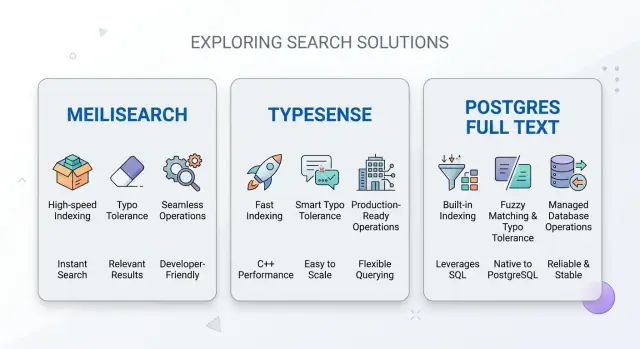
Table of Contents
Why this choice gets hard
A support agent searching by invoice number has a very different job from a customer typing "nik shoez" into a search box. The agent needs exact records, stable filters, and results that follow access rules. The customer wants speed, typo tolerance, and ranking that still makes sense when the query is messy.
That creates tension right away. Teams often want fast setup, flexible filters, and forgiving matching at the same time. In practice, each option is better at some parts and weaker at others, so the tradeoff shows up earlier than expected.
The easy starting point can also create cleanup work later. If you begin with Postgres full text because your data already lives there, basic search can ship quickly. Then the product grows. People ask for synonyms, faceted filters, typo handling, or custom ranking, and the simple setup starts to collect extra queries, helper tables, and reindex jobs.
The reverse happens too. A dedicated search engine can feel better on day one because search quality is stronger out of the box. But now you have another index to keep in sync, another service to monitor, and another place where data can drift from the source of truth.
Benchmark charts rarely show the parts that hurt in real apps: records spread across related tables, per-user visibility rules, fields that change every few seconds, and filters that need exact counts or strict ordering. A clean product catalog is one problem. A messy mix of tickets, notes, users, orders, and permissions is another.
That is why Meilisearch vs Typesense vs Postgres is rarely a pure speed test. The harder question is how much search logic your team wants to own. If your data is simple, you can stay simple longer. If search has to satisfy both staff and customers, the wrong early choice often ends in a rewrite nobody wanted.
What each option gives you
When people compare Meilisearch vs Typesense vs Postgres, they are usually choosing between different tradeoffs, not three versions of the same thing.
Postgres full text keeps search close to the tables your app already uses. You have one database, one backup plan, and one place to track data changes. That makes it a good fit for internal tools, admin panels, and apps where people search for records they already expect to find.
The limit appears when users want more than basic relevance. Typo tolerance, autocomplete, field weighting, and forgiving matching take more work in Postgres. You can build a good experience, but you usually build more of it yourself.
Meilisearch often feels fast to adopt. You can index JSON documents quickly, adjust ranking rules without too much friction, and get customer search live sooner. That helps with product catalogs, directories, and knowledge bases where users type inconsistent queries. The cost is simple: you now run a separate search service and keep another index in sync.
Typesense is more opinionated in a good way. The schema is clearer, the behavior is easier to predict, and the feature set stays focused on the jobs most apps actually need. If your team wants typo-tolerant search without a long tuning project, Typesense often feels easier to live with.
A practical split looks like this: if staff need internal search for orders, invoices, and notes, Postgres may be enough and is usually easier to maintain. If customers search a large product list and often misspell names, Meilisearch or Typesense will usually give better results faster.
The best fit usually comes down to two things: how people search, and how many engineers can maintain the setup after launch. A small team should pick the option it can still understand six months later.
Where indexing work grows
Indexing work usually stays small at the start and then grows when search stops matching your database shape. Postgres can query raw tables directly, so setup is often lighter. Meilisearch and Typesense usually push you toward a search-specific document, often one flat record that combines title, category, tags, status, and other fields users search together.
That extra schema is where hidden work begins. A customer-facing search page may need weighted titles, faceted filters, and synonyms such as "TV" and "television." An internal admin search may need none of that. If both audiences use the same source data, you may end up with two index shapes instead of one.
The ongoing work matters more than the first import. Your app has to send inserts, edits, and deletes into the index in the right order. Miss a delete and people find records that no longer exist. Update only part of a document and search can show an old name, old price, or old status even though the main database is correct.
Before you commit, answer a few dull questions. Can raw tables support search for the next six months? Which fields really deserve more weight? Which filters need exact values instead of loose text matching? Do you need synonyms now, or are you guessing? How many records will a full rebuild touch?
Reindex time changes the risk more than many teams expect. Rebuilding 50,000 records is a small job. Rebuilding 50 million records needs scheduling, progress tracking, retries, and a rollback plan if something goes wrong. Postgres avoids some of that because the data already lives there, but then query tuning and index tuning take its place.
This is where search projects get heavier. The first version feels simple. The second version adds ranking rules, filters, repair scripts, and reindex jobs. Teams that think through those flows early usually avoid a bigger rewrite later.
How typo tolerance changes results
Customer search usually needs a forgiving search box. People drop letters, swap them, or type half a phrase. If someone searches for "iphnoe case" and gets nothing, they do not blame themselves. They blame the product.
That is why Meilisearch and Typesense often feel better for customer-facing search. They can accept small mistakes and still return useful results without much setup. For stores, help centers, and content libraries, that matters more than perfect precision.
Internal search often works the other way. A support agent may search for an order code, a customer ID, or an exact company name. In that case, fuzzy matching can add noise. The right record ends up below a stack of near matches, and that gets irritating fast.
Short queries cause the most trouble. Searches like "AB," "HR," or "JS" can match far too much when typo rules are loose. Mixed terms can confuse ranking too. A query like "Acme 447 red" may need the brand filter and product code to matter more than text similarity.
If filters are present, most teams should rank exact filter matches above fuzzy text matches. When someone selects brand "Acme" and types "447," the Acme item with code 447 should beat a different item with a slightly better text score. Search feels smart when it respects obvious intent.
Postgres full text often feels stricter, which can help with staff tools. But if you want forgiving matching, you usually add custom logic. That means more tuning, more edge cases, and more tests.
Before choosing anything, run real searches: short queries like "hr" or "js," common misspellings like "adress" or "iphnoe," mixed queries like "acme 447 red," and exact identifiers such as emails, SKUs, and ticket IDs. One mistake shows up again and again here: teams use the same typo settings for customers and staff. It sounds tidy, but it usually makes one group unhappy. Separate rules are often the better choice.
What ops work lands on your team
Search gets expensive when it adds a second system to babysit. That is the clearest difference here: Postgres keeps search inside a tool you already run, while Meilisearch and Typesense add another service with its own storage, upgrades, alerts, and failure modes.
Backups are the first place this becomes obvious. With Postgres full text, search data lives with your main database, so one backup plan usually covers both. With Meilisearch or Typesense, you need to decide whether the index is disposable or part of recovery. If you can rebuild from Postgres, recovery looks simpler on paper, but rebuild time can still leave users with weak or stale search for hours.
Memory and disk use need regular checks in all three options, but the pressure lands in different places. Dedicated search engines often want more RAM as the index grows, and disk use can jump during imports or rebuilds. Postgres hides less of this. Slow search queries, bloated indexes, and maintenance work can spill into your main app database and affect normal traffic.
Upgrades and reindexing
A separate search engine means one more upgrade calendar. You need a tested rollback path, not just a version bump. That usually means a snapshot, a staging check with real queries, and a plan for switching traffic back if ranking changes or indexing breaks.
Reindexing is where teams get surprised. Meilisearch and Typesense usually handle background indexing better than Postgres, but they can still show stale results, higher latency, or memory spikes while the job runs. Postgres can feel worse here because rebuild work competes with the same database your product already depends on.
Auth and network access are easier to keep simple for internal tools. If employees search admin data and the app already talks to Postgres on a private network, keeping search there can reduce moving parts. A separate engine adds API keys, firewall rules, and another service you need to expose safely.
For customer search, the balance often changes once traffic grows. Keeping public search load away from the main database can save more pain than it creates. If your team runs lean, every extra service matters, so count the day-2 work before you count features.
How to choose step by step
Start with real searches, not product pages. Teams spend too much time comparing features and too little time checking what people actually type.
Pull the top queries from your logs. If you do not have logs yet, ask support, sales, and ops what they search for every day. Then ask a few customers what they tried to find and failed to find.
A simple process works well:
- Write down the searches that matter most, including the ones that return nothing.
- Mark the queries that need typo tolerance. Customer search usually needs more forgiveness than internal search.
- Count how often the source data changes in an hour. A small catalog updated twice a day is easy. Prices, stock, tickets, or docs that change all day create more indexing work.
- Name the person who will own backups, alerts, upgrades, and broken sync jobs.
- Pick the simplest option that covers today and the next year.
This usually narrows the choice fast. If people mostly search exact IDs, emails, tags, or known phrases, Postgres full text can be enough and keeps the stack smaller. If customers misspell words, shorten names, or expect search to just work, a dedicated engine makes life easier.
Between the dedicated options, pick the one your team will actually keep healthy. A search tool with better relevance on paper is still the wrong choice if nobody wants to run it. Good search beats perfect search when the system stays fast, current, and easy to fix.
A simple example with two audiences
Picture a small SaaS company with two search jobs that look similar at first but are not.
The support team searches order IDs, invoice numbers, and exact customer names. They already know roughly what they want. If an agent types "ORD-18422" or "Maria Chen," search should return the right record fast, with very little debate about ranking.
Customers do something else. They open the help center and type phrases like "cant change billing email" or "refund didnt arrive." They may misspell words, skip details, or use terms your team never used in article titles.
Those audiences pull the tool in different directions. Internal search rewards precision. Help center search rewards tolerance for vague wording and typos.
Postgres full text can work well for the support side, especially if the data already lives in Postgres. You avoid a second index, and exact filters on account, date, or status stay simple. For order numbers and names, that is often enough.
For customer help articles, Postgres often starts to feel stiff. You can improve it, but the work grows quickly once people expect forgiving search. Meilisearch and Typesense usually feel better here because they handle spelling mistakes, partial matches, and friendlier ranking with less custom logic.
That does not mean one tool has to do everything. A split setup is often the calmer choice. Keep internal record search close to Postgres, where exact fields and business rules already live. Put article search in Meilisearch or Typesense, where typo tolerance helps real users find answers sooner.
This also keeps tradeoffs honest. Agents do not need smart search if it hides the right order behind fuzzy guesses. Customers do not care that your help articles sit neatly in SQL if search fails on "adress change." If the two search jobs keep pulling in opposite directions, forcing one stack to cover both can cost more time than running two smaller systems.
Mistakes that lead to a rewrite
Teams rarely rewrite search because one tool is bad. They rewrite because early choices looked cheap and later became expensive under real use. The problem is usually not the engine itself. It is the work built around it.
One common mistake is stuffing every field into search just because you can. A product name, SKU, category, tags, support notes, internal comments, and old metadata do not all deserve equal weight. When everything goes into the index, results get noisy fast. People search for a clear term and get half-related matches because some hidden field happened to contain it.
Ranking causes the next rewrite. Teams often leave default settings in place and plan to tune them later. Later usually means after sales, support, or staff start saying the results feel random. By then, people have built screens, filters, and habits around weak ranking. Changing it turns into a small migration instead of a quick fix.
Filters cause even more pain because they touch both data and product design. If users need to narrow by status, region, price, tenant, or permissions, you need to model that from day one. Many teams build a nice text search first, then discover they cannot add fast faceting or strict permission filters without reshaping the whole index.
Bulk updates break search more often than people expect. A catalog import, nightly sync, or large rebuild can look fine in development and still drag production down. Postgres can slow other queries. A separate search engine can fall behind, queue updates, or show stale results for hours. If you never test a heavy update against realistic data, you are guessing.
The last mistake happens before any code gets written: choosing the tool before you count the weekly ops time. Search is not just setup. Someone owns schema changes, ranking tweaks, failed syncs, rebuild jobs, backups, monitoring, and odd user complaints like "I know this item exists, why can't I find it?" A team with one busy engineer should weigh that cost carefully.
A few warning signs show up early:
- Search returns too many weak matches because the index holds fields nobody planned.
- Users ask for filters that the current model cannot support cleanly.
- Large imports make results stale or slow down the main app.
- Nobody on the team owns ranking rules or search quality.
If two hours of planning can prevent six months of cleanup, take the two hours.
A short checklist before you commit
Teams often rush this choice because all three options can look fine in a demo. Trouble starts later, when data grows, search quality slips, or one deploy breaks the index.
A good test is boring on purpose. Can your team answer a few practical questions without guessing? If not, keep testing.
Ask why each searchable field is in the index. If nobody can explain a field, remove it or test it separately. Extra fields usually add noise, bigger indexes, and odd ranking.
Measure a full rebuild on real data, not a sample of 500 rows. You need a rough number for how long it takes, how much load it creates, and whether users will notice.
Test search with messy input. Try misspellings, plural forms, short names, and exact IDs such as order numbers or invoice codes. Customer search and internal search usually need different behavior.
Make sure one person can recover search after a bad deploy. That means clear runbooks, backups if needed, and a simple way to rebuild or roll back without pulling half the team into a call.
Run the cost math at 10x your current data size. Include storage, memory, CPU, rebuild time, and the staff time needed to keep search healthy.
A small example makes this obvious. If customers search for "blu tooth hedphones" and staff search for "ORD-10482," you need both fuzzy matching and exact lookup. Many teams test only the first case and forget the second, or the other way around.
If you cannot answer several items on this list, keep prototyping. A week of testing now is much cheaper than rebuilding search after users stop trusting it.
What to do next
Pick a small, messy sample of real data and test all three options on that first. A clean demo set hides the problems that usually decide this choice: odd spellings, partial names, stale records, and fields that look simple until people start searching them.
If your Meilisearch vs Typesense vs Postgres debate still feels abstract, make it concrete with the same records and the same query set. Use searches your team already sees in support tickets, admin tools, and product logs. Ten honest queries tell you more than fifty invented ones.
Your test run should answer four things:
- How long it takes to get the first usable index running
- How much work it takes to keep new and changed records in sync
- How often typo tolerance helps versus how often it returns the wrong thing
- Who will own backups, upgrades, incidents, and slow searches
Write the results down while you test. Teams often remember which tool felt nice to set up, then forget that one option needed custom ranking rules, another needed extra sync code, and a third pushed all the relevance work into SQL.
Do a small timing pass too. Measure initial setup time, update lag after a record changes, and how much manual tuning you needed before results looked right. Then add an ops note beside each option: who gets paged if search breaks, and how hard that fix looks at 2 a.m.
Internal search and customer search rarely deserve the same answer. A support team may accept plain ranking if the data stays fresh and simple. A customer-facing product usually needs better typo handling and more predictable relevance, even if that adds another service.
If this choice will affect your product architecture, infra budget, or team workflow, a short review before you commit can save weeks of rework. Oleg Sotnikov at oleg.is helps startups and small teams think through search tradeoffs, data flow, and ops cost when search starts touching the rest of the system.
Frequently Asked Questions
When is Postgres full text enough?
Postgres is enough when staff mostly search exact IDs, emails, invoice numbers, or known names, and your data already lives in Postgres. It keeps filters, permissions, backups, and sync simpler. Once users expect typo fixes, autocomplete, or custom ranking, the work grows fast.
When should I pick Meilisearch or Typesense instead of Postgres?
Choose a dedicated engine when customers type messy queries and still expect useful results. Meilisearch and Typesense usually give you typo tolerance, autocomplete, and better ranking sooner than Postgres. You pay for that with sync code, another service, and more recovery planning.
Which option works best for internal staff search?
For support, ops, and admin tools, Postgres often fits best. Staff usually know the order ID, invoice number, or customer name they want, so exact match and strict filters matter more than fuzzy ranking.
Which option works best for customer search?
Customer search usually leans toward Meilisearch or Typesense. They handle misspellings, partial phrases, and less consistent wording with less tuning, so users find products, articles, or directories faster.
How much extra ops work does a separate search engine add?
A separate engine adds another thing your team must run. You need sync jobs, storage checks, upgrades, alerts, and a rebuild plan if the index drifts or breaks. Postgres avoids that extra service, but heavy search work can spill into your main database.
Does typo tolerance always help?
No. Typo tolerance helps customers who type things like "iphnoe" or "adress," but it can annoy staff who search short codes like "HR" or exact IDs. Use stricter rules for internal tools and looser rules for customer search.
Should one search system handle both staff and customers?
Not always. If staff need exact records and customers need forgiving search, one setup often makes one side unhappy. Many teams keep internal record search in Postgres and move article or catalog search to Meilisearch or Typesense.
What usually causes a search rewrite later?
Teams usually hit trouble when they index too many fields, ignore ranking until users complain, or skip filters and permission rules early. Large imports and rebuilds also expose weak sync code. The engine rarely causes the rewrite by itself; the search model around it does.
What should I test before I choose?
Use real queries from logs, support, and sales. Check exact IDs, short terms like "js," common misspellings, mixed queries like brand plus code, update lag after edits, and rebuild time on real data. Ten honest searches tell you more than a polished demo.
How do I choose between Meilisearch and Typesense?
Start with your team, not the feature chart. Typesense usually feels stricter and more predictable, which many small teams like. Meilisearch often feels easier to tweak for ranking and search behavior. Run the same messy queries in both and keep the one your team will still manage calmly six months from now.


