Queued work for meeting-heavy teams without more chaos
Learn how to set up queued work for meeting-heavy teams with simple forms, review lanes, and service levels so AI can draft work without daily confusion.
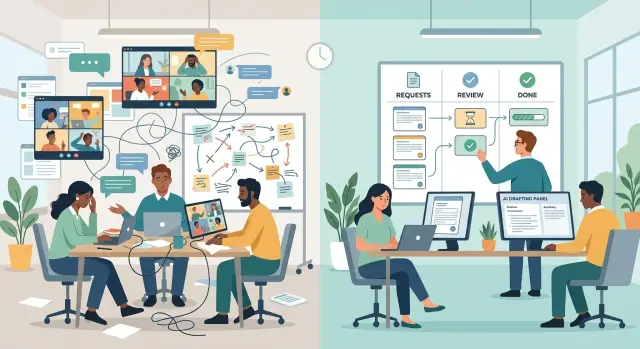
Table of Contents
Why meetings keep taking over
Meetings take over when requests arrive from everywhere at once. One comes through chat, another in a quick call, and a third in a side conversation after lunch. Each request feels small. Together, they create a queue nobody can see.
Small teams feel this first. Sales asks for a custom report in chat. Operations brings up a process fix on a call. A founder drops a new idea during standup. The same few people carry all of it in their heads, so they start booking more meetings just to remember what is pending.
That hidden line of work creates two problems. Nobody knows what is already waiting, and the loudest request jumps ahead of the most useful one. Whoever speaks up in real time gets attention. A quiet but urgent task sits untouched because it never entered a clear system.
You can spot this when teams keep saying things like:
- "Can we just talk for five minutes?"
- "I thought someone already picked this up."
- "This is urgent," with no clear reason.
- "We discussed it, but I don't think anyone wrote it down."
At that point, meetings become a patch for missing structure. People use them to gather details, settle priority, and confirm who owns the work. That can hold for a while. It does not hold for long.
AI makes the gap harder to ignore. An AI drafting workflow needs clear inputs: what is needed, who asked, what a good result looks like, and when it is due. Half-spoken requests do not give it enough to work with. If the request lives in scattered messages and memory, the AI either guesses or waits for another meeting.
That is why queued work for meeting-heavy teams matters. The goal is not to ban conversations. The goal is to stop using meetings as a substitute for intake.
What queued work looks like
This setup starts with one shared intake point. Every request goes into the same place instead of landing in chat, email, and random calendar invites. That change alone cuts noise because people stop asking, "Did you see my message?"
The request itself should be easy to complete. A short form usually works better than a kickoff call. Ask for the outcome, the deadline, the owner, the background, and any files or examples. If someone cannot explain the request in a few fields, they probably are not ready to ask for the work yet.
For most teams, the form needs only a few basics: what needs to be done, why it matters now, who approves the result, when it is needed, and what source material already exists.
After intake, the work moves into review lanes. These lanes sort requests by type and risk instead of by who shouted first. One lane can hold simple drafting work. Another can hold requests that touch legal, finance, or customer data. A third can hold items that need scope approval before anyone starts.
Service levels make the queue feel fair. People know when they will get a first response and what kind of work moves faster. A low-risk draft might get same-day review. A policy change might get two business days and an approval check. That is much easier to manage than constant status meetings.
AI fits best after the form and lane are clear. With structured details, it can draft a summary, prepare a reply, or turn notes into a clean document in minutes. With vague input, it produces vague output, and the team ends up back in a meeting.
A small team with a Fractional CTO can use this for internal requests, hiring notes, vendor replies, and product docs. People fill out one form, the request lands in the right lane, AI drafts the first pass, and a person reviews it before it goes out. The flow is calm, visible, and much easier to trust.
List the requests you already handle
Start with the last 30 days of chat and email. Pull every request you can find, including the messy ones that started as a "quick question" and turned into a 20-minute call.
Put them into one simple table. A spreadsheet is enough. You want a rough picture of demand, not a perfect audit.
After 50 to 100 requests, the patterns usually show up fast. Most teams do not handle 30 different kinds of work. They handle the same few request types again and again, just with different wording.
A small operations team often sees the same groups repeat: access changes, purchase approvals, document review, customer follow-ups, and incident reports. For each type, write down who says yes. That matters more than most teams expect. A request with no clear approver almost always turns into a meeting because nobody wants to guess.
Then note the details that come up every time. If people always ask for a deadline, budget code, account name, system name, or business reason, that belongs in the form. If reviewers always ask the same follow-up question, add that too.
This is where queued work for meeting-heavy teams starts to feel practical. You stop treating every request like a fresh conversation and start seeing it as repeatable work.
Be strict about emergencies. Most teams label too many things urgent. A real emergency needs immediate action because delay causes clear harm: downtime, a blocked customer payment, a security issue, or a legal deadline due today. "I forgot to ask earlier" is not an emergency.
For each request type, keep a short record: what people ask for, who approves it, what details always repeat, how often it shows up, and whether it is routine or urgent.
Once you have that list, request forms for internal work get easier to design. Review lanes and service levels make more sense, and the AI drafting workflow has enough context to produce something useful instead of another vague message.
Build a form people will finish
A good request form feels shorter than it is. People complete it because every field has a purpose, and reviewers stop chasing missing details later. That matters even more when the form replaces a quick chat.
Start with one rule: ask only for what the reviewer needs to make a decision or start a draft. If a field does not change the next action, cut it. Teams often ask for background, history, and side notes that nobody uses.
Drop-downs help more than open text boxes for common requests. They speed up submission, keep wording consistent, and make sorting easier later. If most requests fall into a few buckets, name them plainly.
A basic form usually starts with request type, team or owner, what needs to be delivered, who approves it, and when it is needed. After that, add only the context that actually changes the review.
Free text still matters, but keep it tight. A short prompt gets better answers than a giant blank box. "What should the first draft say?" works better than "Add context."
Examples inside tricky fields save time. People freeze when they are not sure what "business impact" or "audience" means. A tiny sample gives them something to follow. Under audience, for example, you might write "Existing customers in the US" or "Internal finance team."
One small question near the end prevents a lot of rushed messages later: "What happens if this is done after your requested date?" The answer tells reviewers whether the deadline is fixed, flexible, or just a preference. That is usually more useful than asking people to mark something "high priority."
If you want AI to draft first versions, keep the stable inputs near the top of the form: request type, target audience, desired outcome, and source material. Then the AI can produce something useful without five follow-up questions.
A form people finish is not a document. It is a filter. If someone can complete it in two minutes and a reviewer can act on it without a meeting, it is doing its job.
Set review lanes and service levels
Most teams do not need more meetings. They need a clear path for work once a request arrives. If every item lands in the same inbox and gets the same treatment, people interrupt each other just to figure out what happens next.
A simple lane setup fixes that:
- Triage for new requests and missing details
- Draft for first-pass writing or analysis
- Review for approval, edits, or escalation
- Done for completed work and final handoff
Those lanes work only if different request types follow different paths. A customer complaint may need a fast human reply. A finance request may need numbers checked before anyone drafts anything. A legal request should not sit in the same pile as routine admin work.
Service levels matter just as much as the lanes. People calm down when they know what response time to expect. They stop calling meetings for work that already has a clear deadline.
Keep the first version simple. Customer issues might get a first response within four business hours. Internal admin requests can wait one business day. Finance approvals may need two business days. Legal review may need three unless someone with authority marks it urgent.
Urgent work needs one owner. If everyone can mark their own request urgent, the label becomes useless in two days. Pick one person, or at most two, who can reclassify work. In a small team, that is often the operations lead and one backup manager.
Keep a tiny exceptions log as well. It does not need to be fancy. Record the date, request type, why it skipped the normal lane, and who approved the change. After a few weeks, patterns appear. You may find that "urgent" finance items always trace back to the same missing approval step, or that customer escalations need their own lane.
Roll it out in simple steps
Start small. Pick one team and one request type that shows up every week, such as pricing approvals, policy questions, or content requests. If you try to move every request into a queue at once, people will panic and fall back to chat messages and surprise meetings.
For the first two weeks, run both systems side by side. Let people use the old method if they must, but ask them to submit the form too. That gives you real examples to compare: what came in through meetings, what came in through the queue, and where the form failed.
Real submissions expose the weak spots fast. One field will confuse people. Another will be missing. Someone will paste a vague sentence where you needed a deadline or owner. Fix the form after you see that behavior, not before. Most teams learn more from ten bad submissions than from one planning session.
Managers set the tone here. If they keep calling meetings for routine work, nobody will trust the new process. Give them a simple rule: use the queue unless the issue has real uncertainty or real risk.
A meeting still makes sense when several teams are affected at once, when the deadline changed today and someone needs a live decision, when the request is still unclear after one round of written follow-up, or when people need to resolve a conflict rather than gather facts.
That rule matters more than the form itself. This approach works only when managers stop treating every request like a live event.
Once the form works, let AI handle the first draft. Start with low-risk output: summaries, response drafts, task breakdowns, or a recommended next step. Keep a person in review until the team trusts the pattern. When the form captures the right facts, AI can save about 10 to 20 minutes on each request without adding chaos.
A good rollout feels a little boring. That is usually a good sign. Fewer pings, fewer status meetings, and fewer requests that depend on who happened to be online first.
A realistic example from a small team
A six-person sales team at a B2B software company kept getting the same request: "Can you send a custom proposal by tomorrow?" Before they changed the process, almost every request started with a calendar invite. The account manager booked a call with sales ops, then another with finance if pricing looked unusual, then a quick check with legal if the customer asked for custom terms. A proposal that should have taken 40 minutes often took two days because everyone was waiting for someone else's slot.
They replaced the first meeting with a proposal form. It asked for the customer name, scope, expected budget, requested due date, and any unusual pricing or contract terms. If the rep skipped the budget or wrote a vague scope, the request did not move forward. That felt strict for a week. Then people saw the benefit. Fewer messages came back asking, "What exactly does the client want?"
Once the form was submitted, the request entered a queue. Simple deals stayed with sales. Pricing questions went to finance. Contract changes went to legal. Each lane had a service level people could trust: finance replied within one business day, and legal replied within two unless the sales lead marked the request urgent.
AI handled the first draft. It took the form answers, the approved pricing table, and the current proposal template, then wrote a clean version in a few minutes. The rep no longer started from a blank page. They reviewed the draft, fixed any odd wording, and sent it on only if the form had flagged finance or legal.
The team did not remove every meeting. Big deals still needed a real conversation. But they cut most proposal calls because the request arrived with enough detail to act on it.
Mistakes that create more noise
This system breaks fast when a team keeps treating normal work like an emergency. If every request gets special handling, the queue stops being a queue. People go back to pings, side chats, and last-minute meetings.
The first mistake is making exceptions feel normal. One sales request jumps the line, then a finance request does the same, then a manager says their item "will only take five minutes." Soon the team spends more time sorting urgency than doing the work.
Another common problem is a form that feels longer than the task itself. If someone needs 10 minutes to explain a small request, they will skip the form and send a message instead. Keep it tight: what is needed, when it is needed, who owns approval, and any files or context that stop back-and-forth later.
Teams also create trouble when they promise same-day replies for everything. That sounds polite, but it trains people to mark every request urgent. A simple service level works better when it matches the effort. A small copy edit might get a fast response. A policy draft or vendor review should sit in a slower lane.
A hidden queue creates its own mess. If requesters cannot see whether their item is new, in review, blocked, or done, they start chasing updates. That turns the queue back into meetings and status pings.
Leadership behavior matters more than the form. If a founder or department head can skip the process with a direct message, everyone notices. The rule becomes optional, and the team learns that the fastest path is still personal access, not the queue.
A small team can avoid most of this with a few hard rules. Use one intake path for normal work. Define what counts as a real emergency. Show request status to the requester. Match response times to effort, not pressure.
When those rules hold, AI can draft first versions without chaos. The request arrives with enough context, the team knows where it belongs, and reviewers spend their time editing useful work instead of decoding scattered messages.
A short weekly checklist
A queue stays useful only if someone checks it every week. This does not need a long meeting. One person can review the numbers in 15 minutes, post a short update, and fix one obvious problem before it grows.
Start with volume. Count how many new requests came in, how many items the team finished, and how many are now overdue. If new work keeps rising while completed work stays flat, the queue is telling you something early. You may need a tighter intake form, fewer rush jobs, or a more honest service level.
Then look at the form itself. Find the fields people skip, fill with vague answers, or clearly misunderstand. If three people wrote "ASAP" where you needed a due date, the form is the problem, not the people. Cut confusing fields, rename them in plain English, or add one short example.
Check how often work jumped the line. A few urgent items are normal. A steady stream of exceptions usually means your lanes are too loose, or managers still treat the queue like an inbox they can bypass. Count the jumps and record the reason for each one. The pattern becomes obvious quickly.
Compare promised response times with real ones. If you said someone would get a first review in two business days, did that happen? If not, change the promise or change the staffing. Missed service levels create more meetings because people stop trusting the queue.
One more step matters just as much: remove one meeting that the queue now replaces. If status updates already live in the request system, stop holding the weekly "where does this stand" call. That single cut often saves more time than any form tweak.
You are not chasing perfection here. You are making small repairs before people slide back into chat messages, side calls, and last-minute panic.
Next steps for a calmer workflow
Start with one process that creates the most meeting drag. Do not fix everything at once. Pick something common, like access requests, content approvals, or small product changes, and turn that into a simple form first.
A good first form asks only for what the reviewer needs to act. If people need five minutes to fill it out, it is probably too long. Ask for the request, the deadline, the reason, and any files or context that prevent back-and-forth later.
Then set service levels in plain language. Three levels are enough for most teams:
- Urgent: same day, only for work that blocks revenue, customers, or security
- Normal: handled within 2 to 3 business days
- Planned: grouped into the next weekly review
Name one person to triage new requests and one person to approve or review the drafted output. If nobody owns those two steps, meetings come back fast because people start chasing updates in chat.
Keep the first version small. Run the new setup with one team, one form, and one review lane for two weeks. Watch where requests get stuck, where people skip the form, and where AI drafts still need too much cleanup.
If you want help setting this up, Oleg Sotnikov at oleg.is works with startups and small teams as a Fractional CTO and advisor. His work includes practical AI-first development and automation, which fits well when you are trying to reduce meetings in operations without creating a mess elsewhere.
The goal is not to remove every meeting. It is to stop using meetings as the default intake system. When people know where to send work, how fast it moves, and who reviews it, the week gets quieter very quickly.
Frequently Asked Questions
Why do meetings start taking over a team?
Because requests arrive in chat, calls, and side conversations, the team never sees one full queue. People then book meetings to sort priority, fill gaps, and decide ownership.
What should we change first if meetings run everything?
Start with one shared intake point for normal work. A simple form and one visible queue usually cut noise faster than another weekly meeting.
What should a good request form include?
Ask for the outcome, due date, approver, background, and any source files or examples. If reviewers always ask for the same detail later, add that detail to the form.
How long should the form be?
Keep the form short enough to finish in about two minutes. Cut any field that does not help someone review, approve, or draft the work.
When does a meeting still make sense?
Use a meeting when people need a live decision, when several teams conflict, or when written follow-up still leaves the request unclear. For routine intake, the queue should handle it.
What counts as a real emergency?
Treat something as urgent only when delay causes clear harm, like downtime, blocked payments, a security issue, or a deadline due today. "I forgot to ask earlier" should stay in the normal queue.
Why do service levels matter so much?
Service levels tell people when they will get a first response. That lowers status pings and surprise calls because requesters know what to expect before they ask for an update.
How do we stop people from asking for status all day?
Show whether each item is new, in review, blocked, or done. When people can see status for themselves, they stop chasing updates in chat.
Where does AI fit into this process?
AI works best after the team captures clear inputs in the form. It can then draft summaries, replies, proposals, or task breakdowns quickly, while a person checks the final result.
What mistakes make the queue turn into more noise?
Teams usually break the system when they allow too many exceptions, promise reply times they cannot meet, or let leaders skip the queue. Keep one intake path for normal work and enforce it every day.


