MCP tool wrappers that keep prompts small and tools clean
MCP tool wrappers move auth, defaults, and input checks into the tool layer, so agents waste fewer tokens on boilerplate.
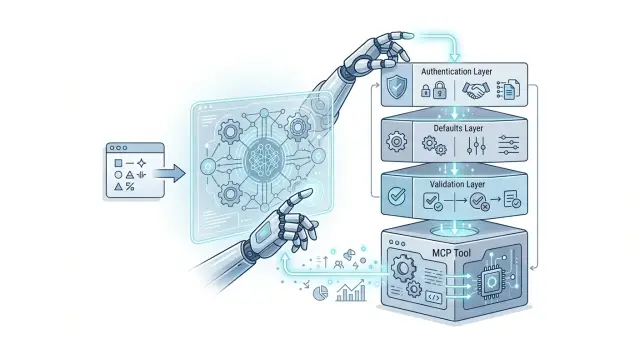
Table of Contents
Why prompts get bloated
Most prompt bloat starts with a simple mistake: teams put tool rules in the prompt instead of in the tool. The agent gets told how to pass auth, which fields are required, which defaults to use, and how to format every request. Then it repeats those rules on every call, even when the backend already knows them.
Auth is a common offender. A model does not need a paragraph about bearer tokens, workspace IDs, or which header to send each time it checks a ticket or updates a record. If that logic lives in the prompt, the model spends tokens restating it, and you pay for the same boilerplate again and again.
Defaults create the same mess. Teams often stuff prompts with things like default region, page size, environment, language, or retry limit. If the backend already has sane defaults, putting them in the prompt only makes it longer and more fragile. One extra sentence like "use 100 unless the user says otherwise" can change behavior in ways nobody expected.
Formatting rules waste a surprising amount of space. Models spend tokens trying to remember field names, empty value rules, date formats, enum values, and what to do when a field is missing. When they guess wrong, they retry. That means more tokens, more latency, and more chances for odd errors.
You can see this in real workflows. An agent that checks logs, opens an incident, and posts a status update may carry the same auth notes and default fields into every step. The prompt grows, but the useful part of the task does not. The model has less room for actual reasoning.
Small prompt edits make this worse. Change one sentence about optional fields or fallback values, and the tool call can shift in subtle ways. That is why prompt-only control feels shaky. When the same rules appear in every prompt, MCP tool wrappers start to look less like cleanup and more like basic hygiene.
Auth, defaults, and validation in plain language
A wrapper should handle the boring parts before the agent reaches the real task. If every prompt has to explain who may call the backend, which region to use, and what counts as valid input, the model spends tokens on rules instead of the job.
Auth is the gate. The wrapper checks identity and permission before it sends anything to the backend. The agent should not carry secrets in the prompt or guess which account to use. It should call one tool, and the wrapper should attach the right credentials for that user, workspace, or environment.
Defaults save space and reduce drift. If most requests use a page size of 50, a fixed region, or a standard status like "open," the wrapper can add those values on its own. Then the prompt only mentions exceptions. That keeps calls short and stops small differences from piling up across repeated tasks.
Validation is the safety check. The wrapper should catch empty fields, missing IDs, bad dates, and malformed JSON before your backend sees them. This is where MCP tool wrappers help most: they turn loose model output into input your systems can accept without guesswork.
Good validation should also be easy to repair. A vague error like "request failed" wastes a turn. A clear error like "customer_id is required" or "page_size must be between 1 and 100" tells the agent what to change and try again.
A solid wrapper usually does four things:
- checks who can call the backend
- fills common values automatically
- blocks malformed or incomplete input
- returns short errors the agent can fix fast
That is enough for most tools. Put repeated rules in the tool layer. Leave judgment, prioritization, and task-specific context in the prompt.
What belongs in the wrapper
A wrapper should handle the parts that repeat, the parts that break often, and the parts the model should never see. That keeps the prompt short and gives the agent one clean way to call a tool.
Start with secrets. API keys, session tokens, internal account IDs, and service URLs should stay on the server side. If an agent needs customer data, it can send a safe identifier like customer_id or email, and the wrapper can attach auth headers, pick the right backend, and log the request.
Defaults belong there too. If every call needs the same timezone, locale, retry setting, page size, or output format, set those once in code. Otherwise the prompt turns into a checklist, and the model wastes tokens repeating the same instructions.
MCP tool wrappers also help when user input is messy, which is most of the time. People write "tomorrow morning," "order 17," "high prio," or a company name with three different spellings. The wrapper can turn that into one stable schema with clear types.
A good wrapper usually takes care of four jobs:
- add auth and internal context
- apply safe defaults
- normalize fields like dates, IDs, and enum values
- translate loose user input into strict tool arguments
That last part matters more than many teams expect. Suppose a support agent asks for "all open tickets for Acme from last week." The wrapper can resolve "Acme" to the right account, convert "last week" into exact dates, map "open" to the tool's allowed status values, and reject the call if two accounts match. The model stays focused on the task instead of building boilerplate.
This pattern works well when one tool hides several awkward details. Oleg often works with AI-augmented development setups where agents touch logs, issue trackers, deployment systems, and internal services. A thin wrapper over each tool can make those systems look consistent, even when the real APIs all behave differently.
If you keep the external schema small and stable, prompts get simpler, tool calls fail less often, and you can change backend details without retraining the agent's habits.
What stays in the prompt
Keep only the parts that change from task to task. The wrapper should handle auth, default fields, and input checks. The prompt should tell the agent why it would use the tool right now.
A good prompt gives the agent a clear trigger. If the user asks to reset a password, check an order, or update a ticket, call the support tool. If the user only wants general advice, answer directly and skip the tool. That kind of instruction is short, and it saves wasted calls.
Then state the goal in one or two plain sentences. "Use the ticket tool to find the customer's open issue and give a short status update." That is enough. The agent does not need a page of boilerplate if the MCP tool wrappers already supply auth headers, default account IDs, and required fields.
Some rules belong in the prompt only for a while. During testing, you may want a temporary limit such as "ask for confirmation before changing billing data" or "use the staging project for internal demos." Keep those rules in the prompt until you know they are stable. Once they stop changing, move them into the tool layer or the app logic.
A short example can help when the agent keeps picking the wrong tool or formats arguments badly. Keep it tiny:
- User: "My login code never arrives."
- Agent: "Use the support lookup tool with the user's email, then summarize the most recent delivery error."
One example is usually enough. More than that turns the prompt into a manual, and token costs creep back up. If a tool needs many examples to work, the wrapper or the tool schema is probably too vague.
Build one wrapper step by step
Pick one action that agents call often and often call badly. Good MCP tool wrappers usually begin with a boring, repeatable job such as "look up an order", "create a draft invoice", or one raw database query that fetches a customer record.
Do not wrap five actions at once. One wrapper is enough to prove the pattern and show where prompts waste tokens.
- Choose the raw operation. Keep it narrow. If the underlying API has twenty parameters, ignore most of them for now and wrap only the path that people actually use.
- Cut the input schema down to the few choices the model should make. If the agent only needs
customer_idand a date range, ask for those two fields and nothing else. - Add auth inside the wrapper. The model should never carry tokens, headers, tenant IDs, or role rules in its prompt. The wrapper can pull them from the session, environment, or server config.
- Set common defaults in code. Page size, timeout, locale, retries, and safe sort order belong in the wrapper unless the model truly needs to pick them.
- Validate before you run anything. Reject missing IDs, bad dates, unsafe filters, and impossible ranges early. Then return a short result with only the fields the agent needs for the next step.
That last part matters more than people think. If the raw API returns 80 fields and the agent only needs order status, total, and last update time, send back those three. Short output keeps the next prompt small too.
Failure handling needs the same discipline. Log enough detail to debug the problem: request ID, tool name, validation error, upstream status code, and a redacted input summary. Do not log secrets, full auth headers, or personal data you do not need.
A small wrapper for a production team might end up doing more work than the prompt: attach the user account, enforce limits, normalize dates, call the API, trim the response, and record a clean error trail. That is fine. Tokens are expensive in every repeated call. Plain server code is not.
If the agent can pick from a tiny schema and gets back a tiny response, you built the right first wrapper.
A simple support example
A support agent gets a short request: "Send me the latest invoice for [email protected]." That sounds simple, but raw tools often turn it into a messy prompt with account lookup rules, paging rules, currency settings, and date checks.
A wrapper removes that clutter. The agent passes the email address and the intent, and the wrapper does the boring work first.
In this case, the wrapper looks up the customer account behind the scenes. The model does not need to remember which API finds users by email, which field maps to the billing account, or how to sort invoices by newest first. The wrapper handles that and calls the invoice endpoint with the right account ID.
It also fills in safe defaults. If the billing API expects a currency and page size, the wrapper can add them automatically. For a "latest invoice" request, it might set page_size=1 and use the account's default currency, or a fallback currency if the account record is missing one.
Validation belongs there too. If the user adds a filter like "from 2025-02-30" or gives an end date earlier than the start date, the wrapper should reject that before the API call. That saves time, avoids noisy failures, and gives the agent a clean error it can explain in one sentence.
The result that comes back to the model should stay small. Something like this is enough:
- invoice number n- issue date
- total amount and currency
- payment status
- download availability
Now the agent can answer without extra boilerplate: "I found your latest invoice: INV-10428, issued on March 1, total $49.00, status paid." If the tool supports sending it, the agent can ask for confirmation or trigger the send action next.
This is why MCP tool wrappers matter. They keep prompts short, reduce repeated instructions, and give the model a clean result set to reason over instead of a pile of API rules.
How to tell if the wrapper helps
A good wrapper should make the agent quieter and more reliable. You should see fewer tokens spent on repeated rules, fewer failed tool calls, and less hand-holding in the prompt.
Start with prompt length. Take 10 to 20 real requests and compare the full prompt before and after you moved auth, defaults, and validation into the tool layer. Use the same tasks, not toy examples. If the wrapper works, the prompt usually loses a lot of repeated text like API notes, required field reminders, and fallback values.
Then watch retry rate. Count how often the agent has to call the tool again because it missed a field, used the wrong format, or forgot a default. If a support agent keeps retrying because customer_id is empty or the date format is wrong, the wrapper is not doing enough. A drop in retries is one of the clearest signs that the change worked.
Output size matters too. Run a small set of frequent requests and inspect both the tool arguments and the assistant reply. The wrapper should keep both compact. The agent should not keep restating tool rules or dumping extra fields just to stay safe. Good MCP tool wrappers remove that clutter.
Some gaps only show up when you read the prompts people still write around the tool. If users keep adding the same reminder every time, the wrapper probably needs one more rule.
A wrapper still needs work when you see patterns like this:
- people keep writing "use the default region" in the prompt
- the agent explains field rules before every tool call
- the tool returns large error messages for simple input mistakes
- one request works, but a very similar one needs extra instructions
This kind of review works well in real production teams. Oleg often pushes logic down into the tool layer for the same reason: agents should spend tokens on judgment, not boilerplate. If your prompts get shorter and your retries drop, the wrapper is earning its place.
Mistakes that make wrappers hard to trust
A wrapper should make a tool easier to use, not harder to understand. Trust drops fast when the agent cannot tell what the tool will do, what it expects, or why it failed. Good MCP tool wrappers cut prompt token waste, but they still need clear edges.
One common mistake is hiding too much business logic inside the tool. If the wrapper silently changes priorities, rewrites requests, or applies approval rules that never appear in the prompt or tool docs, the agent starts guessing. That guesswork causes bad calls and weird retries.
Another problem is returning raw backend payloads with every field intact. Ten fields might help. Fifty usually do not. If the tool sends back internal IDs, timestamps, nested audit logs, and unused metadata, the agent has to dig through noise before it can answer. That defeats prompt token reduction because the clutter moves from input to output.
Loose input is just as bad. A wrapper that accepts almost anything and hopes the backend sorts it out feels convenient at first. In practice, it creates random failures. If a tool needs a customer ID, ticket type, and short reason, ask for those fields and reject the rest.
A few patterns cause most trust issues:
- The wrapper mixes secret handling with user-facing instructions, so auth rules leak into normal tool use.
- The tool guesses defaults that change the result in ways the agent cannot see.
- The response includes dozens of fields the agent never uses.
- The input schema is vague, so bad requests slip through.
- The error message says "request failed" and nothing else.
That last one causes more damage than teams expect. An agent can recover from a clear error such as "customer_id is missing" or "status must be one of: open, pending, closed." It cannot recover from silence.
Keep the wrapper boring in the best way. Put auth, secret handling, fixed defaults, and strict validation in the tool layer. Keep business decisions and user-specific intent where the agent can see them. When a tool behaves the same way every time, people trust it faster, and the agent wastes fewer tokens cleaning up avoidable mistakes.
Quick checks before rollout
Before you ship MCP tool wrappers, hand one to a teammate who did not build it. Ask them to use the tool from a short prompt and watch where they pause. If they need a long note to guess the inputs, the wrapper still exposes too much of its own plumbing.
The wrapper should also carry routine choices on its own. If the prompt leaves out a region, account, retry limit, or common filter, the tool should still run with sensible defaults. The agent should spend tokens on judgment, not on repeating setup text.
Use this quick review before release:
- Ask someone to infer the inputs from the tool name, field names, and short description alone.
- Leave out optional settings in the prompt and confirm that the tool fills them in correctly.
- Send a few bad requests on purpose and check whether each error names the exact field and explains the problem in plain words.
- Trim the response until it returns only the data the next step needs, not raw payloads, debug noise, or repeated metadata.
- Read the logs and remove secrets, access tokens, email addresses, and other personal data.
A support wrapper makes this easy to see. If the agent wants to check a ticket, it rarely needs the whole customer record or the full API response. It usually needs the ticket ID, current status, owner, and maybe one short note about the last update.
This review takes ten minutes, and it catches most wrapper problems early. When the inputs feel obvious, defaults work quietly, errors point to one field, outputs stay small, and logs stay clean, the tool is ready for real traffic.
What to do next
Start with one tool, not your whole stack. Pick the tool that creates the most prompt noise today. That is usually the one with repeated auth steps, lots of default fields, or easy-to-miss input rules.
A support search tool is a good first candidate. So is anything that touches tickets, deployments, billing data, or internal docs. If the agent keeps wasting tokens on the same setup text, the wrapper will earn its keep fast.
Use a short test window and treat it like a real comparison. Run the wrapper for one week and track two numbers: prompt tokens per task and failure rate. If tokens drop and tool errors fall, keep going. If nothing changes, the wrapper may be too thin to matter.
A small wrapper is easier to trust. Once it starts collecting too many checks, hidden defaults, or special cases, split it. One wrapper can handle auth and safe defaults. Another can handle stricter validation for a narrow task. Small parts are easier to debug when an agent does something odd.
A simple rollout often looks like this:
- Wrap the noisiest tool first
- Measure token use and failed calls for one week
- Cut extra rules if the wrapper gets hard to read
- Reuse the pattern only after the first wrapper proves itself
After the first win, copy the approach to other MCP tool wrappers that have the same problem. Do not copy it everywhere by habit. Some tools are simple enough already, and adding a wrapper would only hide useful details.
Teams often get stuck on the boring parts: schema design, guardrails, logging, and deciding what belongs in the prompt versus the tool layer. Oleg Sotnikov can help with that. His Fractional CTO work includes hands-on support with MCP servers, AI-first development workflows, and lean production setups, so teams can keep agents focused on reasoning instead of boilerplate.


