MCP tool schema design for reliable assistant actions
MCP tool schema design helps assistants choose the right action, fill cleaner arguments, and return results that teams can debug and trace fast.
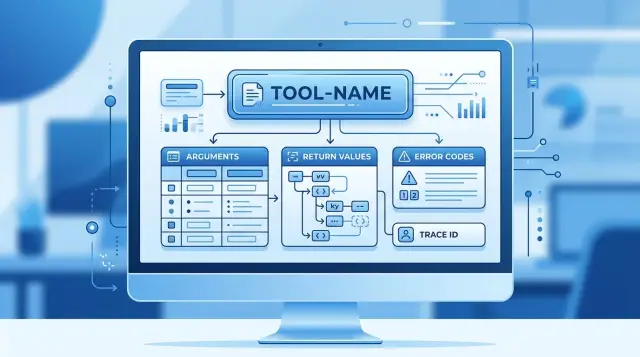
Table of Contents
Why tool calls go wrong
A model does not understand a tool the way someone on your team does. It guesses from the name, the arguments, and the shape of the response. If those signals are fuzzy, the model picks the wrong action, fills fields with bad guesses, or skips a tool it should have used.
Vague schemas create trouble fast. A tool called manage_customer could mean update a profile, suspend an account, issue a credit, or fetch data. Even if the description explains it, the name already pushed the model toward a broad guess. Broad guesses create bad calls.
Similar names make this worse. If your system has get_user, find_user, lookup_customer, and fetch_account, the model has to infer small differences from weak wording. People struggle with that too. Models fail even more often because they do not share your team's context.
The same problem shows up in arguments. If a tool asks for id, the model has to decide which ID you mean. User ID, order ID, or session ID? Some calls work by luck. Others hit the wrong record, trigger a retry, or fail with an error that tells nobody what actually happened.
Weak return values create a second layer of pain. A response like {"success": true} tells the model very little and helps operators even less. Support still has to ask what changed, which record changed, who approved it, and why the previous call failed. When the return data hides that detail, every incident takes longer.
Teams usually pay for bad schema design in the same few places: the assistant retries more often, support spends longer during incidents, logs get noisy, and tasks stall until a person steps in. A small naming problem can turn into a real operations problem. One vague tool call can create extra logs, two or three retries, and a support ticket with no clear cause.
Clean schemas reduce guessing before anything breaks. They also leave a clear trail when something still goes wrong.
What a good schema should do
A good schema cuts down confusion before the model makes its first call. If the tool name, inputs, and outputs read like plain instructions, the model guesses less and the operator spends less time digging through logs.
Start with one tool and one job. A tool that searches, edits, approves, and sends notifications invites bad calls because the model has to choose between several actions inside one interface. Narrow tools work better. A model can pick the right one faster, and a human can see what happened without reading a wall of context.
Inputs should feel obvious at a glance. Required fields need clear names, plain descriptions, and simple types. customer_id, refund_amount_cents, and reason_code are easier to use than vague fields like data, payload, or details. If a field matters, make it explicit. Do not hide an important choice in free text when a short enum or a boolean will do.
Return values should stay predictable too. When every tool answers in a similar shape, operators can scan results faster and spot failures sooner. A clean response usually includes the final status, the main result, a readable error message when something fails, and a request or trace ID for follow-up.
That consistency helps everyone. The model learns what each tool expects. Operators can compare calls side by side. Logging and testing need less custom handling. Failures are easier to classify and fix.
Readability matters more than cleverness. Short field names work when they stay specific. Descriptions should answer three plain questions right away: what goes in, what comes back, and what can fail.
This matters even more in small teams that rely on automation every day. Oleg Sotnikov often works in that kind of setup, where one unclear schema can waste real time across support, engineering, and on-call work. When a schema stays clear under pressure, the model acts with fewer mistakes and the human on call can understand the problem in seconds.
Name tools so intent is obvious
A tool name should tell the model what will happen before it reads the schema. If the name is vague, the model fills in the gaps and usually gets part of it wrong. People do the same when they read logs at 2 a.m.
Start with a plain verb and a plain object. Names like get_customer, create_invoice, and cancel_subscription leave less room for guesswork than customer_manager or process_task. The model sees the action. The operator sees it too.
Match the name to the real action, not the team's internal shorthand. If a tool only submits a refund request for review, call it create_refund_request, not approve_refund. That small difference matters. A misleading name creates bad calls, bad assumptions, and messy audit trails.
It also helps to split read, create, update, and delete into separate tools. One broad tool like manage_user looks flexible, but it pushes too much reasoning onto the model. Separate tools make intent visible and narrow the chance of a wrong call. In practice, names like get_user, list_users, create_user, update_user_role, and delete_user are easy to tell apart and easy to debug later.
Keep similar tools distinct. get_invoice and list_invoices are clear. fetch_invoice_data, retrieve_invoice, and load_invoice_info blur together, and the model starts guessing.
Specific names also make failure logs easier to scan. In production, clear tool names cut a lot of noise because you can tell whether the assistant picked the wrong action or passed the wrong input. That is much easier to fix than a log full of calls to handle_request.
If a tool name needs a long explanation, the name is probably doing too little. Rename it until a new teammate can guess the action in one pass.
Shape arguments so models guess less
Most bad tool calls start before the model writes a single token. If the schema leaves room for interpretation, the model fills the gap with a guess.
Use short field names, but give each field one meaning. user_id is clear. user, target, or ref is not. If one field can hold a name, an email, or an internal ID, the model will eventually send the wrong thing.
Keep IDs and human labels apart. If a tool needs both, ask for both in separate fields, such as project_id and project_name. That makes logs easier to read, and your backend can trust the identifier instead of trying to parse a display label.
Put units in the field name every time. A model should never wonder whether timeout means milliseconds, seconds, or minutes. timeout_seconds, amount_usd, and file_size_bytes look a bit longer, but they stop small mistakes from turning into costly ones.
Optional fields need discipline. If a field changes the meaning of the action, make it required. Keep optional fields for real edge cases, like dry_run or notes, not for inputs the tool cannot safely infer.
Nested objects trip models up too. Deep trees force the model to track structure, spelling, and order at the same time. Flat arguments are easier to call and easier to inspect later. If you need nesting, stop at one level and keep object names plain.
A deployment tool gives a simple example. service_id, environment, and timeout_seconds give the model clear slots to fill. One deployment object packed with labels, IDs, and timing rules invites mistakes.
Good schema design feels almost boring. That is the point. Each argument should answer one plain question: what does the tool need, in what format, and with what unit?
Return values that help people debug
A tool result should do more than say "done" or "failed." The return shape decides how fast a model can recover and how fast a person can find the problem. If the tool only returns success: false, everyone has to guess what broke.
Start with a clear success flag. Keep it direct: true or false. Do not hide the outcome inside a status sentence like "request may have completed" or "operation processed with issues." Models read that loosely, and operators waste time reading logs.
The result also needs a plain reason. One short sentence is enough. Good reasons sound like "customer not found," "approval limit exceeded," or "calendar token expired." They tell the assistant what happened without forcing it to inspect raw debug data.
It helps to separate what the end user should see from what the team should see. A customer-facing message might say, "I could not send the invoice yet." The debug text should say what failed, where it failed, and what input caused it. Keep those fields apart so the assistant does not leak internal details into a chat.
A small return shape often works best: success for the final outcome, reason for the short cause, user_message for safe assistant text, debug_message for internal detail, and trace_id plus error_code for follow-up.
Stable IDs matter more than many teams expect. If every tool call returns the same trace_id that appears in logs, queues, and monitoring, an operator can jump from a failed chat turn to the exact backend event in seconds.
Error codes should stay short and mean one thing only. AUTH_EXPIRED is good. REQUEST_ERROR is too vague. Once you publish a code, keep its meaning fixed. If the meaning drifts, dashboards and runbooks stop helping.
A clean result makes recovery easier. The model knows what to say next, and the team knows where to look.
A simple way to draft a schema
Good schema design usually starts with one real request, not a blank form. Pick something a person would actually ask, like "Resend Maria's April invoice." That single sentence keeps the tool grounded in a job someone needs done.
Then ask a plain question: what does the tool need to complete that job safely? In this case, maybe it needs a customer ID, an invoice month, and a delivery method. It probably does not need ten optional fields, a free-text note, or a priority score.
A simple draft process works well. Write one real user request in plain language. List the smallest set of inputs the tool cannot infer safely. Name the tool and its arguments before writing descriptions. Then test a few fuzzy prompts and see where the model guesses wrong. If some fields stay empty, get bad values, or never change the result, cut them.
Naming comes early for a reason. If the tool is called invoice_resend, the model has a fair shot at choosing it. If it is called message_dispatch_v2, the model has to guess what it does before it even reads the argument descriptions.
The same rule applies to arguments. customer_id beats target. invoice_month beats period. Clear names lower the chance that the model fills the right shape with the wrong meaning.
After that, test the draft with messy prompts, not polished ones. Try "send Maria the invoice again," "email last month's invoice," or "I need that bill resent." These prompts show where the schema still leaves too much room for guessing.
Most first drafts are too big. Teams add fields because they might help later. In practice, extra fields create more wrong calls, more empty values, and more confusion during review. If the model never uses reason_code, or keeps inventing delivery_priority, remove them.
A lean schema is easier for the model to call and easier for a human to inspect. That is usually the better trade.
Example: a refund approval tool
A vague tool name invites bad guesses. If the tool is called refund, the model has to infer whether it should check eligibility, calculate fees, approve the payment, or send the money. That guess turns into mistakes. approve_refund is narrower. It tells the model one action, and it tells operators what the tool tried to do when they read logs.
{ "tool": "refund", "arguments": { "amount": 49.99, "order": "A1842" } }
That call leaves too much room for error. Is amount dollars or cents? Is order an order ID, payment ID, or invoice ID? A model may guess. A human on support may guess too, which is worse because the mistake looks reasonable.
A tighter version removes that ambiguity:
{
  "tool": "approve_refund",
  "arguments": {
    "order_id": "A1842",
    "amount_cents": 4999,
    "reason": "duplicate charge"
  }
}
amount_cents is better than amount for one simple reason: nobody has to wonder about units. One better field name removes a common class of bugs. You avoid 49.99 becoming 49, 4999, or a rounded float after the value moves across systems.
The return value should help both the model and the support team. A bare success: false is not enough. If the refund is denied, return approved: false and say why. That lets the assistant explain the result without inventing a reason, and it gives the operator something concrete to check.
{
  "approved": false,
  "denial_reason": "refund window expired",
  "request_id": "req_01HV8K7M6X"
}
request_id matters more than most teams expect. When a customer writes back two hours later, support can search that ID in logs and find the exact decision path. No one has to piece the story together from timestamps and partial order numbers.
This pattern keeps the tool honest. approved tells you the decision. denial_reason explains a refusal. request_id gives you a handle for follow-up. Each field has one job.
Mistakes that slow teams down
Most schema problems do not look dramatic at first. They show up as small delays: a model picks the wrong tool, a support agent cannot tell why a call failed, or an old prompt keeps sending arguments that no longer fit. After a few weeks, those small delays turn into real drag.
One of the worst patterns is a single tool that tries to do several jobs. A tool named manage_refund might submit, approve, reject, or reverse a refund based on a mode field. That looks tidy in a spec, but it forces the model to guess intent from weak signals. Separate tools are usually cleaner. submit_refund_request and approve_refund make the action plain.
Teams also hide required fields inside deep objects. The model then has to build a nested payload with perfect structure before anything works. That is brittle. If a field matters every time, keep it close to the top level and give it a plain name.
Return payloads cause just as much trouble. One response says status: ok, another says approved: true, and a third returns a full object with no short summary. Prompts written against one shape start failing on the next case. Good schemas keep return values stable, even when the underlying action has several outcomes.
Error handling is another slow leak. A response that only says failed is almost useless when someone is on call. The error should name the failed step, point to the bad argument or missing precondition, say whether a retry makes sense, and return a stable error code.
Versioning mistakes make all of this worse. A team renames an argument, removes a field, or changes a return type without warning. Old prompts keep working just enough to create confusion, which is often worse than a clean break. If you need a new shape, version it clearly and keep the old contract alive until prompts move over.
A short review checklist
A schema review should take minutes, not a meeting. Before you ship a new tool or change an existing one, run through a few simple checks:
- Ask a new teammate to read only the tool name. If they cannot guess what it does, rename it.
- Read a few plain user requests and check whether the model can fill every required argument without guessing.
- Make sure support can find one failed call with a single search using the tool name, request ID, and a short status field.
- Read every error message as if you were the next person on call. It should say what failed and what to do next.
- Test near misses, not only perfect prompts. Real users say messy things.
One small habit helps a lot: keep a short review note for each tool with one success case, two messy user requests, one expected error, and the exact return shape. That gives engineering, support, and operators the same reference.
If a tool fails this checklist, fix the schema first. Do not patch around it with prompt tricks. Clear names, fillable arguments, searchable returns, and useful errors make assistant actions easier to trust when real users stop speaking in perfect sentences.
What to do next
Do not start with a full rewrite. Start with the tools that already cause pain. In most teams, two or three tools create most of the failed calls, the strange retries, and the support messages that take an hour to untangle.
A practical review can fit into one short working session if you keep the scope small. Pull recent failures, read the raw user request, then compare it with the tool name, argument names, and return object. You will usually spot the problem quickly because the model guessed where the schema stayed vague.
A good first pass is simple. Pick the three tools with the highest failure count or operator confusion. Rename one field that people keep misreading. Add a trace ID to every return object so logs, dashboards, and human reviews point to the same event. Write a few tests with messy requests, not clean prompts.
This kind of cleanup pays off fast. A clearer field name can remove dozens of bad guesses in a week. A trace ID can cut debugging time from 20 minutes to 2 because your team can follow one call across the model output, the tool run, and the final response.
If you lead a small team, give one person ownership of schema cleanup and set a fixed limit, like five changes per week. That keeps the work moving without turning it into a side project.
If you want a second set of eyes, Oleg Sotnikov does this kind of work through oleg.is as part of his Fractional CTO and AI automation advisory. For small teams, an outside review often helps because people get used to confusing names and stop noticing them.


