Master data ownership for cleaner finance and ops flows
Master data ownership helps finance and ops teams stop record conflicts, fix handoff rules, and keep customer, product, and billing data in sync.
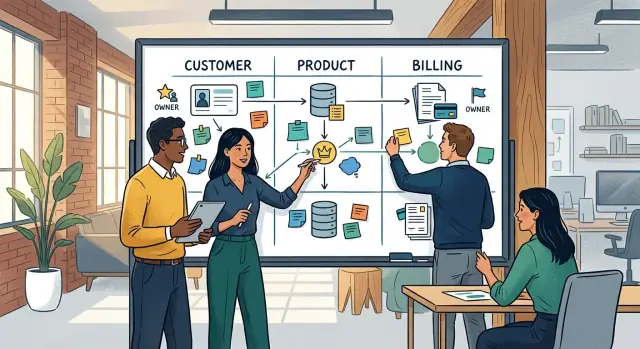
Table of Contents
Why automation breaks when records disagree
Automation looks reliable only when the underlying data is settled. If the same customer, product, or billing field lives in three tools, the workflow has no judgment to apply. It follows the rule it was given, even when another workflow follows a different rule a few minutes later.
That problem shows up early in growing teams. Sales updates a customer name in the CRM. Finance changes the billing entity in the accounting system. Support fixes the contact email in the help desk. Each change makes sense on its own, but the systems now hold different versions of the same record.
The damage usually starts with a normal sync. One workflow copies a value because it treats the CRM as correct. Another workflow runs later and overwrites that value because it treats the billing system as the source. Nothing looks wrong at first. Then an invoice goes out with the wrong legal name, a renewal goes to an old contact, or a report groups revenue under the wrong account.
Teams rarely catch this during setup. They notice it when money, renewals, or customer communication start looking off. That is why bad record ownership feels random. The workflow did exactly what it was told to do. The mistake sits in the data rules, not in the click that triggered it.
The usual causes are boring, but expensive. Different teams edit the same field for different reasons. Two systems write back to each other. Nobody decides which tool owns each field. Someone fixes an exception by hand, and the next sync quietly undoes it.
Once that starts, people stop trusting automation. They export spreadsheets, compare timestamps, and argue about which value was "real" first. Finance blames the CRM. Sales blames the ERP. Support says the customer gave them the latest details. Hours disappear into a debate that should not exist.
Clear ownership fixes most of this. You need one owner for each important field, not a vague idea that the data will "sync." If customer status comes from one place, billing terms from another, and product pricing from a third, everyone needs to know that before any workflow goes live.
Without that clarity, automation turns small data disagreements into repeated business errors. The tool is not confused. It is obedient. It keeps moving bad assumptions from one system to the next until someone notices the cost.
Which records need a clear owner first
Do not try to clean every field at once. That usually burns time and patience. Start with the records tied to money, contracts, renewals, and reporting, because those fields spread across tools fast and break in ways people notice.
Customer records usually come first. One team should own the official customer name, legal entity name, tax number, billing address, and billing contact. If sales keeps one version, finance keeps another, and support edits a third, your workflows start treating one customer like three separate accounts.
Product records come next. Someone needs clear control over product names, SKUs, prices, plan limits, and whether a plan is still active. These fields drive quotes, invoices, renewals, and support decisions. If product updates a plan name but billing still uses an old SKU, reports stop matching and customers see confusing invoice lines.
Billing records also need a single owner. Decide who controls invoice terms, payment status, credits, refunds, and write-offs. In most companies, finance should own these fields because they affect cash, accounting, and collections. Other teams can view them, but they should not overwrite them in their own tools.
A few supporting fields do more work than people expect. Every shared record should have one internal ID that never changes, external IDs for connected systems when needed, a status field with a short fixed set of options, and a timestamp that shows when the record changed and which system changed it.
Those fields help your systems match the same customer, product, or invoice across apps. Without them, teams start matching by name, email, or spreadsheet notes. That falls apart quickly.
If you need to narrow the work even more, make three ownership decisions first: customer identity, product catalog data, and billing truth. Once those are clear, most finance and operations workflows have a stable base.
How to assign ownership step by step
Good ownership starts at the field level, not the app level. Teams often say "the CRM owns the customer" or "finance owns billing," but automation usually breaks on smaller details like billing email, tax ID, renewal date, or plan name.
Start with one plain list of every field that can affect a quote, invoice, renewal, refund, or management report. Pull fields from the CRM, billing tool, product catalog, contract records, and any spreadsheet people still rely on. If a field can change revenue, service access, or reporting, it belongs on the list.
Then work through the list in a simple order:
- Name one owner for each field. Use a role, not a person, so the rule survives staff changes. Sales Ops might own quote terms. Finance might own tax and invoice fields. Product might own plan codes and SKU names.
- Give each field one home system. That is where the final value lives. A customer legal name may live in the CRM, while invoice status should live in the billing system. If two tools store the same field, only one can win.
- Write the change path in one sentence. Say who can request an update, who checks it, and who approves it. For example, an account manager can request a billing contact change, but finance approves legal entity or tax changes.
- Set a conflict rule for duplicate fields. Decide what happens when two tools disagree. You might use a one-way sync, block edits in one tool, or stop the workflow and send the record to a person for review.
- Test the rules on a small batch of messy records before you automate more. Do not test only the clean accounts. Run a few difficult cases through quotes, invoices, renewals, and reports, then check where values drift.
A simple table is enough. You need columns for field name, owner, home system, allowed editors, approval rule, and conflict rule. Keep it short. If the document feels like a policy manual, people will ignore it.
One common miss is product data. Teams often define ownership for customer records but forget plan names, SKUs, bundle codes, or price tiers. Then sales quotes one value, billing invoices another, and finance reports a third. Product fields need the same discipline as finance fields.
When this work is done well, workflows stop arguing about which value wins. You get fewer invoice fixes, fewer renewal surprises, and reports that match what people see in daily work.
Set rules for edits, syncs, and exceptions
Clear ownership starts with a blunt rule: one system writes each field that affects money, contracts, or reporting. If sales can change price in the CRM and support can change it in billing, your systems will fight all day.
Pick the owner at the field level, not just the record level. A customer profile may live in the CRM, while invoice terms live in billing and plan limits live in the product database. "Customer data" is too vague to enforce. Be specific.
Protect money fields
Fields tied to revenue need the hardest guardrails. Price, discount, tax status, legal name, contract start date, renewal date, payment terms, and product SKU should have one write path. Other systems can display those values and use them in workflows, but they should not write them back.
That usually means locking edits in surrounding tools. A support system can show the current plan. It should not push a new plan into billing. A CRM can show invoice status. It should not rewrite payment terms because a rep clicked the wrong dropdown.
Sensitive edits also need a trail. When someone changes a contract field, record who changed it, when they changed it, and why. A short reason code helps. A ticket number is better, because finance and operations can trace the change to a real request instead of arguing over screenshots later.
Plan for exceptions before they happen
Most record fights start with edge cases the team never wrote down. Late updates are common. If sales closes a deal on Friday but billing changes the invoice on Monday, decide which timestamp wins and who reviews the mismatch.
Merged accounts cause another mess. When two customer records become one, choose the surviving account, map old IDs to the new one, and freeze duplicate records so they stop syncing bad data back into the stack.
Plan changes need the same care. Decide when a change takes effect, whether you prorate, and which system sets the official renewal date. Write that rule once, then make every workflow follow it.
A simple operating model works well: one owner writes sensitive fields, other systems read and mirror them, unusual changes need human approval, and every exception leaves a trace.
Teams move faster when they stop fixing the same record in three places. Most of the time, you do not need more syncs. You need fewer writers and clearer rules.
A simple example from a growing company
A common mess starts with one small change at the worst possible time. A sales rep upgrades a customer from Basic to Pro on the last day of the month. The rep updates the CRM right away because that is the tool they use all day. Five minutes later, the account page shows "Pro" in one place and the old monthly price in another.
Nothing about this setup is unusual. The company has a CRM for sales, a billing tool for invoices, and a product table that defines what each plan includes. The problem is simple: nobody agreed which system owns which part of the record.
When ownership is unclear, sales sees the new plan name in the CRM and tells the customer the upgrade is done. Billing still has the old price because no one decided whether the change should take effect now, next cycle, or with a prorated charge. Support opens the account and finds mixed data, so they are not sure what the customer should be able to use.
Now there are three versions of the truth. The CRM says the customer is on Pro. The billing tool says the customer still pays for Basic. The product record may still point to the old feature set. When the month closes, finance sends an invoice based on the old price. The customer complains because sales promised the upgrade. Support tries to help, but they cannot tell whether the invoice is wrong or the plan change never finished.
The same upgrade works cleanly when each field has one owner. The CRM can own the sales request and timestamp. The product record can own the plan code and what Pro includes. The billing system can own the chargeable price, proration rule, and invoice date.
Then the workflow runs in one direction. The CRM sends the request. Billing checks the effective date and updates the amount. The product record updates access after billing confirms the change. Each system syncs back the same final status instead of competing to define it.
By the time support opens the account, they see one plan, one price, and one effective date. Finance sees the right invoice. The customer sees one finished upgrade, not a trail of half-complete edits.
That is the practical goal: one system decides each field, and every other system reads from it instead of arguing with it.
Mistakes that create record fights
When two teams trust different records, the argument usually started with a shortcut. Someone wanted a faster update, copied a field, or skipped a handoff. A few weeks later, finance, sales, and support all have different versions of the truth.
A common mistake is assigning ownership to a whole department instead of one role with decision rights. "Sales owns customer data" sounds reasonable until billing needs an answer today and three sales managers disagree. One role should decide what the official value is, who can change it, and when that change takes effect.
Another problem appears when every app can write to the same field. The CRM updates the company name, the billing system edits it again, and a support tool overwrites it during an import. That feels convenient at first. Later, reports stop matching and nobody knows why.
Spreadsheets create a quieter version of the same problem. A team exports customer or product data to make work easier, adds a few manual fixes, and keeps using that sheet for months. The sheet slowly turns into a shadow database.
That is how invoices go to the wrong legal name, support quotes an old plan or price, renewals use expired terms, and finance closes the month with manual repairs. None of these errors are dramatic on their own. Together, they waste a surprising amount of time.
Product data often breaks in ways that are easy to miss. Someone changes a product name, package, SKU, or price, but finance and support do not hear about it. Finance still sees the old item on invoices. Support sees customers asking about a plan that no longer exists in the help desk. Even small naming changes can create real billing errors if nobody controls when and how they roll out.
Old customer records cause another round of trouble. Teams archive an account to keep the system clean, but they never set rules for returns, credits, renewals, or reactivation. Later, the customer comes back, and nobody knows whether to reopen the old record, create a new one, or attach the credit to the past account. Different teams pick different answers, and the data splits again.
Most record fights come from convenience, not complexity. Good ownership is a little strict on purpose. Name one owner per field that matters, limit which system can write it, and treat exports as temporary working files rather than a source of truth.
Quick checks before you switch workflows on
A lot of broken automation starts with one small issue: two systems both think they own the same field. The workflow keeps moving, but the data drifts. A quote shows one price, the invoice shows another, and someone fixes the mismatch by hand.
Before you turn anything on, ask a few plain questions. Can one person point to the owner of each field in the customer, product, and billing records? Can sales, finance, and operations all name the home system for those fields without opening a diagram? When two values conflict, do your workflows follow one rule every time instead of guessing?
Manual edits deserve extra attention. Teams often treat them as harmless, especially during a busy week. Then three people make three "small" corrections in three different tools, and no one knows which one should win. If you log those edits, you get a trail and a useful signal about where the process still leaks.
A simple test helps. Pick one customer, one product, and one open invoice. Change a low-risk value in the source system, then watch what happens in the CRM, billing tool, and reporting layer. If the update stalls, duplicates, or gets overwritten by an older value, stop and fix the rule before rollout.
This is also the moment to test whether your conflict rule really is one rule. "Newest update wins" sounds tidy until a late sync overwrites finance-approved terms. In many teams, a better approach is field by field. Billing status may belong to the finance system, while product name belongs to the product catalog.
If your team can answer these questions quickly and the systems behave the same way every time, your workflows have a fair shot. If not, pause, clean up ownership, and test again. That delay is much cheaper than chasing bad numbers across every tool next month.
What to do next
Start small and make it real this week. Most teams already know where record conflicts hurt. They show up in invoice fixes, price disputes, credit notes, and reports that need manual cleanup before anyone trusts them.
Pick the 20 fields that cause the most pain. Keep the list practical. Customer legal name, billing address, tax ID, product SKU, price, plan name, renewal date, and payment status are a good start.
Then assign one owner for each field, not one owner for each system. A sales tool can store a value without owning it. An ERP can sync a value without deciding it. That one distinction clears up a lot of noise and gives your rules a shape people can actually follow.
A short working session is usually enough for a first draft. Name the field and where people use it. Choose who owns the value. Write which system can change it. Note where the value syncs next. Add one rule for exceptions.
Write the rules in plain English. Skip policy language. People should be able to read a rule in ten seconds and know what to do. For example: "Finance owns tax ID after the first paid invoice." Or: "Product owns SKU and list price. Sales can request a change, but cannot edit the live value."
After your next billing cycle, review what broke. Look for every manual correction, every internal thread about "the right number," and every export someone had to patch in a spreadsheet. Those are not random annoyances. They show you where the ownership rule is missing, too vague, or ignored by the tool setup.
If your team is already stretched, outside help can speed this up. Oleg Sotnikov of oleg.is works with startups and small businesses as a Fractional CTO and advisor on product architecture, infrastructure, automation, and practical AI adoption, which fits this kind of ownership cleanup well.
Do not wait for a perfect data model. Pick the fields that cost you money or time, assign owners, test through one billing cycle, and tighten the weak spots. If the next invoice run needs fewer manual fixes, you are moving in the right direction.
Frequently Asked Questions
What does a record owner actually do?
A record owner is the role that decides the final value for a field and approves changes to it. That owner also picks the system where that value lives, so your workflows stop overwriting each other.
Which fields should we assign owners to first?
Start with fields tied to cash, contracts, renewals, and reporting. Customer legal name, tax ID, billing contact, SKU, price, renewal date, payment status, and invoice terms usually cause the most damage when systems disagree.
Can two systems share ownership of the same field?
No. Let one system write each field that matters, even if other tools show the same value. Shared ownership sounds flexible, but it usually turns into sync fights and manual fixes.
How do we choose the home system for a field?
Choose the system that the responsible team already uses to make the final decision. If finance approves payment terms, keep that field in the billing or finance system, not in the CRM just because sales sees it first.
What should happen when two tools have different values?
Decide the rule before you automate anything. In most cases, one source should win every time, or the workflow should stop and send the record to a person when the mismatch affects money or contracts.
Who should own billing fields?
Finance should own fields that affect invoices, cash, credits, refunds, write-offs, and payment status. Other teams can view those values, but they should not edit them in their own tools.
How should we handle spreadsheet and manual fixes?
Treat spreadsheets as temporary working files, not as a source of truth. If someone fixes a value in a sheet, move that change into the owner system fast and remove the habit that created the side record.
Do we need field-level ownership or is app-level ownership enough?
Use field-level ownership. Teams often say a whole app owns a record, but most problems start with smaller fields like billing email, legal name, plan code, or renewal date.
How do we test ownership rules before rollout?
Test with real messy records, not only clean demo accounts. Run one customer, one product, and one invoice through your flow, then check every system to see whether the value lands once, stays put, and shows the same status everywhere.
When should we bring in outside help?
Get help when your team keeps arguing about which number is right, or when every billing cycle needs manual cleanup. A good Fractional CTO or advisor can map field owners, home systems, and sync rules quickly so your team stops fixing the same issue in three places.


