Map hidden dependencies before a refactor without surprises
Learn how to map hidden dependencies before a refactor by tracing cron jobs, exports, support scripts, and side feeds before code changes start.
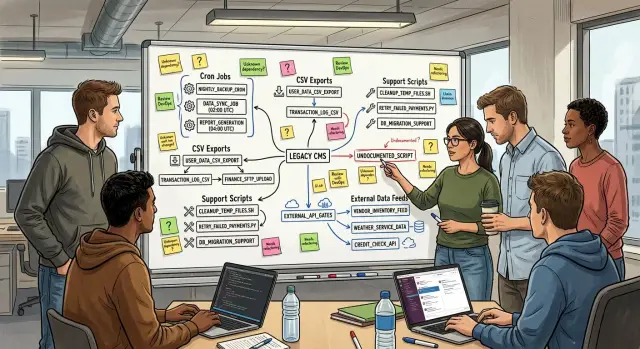
Table of Contents
Why refactors break work outside the app
Most refactors fail in boring places. The main screens still load, the test suite stays green, and the team moves on. Then the quiet work around the app starts to crack.
A business rarely runs on the product alone. It also runs on night jobs, CSV exports, support scripts, finance imports, vendor feeds, and a handful of manual steps nobody wrote down. These pieces often sit far from the code people plan to clean up, so teams miss them.
Release day can look fine. Orders still come in. Users still log in. Two mornings later, accounting opens an empty report because a nightly export expected old field names. Support can't resend invoices because an internal script still calls an endpoint that no longer exists. A small change turns into a business problem fast.
That's why teams need to map hidden dependencies before a refactor, not after it. Most damage shows up after the release noise dies down. By then, the people who noticed odd errors on day one have moved to the next task, and the team starts hearing about broken billing, missing reports, or a partner feed that stopped overnight.
These failures feel surprising, but they usually aren't. They come from work that lives outside the main app flow. Someone in finance downloads a file every morning. Someone in support runs a script during refunds. A cron job pushes data to another system at 2 a.m. None of that appears in a product demo, yet daily operations depend on it.
Small hidden tasks can block bigger things quickly. One broken export can delay invoices. One missed job can leave dashboards blank. One forgotten script can create hours of support work. The app may look healthy while the business around it slowly jams up.
A safe refactor starts with that wider view. Code matters, but the business depends on everything attached to it.
What counts as a hidden dependency
A hidden dependency is any task, feed, or habit that relies on your current system, even if it does not appear in the app itself. If changing a table, field name, status, or schedule would break it, count it.
Teams usually think about screens and APIs first. The quiet stuff often causes more damage. A queue worker that retries failed orders, a cron job that closes stale invoices at 2 a.m., or a small script that cleans up bad data can keep the business running.
Exports belong on this list too. A nightly CSV sent to finance, a weekly vendor file, or an order report a customer expects every Monday may look minor. They stop being minor when payroll, stock updates, or customer billing depend on them.
The same goes for shell scripts, admin tools, and one-off helpers. Sometimes one person in support runs a command every Friday. Sometimes operations uses a private admin page to fix shipping labels. These things rarely appear in tickets or diagrams, but they still shape how work gets done.
Watch for side feeds. Webhooks sent to other tools, files dropped into shared folders, and even shared spreadsheets can become part of the real system. If a spreadsheet gets updated by hand and later imported somewhere else, that is a dependency. It may be messy, but it is still real.
Manual work counts too. If staff repeat the same steps every week, write them down. A person copying refunds into a finance sheet, checking failed emails, or resending vendor exports is doing system work by hand. Remove or change the old flow without noticing that step, and day two gets ugly.
A simple test helps: ask what would stop, who would notice first, and how long it would take for the problem to show up. The answer usually points to the work no one documented.
Start with business moments, not code
Teams often start a refactor by tracing classes, tables, and API calls. That feels neat, but it misses the work the business actually depends on. Start with moments people notice: a new signup, an invoice, a refund, a shipment, a failed payment, a contract renewal.
Pick one event and follow it through time. Ask what should happen in the next hour, the next day, and the next week. That simple time frame pulls out the hidden work around the app.
The first hour usually shows fast reactions. A signup may create a user, send a welcome email, alert sales, and push data into a CRM. A refund may return money, notify support, and update a fraud check.
The next day shows slower work. Finance may export invoices to accounting. Operations may review shipment exceptions. Support may work from a queue that only appears after a nightly sync.
The next week often reveals the stuff teams forget. Reports go to managers. A partner pulls a file. Someone checks failed retries by hand. A script closes the loop long after the original action.
Write the flow in plain language. Skip architecture terms at first. Note every person, file, and system involved, even if the step feels small or awkward.
Keep a short record for each event:
- who touches it by hand
- which files get created, emailed, or uploaded
- which outside system reads or receives the data
- where money, messages, or records leave the app
- who notices first if the step fails
This also cuts through false confidence. A team may think a refund is done when the payment API returns success, but the business still breaks if the ledger export fails the next morning.
If you map business moments before code paths, the dependency map gets clearer fast. You stop asking "what does this module call?" and start asking "what breaks for customers, finance, support, or ops if this event changes?" That question finds trouble earlier.
Trace jobs, scripts, and feeds
Most surprises live outside the main app. A nightly export, a billing sync, or a support script can keep the business moving for months without anyone touching the code.
Start by pulling every scheduled task from the places teams usually forget to check. Look at server cron tables, CI pipelines, cloud scheduler settings, container configs, and any platform dashboard that can run a job on a timer. If a task fires at 2 a.m., it still counts.
Then search the codebase for scripts people run by habit. Look through scripts, bin, task runners, package files, admin commands, SQL jobs, and old shell files. Many teams have a script that creates a CSV for finance, fixes stuck orders, or resends failed emails. Nobody calls it part of the product until it breaks.
Logs help when docs are thin. Scan for work that runs every day, every week, and near month-end. Queue workers, webhook retries, partner API syncs, and file transfers often leave a clear pattern in logs even when the team forgot to write them down.
Don't stop at internal jobs. Check every path where data enters or leaves the system: message queues, webhooks, third-party APIs, email parsers, and file drops. A simple SFTP upload or a daily spreadsheet import can be the only thing keeping reporting or fulfillment correct.
For each item, record the same facts in plain language: who owns it, what triggers it, what input it needs, what output it creates, and what happens if it fails or runs late.
That last part matters most. Some failures stay invisible for a day, then hit finance, support, or operations all at once. This inventory gives you a real picture of change risk instead of a guess based on application code alone.
Talk to the people who handle edge cases
Code rarely tells you who keeps the business moving when the normal path fails. To find hidden dependencies before a refactor, talk to the people who patch gaps by hand. They know about the export that only runs on Fridays, the spreadsheet that fixes a bad total, and the script nobody checked into source control.
Start with support. Ask which reports they rerun, which customer issues need a manual fix, and what they do when an email, invoice, or sync does not arrive. When someone says, "I just run it again," ask where that script lives, what input it needs, and how they know it worked.
Finance usually has another layer of truth. Ask where month-end numbers come from, which files feed those numbers, and where someone edits data before sending it forward. If a revenue total depends on a CSV cleanup or a copied formula in a sheet, that is part of the system whether engineers like it or not.
Ops, IT, and office admins often know the oldest moving parts. Ask which scripts live on laptops, shared folders, or old servers. Ask who still logs into a machine by IP address, who restarts a stuck job, and who notices a missing file before anyone else does.
For every task, write down who does it, when they do it, what file, script, or report they touch, and what failure tells them something is wrong.
Don't trust memory alone. Sit with one person and watch a real task from start to finish. People skip steps when they explain from memory. They forget the renamed file, the copied token, the report they compare against, or the folder they check before they send anything.
One live walkthrough can expose more risk than hours in the codebase. If a person needs 18 clicks, one old script, and a spreadsheet to finish a routine job, your refactor needs to account for all of it.
Record the map in plain language
Use one shared table or board for the whole map. A spreadsheet is fine. A project board is fine too. What matters is that everyone reads the same version instead of passing around private notes and half-remembered chat messages.
Write for the person who did not build the system. Skip internal shorthand when you can. "Nightly invoice export to finance" is better than "job_fin_exp_v2."
A simple map usually needs the same fields every time:
- clear name
- owner or team contact
- timing
- what breaks if it stops
- proof, such as a file sample, screenshot, or command name
The timing field saves people from bad assumptions. "Runs every hour" means one thing. "Only runs on the last business day of the month" means something else, and that detail can save you from a painful cutover.
Write the impact in business terms, not only technical ones. Don't stop at "API fails" or "script errors." Say what people feel on the other side: support can't issue refunds, warehouse labels don't print, finance misses the export, or sales loses fresh leads until the next morning.
Attachments help more than long notes. Add a sample CSV, a screenshot of the admin screen someone checks every day, the exact cron name, or the shell command a support person runs when they need to fix a stuck order. Small artifacts turn vague memory into something your team can verify.
One row can be enough to prevent a day-two outage. "Month-end tax export," owned by finance ops, runs at 11 p.m. on the last day of the month, breaks tax reporting if it fails, sample file attached from last month. That is much easier to trust than a loose comment in code.
This kind of plain record works well because it gives product, support, and engineering the same picture. When the refactor starts, people stop guessing and start checking.
A simple order system example
A small store decides to clean up its order system before the next busy season. The code looks messy, so the team plans a refactor that renames fields, removes old tables, and tightens the API.
On paper, the change looks safe. Orders still get created, paid, and shipped in the app. That is where teams get fooled.
Every night, a quiet export sends new orders to the warehouse. It uses the old field names from the database and drops them into a file the warehouse system already knows how to read. No one thinks about it during planning because it is not part of the checkout flow.
There is also a refund script. When support approves a refund, that script updates a partner portal so the finance side stays in sync. It was written years ago, works fine, and almost never gets touched.
Support has its own workaround too. When payments fail, they check a spreadsheet filled by a small report job. That sheet helps them spot which customers need a retry or a manual follow-up.
Then the refactor changes field names. "order_total" becomes "total_amount." "ship_name" becomes "delivery_name." The app still passes basic tests, but two outside flows break at once. The warehouse export no longer matches the expected columns, and the refund script sends blank values to the partner portal.
A dependency audit would catch this before rollout. The map for this order system does not need to be fancy. It just needs to show what creates or reads order data, which jobs run on a schedule, which scripts push updates to outside systems, and which manual tools, like spreadsheets, staff still use.
Once the team writes that down, the fix is simple. They keep a translation layer for the old export, update the refund script, and test the failed-payment report before release.
That is the whole point. Don't stop at app screens and database tables. Follow the order all the way into the warehouse, the partner portal, and the support inbox.
Mistakes that cause day-two failures
Teams often review the app code, run tests, and feel ready. Then the real trouble shows up a day or two later, when a billing export fails, a finance script can't find a column, or a support task quietly stops running.
One common mistake is treating the application repo as the whole system. It rarely is. The business may depend on cron jobs, desktop scripts, spreadsheet imports, SFTP drops, old shell files on a server, and one-off tools nobody touched for months.
Another mistake is checking only normal daily flows. Many breakages hide in timing. A system can look fine for a week and still fail when month-end reports run, when quarter-close numbers go to finance, or when an annual archive job starts and hits a renamed table.
Memory causes more damage than most teams expect. If one person is "the one who knows how it works," you do not have a map. You have a single point of failure. People forget steps, skip odd exceptions, or leave the company.
Scripts outside version control deserve extra suspicion. They often live on a server, in a shared drive, or inside a support engineer's local folder. Nobody reviews them during a refactor, but they still move data every night.
Data naming changes also create quiet damage. A column rename may look harmless in the app, yet downstream CSV files, BI imports, accounting macros, or partner feeds may still expect the old name.
A short review before cutover catches a lot:
- ask what runs daily, weekly, monthly, and yearly
- ask which tasks live outside Git and who owns them
- ask which exports other teams upload into their own tools
- ask which file names, headers, and table names other systems expect
- ask who knows the weird exceptions and write them down
Teams that do this early avoid the most annoying kind of refactor failure: the one that does not crash production, but still breaks payroll, reporting, or customer support on day two.
Quick checks before you cut over
A cutover test should cover a full business cycle, not just a few screens and API calls. If orders arrive in the morning, exports go out at noon, finance checks totals in the afternoon, and a cron job closes the day at night, test that whole chain in that order.
Put the old and new outputs next to each other. Compare CSV files, email summaries, webhook payloads, and any file another team imports by habit. Small differences break real processes: a renamed column, a missing leading zero, a blank status field.
Then force a few failures on purpose. Stop one scheduled job, make one export produce an empty file, and delay one side feed. You want to see who notices, what alert fires, and how long it takes before someone has to step in by hand.
A short pre-cutover check usually catches more than a long test script:
- run the system through one real day, week, or month-end flow
- compare old and new exports line by line for a sample large enough to expose odd cases
- break one scheduled task on purpose and check retries, alerts, and cleanup
- alert on silence, not only errors
- keep rollback steps on one page, with names, commands, and order
Rollback plans fail when they live in someone's head. Write down who makes the call, what gets switched back first, how you restore old jobs, and how you confirm that downstream teams can work again.
One blunt rule helps: if support, finance, ops, or sales would learn about the problem before your monitoring does, you are not ready to cut over.
What to do next
Don't start with a full system inventory. Start with the three flows that can hurt fastest: the ones tied to money, customer communication, or delivery. If one of those breaks after a refactor, the business feels it within hours.
Pick one flow and trace it end to end. Check the app, cron jobs, exports, support scripts, webhook targets, shared folders, and any manual step someone runs from a laptop. That is the fastest way to find hidden dependencies without turning the work into a month of guessing.
Then turn every unknown into a small record:
- a clear name
- one owner
- what starts it
- what it reads and writes
- a date to confirm it still works
This sounds basic because it is. Teams still skip it all the time. A vague job name, missing logs, or one undocumented script can turn a safe code cleanup into a business outage.
If your team is planning a larger change, this is also the kind of groundwork Oleg Sotnikov does through oleg.is as a fractional CTO: finding the scripts, jobs, and side systems that sit outside the app but still keep the company running.
Refactors go better when the team sees the whole system. Not the neat version in the repo. The real one.
Frequently Asked Questions
Why do refactors break things after release even when tests pass?
Because tests usually cover the app, not the work around it. Finance exports, support scripts, partner feeds, and scheduled jobs can fail a day later even when the main screens still work.
What counts as a hidden dependency?
Count anything that reads from your system or writes back into it. That includes cron jobs, CSV exports, webhook targets, support commands, shared spreadsheets, partner imports, and manual steps staff repeat every week.
Where should I start mapping dependencies?
Start with one business event people care about, like a signup, refund, invoice, or shipment. Follow it through the next hour, the next day, and the next week, and you will find the side work fast.
Who should I talk to first?
Talk to support, finance, and ops before you dive deeper into code. They usually know which scripts they rerun, which files they upload, and which reports go missing when something breaks.
How do I find undocumented jobs and scripts?
Pull scheduled tasks from every place jobs can hide, then search the repo for scripts, admin commands, SQL jobs, and old shell files. After that, scan logs for work that runs on a daily, weekly, or month-end pattern.
Do spreadsheets and manual workarounds really matter?
Yes, they count. If someone copies data into a sheet, fixes totals by hand, or uploads a file every Friday, that step keeps the business moving and your refactor can break it.
What should I record for each dependency?
Keep it plain. Record the name, owner, timing, input, output, and what breaks if it stops, then attach proof like a sample file, screenshot, or exact command.
How do I test a refactor before cutover?
Run one full business cycle, not just a few app checks. Compare old and new exports, emails, and payloads side by side, then break one scheduled task on purpose and see who notices first.
What mistakes cause most day-two failures?
Teams get into trouble when they treat the app repo as the whole system. They also miss jobs outside Git, month-end flows, old field names in exports, and one-person routines that nobody wrote down.
How do I know I’m not ready to cut over?
You are not ready if support, finance, or ops would spot the problem before your monitoring does. You also need a written rollback plan, named owners, and proof that downstream files and jobs still work.


