Missing product decisions that create manual work in apps
Missing product decisions often show up as import cleanup, onboarding rescue, and billing fixes. Learn how to spot them and what to change.
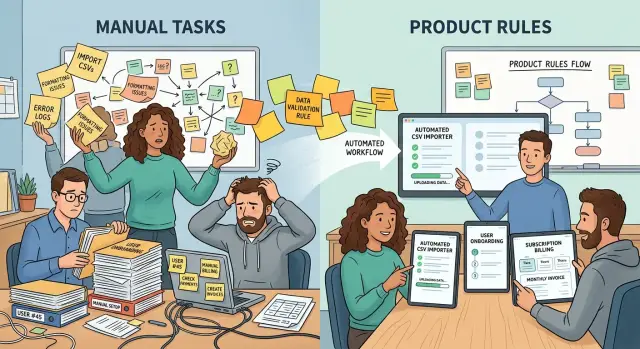
Table of Contents
Why manual work keeps showing up
Manual work rarely appears because a team likes doing things by hand. It shows up when the product leaves a decision open.
Someone on staff ends up choosing which CSV column matches which field, which new account needs a custom setup, or which invoice change deserves a refund. The app stays vague, so people finish the job.
Teams often label this work "ops" and move on. That label hides the real pattern. If support fixes the same import every Tuesday, or finance adjusts the same billing edge case every month, the issue is not random. The product still depends on staff to make a routine decision.
Repeated exceptions feel small because they arrive one ticket at a time. One broken import looks like a messy spreadsheet. One onboarding rescue call looks like a confused customer. One manual charge correction looks like a special case. Put them together and the pattern is obvious: the app never made a clear rule, so the team keeps making that rule by hand.
Users feel this even when they never see the internal ticket. They wait longer, get mixed answers, and learn that success depends on who handles the case. That chips away at trust. Two customers with the same problem should not get different outcomes because two staff members guessed differently.
The same ticket coming back every week is a strong signal. Teams treat it like background noise because they already know the fix. That is exactly why it survives. Familiar pain turns invisible.
People can work around uncertainty for a while. Software cannot. The cost shows up later in slower response times, uneven results, and a queue that never really gets smaller. When a human has to choose the same answer again and again, the product still has not made that decision.
How to tell when a task is really a product problem
A repeated task becomes a product issue when the same person keeps rescuing it. The work may look small, but the pattern matters more than the minutes. If one teammate can finish it quickly only because they remember the "right" answer from past cases, the app has left a decision unfinished.
You see this when teams rely on side notes, private docs, and Slack messages to finish routine work. A new hire opens the screen, follows the steps, and still gets stuck. Then someone says, "Ignore that field," or "Choose plan B unless the customer came from sales," or "Fix the name format before saving." That is not training. That is product logic living outside the product.
The signs are usually plain once you look for them:
- One person can resolve the task from memory, but nobody can explain the rule clearly.
- New staff need extra notes to finish something that looks simple in the app.
- Users cannot tell what will happen after they submit a form, start a trial, or change a plan.
- The app collects data in one format, then staff rewrite or clean it before it becomes usable.
That last point is easy to miss. Teams often call it "cleanup" and move on. But if staff rewrite data every day, the product asked the wrong question, asked at the wrong time, or accepted input that should have been guided.
User confusion is another strong clue. When people cannot predict the next step, staff step in to explain, correct, and reassure. That extra work usually points to weak defaults, vague labels, or missing status updates. People should not need a human to decode a normal flow.
Manual work is not always a staffing problem. Often, the team is covering for unclear rules, missing defaults, or choices the product never made. If a task depends on memory, side notes, or routine rewriting, stop calling it admin work. Treat it as a product gap and fix the decision at the source.
What import cleanup tells you
If people spend hours cleaning imports, the app has not decided how outside data should fit inside it. A CSV file almost never matches your fields exactly. Names differ, date formats change, and one team exports "company" while your app expects "account." When staff map columns by hand every time, they are making decisions the app should make once.
Default picking is another clue. A row comes in without a plan, owner, status, or tax setting, and someone fills the gap from memory. Two people will make two different calls. After a month, the data looks uneven, and nobody can tell which values came from the customer and which ones staff guessed.
Duplicates show the same problem in a different form. If the app cannot decide what counts as the same record, people compare names, emails, phone numbers, and old IDs one by one. That work feels normal after a while, but it points to a deeper issue: the matching rule does not exist, or it is too vague to trust.
Error messages often confirm it. A warning like "import failed" or "invalid row" tells staff that something broke, but not what to fix. Then the team opens the CSV, scans columns, retries the upload, and hopes the next attempt works. Rejected rows with no clear reason turn one mistake into a slow guessing game.
A good import flow makes a few firm choices. It defines which fields are required and which can use safe defaults. It decides how the app matches existing records and when it creates a new one instead of merging. It explains each error in plain language and returns rejected rows with the fix shown next to each one.
This is where missing product decisions show up fast. If support or ops needs a private playbook to complete imports, the product is still unfinished. The fix is rarely "train the team better." The fix is to move those repeated human choices into the app.
What onboarding rescue work tells you
Onboarding rescue work usually means the app asks new users to make choices they are not ready to make. Support steps in, fills the gap, and keeps the customer moving. That saves the signup, but it also hides a product problem.
A common mismatch starts before the user even logs in. Sales promises a quick start, then the setup flow asks for plan details, team roles, account structure, or billing choices that were never explained in the sales call. Support ends up translating the promise into actual steps, one customer at a time.
When staff choose settings for the user, pay attention. The product should either suggest a clear default, delay the decision until later, or explain the tradeoff in plain language. If a support rep has to say, "Most teams like yours pick option B," the app should probably say that first.
The pattern usually shows up the same way each time. New users stop on the same screen and ask the same question. Success or support teams reuse answers from older accounts. Staff manually assign plans, permissions, or defaults. First-week calls cover the same explanation again and again. Customers finish setup only after someone guides them live.
That rescue work is useful evidence. It shows where the product leaves too much uncertainty at the worst moment: right after signup, when the user still doubts whether they made the right choice.
Copying answers from past accounts is especially revealing. Teams do that when the "right" setup is already known, at least for a certain customer type. Once that happens, the app needs templates, recommended paths, and better defaults. Manual memory should not be part of onboarding.
A small SaaS team might notice that every new customer asks who should be the first admin and which plan fits a five-person team. If support gives the same answer on every call, another help doc will not solve much. A shorter setup flow, clearer language, and fewer early decisions usually will.
Onboarding work shows exactly where staff still carry decisions that belong inside the product.
What billing fixes tell you
Billing gets messy when the app leaves policy choices to staff. If one customer gets a refund because Anna read the case one way, and another gets denied because Ben read it another way, the problem is not Anna or Ben. The rule was never clear.
Billing exposes missing product decisions faster than almost any other area because money forces edge cases into the open. Customers notice quickly, support feels the pain, and finance ends up cleaning the same mess every week.
A spreadsheet for proration is a warning sign. It usually means the team never decided how upgrades, downgrades, pauses, and mid-cycle changes should work. Staff then calculate credits by hand, or they follow old notes that only make sense to the person who wrote them.
The same pattern appears when support edits invoices after complaints. If customers keep asking why they were charged today instead of next month, or why seat counts changed in a way they did not expect, the billing logic is hidden or inconsistent. People do not complain because billing is complicated. They complain because the app did not tell them what would happen.
Refunds reveal the same gap. If staff needs to ask around before approving a refund, the policy is probably too fuzzy. If they approve the same exception every week, it is not really an exception anymore.
Good billing flows make the next charge easy to understand before it happens. They show the amount, the timing, and the reason. They also apply the same rule every time. When the product does that well, support stops translating invoices after the fact.
How to trace a task back to one missing decision
Start with one task that keeps coming back. Pick something small and annoying, not a rare edge case. Good examples are fixing failed imports, rescuing stuck onboarding, or changing invoices after a customer writes to support.
Then write down the exact choice a staff member makes each time. Be plain about it. "Should we merge this import row with an existing customer?" is better than "review data issue." The second version hides the real problem.
A simple method works:
- Name the repeated task in one sentence.
- Write the exact decision a person makes during that task.
- Find the screen, form, or workflow where the app leaves that decision open.
- Decide whether the rule belongs in the product or in internal policy.
- Check the rule against a few recent cases and see if it still holds.
That third step matters most. Manual work often starts where the product stops one step too early. Maybe the import tool accepts five date formats, then asks staff to guess which one the customer meant. Maybe onboarding lets a team invite users before roles are clear, so support has to sort out access later. Maybe billing allows plan changes without a proration rule, so finance fixes invoices by hand.
Some choices belong in the product. If the same answer is right most of the time, the app should usually make it or guide the user to it. Other choices belong in policy. Refund approvals over a certain amount, for example, may still need a person because the business risk is real.
Test your new rule on a small batch of recent tickets, imports, or invoices. If people still disagree on the answer, the rule is not clear yet. If the same exception appears again next week, the decision still lives in someone's head instead of in the app.
A simple example from a small SaaS team
A small SaaS team kept seeing the same pattern every Monday morning. About ten import tickets landed in support as new customers tried to move data from spreadsheets into the app. The team treated it like support work, but the pattern was too regular to ignore.
An ops person opened each CSV, guessed what each column meant, fixed the headers, and mapped missing fields by hand. If a customer used "Company" instead of "Account name," or left dates in the wrong format, ops cleaned it up. The app accepted the file only after a staff member made the choices the product should have made.
That work slowed down more than support. New customers often waited two extra days before they could start using the product for real. Some lost momentum in the first week. A few assumed setup would always be this messy and delayed the rollout inside their team.
The issue was not careless customers. The issue was missing product decisions. The app had no clear rules for column mapping, no saved templates for repeat imports, and no useful row-level error messages. Staff filled that gap with human judgment.
The team changed two things first. They added saved mappings, so users could match their spreadsheet columns once and reuse that setup later. They also showed clear row errors, so the app said exactly which line failed and why instead of rejecting the whole file with a vague message.
The effect was immediate. Support stopped translating every spreadsheet by hand. Customers fixed most issues on their own in a few minutes. Monday ticket volume dropped because the rule moved into the product, where it belonged.
That is what this problem looks like in real life. A repeating task seems small, then quietly spreads across support, ops, onboarding, and customer trust. Once the team names the missing rule and builds it into the app, the work usually shrinks fast.
Mistakes that keep the manual work alive
Manual work rarely sticks around because people are lazy or slow. It sticks around because the app keeps asking humans to make choices the product never made.
A common mistake is pushing harder on the team instead of fixing the flow. Managers add targets, ask for faster response times, or tell ops to "be more careful." That may cut delays for a week. It does not remove the decision gap. If the import tool cannot tell which date format to trust, staff still have to guess.
Another mistake is piling on checklists. A checklist can reduce damage, but it often turns a bad flow into a longer bad flow. If onboarding fails because users do not know which workspace type to pick, a ten-step rescue script just moves the confusion from the customer to the team. The screen still asks a question the product should answer, explain, or remove.
Teams also keep manual work alive when they treat every exception as a special case. One bad CSV, one odd tax rule, one account with two owners - soon every edge case gets handled in chat or a private doc. Then nobody knows the real rule. Billing gets expensive this way. One person knows when to prorate, another knows when to waive a charge, and the app stays vague.
The worst version is a partial fix. A team cleans up one screen, adds a warning, or changes one field label, but leaves the rule fuzzy underneath. Then the same issue pops up in another step with a different face.
A better habit is simple: every repeat manual task needs one written product decision. Define the rule, put it in the app, and make the same answer appear in imports, onboarding, and billing. If staff still need to step in after that, the exception is probably real. If not, the product was asking humans to do its job.
Quick checks for imports, onboarding, and billing
Most missing product decisions show up where users are new, confused, or about to pay. That is why imports, onboarding, and billing are worth checking first. If staff keeps rescuing people in those moments, the app is still asking humans to make choices it should already handle.
A short review works better than a long workshop. Watch a few real cases and ask one question: does the app give the same answer every time, or does a person have to step in and decide?
Imports
Import problems often look technical, but many are really product gaps. A file gets rejected, then support has to guess what the user meant, fix column names by hand, or choose which duplicate record should win.
Start with the error messages. They should say which row failed, which field caused it, and what the user can change. Plain wording matters. "Invalid format" is weak. "Row 18: phone number is missing a country code" gives the user a real next step.
Then check consistency. If two staff members handle the same broken import, do they make the same choice? If they do not, the rule lives in people's heads instead of the product.
Onboarding
Onboarding tells you quickly whether the product can stand on its own. A new user should be able to finish the basic setup without booking a call or waiting for a rescue message.
Watch where people stop. If staff keeps explaining plan limits, setup order, or what button to press next, the path is still unclear. The fix is usually simpler than teams expect: remove an early choice, add a better default, or explain the consequence before the user commits.
Billing
Billing needs the same kind of review. Customers should know what the next charge will be, when it will happen, and why. If they need support to predict their invoice, the logic may make sense inside the company but not inside the app.
Read every billing message out loud. If it sounds vague or legalistic, rewrite it. Then count every manual rescue, refund fix, and one-off override. That count matters. If you do not track where staff steps in, the work stays invisible. Once you count it, the pattern gets hard to ignore.
What to fix next
Pick the task your team repeats most often, especially the one that steals attention every week. Do not start with the loudest complaint. Start with the work that quietly burns hours: fixing CSV imports, walking new users through setup, or correcting invoices after the fact.
That is usually where the missing decision hides. Staff keep stepping in because the app still asks them to make the same judgment by hand.
A good fix is small and visible. Take one repeated judgment and turn it into a rule the product can apply on its own. If support agents keep choosing which column matches "email" during imports, add a default mapping rule. If new customers keep asking what to do first, show one clear next step instead of a blank screen. If finance keeps editing the same billing error, change the billing rule before the invoice goes out.
A short monthly review helps keep this moving:
- Find the task people repeated most in the last 30 days.
- Write down the exact decision staff made each time.
- Ask whether the product can make that decision earlier.
- Track fewer handoffs, fewer edits, and fewer rescue calls after the change.
Those measures tell you more than vague feedback. If a fix works, support threads get shorter. Fewer accounts stall in onboarding. Billing stops creating cleanup work for two teams at once.
If your team wants an outside view, Oleg Sotnikov at oleg.is works with startups and small businesses on product architecture, technical leadership, and AI-first operations. That can help when everyone feels the pain of repeated manual work but the team still has not agreed on which decisions belong in the app and which ones belong in policy.


