Manual override rates as a sign your automations are broken
Manual override rates reveal where rules, data, or interface choices push people off the happy path. Learn how to spot patterns and fix the cause.
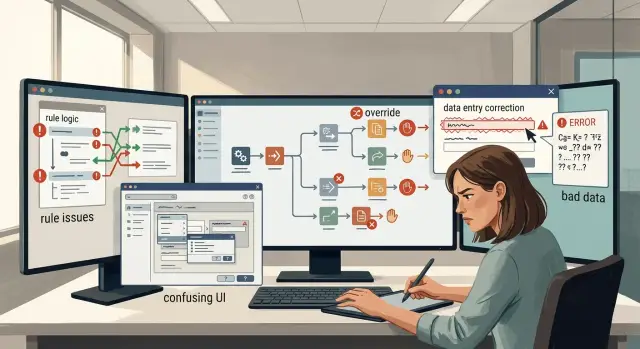
Table of Contents
Why repeated overrides matter
When people keep clicking past an automated decision, they are telling you something the dashboard often hides. The default path slows them down, blocks a real task, or asks them to clean up a bad guess.
One override can be noise. Someone might be in a rush, testing an edge case, or working around a rare exception. But when the same override happens again and again, it stops looking random. It becomes product feedback.
Teams often misread that signal. They treat overrides like rule breaking, as if users refuse to follow the process. Most of the time, people are trying to finish their work. If they keep stepping out of the automated flow, the flow is probably wrong for the job in front of them.
That matters because manual repair adds up fast. Ten extra seconds here, twenty there, and soon a team is losing hours every week fixing decisions the product should handle on its own.
Patterns tell you more than totals. Fifty overrides from one experienced operator mean something very different from fifty overrides spread across a hundred people. Look at who overrides, when it happens, and which step they change. Those three details usually separate a training problem from a design problem.
If new hires override the first few steps on day one, they may need better onboarding. If experienced staff override the same field every afternoon, the rule, the data, or the screen is probably pushing them into extra work.
A common example is an approval flow that fills in a status too early. Staff change it back, not because they dislike automation, but because the system decided before all the facts were in. The override is not disobedience. It is a report from the front line.
Teams that treat overrides as feedback fix better things. Instead of blaming users, they ask better questions. What did the rule assume? What data was missing? What part of the screen made the safer choice harder than the manual one?
Where friction starts
Friction usually starts long before someone clicks "manual override." It begins when the automation treats normal work like an exception. People notice that quickly. After a few wrong decisions, they stop trusting the default path and take the manual route because it feels safer.
A threshold that looks neat in a spec can fail in daily work. Maybe an approval rule flags any invoice above a fixed amount, even though that amount is normal at month end. Maybe a support workflow marks repeat customers as risky because their activity spikes during a launch. The rule is simple. The work is not.
Bad data causes the same kind of friction. Automation can only decide with the facts it has, and many systems work with stale or missing fields. A delayed sync, an empty status field, or an outdated customer record can push a routine case into the wrong branch. Then a person steps in, fixes it by hand, and moves on. If that keeps happening, the people are not the problem. The inputs are.
The screen can push users off course too. Labels like "force," "skip," or "apply" often mean different things to different people. If the manual option is clearer than the automated one, many users will choose it even when the automation could work. Clear wording matters more than teams expect.
Speed matters just as much. If the automated screen takes six seconds to load and the old manual shortcut takes two, people will keep the shortcut. They are trying to finish work, not prove loyalty to a tool. Slow screens teach users to bypass automation even when the logic is mostly right.
Repeated overrides usually point back to one of four problems: a rule that blocks common cases, data that arrives late or incomplete, labels that confuse people, or a screen that feels slow enough to avoid. Remove that pressure, and override rates often fall on their own.
How to measure override rates
Start with a clear definition. An override happens when a person changes, skips, or approves something the automation already decided. If the team does not agree on that definition, the numbers will drift and the argument will never end.
Use a simple rate: overrides divided by total automated decisions. Calculate it for each workflow, then again for each step inside that workflow. A checkout fraud check, an invoice approval flow, and a support ticket router can all look fine in total while one step causes most of the pain.
A small log is usually more useful than a giant dashboard. For each override, record the workflow name, the step name, the reason code if one exists, who made the change, how long it took, and what happened next. That is enough detail to spot patterns without turning the work into another burden.
Keep admin edits separate from real exception handling. If an operations lead updates a rule once a day, that is maintenance. If an agent changes the automated result twenty times in a shift just to get work through, that is friction. If you mix those events together, the real problem disappears inside harmless system upkeep.
Break the rate down by team, shift, and customer type. A flat average can hide a very uneven experience. One night shift may override more often because the incoming data is messier. One customer segment may trigger more manual review because the form asks unclear questions.
Count alone is not enough. Pair manual override rates with time lost and error rate. Ten overrides that take five seconds each are annoying. Ten overrides that each take six minutes and still lead to wrong orders, late invoices, or reopened tickets are expensive.
A simple example makes this easier to read. Imagine an order approval flow with a 9% override rate. That sounds moderate. But if one step, address validation, causes 80% of those overrides and each fix takes two minutes, the issue is not the whole workflow. The issue is one step with bad input or a bad rule.
If you want a trend line you can trust, review the rate every week in the same format. Spikes matter, but steady low grade friction matters too. That is often where broken automations hide.
How to review overrides step by step
Use enough history to see a pattern. One bad day can send you in the wrong direction, but a month of override events usually shows where people keep getting pushed off the default path. If the same step keeps producing manual fixes, the system is asking humans to clean up its mistakes.
A simple review process works well:
- Export one month of override events for the workflow you want to fix.
- Group them by the step where the override happened.
- Add the reason people gave, if your system stores one.
- Pick the biggest cluster and watch a few real cases from start to finish.
- Change one thing first, then compare the rate after the change.
The grouping step matters more than it seems. Ten overrides spread across ten different moments may be noise. Ten overrides on the same screen often point to one clear problem.
Watch three to five real cases, not just logs. Logs tell you what the system recorded. A replay, screen capture, or session review shows what the person saw, what they clicked, and what made them stop trusting the automation.
At that point, check three things. Inspect the rule. Did the logic fire when it should not have, or miss an obvious exception? Inspect the input data. Missing fields, old values, and bad labels can make a decent rule look broken. Then inspect the screen itself. People often override because the UI hides context, uses unclear labels, or makes the safer action look risky.
Suppose a manager keeps overriding task priority in a support queue. The rule may be too blunt, the customer tier data may be wrong, or the screen may hide recent account activity. All three create the same outcome: a human steps in.
Do not try to fix everything at once. Pick the smallest change with the clearest link to the override, ship it, and measure again for the next few weeks. If the rate drops, you found the cause. If it does not, move to the next likely source.
A simple example from daily work
A support team sets up auto routing for incoming tickets. The rule is simple: if a message contains words like "outage," "billing," or "login," the system sends it to the matching queue. On paper, that looks fine. In practice, agents keep pulling some tickets out of the normal queue and moving them by hand.
The pattern appears quickly. A customer writes, "We can't access the dashboard," and the system sends it to general technical support. An agent sees the company name, checks the account, and moves it to the urgent queue because that customer is on a large contract with a short response time promise.
After that happens again and again, the issue is not the agents. The issue is the automation. High manual override rates tell you the rule does not match how the team actually works.
In this case, the keyword rule is not wrong. It is incomplete. The routing logic reads the ticket text, but it does not read two pieces of context the agents use every day: account size and contract status.
That matters more than adding ten new keyword rules. If the system cannot tell whether the sender is a small self serve customer or a large enterprise account, it will keep making the same bad guess.
A small data fix often solves this faster than a larger rule set. The team adds account tier, contract SLA level, and current customer status to the routing input. Now the rule can treat the same words differently. "Login issue" from a trial user goes to the regular queue. "Login issue" from a large paid account with a strict SLA goes straight to the urgent team.
The result is boring in a good way. Agents stop correcting the system all day. Managers stop seeing priority tickets sit in the wrong queue for twenty minutes. The automation starts following the real workflow instead of a simplified version of it.
This is the sort of problem a good product lead or fractional CTO usually spots fast. The team does not need a smarter model first. It needs the right data at the moment the decision happens.
Rule, data, or UI?
Every repeated override points to something broken. When rates stay high, resist the urge to rewrite the whole workflow. Sort the failure first. Most repeat overrides come from one of three places: the rule, the data, or the UI.
Change the rule when normal cases fail the same check again and again. If a common invoice amount always gets sent for manual review, the threshold is wrong or the exception logic is too strict. Users are not being careless. The rule blocks work that should pass.
Fix the data when people keep correcting fields before they can move on. A delivery flow might fail because the system imports an old address, misses a postal code, or maps a product type to the wrong category. The automation follows bad input and produces a bad result. If you only loosen the rule, you hide the real problem.
Fix the UI when users already know the right action but cannot find it quickly. Maybe the approve button sits behind a small menu, or the reason for the block appears in a place nobody sees. In those cases, people are not fighting the logic. They are fighting the screen.
A quick sort helps. If the same condition fails for normal work, fix the rule. If the same fields get edited by hand, fix the data. If people pause, search, and click around before choosing the obvious action, fix the UI.
Mixed problems are common, and they waste time because teams go looking for one big answer. Imagine a support ticket workflow where agents change priority by hand. One group does it because incoming data marks urgent tickets as normal. Another group does it because the urgent option is hidden in a secondary panel. That is not one bug. It is a data problem and a UI problem.
Split those cases before you plan the fix. Small, direct changes usually work better than a broad rewrite. Teams that do this well save time, cut repeat overrides, and learn faster from what users are already showing them.
Mistakes that hide the issue
Teams often call overrides a training problem when the product is the problem. If the same people bypass the same step every day, they are usually protecting the work from a bad rule, missing data, or a screen that slows them down. Start with the flow before you blame staff.
Another mistake is collapsing everything into one average. Manual override rates can look calm on a dashboard while one step, one customer type, or one shift is in constant trouble. Split the data by rule, team, source, and screen. A single blended number hides the pattern you need to fix.
Some teams respond by adding exception after exception. That feels fast, but it turns weak logic into a pile of special cases. After a while, nobody can predict what the automation will do, and support staff learn that clicking around the rule is easier than trusting it.
When a rule needs frequent rescue, fix the rule or the data feeding it. Do not keep stacking conditions on top of bad assumptions. That only moves the pain to a later step.
UI changes can hide the problem too. A team ships a cleaner screen, sees fewer complaints, and assumes the job is done. Then nobody watches a real person use it. Five minutes of observation often shows the actual issue: the default choice is wrong, the warning appears too late, or the labels make sense only to the team that built them.
Closing the issue after one good week is another easy mistake. Maybe volume was low. Maybe your strongest operator was on shift. Maybe the messy cases simply did not show up. Keep tracking the same step for a few cycles, and read the override notes instead of only watching the count.
A short review usually exposes the problem. Inspect one heavy override step at a time. Watch three to five real cases from start to finish. Check rule logic, then input data, then the screen. Delete old exceptions that nobody can explain. Then confirm the rate stays down for more than a single week.
Strong technical teams work this way because it works. They treat repeated workarounds as product feedback, not user failure.
Quick checks before you ship a fix
A patch can make the numbers look better for a week and still leave the real problem in place. Check the pattern first. You want to know whether people are fighting one bad rule, bad inputs, or a confusing screen.
Start with the teams. If one team overrides far more than the others, do not assume they are careless. They may handle edge cases the rule never learned, or they may have a faster way to finish the job. A support team that works with messy customer records will often override more than a finance team that gets cleaner data.
Then look for clusters. Overrides often pile up around one field, one status, or one threshold. A limit that looks fine in a spec can fail in daily work. If almost every override happens when an order total lands just above a set amount, the threshold is probably wrong.
Read the notes people leave when they step in manually. Those notes matter more than many teams think. If users keep typing the same sentence, they are naming the bug for you. Comments like "wrong customer type" or "address format fails again" point to a narrow fix, not a full rebuild.
Time the manual path and the automated path on the same task. If the manual route finishes faster, people will keep bypassing the system even after you tweak the rule. In that case, the problem may sit in the UI. Too many clicks, hidden context, or a vague warning can push users off the default path.
There is also a blunt test that works well: ask a new hire to explain why the system made its choice. If they cannot explain it, the logic is too opaque for daily use. That kind of confusion drives manual override rates up quickly.
Fix the smallest thing that removes the repeated override. Then watch whether the same note, same field, and same team still show up next week.
What to do next
Start with the overrides that happen again and again. One odd case can wait. A pattern cannot. If manual override rates stay high for the same task, write down the top three patterns in plain language: the trigger, the action people take by hand, and the result they actually want.
That short note often tells you more than a dashboard. "Agents keep changing the shipping method when the order weight is missing" is clear. "Users override automation often" is too vague to fix.
Then give each fix path a real owner. One person should own rule changes, one should own data quality, and one should own UI issues. The same bug can touch all three, but shared ownership often means nobody closes it.
Keep the sequence simple. Pick the pattern that wastes the most time or creates the most risk. Decide whether the rule is wrong, the input data is incomplete, or the screen pushes people to bypass the flow. Ship the smallest change you can test in a few days, not a full rebuild. Then watch real users do the task again and count what changed.
Small fixes beat big plans here. If a dropdown label causes confusion, rename it first. If one field arrives empty from another system, patch that input before you rewrite the rule engine. If the rule is too strict, loosen one condition and review the result.
Outside review helps when overrides cross team lines. Product may blame operations. Operations may blame training. Engineering may blame messy data. Someone who can trace the full path across product, workflow, and infrastructure can usually spot where the break starts.
For small teams, that kind of review is often faster than another internal meeting. Oleg Sotnikov at oleg.is works with startups and smaller businesses on this sort of problem, especially when automation issues sit across product decisions, data flow, and technical setup. The useful outcome is simple: fewer hand edits, fewer workarounds, and workflows people no longer have to fight.
Frequently Asked Questions
What counts as a manual override?
Count it as an override when a person changes, skips, or approves something after the system already made a decision. Keep admin rule edits out of that number, or you will mix routine upkeep with actual workflow friction.
How high is too high for override rates?
There is no single cutoff, but repeated overrides on the same step should get your attention fast. A small rate can still cost a lot if each fix takes minutes or leads to wrong orders, late approvals, or reopened tickets.
Are repeated overrides mostly a training problem?
Usually, no. If the same people override the same step again and again, they often protect the work from a bad rule, missing data, or a slow screen. Training matters most when new hires struggle early and experienced staff do not.
How do I tell if the problem is the rule, the data, or the UI?
Start with what the person changes. If they keep changing the same decision on normal cases, fix the rule. If they keep correcting fields first, fix the data. If they hesitate, search, and click around before taking the obvious action, fix the UI.
What should I log for each override?
Track the workflow, the exact step, who changed it, any reason note, how long the fix took, and what happened after. That small log gives you enough detail to find patterns without turning the team into full time note takers.
Should I measure overrides by workflow or by step?
Measure both, but trust the step view more. A whole workflow can look fine while one screen or one rule causes most of the manual fixes. Step level data shows you where the friction actually starts.
Why do experienced users sometimes override more than new hires?
Because they know where the automation fails and they care about getting the job done. When one experienced operator keeps correcting the same field or status, treat that as product feedback, not bad behavior.
Do staff notes on overrides actually help?
Yes. Short notes often name the problem faster than a dashboard can. If people keep writing the same thing, like "wrong customer type" or "address fails again," you probably have a narrow fix, not a broad rewrite.
What fix should I try first?
Pick the smallest change that matches the pattern. Rename a confusing label, patch one missing input, or loosen one rule that blocks normal work. Then measure the same step for a few weeks and see if the same overrides return.
When should I ask for outside help?
Bring in outside help when overrides cross product, data flow, and engineering at the same time, or when teams keep blaming each other instead of fixing the flow. A fractional CTO or advisor can trace the path end to end and find the break faster. Oleg Sotnikov at oleg.is helps small teams with that kind of review.


