Loki label choices that keep log costs under control
Loki label choices can quietly raise storage costs. Learn which values belong in labels, which belong in log fields, and how to trim index noise.
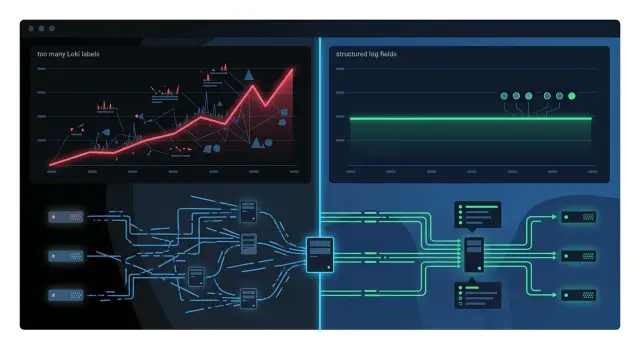
Table of Contents
Why labels raise Loki costs
Loki stays cheap when labels stay small and steady. It does not index the full log message by default. It indexes labels, and every new label value adds index work.
That sounds harmless until an app starts attaching labels that change all the time. A label like service=api is fine because it stays the same across many log lines. A label like request_id=9f3... gets expensive because almost every request creates a new value.
Loki groups logs into streams based on the full label set. When labels change on every request, Loki cannot keep appending logs to a few large streams. It creates huge numbers of tiny streams instead.
That costs money in two ways. Loki writes more metadata and index entries, and it stores lots of small chunks instead of fewer large ones. Small chunks are less efficient to write, store, and query.
A simple app can hit this limit fast. If an API handles 100 requests per second and one label changes every time, you can end up with hundreds of thousands of distinct streams in an hour. The log volume may stay about the same, but Loki suddenly has far more bookkeeping to do.
You usually see the extra work in the same places: more index entries, more small chunks, more backend objects, and heavier queries because the logs are spread across too many streams.
That is why logging bills can rise even when traffic looks normal. The team ships nothing unusual. Request volume stays flat. Log lines stay flat too. Then someone adds a few high-cardinality labels, the storage pattern changes, and the bill follows.
It also makes daily work worse. Queries slow down because Loki has to touch more streams. Retention gets more expensive. Background compaction grows too.
The pattern is simple: small, boring labels keep the index narrow. Request-specific labels turn normal log details into index data, and the index grows much faster than the logs themselves.
Teams usually run into this after adding labels for user ID, session ID, raw URL path, client IP, or feature flag values. Those fields can still be useful, but they are usually cheaper and easier to keep inside structured log fields instead of labels.
If you run Grafana and Loki in production, this is one of the easiest ways to waste money quietly. The app looks fine. Traffic looks steady. The index keeps growing anyway.
What makes a good label
A good label is a little boring. In Loki, boring is exactly what you want.
The best labels describe a stream of logs that belongs together for a long time, not a single request that disappears in a second. Start with facts that rarely change, like service, environment, or maybe region if people actually filter by it. Those values stay the same across many log lines, so Loki can group them into a small number of streams instead of a mess of tiny ones.
A quick test helps: does this label narrow the stream first? If not, it probably should not be a label.
For most teams, useful labels answer a few broad questions: which service wrote the log, which environment it came from, which app or job produced it, and sometimes which cluster or region it belongs to.
Now compare that with request data. A request ID, user ID, session ID, cart ID, or full URL path can change on almost every line. Those fields are still useful for debugging, but they belong in structured log fields, not in labels.
A small example makes the difference obvious. Say your checkout service logs an error in production. service="checkout" and environment="prod" are good labels because they cut the log set down fast. request_id="9f3..." is a bad label because it creates a new stream for almost every request. Put that request ID inside the log body or a JSON field and search it there when you need it.
This is where teams usually go wrong. They label every attribute they have, then wonder why storage and query load climb. Loki works better when labels answer broad routing questions first and log fields carry the fine detail.
If a value changes often, keep it out of the index. If it stays steady across thousands of lines and helps people slice logs quickly, it is probably a good label.
Put search details in log fields
Labels work best for broad buckets like service, environment, and region. The noisy details of each request belong in the log record itself, not in the index.
That means values like request_id, user_id, and path should usually live inside the message as structured fields. If you turn them into labels, Loki creates more streams, stores more index data, and makes queries heavier than they need to be.
Structured JSON makes this easier. The log stays readable, and tools can still parse it cleanly. One line can hold the event name, status code, latency, request path, and user details without blowing up label count.
{
  "level": "error",
  "service": "api",
  "env": "prod",
  "message": "request failed",
  "request_id": "9f2c1",
  "user_id": "18442",
  "path": "/billing/invoices",
  "status": 500,
  "duration_ms": 842
}
This gives you a clean two-step search flow. First, use a small set of labels to narrow the data to the right service and environment. Then parse or filter the fields inside those matching logs.
That order matters. If you are searching for one broken request, Loki does less work when labels narrow the dataset first and fields handle the fine filtering after that. You still find the same issue, but you avoid paying for a huge index full of one-off values.
A simple rule works well: ask whether the value repeats across many log lines. If it changes on almost every request, keep it out of labels. Request IDs are the clearest example. User IDs and raw paths usually land in the same bucket, especially when paths include account numbers, slugs, or other unique parts.
Keep labels small and steady, and let structured fields carry the details you need during debugging.
A simple API example
Take a busy API that runs in production across three regions. If you keep labels to service, env, and region, Loki only needs a small set of streams for that service. The api service in prod across us-east, eu-west, and ap-south gives you three label combinations, not thousands.
That is usually enough to narrow a search fast. You can still keep the details you care about, but they belong inside the log line as fields, not inside the index.
{"ts":"2026-04-13T10:15:22Z","level":"info","message":"request finished","service":"api","env":"prod","region":"us-east","customer_id":"cust_4821","request_id":"req_9f12a7","path":"/v1/invoices","status":200,"duration_ms":83}
In this example, customer_id and request_id stay in the JSON body. They are still searchable. They just do not create a new stream every time they change.
A practical query looks like this:
{service="api", env="prod", region="us-east"}
| json
| request_id="req_9f12a7"
That pattern is the whole point. Query the api service with a small label set first. Then parse the log line and filter for one request. You get the same troubleshooting result without paying the index cost of turning every request attribute into a label.
The stream count difference gets ugly fast. With only service, env, and region, one production API in three regions creates three stream groups for that label set. If you add customer_id and request_id as labels, the count can drift toward one stream per request. A service that handles 500,000 requests in a day can end up creating a huge number of short-lived streams instead of reusing a tiny set.
That is why sensible labels look boring. Boring is cheap. Boring is easy to query. And during an incident, you can still find one bad request by filtering log fields after Loki narrows the search to the right service and region.
How to trim labels step by step
Most teams do not need a full redesign. They need one honest audit of every label their apps emit.
Start by pulling a complete list of labels from every app, job, and log shipper. Do not trust memory. Check what actually reaches Loki today, because old defaults and one-off changes tend to stick around long after the team forgets why they were added.
Then count how many distinct values each label gets in a normal day. A label like service might have 8 values. A label like request_id might have 2 million. Those do not belong in the same class, even if both seem useful during search.
A practical cleanup pass
Work through the list with a blunt rule: if a label changes on most requests, it probably should not be a label.
Keep labels that describe stable groups such as app, environment, region, or log level. Flag labels with many daily values, such as user ID, request ID, session ID, URL paths with IDs, or container hashes. Remove the noisy labels from one service first instead of changing the whole fleet at once. Move those changing values into structured log fields so people can still search them.
Then compare a few real searches before and after the change. That step matters more than most teams expect. People often keep bad labels because they fear losing visibility. In practice, most searches still work fine when the value moves into JSON or another structured field. You filter by a small set of stable labels first, then search inside the log content.
Use real support or incident queries for the test. Look up one failing customer request, one spike in 500 errors, and one issue tied to a background worker. Check query speed, result quality, and whether the search still feels easy to use.
If you already run Grafana and Loki beside Prometheus, keep the cleanup small and dull. Change one service, watch index growth and query behavior for a day or two, then move to the next. That pace avoids surprises and gives the team proof that smaller labels usually mean cleaner logging, not worse debugging.
Mistakes that grow the index fast
Most Loki cost problems start the same way. One label seemed useful for a quick chart. Then another got added, then five more, and the index started growing much faster than the log volume.
The common mistakes are easy to spot once you know what to look for.
- Putting
request_idin a label. Every request gets a new value, so Loki has to track a huge number of streams. - Using full URL paths as labels, especially paths with IDs like
/users/1842/orders/991. - Adding
tenant,session, orfeature_flagas labels by default, even though those values often change too often for the index. - Keeping labels long after the original reason is gone because one old dashboard still reads them.
The full path problem is easy to miss. A team may think they only have one path label, but they are really creating thousands of values because every customer ID, order ID, or slug becomes a separate label entry. If you truly need route-level filtering, put the route pattern in a label and keep the exact path in structured fields.
Tenant and session data can cause the same problem. In a multi-tenant app, labeling by tenant can look reasonable when the tenant count is small and steady. Many teams do it too early. They have not even named the query they need, but they already pay to index the field forever.
Old labels linger for silly reasons too. One chart still uses feature_flag, so nobody removes it. That chart may save five minutes a month while the extra label adds storage and memory pressure every day.
A good rule is to write the exact query someone will run each week before you create a new label. If nobody can name that query, keep the data in structured fields instead.
Early signs your labels got out of hand
Bad label choices usually show up in metrics before anyone checks the bill. The awkward part is that the system can still look "healthy" for a while even as the index grows much faster than the real log volume.
One of the first warning signs is stream count rising faster than traffic. If request volume goes up by 10% but active streams jump by 2x or 3x, someone probably added a label with too many possible values, such as user ID, request path, session token, or build hash.
Another clue is a storage spike after a release that did not change load. When that happens, look at the log schema, not just the app. A small code change that turns one request attribute into a label can create thousands of new streams in a day.
You can also feel the problem during search. Simple questions start needing too many label matchers just to narrow the result set. If engineers must stack matcher after matcher to find one error class, the labels are doing too much filtering and the log line is not carrying enough structured detail.
The usual signs tend to show up together:
- Stream counts rise much faster than request counts.
- Storage grows right after a deploy even though load stays flat.
- Queries become fussy and need several label filters for basic searches.
- Loki writes lots of tiny chunks instead of fewer fuller ones.
Those tiny chunks matter more than many teams expect. Loki works better when logs from the same stream stay together long enough to fill reasonable chunk sizes. When labels split traffic into thousands of narrow streams, chunks flush early, storage gets less efficient, and query performance usually gets worse.
Teams often spot this in dashboards before they spot it in invoices. A simple example: a service starts labeling logs by full API route plus customer ID. Traffic stays steady, but stream count and chunk count jump overnight. That is usually not a traffic problem. It is an indexing problem.
A quick check before you add a label
Most bad labels come from one habit: treating every useful field like it belongs in the index. It does not. A label should earn its place.
Before you add one, ask how often that value repeats. If the same value shows up across many log lines, a label may make sense. Environment, service name, region, and log level often fit. Request ID, user ID, session ID, cart ID, and IP usually do not.
A short checklist helps:
- Does this value stay the same across many events?
- Could it explode into thousands of distinct values?
- Do you need it before reading the log body?
- Would a structured field solve the same need?
- Will more than one real query use it?
If the answer to the first question is no, stop. If the answer to the second is yes, stop again. That field belongs in the log entry, not in a label.
The third question matters more than teams expect. Labels help you narrow the search space before Loki scans log content. If nobody filters on that field first, indexing it is wasted money. Keep it in structured fields, then search or parse it after you have the right stream.
The fourth and fifth questions save teams from "just in case" labels. A field can be useful and still be a bad label. For example, an API route group like /billing can work as a label if many queries use it. A full URL with query params should stay in the log line. People inspect it during debugging, but few teams filter on every exact URL value.
If you are unsure, start with a structured field. You can always promote it to a label later after you see repeated query patterns. Doing the reverse after costs rise is much more annoying.
Next steps for a leaner Loki setup
Start with one service this week, not the whole stack. Pick the noisiest one, usually an API gateway, auth service, or background worker that writes logs for every request. One service is enough to show what should stay a label and what should move into structured fields.
Write a rule your team can actually follow. If a field has a small, fixed set of values and people use it to split logs every day, it may be a label. If it changes per request, per user, per URL, or per session, keep it in the log body instead.
A simple house rule is often enough:
- Keep labels for service, environment, region, and log level.
- Keep
request_id,user_id,session_id, raw IP, and full path out of labels. - Put search details into structured log fields.
- Review any new label in code review before it ships.
After each change, watch the numbers for a few days. Track stream count first, then storage growth and query behavior for the searches your team actually runs. If stream count drops and storage flattens out, you are moving in the right direction. If queries get worse, the fix usually is not to add the label back. It is to make the structured fields easier to search and keep the log format consistent.
It also helps when one person owns the rule. Without that, teams slowly turn every request attribute into index data again, and the bill creeps up before anyone notices.
If you want a second opinion, Oleg Sotnikov at oleg.is reviews observability and infrastructure setups as part of his Fractional CTO advisory work. He has run lean production stacks with Grafana, Loki, and the rest of the tooling, so the feedback tends to stay practical.
Open one config, remove one bad label, and compare stream count and storage after 48 hours. That small test will tell you more than a long debate.
Frequently Asked Questions
Why is request_id usually a bad Loki label?
Because it changes almost every time your app logs a request. Loki groups logs by the full label set, so a changing request_id creates huge numbers of tiny streams and pushes up index and storage work.
Which labels should most teams use first?
Start with labels that stay steady across many log lines, like service, environment, and sometimes region or level. Those values help you narrow logs fast without creating a stream for every request.
Can I still search by request ID if I remove it from labels?
Yes. Keep it inside structured log fields, then filter it after Loki narrows the search with stable labels. That gives you the same debugging value without turning every request into index data.
Should I put full URL paths in Loki labels?
Usually no, especially when paths include IDs, slugs, or query params. A full path creates too many distinct values, so keep the exact path in the log body and label only a stable route group if you truly need one.
Is tenant or customer_id ever okay as a label?
Only if the tenant count stays small and steady and your team filters by tenant often. For most apps, tenant or customer_id changes too much, so keeping it in structured fields costs less and still works for searches.
How do I audit my current Loki labels?
Pull the real labels from Loki or your log shipper and count how many distinct values each one gets in a normal day. If a label changes on most requests, move it into structured fields and test a few real incident searches after the change.
What signs show that my labels are driving up Loki costs?
Watch for stream count rising faster than traffic, storage jumping after a deploy, and queries getting slower or fussier. Those signs usually mean someone added labels with too many possible values.
Will moving fields out of labels make debugging harder?
Most teams do not lose much. You still filter by stable labels first, then search the parsed fields inside the matching logs. If searches feel worse, fix the log structure instead of putting noisy fields back into labels.
Should I clean up labels across every service at once?
No. Change one noisy service first, watch stream count and storage for a day or two, and then move on. That smaller rollout shows what works without surprising the whole team.
What is the best check before I add a new label?
Ask one thing first: will this value repeat across many log lines? If the answer is no, keep it out of labels. Start with a structured field, and only promote it later if your team uses it in real searches again and again.


