Logging libraries by team size for solo devs and teams
Logging libraries by team size means different tradeoffs: solo builders need speed, while larger teams need alerting, structure, retention, and audit trails.
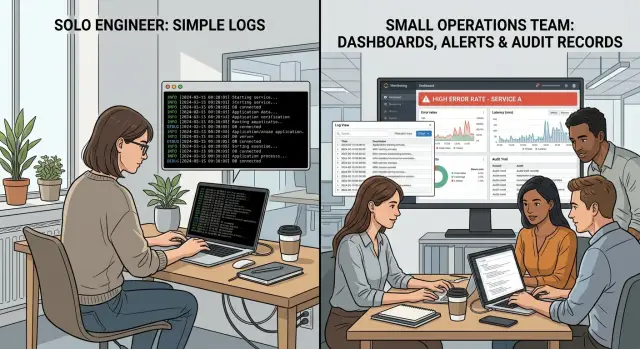
Table of Contents
Why team size changes the logger choice
The best logger for one engineer can be a bad fit for a team of six. That is the whole point behind logging libraries by team size. The job stays the same - record what happened - but the reader changes, and that changes the package you can live with.
When one person owns the whole stack, that person carries a lot of context in their head. A short line like "sync failed" may be enough because they already know which service ran, which customer hit the bug, and what changed yesterday. They can trade polish for speed and keep the setup light.
That stops working once other people join the rotation. At 3 a.m., the person reading the log is often someone who did not write the code and did not deploy the last change. They need logs that explain themselves. A package that makes structured logging easy starts to matter more than a package that only prints fast text.
A small startup shows this shift clearly. One founder-engineer can get by with simple app logs for an API, a worker, and a cron job. Later, two more engineers join, alerts start waking people up, and the same loose messages become a tax on every incident. People waste time guessing instead of fixing.
A team usually needs a logger that makes these fields easy to add and keep consistent:
- timestamp and level
- request or trace ID
- service or job name
- user, account, or tenant ID when it fits
- error type and clear message
Audit logging raises the bar again. Now the log is not only for debugging. It may need stable field names, predictable event types, and records that show who did what and when. If one package encourages free-form messages while another nudges the team toward fixed fields, that difference becomes expensive later.
The wrong package causes two kinds of pain. Some tools make noise so cheap that teams log everything and miss real failures. Others make structure awkward, so the log looks clean until something breaks and no one can answer basic questions. Good logs save time. Bad logs only create more reading.
What a solo engineer usually needs
When one person builds, deploys, and debugs the app, speed matters more than fancy log plumbing. The best choice is often the logger your language or framework already gives you, or the package people already use around that stack. Fewer moving parts means fewer surprises when something breaks late at night.
A solo developer rarely needs a full logging stack on day one. Extra collectors, processors, dashboards, and alert rules take time to set up and even more time to maintain. That time usually pays back later, not now. In practice, logging libraries by team size often come down to one rule: if you work alone, pick the tool with the least friction.
Simple setup beats a long feature list. A logger is only useful if you keep using it the same way across the whole app. If setup feels annoying, people skip fields, mix formats, or fall back to random print statements. That gets messy fast.
Clear messages matter more than clever features. Write short event names, say what happened, and attach a few fixed fields every time. Good defaults are request_id, user_id, job_name, and environment. This gives you structured logging without making the app harder to run.
Keep logs easy to read on your own machine. If plain text helps you scan errors faster during development, use plain text there. If JSON makes filtering easier, use JSON and keep the field names consistent. Mixing styles inside one small app is usually worse than picking the "perfect" format.
A solo setup is usually good enough if it does four things:
- prints timestamps and log levels clearly
- supports a small set of fixed fields
- works locally without extra services
- stays boring when the app grows a bit
Delay extra log tools until the app gives you a real reason. If you have one service, low traffic, and no shared on-call, you probably do not need shipping pipelines, retention rules, or audit-focused tooling yet. A founder building an early product gets more from clean messages and consistent fields than from a big observability setup. That foundation makes the next upgrade much easier.
What changes when several people share on-call
Once more than one person gets paged, logs stop being a private notebook. They become a shared tool for finding the problem fast, often when the person reading them did not write the code.
That changes what matters in your logger package. A simple text logger may feel fine for one engineer, but a team needs logs that machines and humans can both read. Structured JSON is usually the safer choice because search, filters, and alerts work better when every field has a clear name.
A team also needs the same fields in every service. If one API writes request_id and another writes reqId, your search breaks at the worst time. Good defaults help a lot here: request IDs, user IDs when allowed, service name, environment, and a clear timestamp.
Picture a small startup with three services and a weekly on-call rotation. An alert fires because checkout requests started failing. The engineer on duty should be able to filter by service name, grab one request ID, and trace that request across all services in a few minutes. If the logs are plain text with mixed formats, that same job can take half an hour.
A shared team also needs one place to open logs. Copying files from servers or checking each container by hand gets old fast. Centralized logs cut noise and reduce guesswork, especially when the on-call person is new to that part of the stack.
Consistency matters just as much as format. Pick log levels and use them the same way everywhere:
debugfor local diagnosis and short-term deep detailinfofor normal events worth recordingwarnfor odd behavior that did not break the requesterrorfor failures that need attention
This is where logging libraries by team size becomes a practical choice, not a style debate. For a team, I would favor a package with steady maintenance, clear docs, stable JSON output, and predictable level handling over a clever package with unusual ideas.
Teams rarely regret boring logging. They do regret custom formats, missing IDs, and six services that all spell the same field differently.
When audit needs enter the picture
Regular app logs help you fix bugs. Audit records answer a different question: who changed something, when, and under which account. Once money, permissions, customer data, or admin actions matter, keep those records in a separate stream instead of mixing them with noisy app events.
That split changes what you want from a package. A logger that prints useful debug lines may be enough for a solo developer stack, but audit work needs fixed fields, clear timestamps, and an easy way to send entries to a dedicated store. If someone can edit those records later, they stop being useful.
A good audit entry usually includes:
- who made the change
- what changed
- when it happened
- which record or account it touched
- whether the action succeeded or failed
A small example shows the difference. If an admin changes a customer's billing plan, the normal app log might say "plan updated". The audit record should name the admin account, the customer affected, the old plan, the new plan, the exact time, and the request ID. That gives you something solid when a customer disputes a change or your team checks a security issue.
Be careful with data. Do not dump tokens, passwords, full card numbers, private notes, or full personal details into audit logs. Pick a package, or add a thin wrapper around it, that masks or drops sensitive fields before anything gets written. Those rules need to run every time, not only when a developer remembers.
Retention also stops being a casual choice. Decide how long you keep audit records, where you keep them, and when you delete or archive them. Then write that rule down. A simple written rule saves arguments later and helps new team members follow the same process.
Access needs tighter control too. Most developers do not need full read access to raw audit logs. Give wider access to normal app logs if your team needs that for support, but keep audit records limited to a small group. Fewer readers means fewer leaks and less confusion around sensitive events.
This is the point where logging libraries by team size starts to overlap with internal rules. The package still matters, but separation, redaction, retention, and access control matter just as much.
How to choose a package step by step
Start with the people, not the package. A logger that feels perfect for one developer can turn into noise once a team shares on-call, dashboards, and incident reviews. The safest way to choose from logging libraries by team size is to test your daily work, not a feature checklist.
Use a short trial process before you commit:
-
Write down who reads logs now. If it is only you, simple output and fast setup may be enough. If developers, support, and an on-call engineer all read the same logs, you need clearer structure, stable field names, and messages that make sense at 3 a.m.
-
Count every place that writes logs. One web app is easy. A web app, a background worker, a cron job, and two small services change the problem. A package that works fine in one process can get messy once several services need the same format.
-
Pick the fields that every log entry must carry. For most teams, that means timestamp, level, service name, environment, request or job ID, and user or account ID when it is safe to include. If audit logging needs matter, add actor, action, target, and result from the start.
-
Test with real data, not toy examples. Send a day of sample logs through your search and alert setup. Check how fast you can find one failed request, group errors by service, and trace a single user action across systems. Then check the bill. Cheap logging often stops being cheap once log volume grows.
-
Move one service first. Do not switch the whole stack in a weekend. Pick a service with enough traffic to reveal problems, document the format, and treat that setup as the team standard after a few on-call shifts.
This approach is boring on purpose. It avoids the common mistake of choosing a package because it looks fast in benchmarks or has a long feature list. Teams Oleg advises often get better results by picking a logger that matches their current workflow, then tightening the format as more services and people join the system.
A simple example as a startup grows
Month 1 is simple. One founder has one app, one server, and one person to call when something breaks. A basic logger works fine. Plain text is often enough because the same person wrote the code, deployed it, and reads the logs. If checkout fails, they search for the error line, fix it, and move on.
By month 6, the team has two engineers and more moving parts. One app talks to a worker, a database, and maybe a billing service. Plain text starts to slow them down. They switch to JSON logs so both people can filter by request, service, and error level in a shared viewer. The package choice changes, but the bigger shift is around the package: both engineers now need the same fields, the same level names, and the same way to search.
Year 2 feels different again. The product has users all day, and the team shares on-call. At 3 a.m., nobody wants to read messy logs and guess what happened. The logger now needs clear levels, stable field names, timestamps that make sense, and correlation IDs that follow one request across services. A package that was fine for one app can become annoying fast if it makes structured logging hard or inconsistent.
Later, sales asks who changed a pricing rule. Security asks who accessed a customer record. Regular app logs do not answer those questions well. The team keeps operational logs for debugging, then adds separate audit records with stricter rules: who did what, when, and from where. That often means a different package, or at least a different pipeline and storage policy, because audit logging needs longer retention and tighter access.
The lesson is simple. Teams do not replace loggers because a new package looks nicer. They replace them because the work around logs changes. One founder needs speed. A small team needs shared structure. An on-call rotation needs traceable events. Audit logging needs records people can trust later. That is why logging libraries by team size is a practical choice, not a matter of taste.
Mistakes teams make when they switch loggers
Teams often switch loggers right after the first painful on-call week. That is when small habits turn into bigger problems. The usual mistake is simple: they pick the package everyone talks about, not the one that fits how their team actually works.
A solo engineer can live with a fast, minimal logger and a few clear fields. Once a team grows, people sometimes overreact and grab a package with every transport, plugin, and formatter they can find. That sounds safe, but it usually creates more moving parts, more config, and more ways to lose logs during an incident. In practice, logging libraries by team size should get a little stricter as the team grows, not a lot more complex.
Another common mistake is mixing debug chatter with audit records. These are not the same thing. Debug logs help someone fix a bug at 2 a.m. Audit records answer who changed what, when, and from where. If both go into the same stream with the same format, the team gets noise when they need answers.
Teams also log far too much sensitive data during a switch. A developer adds full request bodies to help with debugging, then forgets to remove them. A week later, logs contain tokens, email addresses, or customer details. One payment bug can suddenly turn into a security problem. Redaction rules should be part of the switch from day one, not a cleanup task for later.
Field names drift fast when each service gets updated by a different person. One service writes userId, another writes user_id, and a third stores the same value under account. Now searches break, dashboards get messy, and on-call engineers waste time translating names in their head. Pick a small schema early and keep it boring. Consistency beats cleverness every time.
Startups do this a lot as they grow: they add extra transports, custom serializers, and side tools before the team needs them. A simpler setup often works better. If your team only checks logs in one place, use one path first. Add more only after a real problem shows up.
A good switch keeps three things steady: one purpose for each log type, one naming pattern across services, and one redaction policy that nobody can ignore. That saves far more time than a popular package ever will.
Quick checks before you commit
A logger can look fine in a demo and still cause pain a month later. Before you settle on a package, test it against the work your team actually does when something breaks at 2 a.m. or when support asks for a clear answer.
One simple test works better than any feature list: take a failed request and ask a new teammate to find it fast. If they need ten tabs, three guesses, and a lot of luck, your setup is too loose. Good logs let someone search by request ID, user ID, or error code and get to the right event in a few minutes.
Check these points before you commit:
- Make sure every service uses the same level names and means the same thing by them. If one app treats "warn" as serious and another treats it as noise, people stop trusting the logs.
- Follow one user action across systems. A signup, payment, or password reset should leave a clear trail from the first request to the last background job.
- Look at cost early. Verbose logs can get expensive fast, especially once traffic grows. Estimate what one month of storage and search will cost, not just day one.
- Confirm that support can read the records they need without digging through developer-only details.
- Check that security or compliance work can pull the right records with timestamps, actor details, and enough context to answer who did what.
A small example makes this real. Say a user clicks "Reset password," but the email never arrives. Your API logs the request, your queue accepts the job, and your mail service rejects it. If those three events do not share one trace or request value, the issue turns into a scavenger hunt.
This is where many teams get stuck with logging libraries by team size. A solo developer can live with rough edges for a while. A team with support, on-call rotation, or audit work usually cannot. If your logger passes these checks now, you are much less likely to replace it later.
What to do next
Pick for the team you have now. A solo founder who ships, deploys, and fixes issues alone should not choose the same package as a team that hands alerts across an on-call rotation. If you plan for a much bigger company too early, you usually buy complexity you will not use.
Write down your current stage in one sentence. Something as plain as "one engineer, no on-call rotation" or "four engineers, shared support, customer actions must be traceable" is enough. That sentence should guide the logger choice more than feature lists do.
Then make one decision for the next quarter and stick to it: one logger, one field schema, one way to search. Teams waste a lot of time when every service logs differently. Keep the schema boring and consistent. Request ID, user ID when allowed, service name, severity, timestamp, and event name cover most day-to-day work.
A short checklist helps:
- Name your team stage as it is today
- Pick one package your whole codebase can use
- Define a small shared field schema
- Test it during a real support task, not a demo
- Review it again in three months
The real test is a live problem. Use a recent bug, failed payment, broken signup, or slow API call. Ask someone on the team to find the issue using logs alone. If they cannot trace the request path in a few minutes, the setup is still too messy. If audit logging matters, check one more thing: can you answer who changed what, and when, without guessing?
This is where outside review can save time. Oleg Sotnikov helps startups and small companies sort out logging, on-call flow, and audit logging needs as a fractional CTO. That kind of review is most useful when the team has already felt some pain and wants a setup that stays simple under real load.
Good logging is rarely about the fanciest package. It is about picking a tool your team will use the same way every day.


