Local model hardware sizing before you move on-prem
Local model hardware sizing starts with memory, user load, and fallback costs. This guide shows what to check before privacy drives an on-prem pilot.
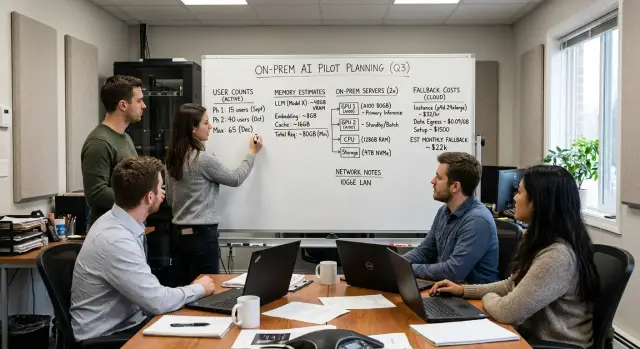
Table of Contents
Why local pilots fail early
Most local AI pilots do not fail because the model is bad. They fail because the first setup was built for a neat demo, not for a normal Tuesday when ten people ask for help at once.
A demo usually has one user, one prompt, and a patient room. Real work is messier. People paste long documents, ask follow-up questions, retry when answers feel slow, and expect the tool to stay responsive while other apps are running on the same machine.
Privacy pressure often makes this worse. A team hears "we need this on-prem" and jumps straight to buying hardware. That sounds careful, but it skips the boring math that decides whether the pilot feels usable. Local model hardware sizing starts there, not with a debate about model benchmarks.
Memory is often the first wall. Teams may compare models by quality and ignore how much VRAM or system RAM they need in practice. Then the model barely fits, loads slowly, or needs heavy quantization that changes speed and output quality. By the time people notice, trust is already slipping.
Concurrency hurts even more than memory. One user can tolerate a 10-second reply during a test. Five users hitting the same box at the same time can turn that into a queue. Replies slow down, then people refresh, then the queue gets worse. After a week, the team says the pilot "didn't work," when the real issue was capacity.
A small example makes this clear. A company tests a local assistant with one project manager and likes it. Then support, sales, and engineering try it on the same server. Response time doubles, then triples. Someone falls back to a cloud tool to finish work, and now the company pays for local hardware and cloud usage.
That is how early pilots lose support. People rarely forgive slow tools, especially when the cloud version felt faster on day one. If you size for actual use instead of a polished demo, you avoid that first wave of disappointment.
What numbers to collect first
Local model hardware sizing starts with a few plain numbers, not a debate about privacy or vendor lock-in. If those numbers are fuzzy, the pilot usually turns into guesswork.
Start with the model you actually want to run, not the one that looks good in a benchmark chart. A 7B model, a 34B model, and a 70B model lead to very different hardware plans. Write down the exact model name, the quantization you expect to use, and whether you want one model or a small set for different tasks.
Then measure message size. You need the average prompt length and the average reply length for real work, not a made-up demo. A support bot that gets 300-token prompts and gives 150-token replies is very different from a document assistant that reads 8,000 tokens and writes 1,000 back. Those lengths affect memory, speed, and how many users you can serve at once.
User count also trips teams up. Do not count everyone who might use the tool in a whole day. Count the busiest hour. If 60 people log in during the day but only 8 ask questions at the same time, size for that busy window. If 3 of those users tend to send another prompt before the first answer finishes, note that too. That is model concurrency planning, and it changes hardware more than most teams expect.
Next, mark which tasks need fast replies. Some jobs can wait 20 seconds. Others feel broken if they take more than 2 or 3. A code helper for an engineer, a live chat tool, and a nightly document classifier should not share the same speed target. Put a response time next to each task.
Last, set two money limits before you shop for servers: the hard cap for hardware and the hard cap for overflow. Overflow means the work you send to the cloud when the local system is full, down, or too slow. A simple note like "$12,000 upfront, $1,500 per month max overflow" gives the pilot a real boundary and stops wishful thinking early.
How memory becomes the hard limit
GPU memory usually runs out long before raw compute does. A model might generate tokens fast enough, but if it does not fit cleanly in memory, the whole plan breaks.
The first chunk is fixed: model weights. Once you pick a model size and a quantization level, that weight file takes a fairly stable amount of VRAM every time the model loads. A 7B model may fit on a modest card, while a larger model can eat most of a 24 GB GPU before a single user sends a prompt.
That is only the starting point. Each live request also needs cache memory for the model to remember the tokens already processed. Longer context means a larger cache. Two users with short prompts may fit comfortably, but two users with long documents can push the same machine over the edge.
What fills memory besides the model
Your memory budget usually has four parts:
- model weights
- per-request cache
- inference server overhead
- operating system and monitoring tools
Teams often count the first item and underestimate the rest. That mistake looks small on paper and painful in practice.
Say you have a 24 GB GPU. The model weights take 14 GB. Your runtime, drivers, and serving stack need another 1.5 to 2 GB. If each active request uses about 3.5 GB of cache at your target context length, you may think you can serve two people at once. In reality, one extra buffer, a slightly longer prompt, or memory fragmentation can remove that second user slot.
This is why local model hardware sizing needs more than a model card and a GPU spec sheet. You need a safe operating margin. If the math says you need 23.5 GB on a 24 GB card, you do not have enough memory.
System RAM matters too. If the server starts swapping, latency jumps and the machine feels broken even when the GPU still looks busy. Leave room for the OS, logs, observability, and any side processes such as embeddings, reranking, or a web UI.
A simple rule works well: budget the fixed model load first, add realistic cache use for concurrent requests, then keep extra headroom for spikes. Without that cushion, a tiny overhead miss turns into failed requests, forced context limits, or one less user than you promised.
Why concurrency changes the answer
A single-user test can fool you. One person sends a prompt, gets a decent reply, and the pilot looks fine. The machine feels fast because it gives that one session almost all of its attention.
The picture changes when several people use it at the same time. With three to five active users, response time can jump from a few seconds to something people start complaining about. That shift surprises teams because the model itself did not change. The workload did.
Each live session keeps part of the conversation in memory. Longer chats usually need more memory and more compute. If the model already sits close to the card's limit, a few extra sessions can push it into queuing, slow token generation, or forced downgrades to a smaller model.
This is where local model hardware sizing often goes wrong. Teams size the box for the model file, then forget the live load around it. They count weights, but not active sessions, context length, system prompts, retries, and the small bursts that happen when several people ask for help at once.
Background work makes the problem worse. A chat assistant may share the same machine with document parsing, embeddings, OCR, code generation, or scheduled batch jobs. Those jobs do not care that a human is waiting. They still take memory, GPU time, and disk bandwidth.
Daily averages hide this issue. If 20 employees use the system across a day, that sounds light. But if six of them use it between 9:00 and 9:20, that short window decides whether the pilot feels usable.
A simple way to think about it is this:
- Count busy-hour users, not total users.
- Separate chat sessions from background jobs.
- Assume a few people will ask longer, heavier prompts.
- Leave headroom for spikes and retries.
Oleg sees this a lot in small teams moving AI workloads on-prem. The first demo works on one machine, then real use starts and the queue appears. If people wait 20 or 30 seconds for a reply, they stop trusting the tool. That is usually the point where cloud fallback, more GPUs, or a different rollout plan becomes necessary.
What fallback really costs
A local setup rarely handles every request. Some prompts run longer than expected, some users paste huge documents, and traffic can jump for an hour without warning. When that happens, a cloud model often becomes the safety valve, whether the team planned for it or not.
That backup path has a real price, but it can still be cheaper than buying more servers too early. If overflow happens a few times a day, paying for cloud usage may cost less than keeping another GPU online all month just to cover rare peaks. This is where local model hardware sizing often goes wrong: teams compare hardware cost to average traffic and forget the messy requests that break the average.
Long context windows raise fallback spend fast. A normal chat request might fit on local hardware, but a request with a large PDF, long conversation history, or extra tools can push memory and latency past your comfort limit. One burst like that can fill your queue and slow everyone else down.
A cloud backup also protects the pilot from visible delays. Users usually forgive an occasional model switch. They do not forgive a system that stalls for 45 seconds or times out when several people use it at once. Sometimes a small monthly cloud bill is just insurance against a bad first impression.
Low volume changes the math even more. If a team only sends a few hundred hard requests each month, fallback can be the cheaper path for quite a while. Buying another machine makes sense when overflow is frequent, predictable, and expensive enough to beat fixed hardware cost.
Privacy does not always block fallback. Many teams can still send low-risk tasks to the cloud if they remove names, emails, account numbers, or internal IDs first. That might cover summaries, drafts, and classification, while sensitive records stay local.
Before you approve hardware, write down five numbers:
- how often requests overflow local limits
- average tokens in those overflow requests
- cloud price for the backup model
- busiest hour you expect each week
- which tasks can leave your network after redaction
A simple example makes the tradeoff clear. If one extra server costs $1,500 a month to own and run, but cloud fallback for rare spikes costs $220, the cheaper answer is obvious. If overflow climbs every week and the cloud bill reaches $1,200, more local capacity starts to make sense.
A simple sizing process
Start small and lock the scope. Most teams make local model hardware sizing harder than it needs to be because they compare too many models, too many servers, and too many what-if cases at once.
Start with one pair of models
Pick one model for the main job and one backup path. Keep both tied to the same task, such as internal chat, document search, or support draft replies. If your first model is a 7B or 8B local model, the backup can be a cloud API or a smaller local model that answers more slowly but still works.
This matters because hardware math changes fast when you switch models. A setup that runs one model comfortably may fail as soon as you move to a larger one.
Next, write down the memory budget in plain terms. Count three buckets: model weights, KV cache, and system overhead. Weights are the base cost to load the model. KV cache grows with context length and active requests. System overhead covers the OS, inference engine, monitoring, and a safety margin so the machine does not sit at 99% memory all day.
If a GPU has 24 GB of VRAM, do not plan to use all 24 GB. Leave headroom. Teams that skip this usually blame the model when the real problem is memory pressure.
Price both paths
Set a real peak concurrency target before you price anything. Do not ask how many people might use it. Ask how many will hit it at the same time during a busy hour. For an internal pilot with 20 staff, that number may be 2 to 4, not 20.
Then compare two budgets. One is fully local: server, GPUs, power, setup time, and support time. The other is mixed: a smaller local box for routine work plus cloud fallback for spikes, long prompts, or model failures. Mixed setups often look less pure on paper, but they usually waste less money early on.
A short pilot tells you more than a month of debating. Run the chosen model on real prompts for one or two weeks. Track memory use, response time, failed requests, and how often the backup path gets used.
If the pilot holds up under your peak hour, buy more hardware with confidence. If it does not, you learned the cheap way.
A realistic pilot example
A 20-person support team wants a private draft-reply tool for customer tickets. They do not need full automation. Agents still review the text before sending, so the model only has to read the ticket, suggest a reply, and pull a few internal notes.
On paper, 20 staff sounds large. In practice, usage is much smaller. Most hours, only two or three agents ask for a draft at the same time. That changes the hardware math. You are not sizing for 20 live sessions. You are sizing for normal overlap, then deciding what to do when the queue grows.
A modest pilot might use one server with a single GPU and enough system RAM to hold the model, the context cache, and the rest of the stack. During a normal afternoon, that box can feel fine. Three agents submit drafts, each waits 5 to 12 seconds, and nobody complains. Raw model speed looks decent, but the better sign is simple: the queue stays short.
Long tickets are where the plan bends. A billing dispute with a long thread, pasted logs, and contract notes can be several times larger than a basic support request. Those prompts stay in memory longer and block other users. Instead of buying a much larger server for a small share of traffic, the team can route only those oversized jobs to a cloud model if policy allows it. That keeps most replies private and local while stopping one giant ticket from slowing everyone else down.
The same pilot can still fail at month-end. Ticket volume rises, more agents work at once, and concurrency jumps from three to seven or eight for short periods. The server did not get slower. The queue got longer. An agent who waits 50 seconds for a draft will often stop using the tool, even if the model still generates quickly once it starts.
That is why local model hardware sizing should start with queue tolerance, not just tokens per second. If the team can accept a 10-second wait, one server may be enough for a pilot. If they want near-instant drafts during spikes, they need either a second server, a smaller local model for overflow, or a cloud fallback rule. The cheap mistake is buying for average load and calling the pilot done. The expensive mistake is buying for the worst hour of the month before anyone has used the workflow.
Mistakes that waste budget
Teams often overspend before the pilot even starts. The most common mistake is simple: they buy for parameter count and ignore context length. A model that looks cheap on paper can need much more memory once users paste long documents, ask for summaries, or keep long chat history.
That is why local model hardware sizing fails when it starts with "we want a 70B model" instead of "what jobs will people run all day?" A smaller model with the right context window often beats a larger one that forces constant trimming, retries, or awkward workarounds.
Another expensive assumption is that every user needs a dedicated GPU. Most teams do not work that way. They need shared capacity for the requests that overlap during busy periods. If 40 people have access but only 4 ask the model at the same time, buying 40-user hardware is waste, not safety.
The costs people forget
Hardware is only part of the bill. Teams skip storage for model files, fast local disks for caching, monitoring, backups, driver updates, and the support time to keep the stack healthy. A pilot can look cheap in a spreadsheet and still burn money once engineers spend hours each week fixing timeouts, log growth, or broken deployments.
Privacy decisions cause another budget leak. Some leaders treat privacy as a yes-or-no choice and push every workload on-prem. That sounds clean, but it often makes costs worse. Many companies can keep sensitive prompts local, strip or mask risky data, and send low-risk jobs to cloud models when demand spikes. That mix is usually cheaper than sizing local hardware for the worst hour of the month.
One metric catches these mistakes fast:
- cost per finished task
- average wait time at busy hours
- memory used at real context lengths
- support hours per week
- fallback spend when local capacity runs out
Monthly spend alone hides the real picture. If one setup costs less each month but finishes fewer tasks, needs more support, and forces costly fallbacks, it is not the cheaper option.
A quick check before you buy
Most bad hardware purchases happen before the first real load test. Teams pick a server for the average day, then the busiest short burst exposes the gap.
Start with your busiest 15-minute window, not your daily total. Count how many requests arrive, how long they run, and how fast users expect an answer. Ten slow internal jobs and ten live chat requests do not need the same setup.
Memory usually breaks the plan first. The model size on a spec sheet is only part of the story. You also need room for the runtime, context cache, embeddings if you use them, logs, and some headroom. A model that barely fits on paper often fails in real use. That is why local model hardware sizing needs a real memory budget, not a hopeful guess.
Then test a simple stress case: what if requests double for one hour? If the answer is "we will queue them and accept slower replies," that is fine. If the answer is "we cannot slow down," you may need more GPU memory, a second node, or a cloud burst path.
A short pre-purchase check helps:
- Measure the busiest 15 minutes you expect in month one.
- Write down the full memory footprint, not just model weights.
- Decide what happens during a one-hour traffic spike.
- Mark which jobs can safely fall back to cloud.
- Name the person who owns patching, monitoring, and hardware failures.
Fallback matters more than teams admit. Some work can go to the cloud with low risk, such as draft generation for public marketing copy or low-sensitivity internal summaries. Other work should stay local, especially anything with customer data, regulated records, or source code you do not want outside your network.
Last, price the human side. Someone must patch drivers, watch disk health, replace failed parts, and keep spare capacity ready. If nobody owns that work, your on-prem AI costs are already higher than the spreadsheet says. Oleg Sotnikov often helps teams sanity-check this exact gap before they lock money into hardware.
What to do next
Most teams should not buy more hardware yet. Pick one narrow job, run it for a few weeks, and make the result easy to judge.
A good first pilot does one thing often enough to produce real numbers. That could be support reply drafts, internal document search, or call note summaries for one team. If ten people use it every day, you will learn much more than from a flashy demo used twice.
Set stop rules before you begin. If queue time stays above your limit, if success rate drops below your target, or if the cost per completed task beats a small cloud setup, pause and fix the plan instead of forcing rollout.
Keep a small cloud fallback while usage settles. That gives you breathing room when demand spikes, a model crashes, or a larger prompt blows past local memory. It also gives you a clean comparison for on-prem AI costs, rather than guessing after you already bought servers.
Each week, review the same numbers:
- total requests
- peak concurrent requests
- average and worst queue time
- task success rate
- fallback usage and cost
Those five numbers usually tell you whether your local model hardware sizing still fits reality. If people wait too long or fall back to cloud too often, the issue may be memory, batching, or scope. If usage stays low, your pilot may be too broad or just not useful enough.
Keep notes simple. Write down what users asked for, where the model failed, and which prompts created the biggest delays. A short weekly review beats a long slide deck no one reads.
If you want a second opinion before you spend more, Oleg Sotnikov can review the hardware math, fallback costs, and rollout scope as a fractional CTO. That kind of outside check is often cheaper than one wrong server purchase.
Small pilots work when the exit rules are clear. Start narrow, measure weekly, keep cloud as backup, and expand only after the numbers stay steady.


