LLM risk matrix for drafting vs deciding in small teams
Use an LLM risk matrix to sort tasks by money, records, and customer impact so teams know when AI can draft and when a person must approve.
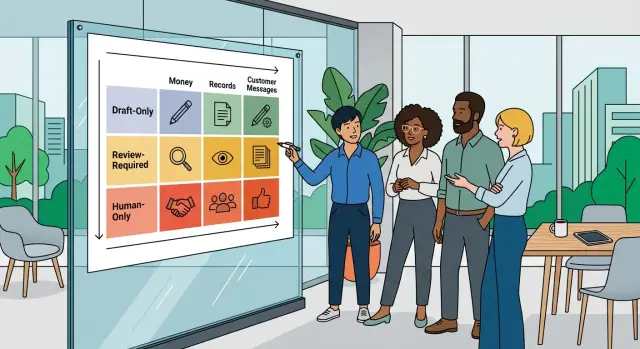
Table of Contents
Why this gets risky fast
An LLM can write a decent draft in seconds, but that does not mean it should take the final action. Drafting a refund explanation, a policy reply, or an account note is one thing. Sending the refund, changing the policy, or editing the account record is a different level of risk.
That gap matters because one wrong click can cause real damage. A bad draft wastes a few minutes and gets fixed before anyone sees it. A bad decision can move money, change a customer record, cancel a service, or trigger work your team now has to undo by hand.
Customer-facing automation gets risky even faster because messages create expectations. If the model tells a customer "we already refunded this" or "your plan will stay at this price," your team may have to honor that promise even if the message was wrong. The cost is not only the refund or discount. It is also support time, trust, and the cleanup that lands on a human later.
Records create the same problem. If a model adds the wrong note, changes a shipping address, marks an invoice as paid, or closes a case too early, that error spreads. The next person who looks at the account may trust the record and act on bad information.
Money raises the stakes again. A model does not feel the difference between drafting "we can offer a credit" and actually issuing that credit. In practice, that difference is huge. One sentence is cheap to review. A financial change can take hours to reverse, and sometimes you cannot reverse it at all.
That is why an LLM risk matrix helps small teams. It separates low-cost drafting from decisions with real consequences. Speed looks great in a demo, but speed does not reduce the price of a bad call. When money, records, or customer promises are involved, human approval is usually the safer default.
Which actions need extra care
Some tasks look small on a dashboard and turn expensive a week later. In an LLM risk matrix, that usually happens when the model touches money, formal records, official customer replies, or account access.
Money actions need the most caution. A model can draft a refund note or flag a billing issue, but it should not decide who gets money back, change a live price, or trigger a charge on its own. One bad refund rule can create losses fast. A wrong price can upset every customer who saw it.
Records need the same caution for a different reason. If a task changes an invoice, contract note, tax field, or audit trail, the cost of being wrong keeps growing over time. Teams often fix the first mistake, then spend hours cleaning up reports, explaining exceptions, and matching numbers later. The model can summarize a document or suggest edits. A person should confirm the final record.
Customer messages also move into higher risk when people read them as the company speaking with authority. That includes billing answers, policy explanations, delivery commitments, and anything that sounds final. If the model drafts the reply, a person should check the facts, tone, and promise before it goes out.
Account changes deserve extra care because they affect access, privacy, and trust. Resetting permissions, changing an email on file, unlocking an account, or editing personal details can hurt a real person fast if the model guesses wrong. These actions often look routine, but they can expose data or lock out the right user.
A good rule is simple: let the model prepare, summarize, and suggest. Slow down when the action moves money, changes a record people rely on, sends an official answer, or changes who can see and do what.
A simple matrix your team can use
Use three scores for every task: cost, undo effort, and public reach. Give each score a number from 1 to 3. That is enough for most small teams, and it keeps the LLM risk matrix easy to use in daily work.
Cost of a mistake gets a 1 if the error is annoying but cheap, like a typo in an internal note. It gets a 2 if someone needs to spend time fixing it. It gets a 3 if it touches money, pricing, refunds, contracts, or account records.
Undo effort gets a 1 if one person can fix it in a minute. It gets a 2 if the team needs a follow-up message or a manual correction. It gets a 3 if the action leaves a billing, compliance, or customer history mess that takes real work to clean up.
Public reach gets a 1 if only your team sees it. It gets a 2 if one customer sees it. It gets a 3 if many customers see it or the result becomes part of a permanent record.
When all three scores stay at 1, keep the model in draft mode. Let it write the email, summarize the ticket, or suggest the next step. A person can skim it fast and move on.
The rule changes as soon as any score goes up. If a task gets a 2 in any category, require human approval before anything gets sent, posted, or changed. That covers most customer-facing automation, where one wrong reply can create extra work even if the mistake looks small at first.
If any category gets a 3, the model should support the human, not decide for the human. It can prepare a draft refund note, collect account history, or suggest options. A person should make the final call and trigger the action.
This method works because it does not ask your team to predict every possible failure. It asks a smaller question: "If this goes wrong, how hard is it to live with?" Many teams put the three numbers at the top of each task template, and the choice takes about 10 seconds.
How to score a task step by step
Start with one short sentence that says exactly what the model will do. If you cannot describe the task in plain words, your team will not review it the same way. "Draft a reply to a billing question" works. "Handle support" is too broad.
Next, name the person who feels the mistake first. Sometimes that is the customer. Sometimes it is the finance lead who must fix a bad refund, or the founder who must explain a wrong record later. This keeps the risk concrete.
Then mark the areas the task can touch. Money, records, and customer-facing actions should raise the score fast. If a task touches one of them, slow down. If it touches two, assume the model should draft and a person should decide.
A small scoring rule keeps this easy to use:
- Give 0 points if the task is clear in one sentence. Give 1 point if people need extra context to do it safely.
- Give 1 point if only your team loses time when it goes wrong. Give 2 points if a customer, finance owner, or compliance owner gets hurt.
- Add 2 points if the task changes money, records, or a message sent to a customer. Add 3 points if it changes more than one of those areas.
- Give 0 points if one named person approves every result. Add 1 point if approval is vague or shared by "whoever is online."
- Give 0 points if you will test a small batch first, such as 10 to 20 cases. Add 2 points if you plan to turn it on for everyone at once.
Use the total to set the rule. Scores from 0 to 2 can often stay in draft mode with spot checks. Scores from 3 to 4 need human approval every time. Scores at 5 or more should not trigger automatic action.
Teams that move too fast usually skip the last two steps. They do not name an approver, and they test on live traffic. That is where small errors turn into refunds, broken records, and awkward customer messages.
A simple example from a billing support team
A small billing team gets the same case every day: a customer says they were charged twice, or they want a partial refund after a plan change. This is a good place to use an LLM, but only for the parts where speed helps and a mistake does not go live on its own.
The model reads the ticket, the invoice, and the refund policy. Then it drafts a reply for the support agent. It can also suggest a refund amount, such as the unused part of a monthly plan, and explain the math in plain language. That saves the agent from writing the same message twenty times a day.
The model should not send the message or push the refund. The agent checks the case history first: past refunds, account notes, payment failures, chargeback risk, and any promise another agent already made. If the suggestion looks right, the agent approves the amount, edits the wording if needed, and sends the final reply.
That split matters. Drafting is low risk. Deciding is higher risk because money leaves the account and the customer receives an official answer. In an LLM risk matrix, this task sits in the middle: the model can prepare the work, but a person should still make the final call.
A simple workflow looks like this:
- The LLM drafts the refund email and suggests an amount.
- The agent checks billing history and policy.
- The agent approves or changes the amount and message.
- The system logs who approved it and why.
The log should be boring and clear. Store the case ID, refund amount, approver name, reason code, and a short note such as "duplicate charge" or "service outage credit." When a customer writes back later, the team can see exactly what happened.
Teams should raise limits slowly. They might start by letting the model suggest refunds up to $10. After a few weeks of clean results, they can move that cap to $25 or widen the set of cases the model can draft. If approvals show messy edge cases or policy misses, keep the tighter limit and fix the prompt or the policy first.
Where people should always approve
People should make the final decision when an action changes money, official records, or a customer account. These are the moments where one wrong step causes real damage: a lost payment, a broken contract record, or an angry customer who now needs extra support.
An LLM risk matrix helps because it separates drafting from deciding. The model can collect details, summarize a request, or prepare a reply. A person should still approve the action itself when the cost of a mistake is higher than the time saved.
Money changes sit at the top of the list. If someone asks to update bank details, reroute a payout, issue a refund, or charge a different card, let the model draft the internal note and flag missing information. A person should check the request, compare it with existing records, and approve the change before anything moves.
Record changes need the same care. Legal names, tax details, invoice entities, contract dates, and signed terms often flow into finance, compliance, and reporting. If the model edits the wrong field, the team may spend days cleaning up the mess.
Customer promises also need human review. Credits, discounts, fee waivers, and deadline extensions sound small, but they change revenue and set expectations. Once a customer sees "approved," the team owns that promise.
Account access is another hard line. Closing an account, restoring deleted access, reactivating a user, or changing permissions can expose private data or lock out the wrong person. The model can prepare the case, but a person should decide.
A simple line works well. If the action moves money, a person approves it. If it changes a record that finance or legal teams rely on, a person approves it. If it grants something to a customer, changes a deadline, removes access, restores access, or could trigger a complaint or chargeback, a person approves it.
That may feel strict, especially for small teams. It usually saves time because it stops the worst errors before they leave the draft stage.
Common mistakes teams make with LLMs
Most teams flip the order. They automate the final click before they trust the first draft.
That sounds efficient, but it is usually the most expensive shortcut. If a model writes a refund reply, drafts an account note, or suggests a contract change, a person can catch the bad parts in seconds. If the same model sends the reply, updates the record, or triggers the refund on its own, one small error can turn into a real customer problem.
Another common mistake is trusting tone more than truth. A polished message feels correct, so people stop checking the facts behind it.
LLMs are good at sounding calm, clear, and certain even when a number is wrong or a policy does not apply. Teams often approve customer-facing automation because the message reads well, not because someone verified the balance, date, account status, or rule behind it.
Teams also skip the boring parts that make automation safe. They do not keep clean logs, they do not mark who approved what, and they do not plan how to undo a bad action. A basic setup should keep a record of the prompt, output, and final action, name the person who approves higher-risk tasks, and define a rollback path for messages, records, or money changes.
Without those checks, the same mistake keeps happening and no one can trace it.
Privacy is another weak spot. Teams paste private records into wide, messy prompts because it is faster in the moment.
That habit creates risk fast. Billing details, health data, legal notes, and internal account history should not go into broad prompts when the task only needs a few fields. Good AI drafting rules start with less data, not more.
The last mistake is using one rule for every task. Teams treat a blog outline, an internal summary, a customer email, and a billing update as if they carry the same risk.
They do not. An LLM risk matrix only works when the rules change with the task. If the work touches money, records, or something a customer will see, the model should usually prepare the work and a person should decide whether it goes through.
A quick check before you turn it on
A short pre-launch check saves more trouble than a long policy document. If an automation touches money, records, or customer messages, slow down for five plain tests.
Start with review time. A person should be able to look at the result and make a clear yes or no call in under two minutes. If review takes longer, the model is doing too much, hiding too much, or producing something too messy to trust.
Then ask how fast you can undo it. If the action can be reversed the same day, the risk is lower. If it changes an invoice, edits a contract record, closes a support case, or sends a message that starts a fight with a customer, draft mode is the safer choice.
The customer test is simple and blunt. If you would feel uneasy showing the output to the customer who receives it, do not let the model send it on its own. That feeling usually points to weak facts, the wrong tone, or missing context.
Approval records matter too. You need a trail that shows who approved the action, when they approved it, and what version they saw. Without that, mistakes turn into arguments. With it, you can fix a process instead of guessing what happened.
Data source checks are easy to skip, and that is where teams get burned. You should know exactly what the model used: ticket text, account history, invoice status, product notes, or something else. If the source is fuzzy, the answer is fuzzy. For anything tied to financial and record changes, that is a bad trade.
A short checklist works well:
- If a person can review it fast, reverse it fast, and explain it fast, automation is usually fine.
- If the action is hard to undo, keep human approval.
- If a customer would question it, keep human approval.
- If you cannot log approval, keep human approval.
- If you cannot name the data source, stop and fix that first.
Teams that adopt AI drafting rules well usually start with the same bias: let the model prepare the work, and let a person decide until the process proves it is safe.
Next steps for a safer rollout
Start with one narrow process where the model can only draft. Good early choices include reply drafts for common support questions, internal ticket summaries, or first-pass tagging of requests. Keep the final send or final change in human hands until your team sees a steady pattern of safe results.
A draft-only start gives you room to learn without risking billing mistakes, bad record edits, or customer messages that create promises your team did not mean to make. If the model saves 15 minutes a day and creates no cleanup work, that is already a win.
Write approval rules in plain English and keep them easy to follow. A person should approve charges, refunds, credits, discounts, and plan changes every time. A person should also approve edits to customer profiles, contracts, account history, and any system of record. For customer messages, keep human review on anything about billing, delays, blame, legal issues, or service commitments. The model can still help with low-risk drafts, wording suggestions, request classification, and internal notes.
Then review real errors every week. Read a sample of clean outputs, not just the obvious failures. One small mistake that reaches a customer can cost more than a month of time saved, so your LLM risk matrix should change as you learn. If a task keeps producing edge cases, move it back to draft-only or add another approval step.
Keep the review simple. Ask what went wrong, how often it happens, who would notice it, and how hard it is to fix. That gives your team a practical way to tighten prompts, change thresholds, or block risky actions.
If your team needs help setting these rules, Oleg Sotnikov at oleg.is advises startups and small businesses on AI rollout, product architecture, and Fractional CTO work. His focus is practical adoption: faster teams, lower operating cost, and approval flows that keep expensive decisions in human hands.
Frequently Asked Questions
What is the difference between an LLM drafting and deciding?
Drafting means the model prepares text, a summary, or a suggestion for a person to review. Deciding means it sends the message, changes the record, or moves money. The safe default is simple: let the model prepare the work, and let a person approve any action that changes something real.
When should a human always approve the final action?
Put a person in the loop for refunds, charges, discounts, pricing changes, account access, customer promises, and edits to official records. If a mistake can cost money, change history, expose data, or force your team to honor a wrong promise, do not let the model take the final action alone.
Which tasks are usually safe for draft-only use?
Low-risk tasks work best first. Good examples include draft replies, ticket summaries, internal notes, tagging, and suggested next steps. These save time because a person can check them quickly before anything goes out or gets changed.
How do I score a task with a simple risk matrix?
Use three simple scores: cost of a mistake, effort to undo it, and public reach. Score each one from 1 to 3. If any score rises, slow down and add review before the model sends, posts, or changes anything.
What score should trigger human approval?
If all scores stay at 1, draft mode with quick review usually works. If any score hits 2, require human approval every time. If any score hits 3, let the model support the person, not replace the person.
Why do money, records, and customer messages need extra care?
Because errors in those areas spread fast and cost more to clean up. A wrong refund can take hours to reverse, a bad record can mislead the next person, and a bad customer message can create a promise your team now has to honor.
How should a billing team use an LLM for refund cases?
Use the model to read the ticket, invoice, and policy, then draft the reply and suggest an amount. The agent should still check history, confirm the policy, approve the amount, and send the final message. That split keeps the speed without letting a bad refund go live on its own.
What should we log for higher-risk AI actions?
Keep a plain record of the prompt, the model output, the final action, who approved it, and why. For billing work, also store the case ID, amount, reason code, and a short note. Clean logs make it much easier to fix mistakes and spot bad patterns.
What mistakes do small teams make most often with LLMs?
Teams often trust polished wording more than checked facts, skip approval logs, paste too much private data into prompts, and turn on live automation too early. Another common miss is using one rule for every task, even though a blog summary and a refund action carry very different risk.
What is the safest way to roll this out in a small team?
Start with one narrow process where the model can only draft, not act. Review a small batch, watch for cleanup work, and raise limits slowly. If a task keeps producing edge cases, move it back to draft-only until you fix the prompt, policy, or review step.


