LLM caching patterns that cut costs without hurting output
LLM caching patterns can trim repeat token spend when you reuse prompts, reuse safe answers, and add a semantic cache with simple checks.
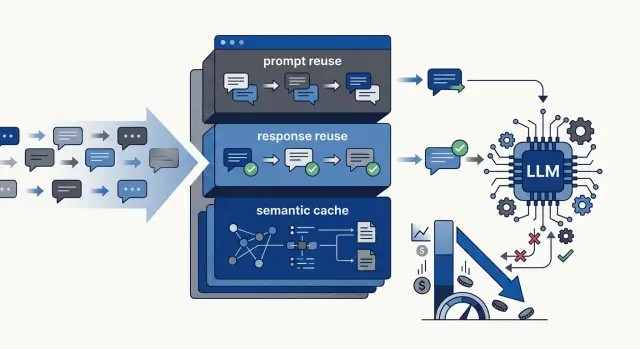
Table of Contents
Why costs rise on normal LLM traffic
Most LLM bills grow for a simple reason: teams keep paying for the same work.
A user asks a familiar question, the app sends the full prompt again, and the model processes it as if it has never seen any part of it before. That gets expensive fast when every request includes a long system prompt, policy text, examples, and formatting rules. If the shared setup costs 1,500 tokens, you pay for those 1,500 tokens on easy questions and hard ones alike.
The repetition is usually bigger than teams expect. Support bots, internal assistants, and search tools often receive the same requests with tiny wording changes. "How do I reset my password?" and "I can't log in, how do I change my password?" often lead to the same answer, yet many apps still trigger a fresh model call for both.
The problem grows quietly. One person adds a few instructions. Someone else adds legal text. Then examples. Then output rules. Each change feels minor, but the prompt keeps expanding until the setup costs more than the user's actual question.
Many teams also miss how much repeated traffic they really have. They watch total request volume and total spend, but they rarely sort prompts into exact repeats, near repeats, and true one-off questions. That blind spot matters. You only save real money with caching when you know what kind of repetition shows up in production.
A simple example makes it obvious. If 2,000 users ask about refund timing over a week in slightly different words, the model may generate nearly the same answer 2,000 times. Without reuse, you pay again for the same instructions, the same context, and often the same output.
Costs rise because token use compounds in the background. Small repeats, long instructions, and unnoticed traffic patterns pile up until the invoice finally gets attention.
Where caching helps and where it doesn't
Caching works best when the model sees the same work over and over. If your app sends a long fixed prompt, repeated policy text, or common customer questions, you can often reuse part of that work and cut spend without hurting output.
The best candidates are usually predictable tasks: long system instructions that barely change, FAQ answers, summaries for the same document, and classification jobs with a small set of stable inputs. Similar questions can also benefit from a semantic cache, but only if you test it carefully.
Caching gets weaker when answers depend on fresh facts. Stock levels, live prices, account balances, recent tickets, and anything tied to a changing database usually should skip shared response reuse. The same goes for one-off writing tasks, messy research questions, and prompts where each user brings a lot of new context.
Prompt reuse is the safest starting point for most teams. If your app sends the same 1,500 tokens of instructions every time, reuse that block and stop paying for it on every call. The answer can still be fresh, while the repeated setup no longer burns tokens.
Response reuse is narrower. It works when the same input should produce the same output, or something very close. Think standard policy answers, repeated moderation checks, or short drafts with fixed rules. It breaks down when timing, tone, user history, or live data should change the reply.
Privacy matters more than a small cost win. Keep personal details, account data, uploaded files, and internal notes out of any shared cache. If you need to cache user-specific material, scope it to that user or tenant and keep the lifetime short.
A blunt test helps: if two different people ask this tomorrow, should they get the same answer? If yes, caching probably helps. If no, call the model again.
Prompt reuse cuts setup cost first
Prompt reuse is usually the cheapest place to start. Many teams pay for the same setup text on every request: role, tone, safety rules, output format, tool instructions, and product facts. If that text rarely changes, keep it in a reusable block and send it in the same order every time.
The cleanest setup is to split prompts into two parts. Put the stable rules in one fixed block. Put the user's message, account details, recent context, and anything time-sensitive in a changing block. That split keeps prompts smaller and makes bugs easier to trace.
In practice, the fixed block usually holds role, style, safety rules, output format, and business policy. The changing block holds the question, customer data, recent messages, and specific limits for that request.
If your model provider supports prompt caching, consistency matters. Keep the reusable block at the top. Keep spacing the same. Don't slip timestamps, request IDs, or session notes into the shared section. Small changes like that often wipe out the savings.
Treat prompts like code and version them. Names like "support_v4" or "summary_v2" are enough. When costs jump or answers change, version tags let you compare prompt changes instead of guessing.
Measure the result before you declare success. Track average input tokens per request, total spend for that flow, and answer quality on a small test set. A support bot that repeats 700 setup tokens across 20,000 requests burns 14 million input tokens on setup alone. That's usually the easiest waste to cut.
Prompt reuse won't shrink every bill, but it pays off quickly when many requests share a long, stable instruction set. That's why most teams should start here before trying more aggressive reuse.
Response reuse fits exact repeats
If the same request appears again and you expect the same answer, don't pay the model twice. Save the first output and return it on the next exact match. This is often the safest form of caching because the rule is easy to understand.
It works best for stable tasks: FAQ answers, policy text, product details that rarely change, or fixed formatting jobs where the same input should always produce the same result. If two users ask the exact same thing and your rules haven't changed, reusing the answer is usually the right call.
The match should stay strict. Build the cache key from everything that affects the answer, not just the visible user text. That usually includes the system prompt, locale, model settings, and any fixed instructions. Cleaning up harmless differences like extra spaces is fine. Getting loose with meaning is not.
Store the prompt version with every cached answer. This avoids a common failure. If you change the system prompt, tighten the style, or add a new output field, older answers should stop matching immediately.
Time matters too. Some answers stay correct for weeks. Others go stale by lunch. Pricing, stock status, support hours, and policy updates need short expiry times. For fast-moving topics, accept more cache misses instead of serving old information.
A few rules keep response reuse safe:
- Reuse only when the same input should return the same answer.
- Attach a prompt version to every cached result.
- Use short expiry times for facts that change often.
- Skip reuse when time, user history, or fresh data can change the answer.
Exact-match reuse isn't fancy. That's the point. It cuts cost quickly, keeps behavior predictable, and fails less often than more advanced cache strategies.
Semantic cache saves money on similar requests
A semantic cache matches requests by meaning, not just by text. That matters when two users ask the same thing in different words. "How do I reset my password?" and "I can't log in, how can I change my password?" may deserve the same answer even though the wording differs.
This approach can cut costs fast in support, search, and FAQ-heavy flows. It can also reduce delay because the system returns a stored answer instead of calling the model again.
The hard part is deciding when two requests are actually similar enough.
A good starting point is a similarity threshold, followed by testing with real traffic. If the threshold is too loose, users get answers that feel close but wrong. If it's too strict, you miss easy savings and fall back to the model too often.
Before trusting semantic matches in production, test several kinds of pairs: questions that should share one answer, questions that look similar but need different answers, messy short queries, slang, misspellings, and edge cases involving dates, prices, or account-specific details.
Start with low-risk tasks. Return policy questions, office hours, product basics, and common setup steps are usually good candidates. Billing disputes, medical advice, legal wording, and anything tied to a user's live account data are not.
For example, a support team might cache answers for "Do you offer refunds?" and reuse them for "Can I get my money back?" if the policy is stable. That same team should not reuse a cached answer for "Why was my card charged twice?" because the correct reply depends on the user's record.
When match confidence drops, call the model again. That fallback protects quality better than forcing every near match through the cache.
The conservative approach works best here. A smaller semantic cache with clean matches is far better than a larger one full of almost-right answers.
Roll out guardrails in order
Good caching starts with restraint. Pick one narrow workflow where the answer shape stays fairly stable, such as support replies for account setup or internal help for policy questions. If you try to cache every prompt in the product on day one, you'll spend more time cleaning up mistakes than saving money.
Start with exact-match response caching. It's the lowest-risk option because the same input returns the same saved answer. Then move long instructions into reusable prompt blocks. Many teams get solid savings just from those two changes.
Only after that should you test semantic matching on a small slice of traffic. It can save more money, but it also adds more risk. Similar questions don't always deserve the same answer. A billing question from one country and a billing question from another may look close enough to match while still needing different responses.
A simple rollout order works well:
- Choose one workflow with low risk and lots of repeats.
- Add exact-match response reuse and review a sample by hand.
- Reuse repeated prompt instructions that rarely change.
- Test semantic matching only after reviewing misses and near-misses.
- Log hits, misses, and bad reuses so you can tighten the rules.
Those logs matter more than most teams expect. Track how often the cache hits, how much it saves, and which reused answers needed a retry. If reused answers cause even a small increase in corrections, tighten the match rules before expanding the cache to other workflows.
A simple support bot example
An online store support bot often gets the same refund question hundreds of times a day. Customers ask about return windows, refund timing, restocking fees, and whether shipping is refundable. This is exactly where caching can pay off.
Start with exact matches. If one customer asks, "Can I get a refund within 30 days?" and the next customer sends the same text, the bot should return the cached answer instead of calling the model again.
A lot of support traffic is close, but not identical. One person writes, "How long do I have to return this?" Another asks, "Can I send it back after two weeks?" The wording changes, but the intent is usually the same. A semantic cache can catch those near-duplicates and reuse a solid answer.
But support bots should not cache everything. If a customer asks, "Where is my refund for order 18427?" the bot needs fresh data. The answer depends on that user, that order, and the current payment status. A cached policy answer is fine for general rules. Account-specific questions need a live call and often a system check.
A practical flow is straightforward: check for an exact match first, then look for a close semantic match, and skip the cache entirely if the question includes order details, account status, or a time-sensitive exception. When the system does generate a new answer, save it with a short expiry.
That expiry matters. Refund rules can change after a holiday season, a pricing update, or a policy rewrite. If cached answers live too long, the bot gives outdated guidance with a very confident tone. For policy questions, a few hours or a day is often safer than several weeks.
Used this way, the cache handles the repetitive work, and fresh model calls handle the cases where being wrong costs more than one extra request.
Mistakes that make output worse
The fastest way to lose trust is to cache answers that depend on live data. Prices, stock levels, account balances, delivery windows, and policy details can change after the model answers once. If you reuse that old text, the answer still sounds confident, but it's wrong.
A support bot can often reuse a return policy summary. It should not reuse yesterday's quoted price for today's shopper. When the source changes often, fetch fresh data first and keep the cache window short.
Another common mistake is sharing cached text across users without checking who asked. Two people may write almost the same question, but one answer may include account details, plan limits, or internal notes that should never be shown to anyone else.
Stale answers cause quieter damage. They don't always look broken, so they sit in the system for weeks. Set time-to-live rules by topic, not one blanket expiry for everything. A product description might stay fine for days. A billing answer might expire in minutes.
Semantic cache settings also cause trouble when teams get too loose. If the similarity threshold is too low, the system starts treating different questions as the same question. That saves money for a while, then users get answers that are off by one important detail, which is often enough to make the whole reply useless.
A few guardrails prevent most of this:
- Don't cache answers tied to live prices or personal account data unless you recheck the source.
- Keep expiry times short for fast-changing topics.
- Use stricter semantic matching than you think you need.
- Split caches by user, tenant, region, or plan when answers can vary.
- Clear or version the cache whenever you change the system prompt or retrieval logic.
That last one gets missed all the time. A prompt update changes the model's behavior, tone, and rules. If old cached answers keep flowing after the update, you end up testing two systems at once and blaming the model for a cache problem.
Quick checks before you turn it on
Caching fails when teams switch it on everywhere at once. Do a short review first and skip any task where a stale or mismatched answer would cause real trouble.
Before picking a caching strategy, ask a few plain questions. If ten users ask the same thing, can they all get the same answer? Does the task use live, private, or user-specific data? How long can the answer stay fresh? What events should force a new model call? And who will review bad cache hits when they happen?
One simple rule holds up well: the more personal or time-sensitive the task is, the shorter the cache life should be. If the answer touches money, security, or compliance, start with prompt reuse only. That cuts setup tokens without replaying text that may be wrong for the next user.
Semantic matching needs extra care. Two prompts can look close while asking for different actions. "How do I cancel my plan?" and "How do I pause my plan?" share words, but they do not ask for the same thing. If a wrong match could send a user down the wrong path, lower the similarity threshold or skip semantic matching for that workflow.
If nobody owns bad cache reviews, the system drifts. A small amount of review up front prevents most of the pain later.
What to do next
Start with one flow that already costs real money. Good candidates are support replies, document Q&A, or any feature that sends the same setup prompt again and again. Measure how many requests repeat exactly, how many are only close, and what each request costs before changing anything.
Then add one cache layer, not three. Most teams should begin with prompt reuse because it's the safest way to cut waste. If that works, add exact response reuse for repeated questions. Leave semantic matching for later, after you know where similar requests help and where they create risk.
A small rollout beats a clever one. Pick one expensive path, log repeated requests for a week or two, add the first cache only to that path, and track savings next to the wrong-answer rate. Review misses and bad hits every few days. Expand only when the numbers stay steady.
The wrong metric can fool you quickly. A cache that cuts spend by 40% is a bad trade if it serves stale answers, repeats old pricing, or mixes up user context. Keep a simple scorecard: hit rate, money saved, latency change, and wrong-answer rate. If one number improves while trust drops, stop and tighten the rules.
This is where many teams get careless. They add semantic cache too early, use loose thresholds, and then blame the model when users get the wrong answer. In practice, boring rules work better: short TTLs, strict matching for sensitive tasks, and no reuse when user data or time-sensitive facts matter.
If you want a second opinion before rolling this out more widely, Oleg Sotnikov at oleg.is works as a Fractional CTO and startup advisor and helps teams build practical AI systems with clear guardrails. That kind of review can save a lot of trial and error, especially when cost control and output quality both matter.
Frequently Asked Questions
What should I cache first?
Pick one flow with lots of repeats and low risk, like FAQ replies or internal policy help. Prompt reuse usually gives the safest first win because you cut repeated setup tokens without reusing a full answer.
Is prompt reuse safer than response caching?
Usually, yes. Reusing the stable instruction block keeps answers fresh while removing repeated setup cost. Full response reuse works well too, but only when the same input should return the same answer.
When should I skip caching completely?
Avoid it when the reply depends on live facts or private data. Prices, stock, account balances, order status, and anything tied to one user should trigger a fresh check and often a fresh model call.
How should I split a prompt for reuse?
Split it into a fixed block and a changing block. Keep role, style, policy, and format rules in the fixed part, then put the user message, recent context, and account details in the changing part.
What makes exact-match response caching safe?
Build the cache key from everything that changes the answer, not just the user text. Include the prompt version, locale, model settings, and any fixed instructions so an old answer does not match after you change the rules.
How long should a cached answer live?
Set the lifetime by topic, not with one rule for everything. A stable policy answer might last hours or a day, while billing, pricing, or delivery details often need minutes or no shared cache at all.
Does semantic caching work for support questions?
It can, but only on narrow tasks with stable answers. Keep the similarity threshold strict, test real question pairs, and fall back to the model when the match feels uncertain.
How do I know if caching is hurting output quality?
Watch more than hit rate. Track money saved, latency, retries, and wrong-answer rate, then review a sample of reused replies by hand. If savings go up but corrections rise too, tighten the rules.
Should I use one shared cache for every user?
No, not by default. Shared caches can leak account details or tenant-specific rules. Scope private material to the user or tenant, and keep that cache short-lived.
What rollout order keeps risk low?
Roll it out in layers. Try exact-match response reuse on one workflow, add prompt reuse for repeated instructions, and test semantic matching last on a small slice of traffic.