Live data migration backfill plan that avoids downtime
A practical guide to a live data migration backfill plan: slice historical data, protect new writes, track catch-up speed, and finish with less risk.
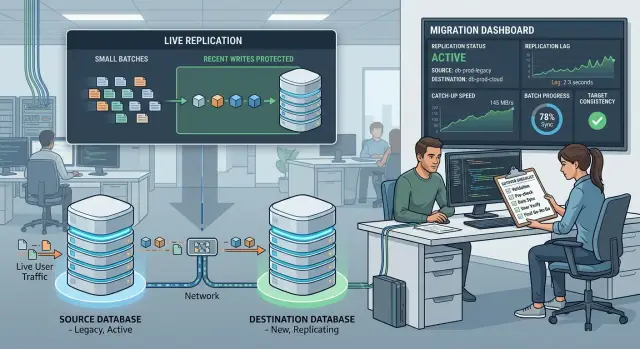
Table of Contents
Why live migrations break in real life
Most teams can't pause a product long enough to copy everything from one system to another. Orders still come in. Users still edit profiles. Support still changes account settings. Background jobs keep writing data. Even a few hours of downtime can mean lost sales, angry customers, and cleanup work that drags on for days.
That is why a live migration has two jobs, not one. It has to move the old data already sitting in the source system, and it has to keep up with the new writes arriving while that copy is still running. Teams usually plan for the first job and underestimate the second.
Old records create a volume problem. You may need to copy millions of rows, files, events, or documents, and every batch takes time to read, transform, validate, and write. New writes create a timing problem. A customer can update the same record while the backfill is halfway through, or seconds after you copied an older version.
When the migration falls behind, users notice fast. They see missing orders, stale balances, duplicate messages, search results that don't match recent edits, or a dashboard that shows yesterday's state on one screen and today's state on another. The app still looks "up," but the data feels random, and that is when trust starts to slip.
A busy SaaS product makes this worse. Picture a team moving customer accounts to a new database while sales reps keep updating billing details and users keep changing permissions. If the migration copies old account rows in large chunks without handling fresh changes, the new system will always trail behind real activity.
The goal is simple: move data without blocking daily work. To do that, the plan has to copy the past, capture the present, and show the team exactly how far behind it is at any moment. If normal work has to stop so the migration can catch its breath, the plan is too fragile.
What the plan needs to protect
Start with one blunt question: what data cannot be wrong even for a minute? Teams often focus on moving everything. The safer move is to name the records that affect money, access, customer activity, and reporting first.
Most systems hold two very different kinds of data. Historical records are old orders, logs, archived messages, and past snapshots. Fresh writes are the rows, files, or events users create right now. You can usually backfill history in batches if you give it enough time. Fresh writes need stricter rules because they keep changing while the move is running.
If you treat those two groups the same way, problems stay hidden until late. A customer updates an address in the old system, a payment lands in the new one, and now the same account exists in two different states. The dashboard may still look fine, but the product breaks in real use.
A practical way to sort priorities is by business risk. Put balances, billing, inventory, and permissions at the top. Next come records customers can edit during the migration. Then cover records needed for support, audits, or legal history. Large old datasets that rarely change can wait until the process is stable.
That order gives you a sensible rollout. Start with data you can copy and verify without much churn. Leave the busiest write paths for later, when version checks, replay rules, and validation are already working. If files depend on database rows, or events rebuild tables later, move them in the order that keeps those dependencies intact.
It also helps to write down what can lag, for how long, and what must match before cutover. A team that agrees on those rules early makes better decisions under pressure.
How to slice the data into safe batches
Backfills work best when each batch is boring. You want slices that finish quickly, fail in a small area, and tell you exactly what to retry. If one batch takes two hours and touches half a table, that is not really a batch. It is another migration hidden inside the first one.
Pick a field that already splits the data in a clean way. Teams usually use time ranges, ID ranges, tenant boundaries, or regions. The best choice depends on how people use the product. If traffic spikes around a few large customers, tenant based slices often make more sense than raw ID ranges. If old records rarely change, date windows are usually easier to manage.
Keep batches small enough that a retry feels cheap. A good batch often finishes in a few minutes, not half a day. That gives you room to pause, inspect errors, and rerun the same slice without turning the whole migration into a fire drill.
Simple rules help. Use one clear boundary per batch, such as one day of data or one tenant group. Size the slice so you can rerun it quickly if validation fails. Start with quiet data before you touch busy accounts or recent records. Record the exact order before you begin, and define stop rules in advance, such as error rate, growing lag, or row count mismatch.
The order matters more than many teams expect. Start with low risk slices first so you can test the path under normal load. Move to heavier or more active slices only after the early ones pass validation. Those first runs will tell you whether the batch size is realistic or whether you need to cut it down.
Write the plan down in plain language. For example: migrate tenants 101 to 150, then 151 to 200, pause if lag stays above five minutes for more than ten minutes, stop if validation fails on any batch. During a live migration, simple rules beat clever ones.
How to protect recent writes while backfill runs
If customers keep placing orders, editing profiles, or canceling subscriptions, your backfill goes stale quickly. During the migration, keep the source system as the only place that accepts writes until cutover.
That choice avoids a messy split brain setup. In most cases, the safest protection is one write path plus a mirrored change stream, not two separate writes from the app to two databases.
Every new insert, update, and delete should create a change record that the target can apply in order. Teams often use change data capture, an outbox table, or an event log for this. The tool matters less than the rule: every change must be replayable.
The target also needs a way to reject stale data. If the backfill copies an older row after a newer edit already reached the target, the target should keep the newer version. A source version number, sequence, or trusted update timestamp usually solves this. If the incoming batch is older than what the target already has, skip it.
Deletes need the same care. Don't drop them from the stream just because the row is gone in the source table. Keep a tombstone or delete event so the target knows the record was removed and does not bring it back during a later batch.
Store enough metadata to recover from a missed window or a worker crash: a stable record ID, the operation type, a source sequence number or log position, the source commit time or version, and a delete marker when the row no longer exists.
A small example makes the point. Say a user changes their shipping address at 10:02, and the change stream delivers that update to the target right away. At 10:03, the backfill copies the older 9:55 row. Without version checks, the target ends up wrong. With version checks, the target ignores the stale batch row and keeps the new address.
If the mirror worker stops for 20 minutes, you should know exactly where to resume. When you can restart from the last stored position and replay every missed change, recent writes stay protected while the backfill keeps moving.
How to measure catch-up speed
A migration fails when the team watches total rows moved but ignores lag. Raw speed looks good on a dashboard, but it does not tell you whether the target is getting closer to real time.
Watch four numbers together: rows copied per minute, failed rows or retry rate, lag between source and target, and queue depth for pending batches or events.
Rows per minute tells you how fast workers copy old data. Retry rate tells you whether that speed is real or fake. A worker that copies 200,000 rows a minute and then retries 15 percent of them is not moving nearly as fast as it looks.
Lag matters most near cutover. Measure it in time and in records. Time lag answers, "How far behind is the target?" Record lag answers, "How much data still needs to land?" You want both, because a small number of heavy records can still slow the finish.
Use net throughput, not just throughput. If backfill workers move 180,000 rows per minute, but the source keeps getting 30,000 fresh rows per minute, your real catch up speed is 150,000 rows per minute. If 12 million rows remain, you need about 80 minutes, not 67. Recalculate that estimate from live traffic every few minutes. A guess made before the run won't hold for long.
Also watch for stalls. Set alerts when a worker reports no progress for a few minutes, when retries jump above the usual range, or when the pending queue grows instead of shrinks. A growing queue usually means one of two things: the target got slower, or fresh writes started arriving faster than your pipeline can absorb.
Don't wait for a full outage to treat that as a problem. If lag climbs for 10 to 15 minutes in a row, pause the next batch, check write load, and find the bottleneck while users can still work normally.
A step-by-step rollout plan
A good rollout feels a little slow at first. That is usually a good sign. You want enough control to catch bad assumptions before they spread across millions of rows.
Treat the migration as a series of gated passes. Each pass needs a clear goal, a clear stop rule, and one person who can decide whether to continue or pause.
-
Freeze the scope for the first pass. Pick the exact tables, fields, and write paths you will include, then leave everything else alone. If the product team keeps adding schema changes or special cases during the first run, you lose the ability to tell whether a mismatch comes from the migration or from shifting requirements.
-
Run a small trial batch first. Use a narrow slice of data that is easy to inspect, such as one tenant, one date range, or a few thousand records. Compare row counts, checksums, timestamps, and a handful of real records by hand. Small tests catch ugly issues fast, like timezone shifts or missing default values.
-
Increase the volume in steps. Move from tiny batches to medium ones, then larger ones, while you watch lag, retry rate, queue depth, and database load. If the first batch copies 10,000 rows cleanly, the next one does not need to be 10 million. A 5x or 10x increase is easier to control.
-
Pause when the numbers drift. Don't push through bad signals. If counts stop matching, recent writes fail to appear, or the source database slows down, stop the backfill, fix the cause, and resume from the last clean checkpoint. That is much cheaper than cleaning up silent data damage later.
Keep notes during each pass. Write down batch size, runtime, lag, and what changed before the next run. After two or three rounds, the pattern usually becomes obvious, and the final rollout stops feeling like a bet.
A simple example from a busy product
A subscription app is a good test case because it never really sleeps. Customers update cards, invoices close, renewals fire, and support staff edit account details all day. If you pause writes, you block revenue. If you move everything at once, you raise the chance of a messy rollback.
A safer plan starts with old customer history. The team copies closed invoices, past billing periods, and inactive customer records first. Those rows still matter, but they change less often, so they are safer to move in batches.
The team might split the copy by invoice month or customer ID range. That keeps each batch small enough to retry. If batch 18 fails, they rerun batch 18 instead of starting over.
While this backfill runs, the app still accepts fresh payments and profile edits. Every new payment, refund, email change, and plan change goes through a replay queue. The new database gets those recent writes after the base records arrive, so it does not fall behind for long.
One simple rule helps: copy the past first, replay the present continuously. That keeps the migration moving without freezing normal work.
Before switching reads, compare both sides with numbers the business actually cares about: active subscriptions by plan, invoice totals by day, unpaid balance totals, the latest payment IDs for sampled customers, and recent profile updates for sampled accounts.
Don't flip traffic just because the copy job finished. Wait until those totals match and the replay queue stays close to empty. If the old system shows 12,404 active subscriptions and the new one shows 12,398, stop and find the gap.
Once the counts and money totals line up, move a small share of read traffic to the new database. Support should check a few real accounts, including one with a failed payment and one with a recent profile change. If those look right, shifting the rest of the reads becomes much less risky.
Mistakes teams make during backfill
Most failures come from simple choices that look harmless on paper. Teams often chase raw speed before they make retries safe. Fast copies look good until one bad batch forces a messy restart.
The first mistake is making batches too large. If one batch touches millions of rows, a timeout, lock, or bad transform can turn a small issue into hours of cleanup. Smaller slices take more planning, but they are much easier to rerun and verify. If a batch fails in the afternoon, the team should be able to retry that slice in minutes, not spend the rest of the day untangling it.
Deletes cause another quiet problem. Teams often keep inserts and updates in sync, then leave deletes for the final switch. That creates ghost records in the target: data that looks real there but no longer exists in the source. If a customer deleted a project three days ago, cutover should not bring it back. Handle deletes from the start, even if you track them in a simple change log.
Another common mistake is trusting row counts too much. Two tables can have the same number of rows and still disagree on the fields users actually notice. A status flag, billing setting, timestamp, or permission value can break the product even when the totals match. Compare sample records field by field, and start with the columns that change what users see or can do.
Teams also cut over too early. They see lag drop once, assume the target is ready, and switch traffic while the system still wobbles under normal load. Watch lag over time, not at one lucky moment. If traffic spikes every weekday morning, wait through that spike and make sure the target still catches up.
A good backfill should feel boring in the best way. Small retries work. Deletes stay in sync. Checks go deeper than row counts. Lag stays low long enough that nobody has to guess.
A short checklist before cutover
Cutover day is a bad time to rely on gut feeling. Before you switch reads or stop the old path, pause and verify a few things by hand.
- Compare a small sample of records in both systems. Include old rows, records created in the last few minutes, and records that changed more than once during the backfill window.
- Check those samples field by field. Look for missing updates, wrong timestamps, empty fields, and duplicate rows.
- Trigger a few real writes and confirm they still land in the correct place. If you use mirrored writes, make sure both sides receive the same change in the same order.
- Review lag, retry volume, and failed records. A low average lag can hide a small set of stuck items that matter a lot.
- Run the rollback steps again, even if you tested them last week. People forget commands, credentials expire, and dashboards change.
Numbers help, but they do not replace direct checks. If your dashboard says lag is near zero, yet one recently edited customer account still differs between systems, stop and fix that first. One mismatch near cutover often points to a whole class of records you have not found yet.
Keep the final check small and practical. Ten to twenty sampled records, a handful of fresh writes, and one rollback rehearsal usually tell you more than another hour of debate. If anything looks unclear, delay the cutover. A short delay is cheap. Cleaning up silent data loss after launch is not.
Next steps if you need a second set of eyes
A migration plan that lives in one person's head usually falls apart under pressure. Write the whole runbook down before you touch production. Keep it plain: what starts first, what stays read only, what gets compared, who makes the cutover call, and what sends the team into rollback.
Your runbook should answer the questions people ask when things get tense. If lag stops dropping, who decides whether to wait or abort? If mirrored writes drift, who checks the source of truth? If support starts seeing customer issues, who pauses the move?
Clear ownership helps more than another meeting. One person should own the data copy and validation checks. One should own app writes, mirrored write behavior, and feature flags. One should own rollback steps and the decision log. One should watch metrics, error rates, and catch up speed during the move.
That level of clarity matters even more when revenue or customer data is involved. If the migration touches billing, orders, subscriptions, balances, or account history, bring in an experienced fractional CTO or outside reviewer before cutover. Fresh eyes often catch the ugly parts internal teams normalize, like hidden write paths, weak rollback steps, or a backfill plan that looks fine on paper but falls behind under real load.
A good review does not need weeks. Someone experienced can read the migration plan, look at batch sizing, recent write protection, validation rules, and the cutover sequence, then point out the weak spots quickly.
If you want outside help, Oleg Sotnikov at oleg.is works with startups and smaller companies as a fractional CTO and advisor. He can review the migration architecture, the backfill flow, and the cutover risks before you switch production traffic.
Frequently Asked Questions
What is a live migration backfill?
It copies historical data in batches while a change stream keeps recent inserts, updates, and deletes moving to the target.
Keep the source as the only write path until cutover. That keeps the move simple and avoids split brain.
How do I choose safe batch boundaries?
Pick a boundary that matches how your product works, not just what looks neat in the database.
Time ranges work well for older records. Tenant groups or customer segments often work better when a few large accounts create most of the traffic. ID ranges help when the data is evenly spread.
How big should each batch be?
Make each batch cheap to retry. A good slice usually finishes in a few minutes, not hours.
If one failure forces half a day of cleanup, the batch is too large. Cut it down until you can rerun it without drama.
How do I stop stale backfill data from overwriting fresh edits?
Give every change a version, sequence number, or trusted update time. The target should apply only the newest version it has seen.
That way, if the backfill sends an older row after a fresh edit already arrived, the target keeps the newer data.
Do I really need to handle deletes during the migration?
Track deletes from the start with tombstones or delete events. If you skip them, the target can bring back records users already removed.
Treat deletes like any other change. Replay them in order and keep enough metadata to resume after a crash.
Which metrics tell me if the migration is catching up?
Watch rows copied per minute, retry rate, lag, and queue depth together.
Lag matters most near cutover. Measure it in time and in records, then use net throughput instead of raw speed. If you copy 180,000 rows a minute but users create 30,000 new rows, you only gain 150,000 a minute.
When should we pause the migration?
Pause when lag keeps rising, retries jump, validation starts failing, or workers stop making progress.
Also stop if the source database slows down enough that users feel it. A short pause is cheaper than fixing silent data damage later.
Are row counts enough to prove the migration worked?
No. Matching counts only tell you that both sides hold the same number of rows.
You can still have wrong status values, missing timestamps, bad permissions, or stale balances. Check sample records field by field, especially the columns that change what users see or can do.
What should I verify right before cutover?
Compare a small sample of old records, recent records, and records that changed more than once during the move.
Then trigger a few real writes, confirm they land correctly, check that lag stays low, and rehearse rollback one more time. If one sampled record looks wrong, stop and find the pattern behind it.
When does it make sense to ask for outside help?
Bring in a reviewer when the move touches billing, orders, subscriptions, balances, permissions, or other data that can hurt customers fast.
A second set of eyes often spots hidden write paths, weak validation, or a rollback plan that looks fine on paper but fails under load. If you want that review, a fractional CTO can check the runbook, backfill flow, and cutover steps before you switch production traffic.


