How to write release notes with a lightweight workflow
Learn how to write release notes with a simple workflow that turns merged work into clear updates for customers, support, and internal teams.
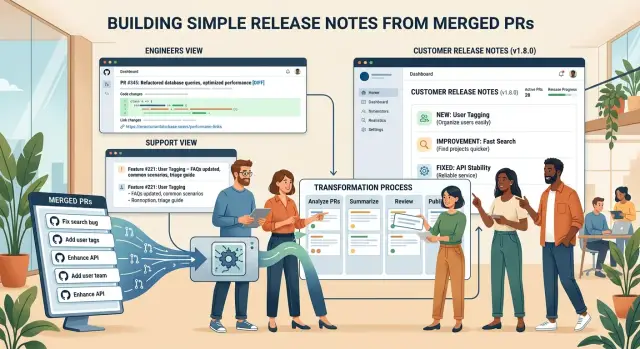
Table of Contents
Why release notes break down
Teams often assume release notes fail because the writing is hard. Usually, the writing is not the main problem. The trouble starts earlier, when work moves from branch to merge to deploy and no one captures the customer context.
Engineers merge quickly for a good reason. Fast teams keep shipping. Someone fixes a bug, closes a ticket, and moves on. By release day, the details that mattered are buried in commit messages, pull requests, and comments that only made sense at the time.
Support often hears about the change too late. Instead of getting a clean summary, they piece the story together from tickets, chat threads, and customer complaints. That handoff breaks down fast. Support can't answer simple questions with confidence, and customers notice.
Then the notes themselves become filler. Teams fall back on lines like "bug fixes and improvements" because they are safe and fast. They are also almost useless. Customers want to know what changed, who it affects, and whether they need to do anything. "Improvements" answers none of that.
Timing makes it worse. In many teams, one person rewrites everything right before release. That person was not in the standup, did not review the pull request, and may not know why the change mattered. They turn technical scraps into public notes under pressure. Good detail disappears. Weak guesses make it through.
That is why release notes break even in strong engineering teams. The writing feels painful because the process asks one person to recover context the team never saved. Fix that moment, and release notes stop feeling like cleanup work. They start working as product communication.
What good notes need
Good release notes answer one question fast: what changed, and why should anyone care? If a customer has to decode ticket names, branch names, or commit slang, the note already failed.
Use plain words first. Write "You can now export invoices as CSV" instead of "Added billing export endpoint." The work happened in a repo, but the note should sound like it belongs in the product.
Each update should say who will notice it. Sometimes that means every user. Often it is a smaller group, such as admins, mobile users, or teams with API access. That small detail saves time because people can tell right away whether the change applies to them.
Say if users need to do anything. If they need to refresh a setting, reconnect an integration, or update a mobile app, put that next to the change itself. Don't bury the action at the end. People skim release notes. They miss hidden instructions.
Keep a hard boundary between public and internal language. Customers do not need "PROJ-1842" or "feature/usage-cap-refactor." Support and engineering might, but those belong in internal notes.
A simple way to keep this clean is to treat each shipped item as two or three short versions of the same update. The customer note explains the visible change in plain language. The internal note keeps ticket IDs, rollout detail, edge cases, and owner names. If support is likely to get questions, add a support note with the expected issue and the answer.
A weak note says, "Refactored auth flow and fixed session handling." A better note says, "Signing in now works more reliably on shared devices. If your team uses saved browser profiles, sign in once again after the update."
That is the standard. Clear change, clear audience, clear action. If someone can read one line and know what changed, the note did its job.
Choose what belongs in the notes
Most release notes get noisy because teams treat them like a changelog dump. That is the fastest way to make people stop reading. Start with a simple filter: does this change matter to a customer, an admin, or support?
Visible features almost always belong in the notes. So do fixes that change behavior, even if they sound minor inside the team. If a button now works on mobile, a report loads in half the time, or failed payments retry in a new way, call it out.
Some updates affect trust more than interface. Billing changes, permission changes, and settings changes need a note even when the screen looks the same. People notice when invoices look different, when a role loses access, or when a default setting changes after an update.
The filter is simple. Include features people can use now. Include fixes that change behavior or results. Include changes to accounts, billing, permissions, and settings. Skip refactors, test updates, and internal cleanup. Add invisible fixes only when support may need them in a real ticket.
That last point saves a lot of trouble. Some fixes never show up for most users but still matter in conversation. If the team fixed a race condition that caused duplicate emails in rare cases, customers may never see it again after the fix. Support should still know what changed and when it shipped.
Be strict about what you leave out. Database migrations, package upgrades, renamed files, and code cleanup belong in internal records, not customer notes. Engineers need them. Customers do not.
If your team is small, this filter keeps the process light. It also makes support faster because every item in the notes answers a question someone might actually ask.
Capture details when work gets merged
Release notes get worse with time because memory fades fast. Wait until release day, and the person who merged the work may barely remember what changed, why it mattered, or what users will notice.
The fix is simple: collect release note detail in every pull request. One extra minute at merge time saves a messy hour later. It also makes the support handoff easier because the context sits next to the code.
A small pull request template is enough:
Customer note:
What changed in one sentence:
Who notices this first:
Likely support question:
Screenshot or before/after image:
Keep each field short. "What changed in one sentence" forces the author to translate repo language into plain English. "Refactored billing service" tells a customer nothing. "Invoices now load faster and show failed payment reasons" does.
"Who notices this first" helps you decide whether the change belongs in customer notes, internal notes, or both. Sometimes the first people affected are admins, support agents, or account managers, not end users.
The support question often saves the team from repeat tickets. Ask support to add the first question they expect after the change ships, such as "Why does the export screen look different now?" That answer can move straight into the release note or support doc.
When the interface changes, ask for a screenshot before the pull request gets approved. A simple before and after image is enough. It helps the final writer describe the change clearly and settles the usual debate about what actually changed on screen.
If you want a lightweight process, start here. Put the template in the pull request, make it part of review, and do not merge without it. Notes get better because the detail shows up while it is still fresh.
Set up the workflow step by step
A release note process only works if people can follow it without thinking too hard. Keep it small and predictable. The best setup starts right after code gets merged, not at the end of the month when nobody remembers what shipped.
Send every merged pull request to one review queue. That queue can live in your issue tracker, a chat channel, or a shared document. The tool matters less than the habit. One place means nobody has to search through five repos and two chat threads to reconstruct the release.
The workflow is simple. Send each merged pull request into the queue with a short raw summary. Review the queue on a fixed schedule, such as every Friday or before each release. Rewrite the technical summaries in plain language. Group related fixes into one update instead of listing every small commit. Then publish the customer version and the support version at the same time.
The schedule matters more than most teams expect. If review happens at random, release notes fall behind and start feeling like extra work. A fixed slot keeps the task small. For a steady product team, twenty minutes a week is often enough.
Raw engineer notes rarely work as customer notes. "Refactored auth token refresh flow" tells support something useful, but it tells a customer almost nothing. Rewrite it as "Login sessions now stay active more reliably during long admin tasks." Same change, clearer result.
Grouping helps too. If a sprint includes four small billing fixes, publish them as one billing update unless users truly need each item on its own. Long lists feel noisy. Short grouped notes feel intentional.
Support usually needs a little more context. Give customers the outcome. Give support the outcome plus a short note on impact, edge cases, or setup changes. Publish both versions from the same source so support does not hear about a change after the first ticket arrives.
Write for customers and support, not for the repo
A merged pull request explains work to engineers. Release notes do a different job. They tell customers what changed, what they will notice, and whether they need to do anything now.
Start with the result, not the task name. "You can now resend invoices from the order screen" is clearer than "Add resend action to billing module." Each line should answer one plain question: what changed for the user?
Keep one change per line. Support teams scan fast, paste updates into replies, and look for the note that matches a complaint. Once one paragraph mixes three fixes, that speed disappears.
Cut team language before you publish. Most customers do not care that you changed an API, rewrote a job, or moved logic into another service. They care that uploads finish faster, search returns the right results, or login stops failing.
If users need to refresh a page, reconnect an integration, or change a setting, say it directly. Put the action in the same line as the change so nobody has to guess.
A few simple rewrites show the difference:
- Bad: "Improved webhook retry handling."
- Good: "Failed Shopify updates now retry automatically. Reconnect the store only if syncing still looks stuck."
- Bad: "Refactored auth token refresh."
- Good: "Sessions now stay active more often. Refresh the app once after the update if you still see a sign-in error."
Leave stack detail for internal readers. Customers do not need React, Redis, queue names, or database notes in public updates. Support may need more context, but that belongs in a separate internal handoff with bug IDs, rollout notes, and workaround steps.
A simple example from one sprint
Most sprint examples start with a boring pull request title. Imagine the team merges a fix for failed card retries after a payment timeout. The code change matters, but the raw PR text does not help customers, support, or anyone scanning updates on Friday afternoon.
One change can produce three short notes. That is the whole point of a lightweight workflow. You are not writing three long documents. You are writing three versions of the same update for three different readers.
Customer version: Payments now recover better after a timeout, so fewer checkout attempts fail when the connection drops for a moment.
Support version: Payment retries now recover more often after a timeout, but some banks may still delay confirmation. If a customer sees a pending charge, ask them to wait for bank processing before trying again.
Internal version: The team changed retry logic for timed out card payments and added better logs around retry attempts, gateway responses, and final status updates.
The customer note stays simple. It explains the result, not the mechanism. Most people do not care that the team changed retry rules. They care that checkout works better.
The support note adds the edge case. Some banks confirm slowly, so support needs a clear answer when someone asks why a payment still looks stuck.
The internal note keeps the engineering detail the other two versions do not need. That helps the next person who debugs billing, reviews logs, or checks whether the fix worked after release.
This is how to keep release notes from turning into homework. Capture the merged work once, then split it by audience. Five extra minutes at merge time can save a long support thread later, especially when finance asks why a charge still shows as pending.
Mistakes that make notes useless
Most bad release notes fail at translation. Teams ship real work, but the notes stay stuck in repo language. Customers do not care that a pull request renamed a service, split a job, or cleaned up a queue. They care what changed for them.
A pull request title is often a terrible final note. "Refactor auth cache invalidation" may be fine for engineers, but it does not help support or customers. A useful note says what the person will notice, such as "Fixed a sign in issue that could happen after a password reset."
Another common mistake is mixing internal cleanup with product changes in the same update. If you upgraded a library, removed old code, and changed checkout behavior, only one of those belongs in public release notes. Support may need the full picture. Customers need the part they can see.
Vague summaries create a different kind of confusion. Teams often pack ten small fixes into one line like "Bug fixes and improvements across the app." That saves two minutes for the writer and wastes much more time for everyone else. Support cannot answer questions from that sentence, and customers cannot tell whether the fix affects them.
A few patterns cause most of the trouble. Teams mention a feature that is still behind a flag, so customers go looking for something they cannot access. They write about a gradual rollout as if everyone already has it. They merge several small fixes into one blurry sentence. Or the first clear explanation appears only after complaints reach support.
Rollout timing needs plain words. If only 10% of users have the change today, say that. If a feature is available only to beta users, say that too. Silence creates more confusion than one honest sentence.
The worst habit is waiting for tickets to explain the release. By then, support is guessing, customers are annoyed, and the team is reconstructing what shipped. Good notes do that work before the questions start.
Quick checks before you publish
A release note fails fast when a customer has to read the same line twice. Teams often skip this last review, then wonder why support still gets basic questions after every release.
Read each line once as a customer, not as the person who built it. The sentence should say what changed, where people will notice it, and whether they need to do anything.
If a line feels vague, rewrite it in plain language. "Improved OAuth token refresh handling" may make sense in the repo, but customers understand "Login now stays active more reliably during long sessions."
Support needs a quick answer to the first question people will ask. Usually it is simple: "Do I need to change anything?" "Why does this look different?" "When will I see it?" The notes should make those answers obvious.
Before you publish, remove ticket IDs, branch names, and other internal shorthand. Group related changes so people can scan one product area at a time. Mark actions clearly. Say whether users need to update a setting, reconnect something, or do nothing. Mark risk clearly too. If a change can cause short delays or a different flow, say so in plain words. And mark timing clearly by saying when the update ships and whether everyone gets it at once or in stages.
One small habit helps more than people expect: read the notes out loud before posting them. If a sentence sounds like it belongs in a pull request, it probably does.
A final pass should take about ten minutes, not an hour. That short review can save support a long afternoon of repeat replies.
Next steps for your team
The fastest way to lose this process is to roll it out across the whole company on day one. Start with one product area instead. Pick a team that ships often enough to give you real examples, but not one buried under five layers of approval.
Run the workflow for two weeks, then change the template based on what people actually used. A short test is enough to expose the usual problems: fields nobody fills in, notes that still sound like commit messages, and review steps that slow everything down.
A small pilot needs very little. One person drafts the note after work gets merged. A short template captures plain language detail. A support reviewer checks for likely customer questions. A release owner decides what gets published.
Keep the template small. If it starts looking like a ticket form, people will avoid it or paste in lazy text. Most teams only need four things: what changed, who will notice, whether anyone needs to do anything, and what support should watch for.
Support should shape the process more than many teams expect. After the two week test, ask which notes cut repeat questions and which releases still caused confusion. If support says customers kept asking the same thing anyway, the note was probably too vague or buried the action in technical detail.
Be a little strict here. If a field never helps customers or support, remove it. If a review step adds a day and catches nothing, remove that too. The smaller the system stays, the more likely engineers will keep using it without reminders.
If you need help setting this up, Oleg Sotnikov at oleg.is works with startups and smaller companies on lean engineering process, Fractional CTO support, and practical AI software workflows. That can be useful when you want release notes to fit the way your team already ships instead of turning into another chore.
A good first test is simple: pick one area, publish notes for the next two weeks, and compare support questions before and after. That will tell you more than any long planning document.
Frequently Asked Questions
Why do release notes usually break down?
They usually fail before anyone starts writing. Teams merge and ship fast, but they do not save the customer context while the work is fresh, so one person has to guess the story right before release.
What should every release note include?
Each note should say what changed, who will notice it, and whether the user needs to do anything. If a reader can scan one line and understand the impact right away, the note works.
What changes belong in customer release notes?
Include features people can use now, fixes that change behavior, and updates to billing, permissions, settings, or accounts. If support will likely get questions about it, include it in some form even if most users never notice it.
What should stay out of public release notes?
Leave out refactors, package upgrades, database work, renamed files, and general cleanup. Engineers may need that detail internally, but customers only need changes they can see or feel.
When should the team write down release note details?
Capture the note at merge time, not on release day. A one minute summary in the pull request saves a lot of backtracking later and gives support better context.
What should a pull request template ask for?
Keep the template short so people actually fill it in. Ask what changed in one sentence, who notices it first, whether anyone needs to act, and what support should watch for.
How often should we review and publish notes?
Pick a fixed rhythm and stick to it. Many teams do fine with a short weekly review or a pass right before each release, as long as the work happens on schedule instead of at random.
Should customers and support get the same release notes?
Use the same source, but publish two versions. Customers need the outcome in plain language, while support needs the outcome plus edge cases, rollout detail, and the first likely question.
How do I turn technical pull request text into plain release notes?
Start with the user result, not the engineering task. Change "refactored auth token refresh" to something like "sessions now stay active more reliably," then add any action the user needs to take in the same sentence.
How can a small team test a lightweight release note process?
Run a small pilot with one product area for two weeks. Compare support questions before and after, trim any fields nobody uses, and keep the workflow small enough that engineers can follow it without reminders.


