Lean infrastructure stack for software teams under ten
Build a lean infrastructure stack with one home for code, one deploy path, one alert channel, and one log store before tools start to pile up.
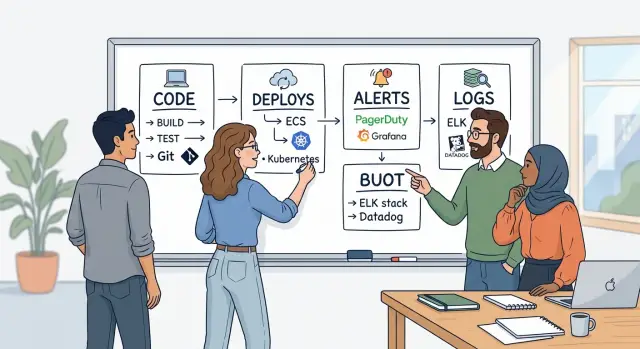
Table of Contents
Why tool sprawl hurts small teams
A team of six rarely loses a whole day at once. It loses 10 minutes here, 20 there, and another half hour when people check three tools before they can answer one simple question. That drift adds up fast.
Extra tools create duplicate work almost by accident. Someone writes a release note in one app, copies it into chat, then pastes the same update into a ticket. Another person sets alerts in two places because nobody trusts the first one. Soon the team does the same work twice just to stay aligned.
The mess gets worse when code, deploys, and logs live in different places. A bug shows up after lunch. One person checks the repo, another opens the deploy dashboard, and someone else searches logs in a third system. Now the team is not fixing the issue yet. It is rebuilding the timeline by hand.
For a team of five or six, context switching hurts more than people admit. If two engineers spend 30 minutes bouncing between tabs, chat threads, and dashboards, that is a big share of the team's attention gone. Small teams do not have spare people for tool archaeology.
A simple test works well: ask two teammates where they would check the current code, the last deploy, and the first error tied to an incident. If they give different answers, your stack already grew too far.
This is one reason lean teams often move faster with fewer systems, not more. Oleg Sotnikov has shown that even large production workloads can run with a tighter setup when the team picks clear sources of truth and sticks to them. Boring tools, used consistently, beat a pile of clever ones that nobody fully trusts.
The four places you need first
A small team needs four clear homes before anything else: one for code, one for deploys, one for alerts, and one for logs. If people ask, "Where do I check this?" and get four consistent answers, work gets calmer fast.
Start with code. Everyone should know where the real repository lives, where pull requests happen, and who can merge. One person should own this area, usually the engineering lead or the most senior developer, so permissions, branch rules, and backups do not drift.
Then pick one deploy path. The team should ship the same way every time, whether that means one CI pipeline or one release script that everyone trusts. Give one person ownership of that path so failed builds, release steps, and rollback rules stay simple instead of becoming tribal knowledge.
Alerts need the same discipline. Choose one place that sends alerts, and make it the only place that can wake people up. One owner should tune thresholds and remove noisy alerts, because a channel full of false alarms trains everyone to ignore the real one.
Logs are the last piece, and they matter most when something breaks at 9:10 on a Friday. Put application logs in one searchable place with clear names and a basic retention rule. Give one owner responsibility for log format and access, so the team can search by service, request, or error without guessing.
A lean infrastructure stack is not about using the fewest tools possible. It is about making sure each job has one home and one person who keeps it tidy.
When a bug hits production, the flow should feel obvious:
- check the repo for the change
- check the deploy history for what shipped
- check the alert for when the issue started
- check the logs for the exact failure
If those four places are clear, even a team of five can move with less stress and fewer meetings.
How to choose your stack in one afternoon
Most small teams do not have a tool problem first. They have a trust problem. If code lives in one place, deploys happen in two places, alerts arrive from three apps, and logs sit wherever the last engineer left them, people waste time guessing.
Start with a quick inventory. Open a doc or whiteboard and list every tool the team used in the last month for code, deploys, alerts, and logs. Include the "temporary" ones too. A lean infrastructure stack starts to show up as soon as you can see the duplicates.
Then ask one blunt question for each area: which tool do people actually check during a normal workday? Keep the tool that handles the daily job. Do not keep a second tool just because it once solved a rare edge case at 2 a.m. Rare problems matter, but they should not shape the whole setup for a six person team.
A simple way to decide:
- Write every current tool under code, deploys, alerts, and logs.
- Circle the one your team trusts first in each area.
- Check whether it covers most daily work without extra glue.
- Write down which tools you will retire this month.
- Put a review on the calendar for 30 days from now.
Make the "stop using" list explicit. If you do not name the tools you are dropping, they stay alive in habits, old bookmarks, and stray notifications. That is how the mess returns.
One small example: if engineers push code to GitLab, deployments run from GitLab CI, but alerts still come from three cloud dashboards, keep GitLab for code and deploys, then pick one alert source and turn the others off. Use the same rule for logs. One searchable place beats four partial ones.
After 30 days, review what people opened, ignored, and bypassed. If nobody missed a retired tool, you made a good call.
Pick one place for code
A lean infrastructure stack starts with one clear home for code. If source files live in one tool, merge requests in another, and CI in a third, small teams lose time on basic questions: Which branch is current? Where did the approval happen? Which build matches this change?
Keep code, reviews, and CI as close together as you can. One tool is usually best. When the same place shows the commit, discussion, pipeline, and release tag, people make fewer mistakes and new teammates catch up faster.
Oleg often uses self-hosted GitLab for this setup because code, merge requests, and CI stay together. The specific tool matters less than the rule: pick one home and stop splitting code decisions across chat, email, and private notes.
Use one branching rule that everyone can remember without checking a wiki. For a team under ten, this is often enough:
- keep
mainready to ship - use short branches for each change
- require one review before merge
- fix broken builds before new work starts
Every repo also needs an owner. That does not mean one person guards every line. It means one person keeps the repo tidy, closes stale branches, updates basic docs, and decides who should review unclear changes.
Release notes and code decisions should stay near the code. If someone explains a risky change only in Slack, that context disappears in a week. Put the reason in the merge request, commit message, or a short note in the repo.
Permissions should stay boring. Give write access to the people who ship work, admin access to very few, and avoid custom exceptions for each person. Small teams usually get into trouble when access rules start to look like a spreadsheet.
When one place holds the code story from idea to merge, the rest of the stack gets easier to trust.
Pick one deploy path the whole team trusts
A deploy should feel boring. If one person knows the "real" way and everyone else asks in chat, the process is already weak.
Keep staging and production on the same path. Build the app once, run the same checks, and move the same release forward. When production has its own secret steps, small teams ship fear along with code.
Any engineer should be able to run a normal deploy from a written process. That does not mean everyone needs free access to production. It means nobody should need hidden knowledge like "ask Alex to restart the worker" or "use a different command for this service."
Store environment rules in one place, inside your deployment pipeline and its config. Put approval rules, branch rules, secrets handling, and release steps there. If half the rules live in a wiki and the rest live in old shell scripts, people will guess, and guessing in production gets expensive fast.
Rollback needs practice, not hope. Run a safe test rollback before the first real incident. Time it. If your team needs fifteen minutes to remember the steps, fix that now instead of during an outage.
Your deploy history should answer five questions without digging:
- Who started the deploy
- What commit or version went out
- Which environment changed
- Whether checks passed
- When someone rolled back
This matters more than teams expect. When a bug appears after lunch, clear deploy history can save thirty minutes of blame and confusion.
If you already use a tool like GitLab CI/CD, keep the path simple and visible there instead of splitting it across extra dashboards. One trusted deploy flow does more for a small team infrastructure than a pile of clever scripts.
Set alerts for real problems
Most teams under ten get into trouble when they alert on system trivia instead of customer pain. Start with failures users notice right away: logins stop working, payments fail, pages throw 500 errors, or a background job stalls long enough to block orders, reports, or messages.
A good lean infrastructure stack treats alerts as interrupts, not decoration. If an alert wakes someone up, that person should have a clear action to take within a few minutes.
Send every alert to one shared channel and one on-call path. The shared channel gives the whole team context. The on-call path wakes only the person responsible at that time. If everybody gets paged for everything, people mute alerts fast.
A short list is enough at first:
- sign-in or checkout fails for real users
- error rate jumps above your normal range
- queue backlog grows enough to delay customer work
- disk, certificate, or database limits get close to breaking production
Cut anything nobody acts on. If an alert fires three times and the team says "we can ignore that," remove it or turn it into a dashboard check. A CPU spike that settles on its own is often noise. A payment failure is not.
Each alert needs a tiny response note. Keep it plain: what this means, where to look first, how to roll back safely, and who owns the fix. One short note can save 20 minutes of guessing when someone is tired.
Test at least one alert on purpose. Break something safe in staging, or disable a noncritical worker for a minute. Then check what happens. Did the alert arrive? Did it say what broke? Could the on-call person fix it without asking around? Teams that run Sentry, Prometheus, Grafana, or simple uptime checks all face the same rule: if no one can act on the alert, it should not be an alert.
Keep logs in one searchable place
When an error shows up, nobody wants to jump between three dashboards and two servers just to learn what happened. Put application logs, background job logs, and proxy logs in one place from day one. If a request fails at the edge, times out in the app, and then breaks a worker, you should be able to follow that path in minutes.
Use the same service names everywhere. If the app is called billing-api in production, do not call it billing, billing-service, and api-billing in other environments. Consistent names make filters work, keep alerts readable, and stop people from guessing which log stream is the right one.
Readable log lines matter more than fancy structure at first. A plain line with a timestamp, level, service name, request ID, and a clear message beats a messy JSON blob full of fields nobody uses. Add more structure later if the team has a real need for it.
Retention needs a simple rule. Keep enough history to debug the problems you actually see. For many small teams, 7 to 30 days is plenty for full logs, with longer storage only for audit or billing events. Anything longer should have a reason, because storage costs creep up quietly.
A few saved searches also help more than people expect. Reuse them across the team so everyone debugs the same way.
- 5xx errors by service
- failed background jobs
- slow requests from the proxy
- logs for one request ID
- deploy window errors in the last hour
This is one of the quiet wins in a lean infrastructure stack. Oleg often builds around a simple observability setup with centralized logs and clear service naming because small teams do better with one search box they trust than a pile of tools nobody fully understands.
A simple setup for a team of six
A team of six can keep things very tight. Picture one product, one API, and one web app. Two engineers mostly handle backend work, two handle frontend and product changes, one person runs product, and one person covers support.
That team usually needs only four homes for day-to-day work:
- GitLab for code, merge requests, and change history
- GitLab CI/CD for every build, test, and deploy
- Grafana alerting for outages, slowdowns, and error spikes
- Loki for logs from the API, web app, and background jobs
This setup covers most of the work because everyone uses the same path. A developer pushes code, opens a merge request, and GitLab CI runs tests. If the checks pass, the pipeline deploys to staging, then production. Nobody keeps a secret script on a laptop. Nobody deploys by hand "just this once."
When a deploy fails, the team can react fast because there is only one place to look first. GitLab shows the failed step. If the deploy went through but users hit errors, Grafana alerting fires within minutes. Loki shows the exact service, request, and timestamp, so the engineer can see whether the problem came from the API, the web app, or a bad config.
A rollback should use the same deploy path. One engineer reverts the change or promotes the previous release, and the team is back on stable ground in a few minutes instead of hunting through servers.
During an incident, product and support should not dig through technical tools. They need one shared Grafana dashboard with a few plain numbers: uptime, error count, response time, and whether the latest release is live. That gives them enough to answer customer questions and decide whether to pause a launch, without pulling engineers into every update.
Common mistakes that make the stack messy
Most small teams do not create a messy stack on purpose. They get there one "small improvement" at a time. Someone adds a second tool because one screen looks nicer, another person keeps the old one "for now," and a few months later nobody knows where the real source of truth lives.
A common mistake is swapping tools for one pleasant feature instead of a real need. A prettier deploy view or a better alert chart rarely fixes a weak process. If your team already commits code in one place, then deploys should follow that same path unless the system itself needs something different.
Migrations create another mess. Teams move alerts to a new service, but they leave the old rules running. Then people get duplicate pages, ignore them, and train themselves to treat alerts as background noise. That is how real problems get missed.
Deploys often split for the wrong reason. The backend team uses one method, the frontend team uses another, and someone still ships a worker from a laptop script. Different systems may need different steps. Different teams do not need separate habits just because they sit in different channels.
Logs usually fail in a quieter way. They stay inside servers that nobody checks until something breaks. During an incident, a developer opens a terminal, searches by hand, and wastes 20 minutes trying to piece together what happened. One searchable log store saves that time every single time.
Tool sprawl also starts when nobody owns the decision. Teams buy a new product before they name the person who will clean old alerts, remove dead dashboards, and say no to overlap. A lean infrastructure stack stays lean when each tool has one job and one owner. If you cannot name both in ten seconds, the stack is already drifting.
Quick checks before you add another tool
A lean infrastructure stack stays lean because the team says no more often than yes. Most extra tools do not fail on day one. They fail three months later, when nobody remembers why they were added and everyone has one more screen to ignore.
Before you sign up for anything, write the reason on one line. If you cannot explain the problem in a plain sentence, the team is probably reacting to noise, not fixing a real gap.
Use a short test like this:
- Ask whether your current tool can handle the job with one setting change, a small script, or a cleaner workflow. Many teams buy a new app for a problem they could solve in 20 minutes.
- Decide who will own the new tool for the next six months. If no one wants that job, do not add it.
- Check whether it replaces something old. If it only adds another dashboard, another login, and another alert source, it is probably clutter.
- Look at weekly use, not rare edge cases. If the whole team will not touch it most weeks, the tool should face a very high bar.
- Say the reason out loud to another person. If it sounds vague or bloated, the idea is still half-baked.
A simple example helps. Say your team wants a separate incident app because one alert felt messy last Friday. That is weak reasoning. If your current alerting tool can route messages better and silence duplicate warnings, fix that first. If the new app would replace two older tools and one engineer agrees to own it, the case gets stronger.
Small teams do best with boring choices they can explain fast. If a tool saves time, replaces something, and has a clear owner, add it. If it mainly gives the team one more tab, skip it.
Next steps when your stack already sprawls
Start where people lose time every day. If the team keeps asking which repo is current, which pipeline actually deploys, or which alert channel matters, that is your first cleanup job. Fix the part that creates repeated confusion, not the part that looks ugly on a diagram.
Do not replace everything at once. Small teams usually create a second mess when they switch code hosting, deploys, logs, and alerts in the same month. Remove one overlapping tool, move the habit with it, then give the team a little time to feel the change.
A short stack map helps more than another debate. Keep it to one page so a new hire can read it in five minutes and know where to go.
- Which repo is the source of truth?
- What path puts code into production?
- Which alerts wake someone up?
- Where do people search logs first?
That simple map also shows duplicates fast. If deploy notices come from one tool, failures come from another, and logs sit in two places, you do not have a lean infrastructure stack. You have extra noise.
Teams also get stuck because everyone has a favorite tool. When that happens, ask for a short outside review. A fresh reviewer can spot overlap that the team now treats as normal.
That is one place where a fractional CTO can help. Oleg Sotnikov has spent years cutting infrastructure waste, simplifying production systems, and moving teams toward AI assisted operations without breaking day-to-day work. A short review from someone with that background can settle tool debates, trim overlap, and give the team a safer order for changes.
Cleanups work best when they stay boring. Pick one problem, remove one duplicate, update the stack map, and keep going until people stop asking where things live.


