Lean infrastructure for a global product with one owner
Lean infrastructure for a global product means fewer services, simple monitoring, and backup routines that one technical owner can run without chaos.
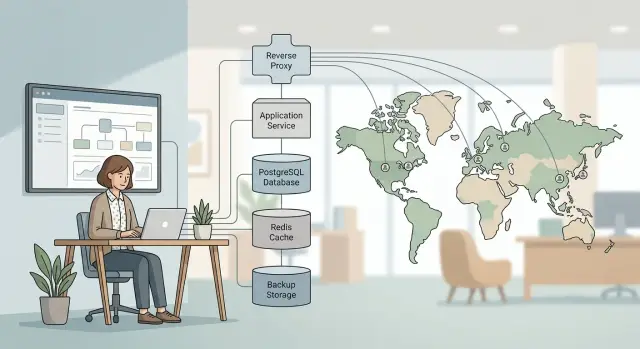
Table of Contents
Why a long vendor list breaks a small operation
Small products rarely fail because one server is too simple. They fail because the stack turns into a maze.
Every extra service adds a bill, a login, an alert, and another place where something can fail quietly. When one person owns the system, that cost is not abstract. It shows up at 2 a.m. when email stops, logins break, or the app slows down and there is nobody else to call.
The problem gets worse when tools depend on each other. A small DNS mistake can break auth. An auth problem can block the app. Then monitoring starts yelling about symptoms instead of the real cause. The fix might take five minutes. Finding it can take three hours.
Normal work suffers too. Renewing subscriptions, checking usage limits, rotating secrets, and clearing alert noise all eat the same hours that should go to product work. Features slip. Bugs wait longer. Simple maintenance turns into an afternoon of clicking through five admin panels.
That is why experienced operators usually cut tools before they add them. Oleg Sotnikov has shown the same idea in practice by keeping a global platform running with a tiny AI augmented operation. The lesson is simple: small teams need clear systems, not more systems.
If a new service does not remove weekly work, it is probably adding future outages.
What a global product actually needs
Most products do not fail because they lack one more vendor. They fail because the basics break at the worst possible time.
For lean infrastructure for a global product, the first goal is simple: pages load quickly, login works every time, and the app stays steady under normal traffic. Users notice delay before they notice features. If the first screen drags, they leave. If login fails once, trust drops fast.
A solid database matters more than a pile of side systems. Pick a database you know how to run, keep it healthy, and avoid splitting data across extra tools too early. For many products, one well run PostgreSQL instance with tested backups is enough for a long time.
You also need fast answers when something goes wrong. Clear alerts, recent logs, and a simple view of errors save real time. An alert that says the error rate jumped after a deploy is useful. Fifty notifications in an hour are not.
Backups only matter if restore works. Keep recent snapshots, test restores on a schedule, and write the steps in plain language. Many founders spend money on fancy tooling before they can restore the database in under an hour. That order is backward.
Traffic spikes need headroom, not a dozen platforms. Leave enough CPU, memory, and database connections so a launch or email campaign does not knock the app over. This is the kind of setup that keeps uptime for small teams high: small enough for one technical owner to understand, strong enough to stay online.
Start with a simple core stack
Most products can run well on fewer parts than people think. If one person owns uptime, every extra service means another dashboard, another bill, and another place to debug.
Keep one app service at the center and make the request path short. A web app or API, one primary PostgreSQL database, and one clean deployment method can carry a real product for a long time. That gives the owner fewer moving parts to watch and fewer places to look when something breaks.
Do not add a cache on day one because other teams use one. Add Redis when you can point to a clear job for it: repeated heavy reads, slow session handling, or background work that blocks user requests. Until then, the database often does the job just fine.
The same rule applies to extra data stores. Search engines, message brokers, event systems, and separate analytics databases can help later. Early on, they usually create more backup jobs, upgrades, and failure points than they save.
A small stack often looks boring:
- one main app service
- one primary database
- one deployment path
- one place for logs and alerts
Boring is a compliment here.
Familiar tools matter more than trendy ones. If the owner already knows Docker, PostgreSQL, Linux, and a simple CI/CD flow, that setup usually beats a newer stack they would still be learning during an incident. The system stays understandable, and that is half the battle.
Build in the right order
A single technical owner stack should not start with a shopping spree. Build the system in the order that protects uptime first.
Start with one reverse proxy. nginx can handle TLS, route requests, and give you one place to manage traffic rules. Then set up PostgreSQL and keep it plain. Most products can live on one solid database far longer than people expect.
Create backups before you chase scale. If you cannot restore quickly, more servers only give you more ways to fail. After that, add Redis if you can name the job it will do. If you cannot explain why it exists, wait.
A second region should come later, after you measure a real problem. A product with users in Europe, the US, and Asia does not need three regions on day one. Start with the app and database in one region, measure response times, and watch support. If the app feels fast enough and nobody complains, keep the setup small.
Redis is one of the most common early mistakes. Teams add it because it feels like part of a modern stack, then spend weeks dealing with cache misses, stale data, and one more thing to monitor. If PostgreSQL handles the load and page times stay healthy, skip it until the product proves otherwise.
The same goes for multi region work. A nightly database dump and a tested restore drill matter more than a second region you have never failed over to. Let real latency, growth, or compliance needs force the change.
A practical stack that stays small
A small global product does not need ten vendors and five dashboards. It needs one stack that one person can understand under pressure and fix quickly after a bad deploy or traffic spike.
A good starting shape is straightforward. Put the web app and API behind the same reverse proxy, on the same infrastructure, for as long as that still works. One entry point means fewer certificates, fewer routing rules, and fewer places for requests to go missing.
Let PostgreSQL carry most of the product data unless you have a clear reason to split it up. User accounts, billing records, app data, and internal admin tools can all live there for quite a while. Many teams create extra work by adding a second database too early.
For deploys, use one CI/CD path and keep rollback in that same path. In self hosted infrastructure, this matters even more because you do not have a large ops team catching drift. Oleg often uses self hosted GitLab CI/CD for lean systems for exactly that reason: one pipeline can build, test, deploy, and revert without extra glue.
Keep observability together too. Prometheus and Grafana for metrics, Loki for logs, Sentry for application errors, and one alert path to the owner is a practical setup. You can move from a spike in CPU to the bad deploy to the exact exception without opening six tabs and guessing.
When users spread across regions, move static files behind a CDN first. Images, downloads, JavaScript, and CSS benefit right away, while the app and API can stay centralized much longer. Oleg uses Cloudflare and nginx in production for this kind of setup because it cuts latency without forcing a full rebuild.
If one person can explain the whole stack on a whiteboard in five minutes, it is probably still small enough.
Keep deploys boring and reversible
When one person owns the stack, every deploy should follow the same path. No special cases. No late night shell commands. No guessing which server changed last time.
A simple release flow beats a clever one. Push code, run the same tests, build the same artifact, deploy the same way, then check the same health signals. Repetition is what makes deploys safe.
Small releases are easier to trust. If a change touches one API route, one billing rule, or one background job, you can spot trouble quickly and undo it quickly. Giant batches do the opposite. They hide the cause of errors, make rollback messy, and turn a short fix into an hour of log reading.
A good deploy routine is not complicated. Use one pipeline for every environment. Keep a rollback checklist with exact commands. Write release notes in plain English. Put version markers into error tracking and alerts so you can see right away whether release 1.8.4 caused the spike.
Rollback steps should fit on one screen. If the process needs ten manual actions, it will fail when you are tired.
Teams that run lean usually keep this simple: clear release tags, one visible deploy trail, and observability tools that show what changed and when. The brand names matter less than the shape of the process.
Practice rollback before you need it. Ship a tiny change on a normal weekday, watch the rollout, confirm alerts, then roll it back once on purpose. If the drill feels annoying, that is useful information. It means the process still has too much friction.
Monitoring and backups one person can trust
One owner does not need more alerts. One owner needs the right alerts.
If login fails, checkout breaks, pages slow to a crawl, or API errors jump, send a page. If CPU spikes for a minute and users feel nothing, record it and review it later. Alert on user pain, not raw server drama.
Recent logs should be easy to search while the issue is still live. Keep app logs, deploy events, and basic metrics close together with matching timestamps. When one person is on call, losing ten minutes across three dashboards is expensive.
A small observability setup often works better than a clever one. Error tracking for app failures, a few uptime checks, and dashboards for database health, queue health, and response times are usually enough. Searchable logs matter most during incidents. If you can filter by request ID, release, or customer account, you cut guesswork fast.
Oleg Sotnikov uses this kind of lean production setup with Sentry, Grafana, Prometheus, and Loki. The point is not the tool names. The point is that one person can open the system and find the problem quickly.
Backups need the same discipline. Store database backups somewhere separate from the main servers and primary account. Keep recent copies for fast restores and older copies for the slower mistakes people notice days later.
Then test a full restore on a real schedule. Monthly is a good start for many small teams. A backup only counts after you restore it into a working environment and confirm the app starts, connects, and serves traffic.
Write down who gets paged and when, even if the answer is mostly one person. Be specific about what wakes you up at 2 a.m. and what can wait until morning. That tiny note saves time when stress is already high.
A realistic setup for users in three regions
A small SaaS product can serve customers in the US, Europe, and Asia without a huge stack. One owner can often run a single app, one PostgreSQL database, and a small Redis instance in one primary region. That is enough for a lot of products built around forms, dashboards, reports, and background jobs rather than live video or heavy realtime traffic.
Users in each region can still get a decent experience because the CDN serves static files close to them. JavaScript, CSS, images, and downloads come from edge locations, so the app server only handles work that needs fresh data. That keeps the main server smaller and cuts wasted bandwidth.
This setup stays manageable because each piece has a clear job. PostgreSQL stores product data. Redis handles cache or short lived jobs if the app really needs it. The app does the rest. You are not paying one service to cache, another to queue jobs, a third to ship logs, and a fourth to store the same metrics again.
Daily checks stay simple too. Look at app errors, database disk growth, Redis memory if you use it, backup success, and whether alerts still go to one place and make sense. One owner can handle that over coffee. One owner cannot handle 40 noisy alerts across six vendors.
This will not fit every product. If you run live collaboration, low latency trading, or large media pipelines, you will need more. But for a typical SaaS with users spread across three regions, it is a sensible mix of speed, uptime, and sanity.
Mistakes that create extra work
Most extra work comes from running things you do not need yet. The stack gets bigger, but the product does not get safer or easier to operate.
Kubernetes is a common example. If one app runs well on a small number of servers, or even Docker Compose, Kubernetes can add more moving parts than it removes. Now you are dealing with cluster updates, networking rules, secrets, ingress, and failures that have nothing to do with your product.
Running several databases for small features causes the same problem. A team starts with PostgreSQL, adds Redis because everyone does, then adds Elasticsearch for search, ClickHouse for reports, and maybe another store for queues. Each one needs backups, upgrades, alerts, memory tuning, and a plan for data drift.
Fragmented observability is another slow drain. When something breaks, one person should not need to open five dashboards to answer one simple question. If deploys, logs, uptime checks, and error tracking all live in different systems with different timestamps and alert rules, diagnosis takes longer than the fix.
Teams also rush into multi region setups too early. It sounds smart on paper, but it often doubles the work for deploys, replication, caching, failover, and support. If most users are happy with one well placed region and a CDN, early multi region work is usually expensive rehearsal.
Backups create the most dangerous false confidence. Green backup jobs look reassuring until a bad migration lands and the restore turns out to be incomplete, too old, or too slow to use.
A good rule is simple: add complexity only after the current setup causes a real problem twice. Until then, keep one clear stack, one main database, one observability path, and regular restore tests.
Quick checks before adding another service
Every new service should solve a pain you already feel. If the reason sounds vague, like "better scale" or "more flexibility," wait.
A new tool is never just one more bill. It also adds a login, an API token, another dashboard, another alert source, and one more failure point to remember when something breaks.
Before you say yes, run four quick checks:
- Name the exact problem in one sentence.
- Count the new bill, secret, alert, and failure point it adds.
- Check whether your current stack already does most of the job.
- Make sure the owner can explain how it works in ten minutes.
That third check saves a lot of money. Teams often buy separate services for queues, cron jobs, feature flags, logs, or internal tools when PostgreSQL, GitLab CI, Grafana, or Sentry already cover enough.
Explanation matters more than feature lists. If the person on call cannot explain what the service does, how it fails, and how to bypass it, the stack is too complicated.
Incidents expose dead weight fast. If nobody checks a dashboard during an outage, remove it. If alerts go to a channel people ignore, turn them off or fold them into the system you already trust. A smaller stack is easier to defend, cheaper to run, and much calmer to live with.
When you are unsure, delay the purchase and write down the workaround. If the workaround hurts every week, add the service. If it does not, you just avoided another permanent dependency.
When one owner needs backup
One owner does not need a rescue plan built around five consultants. They need a plain map of what runs, what it costs, and what breaks first.
Put every service on one page with its monthly cost, who controls it, and what depends on it. Include the boring parts too: DNS, email, error tracking, CI, backups, CDN, and billing accounts. Small teams usually find overlap quickly. Two monitoring tools, two build systems, or a paid service that does almost the same job as the main server stack adds cost and stress without adding much safety.
Keep a short runbook next to that list. Note where secrets live, how to restart the app, where logs go, and who can access production. If another person cannot follow those notes in 15 minutes, the setup is still too personal.
Then put a few tasks on the calendar this month: list every service and its bill, restore one backup into a clean environment, roll back one deploy on purpose, and cut overlap before buying anything new. Those checks change the mood of a one person operation. You stop guessing and start measuring.
Sometimes the stack feels heavier than the product because nobody has challenged old choices. That is often the right moment for a second opinion. A fractional CTO for startups can help trim infra spend, tighten the deploy path, and remove weak points without turning the whole system upside down.
Oleg Sotnikov does this kind of advisory work through oleg.is, with a focus on architecture, infrastructure, and practical AI driven operations for small teams. Sometimes a short review is enough to get a one owner setup back under control.
Frequently Asked Questions
What should my first production stack include?
Start with one app service, one PostgreSQL database, one reverse proxy such as nginx, one deploy path, and one place for logs, metrics, and errors. That gives one owner a short request path and fewer places to debug at 2 a.m.
Do I need multiple regions on day one?
Usually no. Run the app and database in one solid region first, put static files behind a CDN, and measure real latency before you spread out. Many SaaS products feel fine worldwide with that setup.
Is PostgreSQL enough for an early global product?
For many products, yes. PostgreSQL can handle accounts, billing, product data, and internal tools for a long time if you keep backups tested and watch database health. Split data later when a clear bottleneck shows up.
When should I add Redis?
Add Redis only when you can name one job for it, such as caching repeated heavy reads, handling sessions, or running background jobs. If PostgreSQL keeps page times healthy, skip Redis for now and avoid one more thing to monitor.
What should I monitor if I run the stack alone?
Page on user pain first: login failures, checkout errors, slow pages, rising API error rates, and failed deploys. Keep logs, deploy events, metrics, and app errors close together so you can move from alert to cause quickly.
How often should I test backups and restores?
Test restores on a real schedule, and monthly works for many small teams. A backup only helps when you can restore it into a working environment, start the app, and confirm it serves traffic.
Is Kubernetes worth it for a small product?
Usually not at the start. If one app runs fine on a few servers or Docker Compose, Kubernetes often adds cluster work, networking rules, and secret handling without solving a real problem.
How do I keep deploys safe with one owner?
Use one pipeline for every environment, ship small changes, and keep rollback steps short enough to fit on one screen. Add version markers to error tracking so you can spot whether a release caused the spike.
How do I decide if a new service is worth adding?
Write the exact problem in one sentence, then count the bill, login, secret, alert source, and failure point the service adds. If your current stack already covers most of the job, wait and keep the stack smaller.
When should I get outside help?
Bring in a second pair of eyes when the stack feels heavier than the product, costs keep climbing, or nobody trusts backups and deploys. A short architecture review can cut overlap, trim spend, and make one-owner operations easier to run.