Lean automation stack for small companies with one CTO
A lean automation stack covers forms, queues, logs, and AI review without a platform team. See how one outside CTO can plan it.
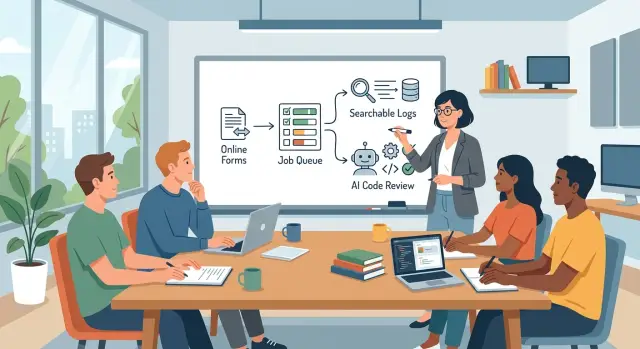
Table of Contents
Why small teams get stuck
Small teams rarely get stuck because people do not care. They get stuck because work comes in through too many doors, and nobody has time to shape one clear path.
A sales lead lands in email. A support request shows up in chat. Follow-ups live in a spreadsheet because it felt quick at the time. Each choice seems harmless. After a few months, the team spends too much energy asking where a request went and who owns it.
The app often slows down for the same reason. A small company will handle long tasks inside the same request a customer is waiting on. The app sends a file, calls an outside API, creates a PDF, and writes several records before it responds. That works at low volume. Then one slow step blocks the rest, and the whole app starts to feel fragile. Without a queue, every delay hits the user.
The same pattern shows up in logs. The server has one set of logs, the app has another, and alerts arrive somewhere else. A developer checks one dashboard, misses another, and learns about a real problem from a customer message. Teams do not ignore logs on purpose. They just do not have one place that makes sense at a glance.
Code review slips in the same way. Small teams ship urgent fixes late, often after a full day of other work. Review gets rushed. People scan for obvious breakage and move on. Then simple issues slip through: a missing validation rule, a slow query, a secret left in config, or an edge case nobody tested.
This is where an outside fractional CTO often helps. The job is not to pile on more tools. It is to cut the mess down to a small stack, give every form a clear route, move slow work into queues, bring logs into one view, and add a fast review step before risky changes go live.
That cleanup sounds minor. In practice, it can save hours every week and remove the low-grade chaos that wears a team out.
What the stack needs to do
A small team does not need a platform department. It needs one clear path for work to enter, one place for slow tasks to wait, one log view people can search, one review step before code goes live, and one person who gets the alert when something breaks.
Start with intake. If requests arrive through email, chat, calls, and random spreadsheets, the team wastes time sorting noise before it can do real work. A simple form fixes a lot of that. Every request should land in the same place with the same fields, so the team can tell what it is, who asked for it, and what needs to happen next.
Some jobs should not run while a person waits on the screen. File processing, report generation, sync jobs, webhook retries, and AI checks belong in a queue. The queue lets the app accept the request fast and finish heavier work in the background. Users see progress, and the team avoids timeouts and messy retries.
Logs also need one home. When something fails, nobody should hunt across app servers, cloud panels, and copied terminal output. Searchable logs save real time because they show the request, the error, and the order of events in one place. If a form submission fails at 2:13 PM, the team should find that exact run in seconds.
Code review needs the same kind of simplification. A lean stack should run AI review inside the normal delivery flow before deployment. The AI can catch obvious mistakes, risky changes, missing tests, and odd patterns. It should not replace a person. It should make the first pass much faster.
Alerts need one owner, not a group chat full of maybe. If a queue stalls or a deploy fails, one person should get the message and know they own the next step. A good outside CTO can set this up with simple rules and the tools the team already has.
That is enough for most small company automation. If the stack can collect, queue, log, review, and alert well, it already handles the hard part.
Keep the stack small from day one
Small teams get into trouble when they solve the same problem in three places. One form builder for sales, another for support, a separate chatbot intake, and a spreadsheet on top. It feels flexible for a week. Then nobody knows which path holds the real data.
Pick one path for incoming requests and make it boring. A web form posts data into your app or database, then one background queue handles the next step. If you add AI review later, send that job through the same queue instead of building a second lane just for AI.
Most small teams need fewer parts than they expect: one entry point for each type of request, one queue for background jobs, one log store for apps and workers, and one place to set retention rules and alerts.
That is enough for many companies. A support form can create a record, push a job to send an email, trigger a document check, and log the result in one place. When something fails, the team checks one log store instead of hunting across five dashboards.
Logs need rules or they turn into clutter fast. Keep full logs for a short window. Keep error logs longer. Delete noisy debug data on a schedule. Most small teams do not need a huge observability setup on day one. They need to answer three plain questions: what failed, when did it fail, and who needs to act.
Tool choice matters more than feature count. Choose tools your current team can run without hiring an ops team to babysit them. If a form tool, queue, or logging system needs constant tuning, it is too heavy for a ten-person company with one engineer.
This is where outside help often matters most. The job is not to add shiny parts. It is to cut the stack down to the few pieces that save time every week and still leave room to grow.
Build the flow step by step
A lean automation stack should start with one business process, not a pile of tools. Pick something boring and frequent, like a website form that becomes a quote request, a support case, or a follow-up task for sales.
Write the flow on one page before you build anything. Keep it plain: a person fills out the form, one service checks and stores the data, a worker handles the slow part, and the team gets a clear result.
A solid first version is simple. Send every form submission to one service first. That service should validate the fields, save the request, and return a basic success or error message. Push slow work into a queue. Email sending, PDF creation, CRM sync, and AI checks should run in the background so the form stays fast.
Add a request ID at the first step and carry it through the whole flow. When something breaks, you can find the exact form entry, queue job, and log line in minutes. Keep logs readable. Log when the request arrives, when the worker starts, when it finishes, and why it failed.
Run AI review on pull requests, not in production. Let it check for obvious bugs, missing tests, risky changes, and unclear code before anyone merges.
This is another place where a fractional CTO can save time. One person can pick a service for intake, one queue for long jobs, and one place for logs instead of letting the team glue together five overlapping tools.
A small example makes this concrete. Say a cleaning company has a booking form. The form service stores the request, gives it request ID 84271, and puts pricing into the queue. A worker calculates the estimate, sends the email, and logs each step under that same ID. If pricing fails, the team sees exactly where it stopped.
Before launch, test one failure on purpose. Break the email step or make the queue worker reject a job. If your team cannot trace that failure from form to log in a few minutes, the stack is still too loose.
A simple example from a small company
Imagine a 15-person service company that wants every website enquiry handled quickly without anyone babysitting inboxes. A lean automation setup can do one job well: catch each request, route it, and leave a clear trail.
A customer opens the contact form, adds their name, company, and a short note, then clicks send. The app does not try to do everything at once. It saves the request in the database first, gives it an ID, and places a small job in a queue.
That split matters. If email is slow or a downstream tool has a bad minute, the form still works. The customer sees a success message, and the team does not lose the lead.
A worker picks up the queued job a few seconds later. It creates a follow-up task for sales or support, sends an internal notification, and can prepare a draft reply if the company wants one. If one step fails, the worker retries that step instead of forcing the customer to submit the form again.
The logs tie the whole path together. The form submission, the queued job, the worker run, and the final result all share the same request ID. When somebody asks, "Did we get this message?" the team can answer in a minute instead of digging through three tools and guessing.
The setup stays small: one form handler, one queue, one worker, one place for logs. No platform team, no maze of services, no diagram nobody updates.
AI review fits before release, not in the live request path. When a developer changes the form handler, an AI review step can check for missing validation, unsafe input handling, duplicate job creation, or secrets showing up in logs. It flags risky code before it goes live.
That is enough for many small companies. A flow like this covers forms, queues, logs, and AI review without turning a basic contact page into a mini enterprise system.
Where AI review fits
In a lean automation stack, AI review belongs after automated tests and before a person approves the merge. That spot matters because the tool can see the diff, the test results, and the files that changed. It comments on real risk instead of guessing.
Used well, AI review is a fast second pair of eyes. It can catch weak naming, missed edge cases, and tests that should exist but do not. It can also spot patterns that often cause trouble when a small team moves quickly.
Keep the scope narrow at first. Start with one repo or one service, not the whole company. A fractional CTO can define simple review rules, connect them to CI, and tune the comments so the team gets fewer noisy alerts.
What AI should flag
AI review helps most when it checks a short list of issues that humans often miss during busy weeks:
- unclear names that make later changes harder
- missing tests for failure paths and odd inputs
- risky edits around auth, billing logic, and database migrations
- changes that affect queue retries, duplicate job handling, or logging
That last area matters more than teams expect. A form can submit twice. A worker can retry the same job. A log line can hide the one field you need during an outage. AI can warn about those patterns before they reach production.
Human approval should still control merges and releases. AI does not know the business context well enough to make the final call, and it should never push code straight to production on its own. Keep the rule simple: AI comments, people decide.
Say a company has one service that accepts forms, pushes jobs to a queue, and writes status updates to the database. A developer changes the retry logic for failed jobs. AI review can point out that the code now risks duplicate charges, misses a test for a timeout case, and renames a field in a way that breaks log search. That saves a painful cleanup later.
The hard part is not adding an AI reviewer. The hard part is teaching it what your team should treat as risky.
Mistakes that create extra work
Small teams rarely drown because they lack tools. They drown in too many small decisions that pile up fast. A good fractional CTO often fixes this by removing parts, not by adding another app.
The first mistake is buying a separate tool for every problem. One tool for forms, another for background jobs, another for alerts, and another for logs looks tidy on a pricing page. In real work, it means four dashboards, four bills, and four places where nobody feels fully responsible.
Another common problem starts when the team keeps adding workflows but no one owns them. A sales form posts to one queue, support requests go somewhere else, and a half-finished automation still runs because nobody wants to touch it. Three months later, people stop trusting the system and go back to chat messages and spreadsheets.
Logs create their own pain when requests have no ID that follows them through the whole path. A customer submits a form. The job enters a queue. An AI review step checks the result. Something fails, but the team cannot trace that one request across services. They waste an hour reading logs that look unrelated.
Job failures cause even more silent damage when the stack has no retry rules. Networks blip. APIs time out. Queues stall. If one failed job simply disappears, staff start doing manual re-entry, which is slow and easy to get wrong. Most small companies do fine with simple retry logic, a dead-letter queue, and a clear alert when a job still fails after a few attempts.
AI review needs the same discipline. Letting AI approve code, content, or support actions with no written rules is asking for drift. The model may be fast, but speed is not judgment. Set boundaries early. Decide what AI can approve alone, require human review for risky changes, log every AI decision with the prompt and result, and define rollback steps before release.
A lean automation stack should feel boring in the best way. The team should be able to follow every request, fix failures fast, and know who owns each moving part.
Quick checks before you commit
Before you add another tool, run one real request through the whole flow. Ask the person who designed it to explain every step in under five minutes. If they need a whiteboard, three tabs, and a lot of caveats, the setup is already too hard for a small team.
Start with the front door. A non-engineer should be able to submit a test form without asking for help, wait for the result, and understand what happened. If the first test needs a developer standing nearby, the process will break the moment the team gets busy.
Then trace that same request all the way through. You should know where the form stores the data, which queue picked it up, what worker handled it, where the logs went, and how the result came back. In a lean automation stack, this path should feel almost boring. That is a good sign.
A few checks tell you a lot:
- One person can explain the full flow out loud in five minutes.
- The team can trace one request from form submission to final result.
- Failed jobs show up in one visible place without manual digging.
- A non-engineer can submit a test form and confirm the outcome.
- You can remove one tool and still keep the core process working.
That last point matters more than people think. If the whole system collapses because you swap one queue, logging tool, or AI review step, you do not have a stack. You have a pile of dependencies.
AI review needs the same test. The team should know what the model checks, where the review output appears, and what happens when the model flags something or times out. Nobody should have to search raw logs just to answer, "Did the review run?"
What to do next
Pick one process that wastes time every week and automate only that. Do not start with five ideas at once. A lead form that goes nowhere, support requests that sit in chat, or invoice approvals that depend on memory are all good first targets.
Write the current flow in plain language. Keep it short: where the request starts, where it waits, who checks it, and where problems show up. If you cannot describe it in six or seven lines, the process is still too messy to automate.
For most small teams, the first version needs less than people expect: one way to collect input, one queue where work waits, one place to read logs, and one review step before the result moves on. That covers forms, queues, logs, and AI review without turning the setup into a side project. If your team already uses a form tool, a ticket list, and a logging view, keep them. New tools rarely fix a weak process.
Give one person ownership. That person does not need to build everything alone, but they should own setup, test runs, and a short weekly check. Fifteen minutes once a week is often enough to spot stuck jobs, noisy logs, or AI feedback that people ignore.
A simple first workflow can already pay off. A website form creates a queue item, the system logs each step, and AI writes a draft reply or tags the request for the right person. A human checks the output before it goes out. That saves time and keeps mistakes visible.
If the first version works, resist the urge to pile on extras. Run it for a month. Count how many tasks moved through it, where people still step outside the flow, and which alerts nobody reads.
Some teams bring in outside help because they do not have time to sort tools, costs, and architecture on their own. Oleg Sotnikov at oleg.is advises small and medium businesses on this kind of work, from fractional CTO support to lean infrastructure and AI-augmented development setups. If the goal is a small stack that people can actually run, that kind of practical help can save a lot of rework later.
Frequently Asked Questions
What should a small company automate first?
Start with one process that wastes time every week, like a contact form, support request, or quote request. Pick something common, easy to test, and painful enough that everyone notices when it breaks.
Why should I use a queue instead of doing everything in one request?
A queue keeps the form or app fast because it moves slow work into the background. You let the user submit the request right away, then a worker handles email, PDF creation, sync jobs, or AI checks without blocking the screen.
How many tools does a lean automation stack need?
Most teams need less than they think: one way to collect input, one queue for background jobs, one log view, and one review step before release. If you need three tools for the same job, the stack will get messy fast.
Where does AI review fit in the delivery flow?
Put AI review after tests and before a person approves the merge. That gives the model enough context to catch obvious bugs, weak validation, retry problems, and missing tests without letting it control releases.
Who should own alerts when something breaks?
Give alerts to one named owner, not a group chat. When a deploy fails or a worker stalls, one person needs to know they must check it, decide what to do, and close the loop.
How do we make failures easy to trace?
Add a request ID at the first step and keep it through the whole flow. Log the request arrival, queue job, worker run, retries, and final result under that same ID so your team can find the exact failure in minutes.
Do we need a big observability setup from day one?
No, not at first. A small company usually needs searchable logs, a few useful alerts, and clear retention rules more than a huge monitoring setup.
Can non-engineers test the workflow?
Yes, and they should. A non-engineer should submit a test form, wait for the result, and confirm what happened without asking a developer to stand by the whole time.
When does it make sense to hire a fractional CTO?
Bring one in when the team keeps adding tools, nobody trusts the workflow, or failures take too long to trace. An outside CTO can cut overlap, pick a smaller stack, and set clear ownership without turning the project into a long rebuild.
What mistakes create the most extra work in a small automation stack?
Teams usually create extra work when they split intake across too many places, skip request IDs, ignore retry rules, or let AI act without written limits. Keep one clear path for requests, one home for logs, and human approval for risky changes.