Latency fixes before second region: what to tune first
Latency fixes before second region start with measurement. Tune assets, query paths, caching, and async jobs before adding more geography.
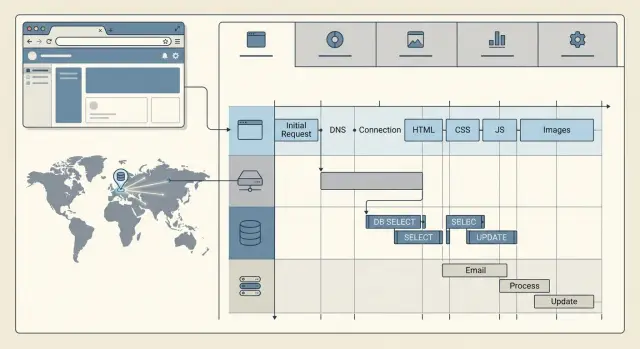
Table of Contents
Why a second region may not help
When users say an app feels slow, opening a second region sounds like the obvious fix. Sometimes it helps. Often it doesn't.
People feel delay for many reasons, and network distance is only one of them. If the browser downloads heavy scripts, large images, or too many fonts, the page still feels slow even when the server sits closer to the user. If the app makes several API calls in sequence, each small wait adds up. If one request triggers slow database reads, cache misses, and a third-party call, moving that same path to another region just copies the problem.
That is why the first round of latency work usually stays close to the request itself. Trim the bytes sent to the browser. Cut extra query work. Stop doing side jobs while the user waits for a response.
Take a simple example. A dashboard loads in 2.8 seconds for users in Europe while the app runs in the US. It is tempting to add an EU region. But if 1.4 seconds come from front-end assets, 800 ms come from two slow queries, and 300 ms come from sending an email inside the request, geography is not the first issue. Even with a nearby server, the page still feels slow.
A new region also creates more work than many teams expect. You now manage more infrastructure, more deploy steps, more logs, more failure modes, and usually more database complexity. Replication lag, cache consistency, background job routing, and support coverage all get harder. Costs rise before users feel a clear win.
Fix the local bottlenecks first. If the app still spends most of its time crossing oceans after you slim assets, shorten query paths, and move slow work into async jobs, then a second region starts to make sense. At that point, you are solving a real distance problem instead of paying to duplicate avoidable delay.
Measure where the wait happens
A page can feel slow even when the server answers fast. Users wait for the whole experience: the first HTML, scripts, styles, images, API calls, and the database work behind those calls.
Start with end-to-end timing in a real browser. If the page loads in 3 seconds but the server spent only 200 ms on the first response, a second region will not change much.
Break the delay into a few buckets: the initial HTML response, static assets like JS and CSS, API requests after the page starts rendering, and database time inside those API requests. That split tells you where to spend effort. A slow HTML response points to server or query issues. Slow assets point to caching, file size, or compression. Slow API calls often expose chatty front-end code or repeated database reads.
Compare the first visit with a repeat visit from the same browser. On the first visit, users download everything cold. On the second, the browser should reuse cached files and load much faster. If repeat visits still feel heavy, your cache rules may be weak, or your app may change asset filenames too often.
Do not trust averages alone. A page with a 1.2 second average can still frustrate users if one out of ten visits takes 5 seconds. Look at the slower tail too. Mobile networks, older devices, and busy periods usually expose the real problem faster than a clean office connection.
Keep the focus on the paths people use most. If users open the dashboard, search, and save changes all day, measure those flows first. A tuned marketing page will not help much if the app stalls after login.
One small example shows why this matters. A team sees a slow dashboard and assumes geography causes it. Browser timing shows the HTML arrives quickly, but the page then makes six API calls, and two of them run the same heavy query. Fixing those calls usually cuts more time than adding another region.
Trim asset delivery
A lot of latency work starts in the browser, not on the map. If a page ships too many heavy files, users wait before they can do anything useful. Moving the same bloated page closer helps a little, but it does not fix the main delay.
Start with images. Teams often upload a large desktop image and reuse it everywhere, including small mobile cards and thumbnails. That forces the browser to download far more data than the screen needs. Export images at the size they actually render, and use lighter formats when they still look good.
Fonts, scripts, and style files cause the same problem. Compress them. Remove code you no longer use. Split large bundles so the browser gets only what the first screen needs. This kind of cleanup usually pays off faster than adding a new region.
Third-party scripts are a common mess. Analytics, chat widgets, heatmaps, ad tags, and social embeds often slow the first useful view. If the page can work without them for a few seconds, load them later. Users care more about seeing the page and clicking the main button than about a chat bubble appearing instantly.
A quick pass often finds easy wins. Cache static files aggressively so repeat visitors do not fetch them again. Defer nonessential scripts until after the page becomes usable. Load optional code only when a user opens that feature. Keep the first screen light with one font family, small CSS, and as little JavaScript as you can get away with. Then audit the network panel and cut the worst offenders first.
Picture a signup page with a hero image, two font families, a chat widget, and a full dashboard bundle loaded upfront. Strip the image down, keep one font, delay the widget, and load the dashboard code only after login. The page often feels much faster without touching geography at all.
Shorten query paths
Many slow pages do not suffer from geography first. They suffer from too many stops on the way to a response.
One screen loads, fires a dozen small queries, calls two internal services, waits on both, and only then renders. That pattern gets expensive fast. Ten queries at 15 to 25 ms each can feel worse than one well-shaped query from farther away.
Start with the screens users open most. Check how many database queries one request triggers, how long each one takes, and whether the page also waits on other services. Admin dashboards, account pages, and search results often hide the worst query chains.
The N+1 query pattern still shows up everywhere. The page loads a list of 50 items, then asks the database for related data 50 more times. Users see one page. Your app makes 51 trips to build it.
Add indexes for the filters and sorts people use all the time. If a page always loads orders by account ID and sorts by created date, index that path. Do not add indexes blindly, though. Extra indexes slow writes and add maintenance work.
Return less data. If the page needs a name, status, and total, fetch those fields only. Do not pull full rows, large text columns, or JSON blobs just because the ORM makes it easy.
Cache reads that barely change. A pricing table, feature flag set, country list, or plan limits can sit in memory or Redis for a short time and save repeated database work. A 30 second or 5 minute cache often cuts a lot of waste without adding much risk.
Internal service calls can stack up inside one request too. If a checkout page calls user service, billing service, inventory service, and analytics service in sequence, the slowest hop controls the whole page. In many cases, one aggregated read or a small read model is faster and simpler.
A small example makes the payoff clear. A customer dashboard takes 900 ms to load. Tracing shows 320 ms in the browser, 180 ms in the database, and 260 ms across internal API calls. After one composite index, a smaller SELECT, and one cached summary instead of three service calls, the same page drops to about 380 ms. No second region needed.
Move slow work off the request
A lot of pages stay slow because the app tries to finish every task before it answers the user. If a button click triggers a database write, an email, a webhook, a PDF export, and a summary build, the browser waits for all of it. A second region does not fix that. It just repeats the same delay in another place.
The fastest pattern is simple: save the minimum you need, return the response, then finish the rest in the background.
This usually works well for emails sent after signup or checkout, webhooks to other systems, CSV and PDF exports, report builds, AI summaries, image processing, and file conversion. The first step must still be safe and complete. Save the user action first. Give it an ID. Then let a worker pick up the slower job. If that job fails, you can retry it without asking the user to click again.
Reports deserve special treatment. If people open the same dashboard every morning, build the report on a schedule instead of making each person wait 8 or 10 seconds. Prebuilt summaries often feel instant, even when the real computation is heavy.
The user interface matters too. Do not trap people on a spinner if the result will take a while. Show a clear status like "processing", "ready", or "failed". For exports, send a notification when the file is ready. For forms, save progress first and let the page confirm that the request went through.
The difference is easy to see. A customer submits an order and waits while the app creates the order, sends a receipt, updates the CRM, and generates an invoice. That can take several seconds. If the app saves the order and responds right away, the customer sees confirmation almost at once while the rest finishes in the background.
Teams that run lean infrastructure often get more from this change than from extra geography. Cut the waiting inside the request first, then decide if you still need another region.
Test in a simple order
Start with one user flow that feels slow and matters to the business. Login, dashboard load, checkout, or saving a form are good choices. If you test too many flows at once, the numbers get muddy and you will not know what actually improved.
Define the flow in plain language and keep that definition fixed. For example: the user clicks Log in, enters credentials, and reaches a usable dashboard.
Then record a baseline from the places where users actually live. Your office network does not count unless your customers sit there too. If most traffic comes from London, New York, and Singapore, test from those places and write down both the median and the slower tail.
A simple order works well:
- Pick one slow flow with a clear start and finish.
- Measure it from the user locations that matter most.
- Change one thing only.
- Run the same test again.
- Write down the time saved and the cost of that change.
Keep each change small. Compress images, trim JavaScript, add a missing index, or move email sending to a background job. Do not combine three fixes into one release if your goal is learning. When you stack changes, you lose the answer to a simple question: which fix paid off?
After every round, compare the win with the price of opening a second region. If one tweak saves 700 ms for most users and costs almost nothing, that beats adding more servers, more deployment work, and more failure points. A second region starts to make sense only after you clean up the obvious waits and users still feel distance.
Mistakes that waste money
The fastest way to waste budget is to open a second region before you know where the delay comes from. If users wait on a 2 MB JavaScript bundle, slow image delivery, or one bad database query, extra geography changes very little. You just pay twice for the same bottleneck.
Teams also overreact and copy every service. One slow account page does not mean you need a second database cluster, another queue, duplicate search, and a full failover setup. That move adds cloud cost, ops work, and more things to break. Fix the narrow path first.
Cache rules create a lot of quiet waste. Static files with versioned names should stay cached for a long time. Files that change without a new name should not. When teams skip this cleanup, browsers keep pulling files they already had, or users keep stale assets that force messy workarounds. Both cases cost money and keep pages slow.
Another expensive habit is leaving slow jobs inside login, checkout, or signup. Sending email, creating PDFs, syncing to another system, or writing large audit records should happen after the response when possible. If the user must wait for all of that, the app feels slow even when the server is healthy.
Averages hide these mistakes. An app can show a decent 400 ms average while the slowest 5 percent of requests still take 4 seconds. Those are the requests people remember. They also trigger support tickets and abandoned carts.
A quick review catches most of this. Look at p95 and p99, not only averages. Split time between assets, app code, database, and third-party calls. Compare warm-cache and cold-cache behavior. Check whether request paths still run batch work. Test the slowest screen, not only the homepage.
Most of this work is boring. That is fine. Tighten asset delivery, shorten query paths, and move non-urgent work to async jobs. If a second region still makes sense after that, you will know exactly why you need it.
A simple example
A small SaaS team wanted to open a second region because users far from their main server said the dashboard felt slow. The app itself was not huge. The problem sat in a few ordinary places that added up.
The first issue was the dashboard bundle. Every visit loaded a large chart library, even when the user only needed a simple summary card and never opened the chart view. On a fast office connection that felt annoying. On hotel Wi-Fi or mobile data, it felt broken.
The same page also asked the database for one summary in five separate calls. One query fetched account totals, another pulled recent activity, two more counted items by status, and the last one checked invoice state. Each call was small, but the page waited for all five.
Then there was checkout. After payment, the app built and sent the invoice email before it returned the success screen. Users sat there for another second or two, wondering if payment had failed.
The team fixed three things first. They loaded the chart library only when a user opened the chart tab. They replaced five database calls with one query built for the summary block. They moved invoice email work into a background job and returned the success page right after payment cleared.
None of that changed geography. It just removed wasted time from the request path.
The result was boring in the best way. The dashboard opened faster, checkout felt instant, and support questions dropped. A user in the same city barely noticed the difference. A user on another continent did.
After that, the team tested again from remote locations. This time they had a cleaner baseline. If users still felt delay, they could judge a second region on the real remaining problem, not on slow assets, chatty queries, and work that never belonged in the request in the first place.
This is the kind of cleanup Oleg Sotnikov often pushes teams to do before they spend more on infrastructure. It is cheaper, faster to test, and often enough on its own.
Quick checks before you expand
A second region costs money every month, so it should fix a real distance problem, not hide slow pages. Many teams can cut a noticeable chunk of wait time without touching geography at all.
Start with the user experience after the first load. Repeat visits should feel much faster because the browser can reuse cached files. If the second and third page views still feel almost the same, your cache rules, file sizes, or asset versioning likely need work.
Before you add new infrastructure, check a few plain things:
- Review your biggest images, fonts, videos, and scripts. A phone should not download a desktop hero image.
- Review slow database calls. Busy queries should use indexes, touch fewer rows, and return smaller result sets.
- Watch the request path for work users do not need right away. Email sends, report generation, webhook fan-out, and large audit writes usually belong in background jobs.
- Compare first-visit and repeat-visit timings. If repeat visits do not drop much, browser caching still needs work.
- Map slow users by region after these fixes. If complaints now cluster in one faraway geography, a second region starts to make sense.
The query review matters more than many teams expect. A single missing index can add hundreds of milliseconds, and that delay hits every user no matter where they live. The same goes for oversized JSON responses. Sending less data is often cheaper than building more infrastructure.
Async work is another common leak. If a request waits for image processing, document generation, or a third-party API call, users feel that pause directly. Put that work on a queue, return the page, and update the status after.
The goal is simple: make sure distance is the problem that remains. When repeat visits are fast, queries are lean, assets are right-sized, and background jobs handle the slow extras, regional demand becomes much easier to spot.
What to do next
Pick two or three user flows that pay the bills. Set a target for each one before you change anything. Keep it concrete: account login under 500 ms at p95, dashboard load under 1.2 s, checkout submit under 700 ms. Vague goals lead to vague work.
Then test from the places where your paying users actually sit. If most customers are in Chicago, London, and Frankfurt, measure from those cities instead of chasing global averages from random probes. A second region helps only when network distance still adds enough delay after you fix the app itself.
A good next pass is straightforward. Measure real user flows, not homepage-only tests. Compare asset time, app time, database time, and third-party time. Remove slow work from the request path where you can. Rerun the same tests from the same cities after each change. Add a second region only if distance is still the main source of delay.
Write down one rule for expansion: "We open a second region only if users in target cities still miss the latency goal after app and database fixes." That single sentence can save a lot of money.
If you want an outside review, Oleg Sotnikov at oleg.is works with startups and small teams as a Fractional CTO on architecture, infrastructure, and practical AI-assisted development. That kind of review is most useful after you have measured the delays and need a clear call on what to fix first.
The next move should be easy to defend: set the target, test from real user locations, fix the slow path, and expand only when distance still shows up in the numbers.
Frequently Asked Questions
Will a second region make my app faster?
Not usually. Start by measuring where the time goes. Heavy scripts, large images, slow queries, and extra work inside the request often cause more delay than network distance.
How do I find where users actually wait?
Use real browser timing and split the load into HTML, assets, API calls, and database time. If the server answers fast but the page still feels slow, the browser or the request path needs work before you add more geography.
Why is the first visit much slower than the second?
Browsers should reuse cached files on later visits. If repeat visits still feel heavy, your cache rules may be weak, your files may be too large, or you may change asset names too often.
What should I trim in the frontend first?
Begin with the biggest images, unused JavaScript, extra fonts, and third-party scripts. Shrink files to the size users need, compress them, and delay anything the page can load after it becomes usable.
How do database queries make a nearby server still feel slow?
Slow pages often make too many trips to the database. Check how many queries one screen runs, fix N+1 patterns, add the right indexes, and return only the fields the page needs.
What work should I move out of the request?
Move anything the user does not need right away. Emails, webhooks, PDF generation, image processing, AI summaries, and report building usually belong in background jobs after you save the main action.
Should I watch averages or p95 and p99?
Look at both. Averages can look fine while a small share of requests still takes several seconds. Users remember those slow cases, so p95 and p99 usually tell you more than the mean.
Which user flows should I optimize first?
Start with the flows people use most and the ones tied to revenue. Login, dashboard load, checkout, search, and saving a form usually matter more than polishing a marketing page.
What new problems come with a second region?
Expect more ops work, more logs, more deploy steps, and more things to break. You may also deal with replication lag, cache drift, job routing issues, and higher monthly spend before users feel a clear gain.
When does a second region actually make sense?
Add one when you already trimmed assets, shortened queries, and moved slow side jobs into async workers, yet users in faraway cities still miss your latency target. At that point, distance is the real problem left to solve.


