Latency budgets for AI features: set clear time targets
Latency budgets for AI features help teams set clear response time targets, spot slow steps, and choose streaming, caching, or background jobs wisely.
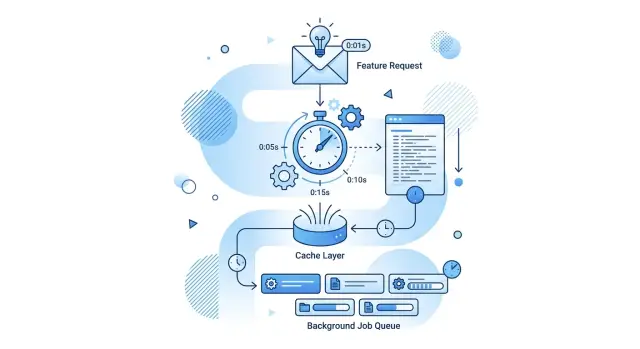
Table of Contents
Why small delays feel big to users
People notice waiting before they notice quality. If an AI feature pauses for two or three seconds before anything happens, many users already think it's slow, even if the full answer arrives soon after.
That first pause feels heavier than the same amount of time at the end. A reply that starts in half a second and finishes in four often feels better than a reply that stays blank for three seconds and then appears all at once at four. The clock is the same. The experience is not.
That's why time budgets matter so much for AI features. Users don't judge only the final answer. They judge the silence, the typing state, and whether the product feels alive.
One hidden delay can spoil the whole feature. The model might answer fast, but the request can still drag because the app checks permissions, loads past messages, runs a search, rewrites the prompt, or waits on a slow database call. Users don't care which step caused the lag. They only feel that the feature hesitated.
Teams often blame the model first. Sometimes that's right. Just as often, the model is only one part of the wait. Many apps spend more time on retrieval, safety checks, and logging than on generation itself. Fixing the model alone won't change how the product feels.
A support chat makes this obvious. If the assistant shows a quick "Working on it" state, starts streaming a draft, and fills in details a moment later, users stay patient. If the screen stays empty while several small delays stack up, trust drops fast.
People forgive a short finish wait. They rarely forgive a slow start.
Map the full request path
Most teams time only the model call and miss half the wait. Users feel the full gap between the click and the first useful words on screen.
Write the path down as a sequence. Start with the user action, such as clicking "Generate reply," and end at the moment the answer becomes visible. If your app streams text, mark both moments: when the first token appears and when the full answer finishes.
In many products, the path looks something like this: the browser sends the request, the app checks auth and loads context, retrieval pulls documents or past messages, the model generates the answer, and the app formats, saves, and displays the result.
Even that is usually too simple. Delays often hide in the handoffs between services. A database query may take 40 ms on a normal run and 300 ms when load rises. A vector search may be quick, but the trip to another region can add more time than the search itself.
For each step, record two numbers: the usual time and the slow time. The usual time tells you what people see on most days. The slow time tells you what happens when traffic spikes, a cache misses, or one service stalls.
Keep the notes boring and specific. "Model call: 1.8s usual, 4.6s slow" is useful. "AI is slow" is not.
On lean systems, this kind of map often shows that the model is only one part of response time. Once you can see the whole chain, you can decide where streaming helps, where caching pays off, and which steps should leave the request path entirely.
Pick one total response target
Most teams start by timing the model. Start with the user instead. Decide what wait feels acceptable for the task, then make the system fit that limit.
Different jobs need different targets. A chat reply should feel almost immediate. An AI search result can take a little longer if the first results appear fast. An admin task, like summarizing a week of tickets, can wait longer because the user expects heavier work.
As a starting point, a chat assistant should usually show something within about one second and finish within five to eight. AI search should show first results in under a second and refine them within two to four seconds. Admin or batch work can take ten to thirty seconds, but it still needs a status update early so the screen doesn't feel dead.
These numbers aren't laws. They're a baseline. If users are on a support screen and need to keep moving, even three seconds can feel slow. If they asked for a long report, fifteen seconds may be fine if they see progress right away.
Set two targets, not one. The first is time to first visible output. That can be a streamed sentence, a result card, or a clear progress state. The second is time to full answer. Users judge the first one emotionally and the second one practically.
A clear promise keeps the system honest. If the product says answers start in one second and finish in six, the team can design for that. Without a target, every step grows a little, and the whole chain turns slow before anyone notices.
Split the time budget step by step
Start with one number at the top of the page: the total time a user can wait without feeling stuck. If your target is four seconds, every part of the request has to fit inside that limit.
Don't give the whole budget to the model. The browser, app, and network already spend part of it before the model starts and after it finishes. On a normal connection, those pieces can easily take 400 to 800 ms.
A reasonable split for a four-second target might look like this:
- 500 ms for request setup, auth, and network
- 700 ms for retrieval or tool calls
- 1800 ms for model work
- 300 ms for post-processing and formatting
- 200 ms of spare room
That spare room matters. Traffic spikes, cold starts, and one retry can wreck the plan fast. A small buffer keeps one slow step from breaking the whole experience.
Be strict with each step. If retrieval often jumps past its limit, fix retrieval first instead of squeezing the model harder. If post-processing grows because you added extra checks, count that time honestly. Hidden work still hurts response time.
Then measure real traffic and adjust the split. Your first budget is a guess, but it should be a useful guess. After a few days, you may find that streaming helps more than model tuning, or that caching removes most of the delay for repeated requests.
A budget only works if the team uses it during real decisions. When a new feature adds 600 ms, someone needs to say where that time will come from. If nobody can answer, the feature is too expensive for the current target.
Use streaming when early output helps
Streaming works best when partial output is still useful. If a person can start reading, reviewing, or deciding before the full answer arrives, showing the first words fast feels much better than making them wait for the complete result.
That's why streaming often improves chat, search summaries, support drafts, and writing tools. A support agent doesn't need the whole draft at once. If the first sentence appears in 700 ms instead of four seconds later, the wait feels shorter and the work can start sooner.
That said, streaming isn't always worth the extra work. If your reply is tiny and already shows up in a second or two, streaming can add UI complexity without giving the user much back. A short status message or a one-line classification result usually doesn't need a word-by-word reveal.
It also fails when users can't trust partial output yet. If your app still needs a safety check, policy check, tool result, or formatting pass before anything can appear, streaming raw text can create a worse experience. Users may read text that later changes, stalls, or disappears.
A simple rule works well: stream when users can act on early output and when the first chunk can appear much earlier than the last one. Skip it for very short replies or when heavy checks must finish before display.
Streaming doesn't reduce full completion time by itself. It reduces dead air. That's what users feel most.
If you test it, measure one number first: time to first useful text. That tells you whether streaming actually helps or just makes the interface look busy.
Cache the parts that repeat
Many slow AI requests aren't slow because of the model alone. They slow down because the app repeats the same work on every request: loading a long system prompt, running the same retrieval query, or rebuilding the same context from scratch.
A good latency plan includes a cache plan. Start with work that repeats across users, within one session, or across a common task. A support team answering refund questions, for example, may pull the same policy snippets all day.
Don't focus only on the final text. Final replies often change with tone, account details, or recent events, so they may not hit often. The better win usually comes earlier in the chain: assembled prompts, retrieval results for common queries, ranked document chunks, tool outputs that change slowly, and setup data needed before the model call.
Short cache times matter when content changes often. Prices, stock, support rules, and live account data can go stale fast, so keep those entries brief. Older docs or fixed reference material can stay longer.
One simple rule helps: if stale data could cause a wrong answer, shorten the cache time or tie the cache to a version number. When the source changes, the old entry should stop matching right away.
Track misses as closely as hits. A cache that rarely hits adds code and memory use without saving much time. Measure hit rate, lookup time, and how many milliseconds each hit removes from the request.
Sometimes the best cache is for setup work users never see. If your app spends 400 ms building retrieval context before the model even starts, caching that step can feel better than caching the final reply. Users notice the shorter wait, even if the answer is fresh every time.
Send slow work to the background
Some work doesn't need to happen before the user can move on. If the app can answer the main request first, push the rest into a background job.
This works well for summaries, tagging, long analysis, exports, and other tasks that add detail but don't block the next click. Keeping them in the main path makes response time jump around, and users feel that right away.
A short confirmation is often enough. "Your draft is ready. Extra analysis is still processing." feels better than a spinner that sits there while three extra tasks run behind the scenes.
Good candidates for background processing include long summaries, topic tags, embeddings for later search, detailed risk checks, and report generation. The foreground path should stay small: save the request, do the minimum work needed for the first useful result, return it, and queue the rest.
That makes response time more predictable, which matters more than chasing a perfect average.
Users also need a clear finish signal. Send an in-app notice, refresh the page state, or email them when the job is done. If nothing tells them it finished, many will click again and create duplicate work.
A support tool is a simple example. The agent asks for a reply draft and gets it in about two seconds. The system then runs sentiment labels, account summary, and full conversation analysis in the background. The agent can start editing at once instead of waiting for every extra step.
A simple example: AI reply draft for support
A support agent opens a ticket and clicks "Draft reply." If the screen stays blank for five seconds, the tool feels slow right away.
Say the team sets a total target of four seconds. The draft doesn't need to be perfect in the first instant, but the agent should see useful text fast.
One sensible split is 300 ms to load recent ticket history, 200 ms to fetch customer details, 500 ms to build the prompt and apply reply rules, 800 ms for the model to produce and stream the opening lines, and the remaining 2.2 seconds for the rest of the draft to finish and render cleanly.
That first visible output changes the feel of the whole flow. The model can start with a greeting, a short summary of the issue, and the first action the customer should take. While the agent reads those opening lines, the rest of the answer can keep generating.
Some work shouldn't sit on the critical path at all. Internal notes, extra policy checks, CRM tags, and a summary for future handoff can run after the draft appears. The agent gets the reply first, and the system fills in the rest a moment later.
Caching helps too. If the agent retries the draft, the app should reuse ticket history and customer data instead of fetching everything again. That alone can cut enough delay to make response time feel steady, which matters more than rare peak speed.
Mistakes that break the budget
Most time budgets fail in ordinary places. A team gives each step a little extra time "just in case," and the total target stops meaning anything.
If auth gets 300 ms, retrieval gets 800 ms, the model gets three seconds, and post-processing gets another second, you don't have a budget. You have a wish list. Every step needs a hard limit, or the slowest path becomes the default path.
Streaming also gets used as cover for a slow system. It helps when early words are useful, but it doesn't fix a bad chain. If users wait four seconds before the first token appears because the app spent that time on database reads, network calls, or prompt assembly, streaming only hides the real problem.
Caching can backfire too. A fast reply that uses old account data, stale pricing, or yesterday's support status feels broken. Users forgive a short delay more easily than a confident wrong answer.
The same traps show up again and again. Teams run every extra check before showing anything. They cache data that changes often. They blame the model while the database is slow. They add more services, queues, or calls without updating the budget.
Extra work is where many apps waste time. Draft suggestions, sentiment labels, long-form formatting, and analytics don't all need to block the first response. Show the useful part first. Push the rest to the background when you can.
The model is often not the only bottleneck, or even the biggest one. A slow SQL query, a cross-region request, or a cold start can eat more time than generation itself. Measure the whole path, then cut the step that steals the most time.
Quick checks before you ship
A feature can give a good answer and still feel slow. Users judge the wait, not your architecture diagram. If nothing changes on screen for a second, many people assume the app froze.
Start with visible progress. For many AI features, that means showing typing, partial text, a loading state with real movement, or the first useful token through streaming. If you can't show progress in under one second, the feature needs another pass.
Before launch, time every step with logs or tracing instead of guessing. Check whether one step can disappear without hurting the result much. Test on a slow mobile connection, not only office Wi-Fi. Make sure users see progress quickly even if the full answer takes longer.
Teams often spend days shaving 100 milliseconds off model time while a database lookup, auth check, or extra formatting call burns twice that. Good budgets come from measurement, not instinct. If one step takes too long, decide whether caching can skip it or whether that work should leave the request path.
Be a little ruthless here. If removing one step makes the feature 30 percent faster and users barely notice the difference in quality, remove it. Fancy extras are easy to add back later.
Test the full path in realistic conditions. A support agent on a laptop with good Wi-Fi is one case. A customer on a train with weak signal is another. If the feature still feels steady there, your response time will hold up in real use.
What to do next
Choose one AI flow that people use every day and time it from click to useful result. Don't start with every workflow. One busy path gives you enough signal, and it keeps the work small enough to finish.
A support reply draft is a good example. Measure the full path with real numbers: the request reaches your app, context loads, the model starts, the first output appears, and the final answer lands. Then write down your target beside each step. That's how a vague wish turns into something your team can act on.
A solid first pass is simple. Pick one flow with real traffic and visible waiting. Measure the current time for each step. Set a target for first output and final completion. Then fix the slowest step the user actually feels first.
Start with the painful part, not the interesting part. If users stare at a blank box for two seconds before anything appears, streaming may help more than model tuning. If the same context loads again and again, caching may save more time than changing prompts. If the result doesn't need to block the screen, move it to the background and show progress instead.
After each change, measure again. Small wins add up fast, but only if you confirm them with numbers.
If your team needs a practical review of the app path, model choices, or infrastructure behind these delays, Oleg Sotnikov at oleg.is does this kind of work as a Fractional CTO and startup advisor. The useful part is the trade-off thinking: where to cut delay, what to move out of the request path, and which extra systems aren't worth the cost.
Frequently Asked Questions
Why does a short blank pause feel so bad to users?
Users read a blank screen as hesitation or failure. If nothing happens for two or three seconds, many people decide the feature is slow before the answer even starts.
A fast start changes the feel of the whole interaction. Show a typing state, progress message, or first useful text quickly, then finish the rest.
What latency metric should I track first?
Track time to first visible output first. That tells you when users stop staring at an empty screen.
Then track full completion time. The first number shapes trust and patience, while the second tells you how long the whole task takes.
How do I pick a good response-time target?
Start with the user and the task. For chat, try to show something in about one second and finish in five to eight seconds.
For search, first results should appear fast, then refine over the next few seconds. Heavier admin work can take longer, but you still need an early status update.
Should I optimize the model before anything else?
No. Measure the whole request path before you blame the model.
Many apps lose more time in auth, retrieval, database calls, logging, or prompt assembly than in generation. Fix the step that steals the most time users actually feel.
When does streaming help the most?
Use streaming when early text helps someone act sooner. Chat, support drafts, and writing tools usually benefit because people can start reading before the answer finishes.
Skip it for tiny replies or flows that still need checks before display. Streaming cuts dead air, not total work.
What parts of an AI request should I cache?
Cache repeated setup work first. Good targets include retrieval results for common queries, assembled prompts, document chunks, and tool outputs that change slowly.
Be careful with live account data, pricing, or policy rules. If stale data could mislead a user, shorten the cache time or tie it to a version change.
What work should I send to the background?
Move work out of the request path when users do not need it for the first useful result. Summaries, tags, embeddings, exports, and deeper analysis often fit well in background jobs.
Return the draft or answer first, then finish the extra work after. Just make sure the product tells users when that later work is done.
How do I split a latency budget across the stack?
Write down one total target, then give each step a hard share of that time. Include setup, retrieval, model time, post-processing, and a small buffer.
If one step keeps going over budget, fix that step instead of quietly stretching the total. A budget only works when the team treats it as a limit.
What mistakes usually break latency budgets?
Teams often give every step a little extra time until the total becomes meaningless. They also use streaming to hide slow setup work, or they cache data that changes too often.
Another common mistake is keeping every extra check in the main path. Show the useful part first and move the rest out when you can.
What should I check before I ship an AI feature?
Test the full path on real devices and slower connections, not only on office Wi-Fi. Confirm that users see progress in under one second and that the feature still feels steady when one service slows down.
Log each step, compare usual time with slow time, and remove any step that adds delay without helping much. Small cuts here often matter more than model tweaks.


