LangGraph vs plain code for agent workflows: what to pick
LangGraph vs plain code for agent workflows affects how you debug, change logic, and handle upgrades. This guide shows where each option fits.
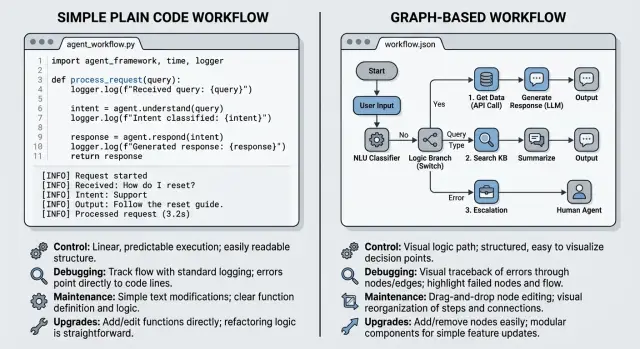
Table of Contents
Why this choice gets messy fast
Most teams do not start by planning a full agent framework. They start with a prompt, one tool call, maybe a retry, and a bit of memory. A week later, the script has branches, fallbacks, approval steps, and logs nobody wants to read.
That is when a framework starts to look tempting. It offers structure and a clearer flow. The catch is simple: it can organize the mess, or it can bury it under new concepts, extra state, and rules you never needed.
That is why this decision is harder than it looks. Plain code gives you direct control. You can trace each function, inspect each variable, and change odd behavior without fighting a graph model. LangGraph gives you a stronger shape for multi step agents, especially when the flow keeps growing.
What teams feel day to day is less abstract than any architecture debate. Bugs show up only after the second retry. The agent calls the same tool twice for no clear reason. State changes in one step break another step later. A small product change spreads across too many files. An upgrade changes behavior you thought was stable.
Plain code usually hurts first through sprawl. Files get long, conventions drift, and every new branch adds another special case. Frameworks often hurt later. You get hidden state, harder debugging, and upgrade pain when the library changes how nodes, persistence, or callbacks work.
Teams waste time when they choose too early. Some adopt a framework because the demo looks clean. Others avoid one on principle, then rebuild half of it by hand. Neither move is automatically smart.
The real choice is where you want the complexity to live: in your own code, where it stays visible, or inside an abstraction that helps now and may fight you later.
What plain code gives you
Plain code feels easier because you can see the path in one place. One function calls the next, a condition sends work down another branch, and you can read the flow from top to bottom without learning a framework first.
That matters more than people admit. Early on, direct code usually wins on clarity. If your agent takes a user message, checks intent, fetches data, and writes a reply, a few small functions in Python or TypeScript are often enough.
Logs and breakpoints also feel more natural at this stage. You can stop the program on the exact line where the model output looks wrong, print the input and output, and inspect local variables without translating everything into nodes, edges, and shared state objects.
A simple version might have four functions: classify_request(), search_docs(), draft_answer(), and review_answer(). When something breaks, you usually know where to look first because each step is just code.
Plain code also gives you full control over the details that matter. You decide when to retry a failed model call, what to store between steps, how to handle a bad tool response, and when to stop for human review.
But that comfort has limits. Once the workflow grows past a handful of steps, the code starts to spread across files, helper functions, and special cases. A simple chain turns into branches, retries, fallbacks, timeout handling, and state checks. At that point, the logic stops feeling obvious.
You also have to build your own guardrails. That usually means writing rules for state validation, loop limits, error recovery, audit logs, and safe handoffs between tools. Teams often skip those parts because the happy path works. A month later, the agent behaves strangely on edge cases, and nobody enjoys tracing why.
So plain code is a good starting shape, not always a good long term one. It stays pleasant while the workflow is small and the team still remembers every branch.
What LangGraph changes
LangGraph asks you to describe an agent as a graph instead of a script. A node is one step, such as planning, searching docs, calling a tool, or writing an answer. An edge decides where the workflow goes next. State is the shared data that moves through the run: the user request, tool results, and notes from earlier steps.
That structure helps when the path can split in several directions. If the model requests a tool, the graph can route to a tool node. If the tool times out, the graph can retry. If the answer looks weak, the graph can send it to review instead of returning it right away.
You can build the same behavior in plain code. The difference is shape. A graph gives you a map of the workflow, and that map gets useful once the agent stops being a short chain.
Picture a support agent with a few branches. It classifies the question, answers simple cases directly, calls a tool for account data when needed, retries once if that tool fails, and sends risky answers to review. That flow is easier to discuss in a graph than in a long file full of nested conditions.
The tradeoff is mental overhead. Your team now has to think in nodes, edges, and state transitions, not just functions and variables.
Abstraction also hides basic flow details. In plain code, you may see the whole retry loop, stop condition, and fallback in one place. In a graph setup, that logic can spread across node code, routing rules, and framework state. That can feel cleaner when the workflow is large. It can also make a simple agent harder to trace than it needs to be.
If the agent already has branching, retries, reviews, and repeated tool handoffs, LangGraph starts to make sense. If it still behaves like a short script with a few checks, plain code is usually easier to read and debug.
A support example
Take a support agent that handles refund requests. It reads the message, decides what kind of issue it is, checks the refund policy, and drafts a reply for a human to approve. That is enough moving parts to show the tradeoff without turning it into a huge system.
A customer writes, "I was charged twice. Can I get a refund?" The agent does three things. First, it classifies the request as billing. Next, it checks policy and order data. Last, it drafts a reply that says whether the refund fits the rules.
In plain code, this often looks like one small function calling the next. You classify the message, fetch the policy or order data, draft the reply, and stop for help if a step fails. It is boring, and boring is often good.
If the policy tool returns an error because it got the wrong order ID, you can log the bad input, retry once, or fall back to a canned reply such as "I need a human to check this order." The failure sits right next to the tool call, so most developers can spot the problem quickly.
In a graph, you split the same flow into nodes and edges. One node classifies. Another checks policy. Another drafts the answer. If the tool call fails, the graph can route the run to a retry node, then to a fallback node, then back into the main path.
That is tidy when the flow branches a lot. It also changes where you look when something breaks. In plain code, you inspect one function and the logs around it. In a graph, you inspect node state, edge rules, and the saved run history. If the agent retries when it should stop, the bug may live in the routing rule rather than in the tool call itself.
Neither version is magic. For a support flow with one main path and one or two failure cases, plain code is usually easier to picture and fix. If the same agent later needs approvals, escalations, loops, and separate paths for billing, shipping, and fraud, a graph starts to earn its keep.
How to decide
Start with one real workflow that already causes work or mistakes. Do not design for an imaginary future with ten agents and endless edge cases. Pick something concrete, like a support agent that checks an order, drafts a reply, and asks a human to approve refunds above a set amount.
That tells you more than any feature chart. Real work exposes the parts that matter: state, retries, approval steps, and failure points.
Write the workflow from start to finish on one page. Include every tool call, every decision, and every place a human steps in. Then count the branches, retries, timeouts, and loops. If you have two or three clean paths, plain code is often easier to read and test. If the flow keeps bouncing between states, a graph starts to justify itself.
Then ask who will debug it at 2 am. If that person is comfortable living in Python or TypeScript, logs, traces, and stack traces, plain code may be the safer choice. If several people need to see the same state machine and reason about transitions quickly, LangGraph can help.
Also check maintenance, not just build speed. Someone will update prompts, adjust tool schemas, fix retries, and deal with library changes. Pick the setup your team can still understand six months from now.
Small teams should be honest here. If one senior engineer owns everything, another abstraction can turn a simple incident into a scavenger hunt. On the other hand, if your workflow already has review gates, resumable steps, and repeated handoffs between tools, forcing all of that into ad hoc code gets old fast.
The cleaner choice is the one your team can debug under pressure, change without fear, and explain to a new hire in ten minutes.
Where debugging gets hard
Debugging is where this debate stops being theoretical.
With plain code, you usually start from a stack trace. You get a file, a line number, local variables, and a path through the code that failed. Again, boring is good when production breaks at 2 am.
With a graph tool, the first thing you often inspect is state: which node ran, what it wrote, what the next edge decided, and what the stored payload looked like at each step. That can be useful, especially when an agent takes several branches before it fails. But it adds a second layer to your thinking. Now you are debugging both the business logic and the graph runtime.
Hidden state is where bug hunts slow down. A node may look fine on its own, yet the real problem sits in a mutated state object, a memory store, a tool result that changed shape, or a callback that wrote something unexpected. The longer the workflow runs, the more likely it is that the bad value appeared several steps earlier.
Replay sounds like a clear win, and sometimes it is. If you can rerun the same inputs, the same model settings, and the same tool outputs, replay helps you isolate the exact turn where things went wrong.
But replay also fools people. If the model output changes between runs, or a tool hits a live API, your replay stops being a true replay. You may reproduce the outline of the failure without reproducing the failure itself.
A simple test helps. Can you reproduce one failed run exactly? Can you inspect the state before and after each step? Can you see which tool or model call changed the result? Can a new engineer trace the failure in under 15 minutes?
If the answer is no, the workflow is harder to debug than it looks. That is often the moment when plain code feels slower to build but much easier to trust.
Where upgrade pain shows up
Upgrade pain rarely appears in the first week. It shows up later, when the workflow already works, people depend on it, and nobody wants to slow down shipping.
With plain code, most changes stay local. You change a function, update a test, and fix the few call sites you own. That can still be annoying, but the blast radius is usually visible.
Framework upgrades feel different. A version bump can change graph APIs, state handling, checkpoint rules, or retry behavior. Your code may still run but produce different results on edge cases. That is worse than a loud error because teams trust a green deploy.
State drift gets expensive fast
State shape drift is a common trap. Early on, teams pass a loose object through a few nodes and keep moving. Six months later, that object holds routing flags, partial outputs, user metadata, retry counters, and traces for human review.
Then someone renames a field, splits one value into two, or changes a nested structure. In plain code, you can often trace data flow with search and tests. In a graph setup, old checkpoints, resumable runs, and helper layers can keep the old shape alive longer than expected.
The problem gets worse when teams build wrappers around the framework. A small helper for node registration looks harmless. Then it grows into decorators, shared state builders, custom retry logic, tracing hooks, and internal conventions. Now you are tied to two moving targets: the framework version and your own glue code.
That is where time disappears. You are not just updating imports. You are also updating the code that made the framework easier to use in the first place.
Busy products pay more for the same change
Migrations hurt more when the product is already busy. If users trigger flows every hour, you cannot pause everything and cleanly rewrite state.
Upgrade pain spikes when you have saved checkpoints, queued jobs, shared helpers used across many workflows, dashboards built around old event shapes, and on call teams who need predictable failure modes.
A small breaking change can turn into a week of careful rollout, replay tests, and fallback code. Lean teams usually notice this first. If uptime matters, boring code you control often ages better than clever abstraction you need to babysit.
Mistakes teams make early
One common mistake is adding a framework too soon. A demo works, the graph looks neat, and someone decides the workflow needs a formal shape right away. That often creates more cleanup work later.
If the flow still changes every week, plain code is easier to rewrite. You can move steps around quickly, rename things, and delete bad ideas without dragging old nodes and routing rules behind you.
Another mistake is putting business rules inside prompt glue. Then a simple rule, like who can approve a refund or when a lead should escalate to sales, ends up split across prompt text, router conditions, and helper functions. A few weeks later, nobody knows where the real rule lives.
Keep the split simple. Prompts should handle language. Code should handle policy, checks, and side effects.
Teams also skip tests for the messy paths. The happy path passes, so everyone moves on. Real failures show up in retries, timeouts, empty tool output, duplicate calls, and fallback branches that only run under stress.
A small support agent can look fine in staging and still fail in production because nobody tested what happens after the second failed tool call. That is where loops, silent drops, and bad user replies start.
Diagrams get too much credit too. A graph can make a workflow easier to see, but it does not make it easier to maintain. If each node hides custom state, prompt edits, and retry rules, the diagram is decoration.
Ownership is another weak spot. After launch, someone needs to own prompt changes, tool contracts, incident review, and framework upgrades. If nobody owns those jobs, the workflow slowly turns into shared clutter.
A quick check before adding another layer
A new framework can feel tidy on day one. Two months later, the team may pay for that neat diagram with slower fixes, stranger bugs, and more code nobody wants to touch.
Use one real request as the test. Pick a run that calls a model, uses a tool, stores state, and returns something the user sees. Then ask a few plain questions.
Can a new teammate trace that request from input to final output without a guided tour? If you change one step, such as replacing a retrieval call with a different tool, do you edit one file or chase side effects across half the project? If the run fails, can you replay it with the same prompt, state, and tool results? If the model changes next quarter, can you swap it without rebuilding the whole flow? And if someone asks why the framework exists, can the team answer in one or two specific sentences?
That last question matters a lot. "Because it feels cleaner" is not a real reason. "We need persistent state between steps, easy replay, and a graph view for long runs" is a real reason. "Everyone uses it" is not.
A small example makes this concrete. Say your support agent reads a ticket, checks account data, asks a model for a draft, and sends the reply for approval. If one timeout in the account step forces you to dig through decorators, hidden state, and framework callbacks, you added weight, not clarity.
If most of those answers are weak, stay with plain code longer. Small functions are easier to test, log, and replace. Add another layer only when the pain is real, repeated, and expensive enough to justify it.
What to do next
Pick one workflow that already hurts. Maybe it is the support bot that keeps looping, or the lead triage flow that sends the wrong reply. Start where failure costs money, burns team time, or creates angry emails. A demo flow will not tell you much.
Before you choose any tool, write down how the workflow fails today. Keep it plain and specific. Maybe the model picks the wrong tool, state disappears between steps, retries hide the first error, logs do not show which prompt caused the break, or a package update changes behavior in small but nasty ways.
That short list does two jobs. It tells you what to measure, and it stops the team from picking a graph library just because the diagram looks clean.
Then run the workflow in real use, or as close to real use as you can, for a few weeks. Watch where people actually get stuck. Teams often guess wrong at the start. A simple script with clean logs can beat a more abstract setup until the flow has enough branching, handoffs, and recovery paths to justify the extra layer.
Review the choice again after you have real traces, real failures, and a few painful incidents to learn from. If debugging still feels muddy, or changes keep breaking old paths, move up one level of abstraction. If plain code is still easy to trace and change, keep it.
If you want a second opinion, Oleg Sotnikov at oleg.is does this kind of review as a Fractional CTO and startup advisor. A short outside review can help when you need a clear call on workflow design, debugging setup, or upgrade risk without turning the whole project into a framework exercise.
Frequently Asked Questions
Should I start with plain code or LangGraph?
Start with plain code unless your workflow already has many branches, retries, approvals, or long running state. A few small functions are easier to read, test, and fix. Move to LangGraph when the flow keeps bouncing between steps and the script no longer stays clear in one place.
When does plain code stop being a good fit?
You usually feel it in maintenance, not on day one. If one product change touches many files, retry logic spreads everywhere, or nobody can explain the full path without opening half the project, plain code has grown past its comfortable size.
What kind of agent workflow fits LangGraph best?
LangGraph fits workflows with branching paths, repeated tool handoffs, human review, and resumable runs. If your agent needs to route between billing, fraud, approval, and fallback paths, a graph can keep that flow easier to discuss and inspect.
Is LangGraph harder to debug?
Often, yes. With plain code, you can jump to a line, inspect local variables, and follow the stack trace. With LangGraph, you also need to inspect node state, routing rules, and stored run history, so bug hunts can take longer if the team does not know the runtime well.
How do I know if replay will actually help?
First, pick one failed run and try to reproduce it with the same prompt, state, model settings, and tool outputs. If you cannot do that, replay will only give you a rough copy of the issue. Good replay needs stable inputs and clear state before and after each step.
Where does upgrade pain show up first?
Framework upgrades tend to hurt more because they can change state handling, retries, callbacks, or checkpoint behavior in ways that look fine until edge cases fail. Plain code usually keeps changes local, so you can see the blast radius sooner.
Should prompts contain business rules?
Keep prompts focused on language and keep rules in code. Approval limits, escalation logic, refund checks, and side effects should live in normal code where you can test them. When teams bury those rules in prompt text and router glue, fixes get messy fast.
What should I keep in agent state?
Store only what later steps truly need. Keep the shape small, name fields clearly, and avoid dumping every intermediate value into one shared object. Large state objects drift over time, and then one renamed field can break retries, checkpoints, or review steps.
How can a small team avoid overbuilding agent workflows?
Use one real workflow as your test and let it run long enough to fail in honest ways. If the current script still stays easy to trace and change, do not add another layer yet. Small teams save time when they wait for repeated pain instead of planning for every future branch.
When should I ask for an outside review?
Bring in outside help when the team keeps arguing about tools, incidents take too long to trace, or upgrades feel risky but nobody can explain why. A short review from an experienced CTO can give you a clear call on workflow shape, debugging setup, and upgrade risk before you lock in more complexity.


