Kubernetes job retries and the cloud bill you miss
Kubernetes job retries can quietly double cloud costs. Learn how to cap retries, remove orphaned pods, and alert on stuck business work.
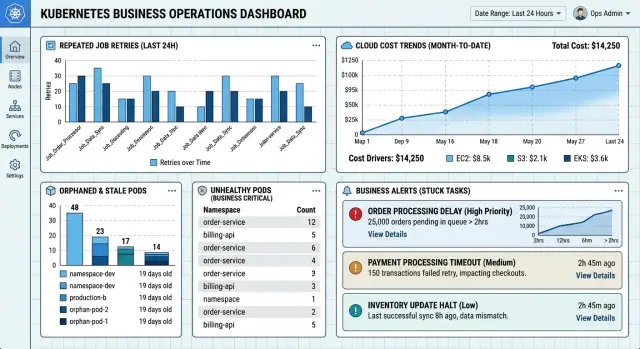
Table of Contents
Why this problem hits the bill fast
A failed batch job rarely fails just once. In Kubernetes, one miss can trigger a new pod, then another, until the retry policy runs out. That looks harmless in a config file. On the invoice, it can mean you paid for the same failed work three or four times.
Every retry starts the meter again. The cluster may pull a container image, reserve CPU and memory, write logs, open network connections, and create temporary storage. Even if the job crashes in 20 seconds, those costs still count. If the image is large or the node cache is cold, the waste adds up fast.
The problem gets worse when jobs run on a schedule. A retry count of 3 sounds modest until dozens of batch jobs hit the same bad input, expired token, or broken secret. Then one quiet failure turns into a stream of short-lived pods all night. If autoscaling is enabled, those retries can even bring up more nodes for work that already failed.
One import that runs every 10 minutes can create hundreds of extra pod starts in a day with only a few retries. That is why even small retry limits can snowball. The real issue is not one job. It is one job repeated over time.
Teams often notice the bill before they notice the pattern. A cloud dashboard shows higher compute, log storage, or network use, but failed jobs are easy to miss because each pod dies quickly. No single pod looks serious. The repeated churn is what costs money.
Failed runs also create side costs outside raw compute. They produce noisy logs, clutter monitoring, and leave engineers sorting through dead pods instead of fixing the real fault. Good cloud cost control starts with stopping useless repeats, because a small config mistake at 11 p.m. can keep spending until morning.
Where the extra cost actually comes from
Most teams check CPU and memory first. The bill often grows in the gaps between failed attempts.
Every retry creates a new pod, and that pod costs money before it does useful work. The node has to schedule it, start the container, attach storage, set up networking, and write logs. If the image is large or the node was empty, startup can take longer than the task itself. In some Kubernetes batch jobs, ten short failures cost more than one long successful run.
Retry policies also stretch waste across time. A job that fails, waits, and tries again for two hours keeps compute reserved, keeps logs growing, and keeps queue items blocked. Even when the pod exits fast, the retry window can keep dead work alive far longer than the business task deserves.
Orphaned pods add a quieter bill. They can leave log files, temporary volumes, and IP addresses in use after the job has already failed in practice. Teams usually spot this late, when nodes look busier than expected or storage climbs for no obvious reason.
Alerting can make things worse. If you alert on raw pod counts, people chase the symptom instead of the job that is stuck. A burst of failed pods can page the team all night while one broken import or bad message format keeps retrying in the background. The fix takes longer, so the waste lasts longer too.
The usual leaks are simple:
- startup time for every fresh pod
- long retry windows that keep dead work alive
- stale pods holding logs, storage, or IPs
- noisy alerts that slow down cleanup
That is why the invoice can jump without any rise in customer traffic. The cluster is busy repeating failure.
A simple example from a nightly import
At 1:00 a.m., a batch job starts a nightly import from a partner CSV file. Most nights it finishes in 15 minutes, but one night a single record has a broken date field and the parser stops halfway through.
The team expects one failed run. Instead, the Job retries again and again because the retry limit sat unchanged for months. Each retry starts a new pod, pulls the same image, reads the same file, writes the same logs, and burns more node time before it hits the same bad row.
By 3:00 a.m., the cluster has a small pile of failed pods from that one import. None of them look dramatic on their own, which is why this problem slips past busy teams. A few extra pods, a few more log streams, a few more minutes of CPU time - each part looks cheap in isolation.
At 9:30 a.m., someone fixes the bad record and reruns the import. The new run succeeds and everyone moves on. But the stale failed pods stay behind because no cleanup policy removes them, and nobody notices the extra log volume they left behind.
That is where the bill grows quietly. Compute costs rise from repeated work, log charges rise from each failed attempt, and storage can creep up if temp files or artifacts stick around. If the same pattern shows up across several jobs, the waste stacks up quickly.
Finance usually does not spot it the next day. They see it at month end, when compute is higher than expected and log bills make even less sense. Engineers remember a few overnight failures that seemed minor, but the invoice tells a different story.
This is also how orphaned pods turn into a money problem instead of a housekeeping problem. The bad record took minutes to fix. The retries, stale objects, and extra logs kept charging long after the data issue was gone.
How to cap retries without missing real failures
Most jobs do not need many second chances. When a batch task fails for the same reason every time, extra retries only add compute time, log volume, and more pods. Retry limits should match the job, not a default that nobody revisits.
Start with the jobs that retry the most. Look at the last few weeks and rank them by retry count, runtime, and cost. You will usually find a small group of noisy jobs doing most of the damage.
A short review often shows two kinds of failures. Some are random and clear on the next run, like a brief network timeout. Others are fixed failures, like a bad input file, wrong schema, or missing secret. Retries help the first group. They rarely help the second.
For one-shot batch work, keep the retry cap low. In many cases, a backoffLimit of 1 or 2 is enough. After that, mark the job as failed and stop paying for the same error. If another controller or script keeps recreating the job after the final retry, fix that too or the cap will not matter.
A practical starting point is simple:
- review the noisiest jobs first
- set a small retry cap for repeatable failures
- fail clearly after the last retry
- send those failures to manual review
- test the new limit on one job before changing the rest
Manual review sounds slower, but it is often cheaper and faster overall. If a customer upload has the wrong columns, five more attempts will not repair the file. A person can check the error once, correct the input, and rerun the job cleanly.
Roll this out one job at a time. Pick a job with frequent retries, lower the cap, watch failure rates for a week, and confirm that people still catch real issues. Then move to the next one. That gradual approach avoids surprise outages and makes the cloud bill easier to shrink without hiding actual failures.
How to clean orphaned pods
Old job pods can sit in a cluster for days, even when the work finished long ago. They clutter dashboards, confuse on-call checks, and in some setups they keep small costs alive through storage, logs, or follow-on automation that still scans them.
Start by deciding which pods should disappear and when. For most batch jobs, successful pods do not need to stay forever. Failed pods may need a little more time so someone can inspect the error, but they should not live on without a reason.
Start with a rule
A simple rule usually works better than a clever one. Many teams do fine with this:
- delete successful job pods after a few hours
- keep failed pods for 1 to 3 days
- keep them longer only for audits or hard-to-reproduce failures
Then check for pods that outlive the job that created them. If a job ended yesterday and its pods still sit there, that is drift, not history. In clusters with frequent retries, this pile grows faster than people expect.
The cleanest option is TTL cleanup on finished Jobs. It keeps the policy close to the workload, so the cluster removes old objects on its own. If TTL is not enough for your setup, run a scheduled cleanup task that deletes pods and Jobs by age, namespace, label, and status. Keep the rule narrow at first. Deleting too little is annoying. Deleting the wrong thing breaks debugging.
Before you remove old pods, make sure you keep the logs you actually use. Send stdout, stderr, and job status to your logging system first. If you need more context, save event data or a short failure summary outside the pod. Once that is in place, deleting old pods feels much less risky.
A small naming and labeling standard helps a lot. Give batch jobs labels for team, system, and retention class. Then your cleanup task can state clearly which failed pods stay 24 hours and which stay 7 days.
Watch the result for a week. Check how many old pods remain, whether anyone missed logs, and whether support or engineering had to recover deleted evidence. Then adjust the age limits. The best rule is usually boring: it removes stale pods quietly, and nobody notices except the bill.
Alert on work that is stuck, not on pod totals
Most teams alert on what Kubernetes can count: pods, restarts, pending states. That is easy to set up, but it often tells the wrong story.
People do not care that 14 pods exist. They care that the invoice sync did not finish before finance starts work, or that a report export missed the morning deadline. Useful Kubernetes alerts start with the business task and its finish window.
A nightly import is a good example. Say it normally finishes by 2:15 a.m. If it is still running at 2:30, or retries keep pushing it past that window, the work is stuck even if some pods still look healthy. That should trigger one alert for the whole job run.
Raw pod count alarms still have a place, but they should sit lower in priority. Pod totals jump for harmless reasons: parallel runs, slow image pulls, node changes, or cleanup lag. When every pod creates its own page, people stop trusting the system. Then real failures hide inside the noise.
One alert per job run works better. It gives the on-call person one clear problem to check, not a pile of nearly identical messages from the same failed run. This also makes retries easier to judge. A retry is fine. Ten retries over 45 minutes on the same report export is not.
A useful alert message should include:
- the task name, such as invoice sync or report export
- when the run started
- the current age of the job
- how many retries happened
- the latest failure reason
That small change saves time. The person reading the alert can tell in seconds whether the job is just slow, trapped in a retry loop, or blocked by something external like a bad upstream file.
If you already track job status in your app or workflow layer, use that as the main signal and let pod metrics support it. Lean teams usually do better with this setup. They spend less time chasing harmless pod churn, and they catch the work that actually risks missed deadlines, duplicate processing, or a larger bill.
Mistakes teams make
Teams usually lose money on batch work in ordinary ways. The bill grows a little on every retry, every log write, and every alert that pulls someone out of bed for no good reason.
A common mistake is leaving retry settings at the default and never checking whether they fit the workload. A retry count that seems harmless can multiply compute use fast, especially when jobs pull large images, warm up connections, or call outside services on every run. Retries are not free insurance. They are extra runs.
Another mistake is retrying work that failed because the input was wrong. If a CSV is missing a required column, the next five attempts will fail for the same reason. Some teams treat every failure like a temporary outage, even when the job is plainly telling them the data is bad.
Teams also delete failed pods too early. They want a clean dashboard, so they remove the evidence before anyone checks the logs, exit code, or last event. Then people guess, rerun the job, and pay again to rediscover the same issue. Keep failures around long enough to learn from them.
Alerting causes trouble too. Some teams page on every failed pod. That sounds safe, but it trains everyone to ignore the pager. One business task can create several failed pods before it finally succeeds or times out. The pod count looks dramatic while the business impact may still be small.
Before wiring alerts, ask a few direct questions:
- Did the business task finish?
- Is the job stuck, or is it retrying within a normal limit?
- Did bad input cause the failure?
- Are logs growing faster than the job count?
Short-lived jobs can also hide storage costs. Teams watch compute and forget that logs, artifacts, and image pulls keep adding up. Small jobs sometimes cost more in log retention than in CPU time because each retry writes the same stack trace again and again.
If you run many batch jobs, these small mistakes stack up quickly. A retry cap, simple input checks, and calmer alerts often cut waste faster than another round of cluster tuning.
A quick checklist before you change settings
Small changes to retry limits and cleanup rules can cut waste fast, but they can also hide real problems if you guess. Before changing anything, decide what you want to protect most: money, delivery time, or support load. Most teams care about all three, so a short review now saves rework later.
Use this checklist on the jobs that run every day, especially batch work that pulls data, converts files, sends reports, or talks to outside APIs.
- Start with the jobs that can burn money fastest. Look for runs that start often, pull large images, use a lot of CPU or memory, or hit paid third-party services on every retry.
- Split failures into two groups. Retry short network errors, temporary rate limits, and node hiccups. Stop on bad input, broken credentials, missing files, or code bugs that will fail the same way every time.
- Set a clear retention window for finished jobs and pods. Keep them visible long enough for debugging, but not so long that old objects pile up and confuse people.
- Decide who owns the alert when business work gets stuck. That owner should be the team that can fix the cause, not just silence the page.
- Pick the numbers you will watch after the change, such as successful runs, retry count per job, orphaned pods, average runtime, and cost per completed run.
A simple test helps. If a nightly import normally finishes in 12 minutes, alert when no successful run lands by the business cutoff. That tells you when work is stuck, which matters more than a raw pod count.
What to do next
Do not try to fix every batch job at once. Pick the one that wakes people up, burns the most compute, or fails often enough that nobody trusts it anymore. One noisy job is usually enough to show whether your retry policy is wasting money.
Start with a small weekly change set and measure the result after one full run cycle:
- lower the retry cap on that job and watch what happens
- add automatic cleanup for finished and orphaned pods
- rewrite one alert around a missed business outcome instead of raw pod totals
Each step cuts a different kind of waste. Fewer retries reduce repeated compute. Pod cleanup makes the cluster easier to read and trims storage noise. Business-focused alerts stop the team from chasing harmless restarts while real work sits stuck.
Take a simple case: a report import usually succeeds on the second try, but it hits permission errors once a week. With a high retry cap, the job can hammer the same bad state for an hour. Lowering the cap to two or three attempts turns a quiet cost leak into a visible issue someone can fix.
After that, compare before-and-after numbers. Look at retry counts, runtime, and cost for that job over a few days. If the change helped, repeat the same pattern on the next noisy job.
If you want an outside review, Oleg Sotnikov at oleg.is helps startups and smaller teams tighten retry limits, cleanup rules, and alert design as part of Fractional CTO and infrastructure advisory work. Sometimes a short review is enough to spot the waste that your team has stopped seeing.
Frequently Asked Questions
Why can one failed Kubernetes job raise my bill so much?
Each retry starts a new pod and starts billing again. You pay for image pulls, startup time, CPU, memory, logs, network traffic, and sometimes extra storage even when the job fails fast.
What retry limit makes sense for batch jobs?
For most one-shot batch jobs, start low. A backoffLimit of 1 or 2 often gives enough room for a brief glitch without paying for the same failure again and again.
When do retries actually help?
Retry when the problem can clear on its own, like a short network timeout or a brief rate limit. Stop early when the job fails on bad input, missing secrets, wrong credentials, or a code bug, because the next run will hit the same wall.
Can retries trigger autoscaling and add more cost?
Yes. If retries keep creating new pods, the cluster may add nodes for work that already failed once. That turns one broken job into more compute spend with no business value.
Where does the extra cost come from besides CPU and memory?
The bill often grows in startup and cleanup work. Fresh pods pull images, attach storage, open network paths, and write logs, so a pile of short failures can cost more than one normal run.
How do I clean up orphaned job pods?
Use TTL cleanup on finished Jobs if your setup supports it. If not, run a small scheduled cleanup that removes old Jobs and pods by age, label, namespace, and status.
How long should I keep failed pods around?
Keep successful pods for only a few hours in most cases. Keep failed pods for about 1 to 3 days so engineers can inspect the logs, then delete them unless audit rules or a hard bug give you a clear reason to wait longer.
Should I keep logs before I delete old pods?
Save the logs first, then delete the pods. Send stdout, stderr, and job status into your logging system so your team can debug later without keeping old objects in the cluster.
What should I alert on instead of pod count?
Alert on the business task, not on raw pod totals. One alert for a job that missed its finish window works better than a flood of pages for every failed pod in the same retry loop.
What is the first change I should make to cut waste fast?
Pick the noisiest job first and change one thing at a time. Lower its retry cap, add cleanup for finished pods, and watch retry count, runtime, and cost per successful run for a week.


