Kubernetes ingress split for public, partner, and internal
Kubernetes ingress split starts with a clear map of public, partner, and internal traffic so auth, rate limits, and logs stay easy to manage.
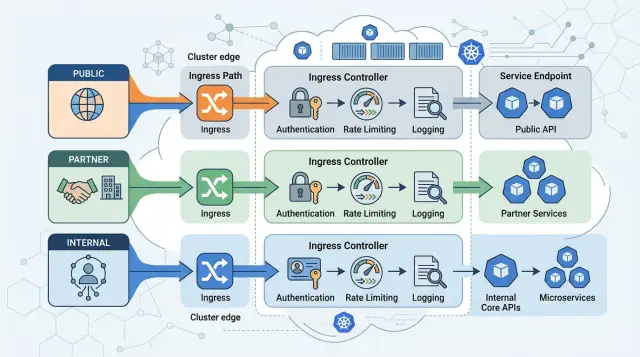
Table of Contents
Why one ingress gets messy fast
One ingress looks tidy on day one. You put every route in one place, ship it, and move on. That calm usually ends when different kinds of traffic hit the same app.
Public users, partners, and staff rarely need the same rules. Public traffic often needs bot filtering, simple rate limits, and broad availability. Partner traffic usually needs caller-specific auth, IP allowlists, or higher limits for batch jobs. Internal traffic needs tighter access, different audit trails, and far less tolerance for accidental exposure.
When all of that sits behind one shared ingress, the boundary gets blurry. You can still route requests, but it becomes harder to tell what a request was meant for. A 403 in the logs might come from a customer, a partner integration, or an employee opening an admin screen. If your team has to inspect paths and headers every time, debugging slows down for no good reason.
The mess usually starts with small exceptions. One path needs a longer timeout. One partner needs a bigger burst limit. One internal endpoint must skip a public rule. Each request sounds reasonable on its own, so teams keep adding annotations, path matches, and special cases. After a while, nobody wants to touch the ingress because one change can break three audiences at once.
Picture one host handling /api, /partner, and /admin. Public traffic spikes because of a promotion, partner jobs run every hour, and staff use the admin area during business hours. If they share the same entry rules and the same logs, noise from one group can hide trouble in another.
That is why splitting ingress usually pays off early. This is not about neat YAML. It is about clear boundaries. Auth rules stay easier to reason about, rate limits fit the caller, and logs tell a cleaner story when something fails.
Mark the boundary before you write rules
A clean ingress split starts on paper, not in YAML. If you skip that step, public, partner, and internal traffic end up mixed behind the same edge, and every auth rule turns into an exception later.
Start by naming every caller that reaches the cluster. Do not stop at "users" and "services." Include browsers, mobile apps, partner webhooks, back office staff, support tools, CI jobs, office VPN users, and scheduled tasks. Teams often forget one quiet caller, then build the whole ingress around the wrong shape.
Next, mark each route by audience. Public routes face the open internet, so they need stronger abuse controls and simpler failure behavior. Partner routes need stable contracts, clearer identity checks, and logs that answer a basic question: did their system call you correctly, or did your side fail first? Internal routes belong on private paths and should stay away from public exposure, even if the endpoint looks harmless.
You also need to note how each group enters the system. A browser may come through a CDN or load balancer. A partner may call a fixed hostname from known IP ranges. Internal staff may come through VPN, SSO, or a private network. That entry point changes what headers you trust, where rate limits apply, and how you read source IPs in logs.
A quick review catches most mistakes:
- Who calls this route?
- Where do they enter from?
- How do they prove identity?
- What logs will you need when something breaks?
- Can this route safely share an edge with another audience?
Some routes should not share the same edge, even when traffic is tiny. Admin panels, billing callbacks, partner upload endpoints, health endpoints, and internal tools are common examples. If one bad config could expose them, split them early.
Say your app has a public signup API, a partner order webhook, and an internal staff dashboard. All three may be small at first. If they sit behind one ingress, you soon add path exceptions, custom headers, special rate limits, and mixed logs. If each audience gets its own lane from the start, later changes stay local and incidents are much easier to untangle.
Choose a split pattern your team can keep simple
The best ingress split is the one your team can read in a minute and change without fear. If public users, partners, and staff all enter through the same ruleset, small differences pile up fast. One auth change for partners, one rate limit for the public API, one logging tweak for internal tools, and the file starts fighting back.
A good default is separate hosts for separate audiences. Give the public site its own host, give partner traffic its own host, and keep internal tools on a private host or private network path. Different audiences need different policies. Separate hosts make that obvious.
Use separate ingress objects when the rules are different. Even if one controller handles all of them, split the objects by audience. That keeps auth settings, rate limits, IP allowlists, and log annotations in the right place instead of mixing them into one large manifest.
For many teams, a simple pattern is enough: public traffic gets one host and one ingress object, partner traffic gets another, and internal tools stay off the public entry point. One ingress controller can handle all three at first. DNS, certificates, and routing stay easy to follow, and a change for partners does not quietly affect employees or public users.
Internal tools need more discipline than most teams expect. If a dashboard or admin panel sits behind the same public entry point as customer traffic, someone will eventually treat it like just another path rule. Put it behind private networking, a VPN, or at least a separate private load balancer. That one choice removes a lot of future cleanup.
Add another ingress controller only when you need hard isolation. Good reasons include a separate network boundary, different operations ownership, stricter compliance rules, or a need to reduce blast radius between public and internal traffic. If you do not have one of those reasons, a second controller usually adds more moving parts than it saves.
Set up the split step by step
Use three lanes from day one: public, partner, and internal. Give them plain names nobody will misread six months later, such as public-api, partner-api, and internal-api. If your team uses different hostnames for each lane, people spot mistakes faster during reviews.
Keep one ingress for each lane, and give each ingress one job. That sounds strict, but it saves time later. When a public rule sits next to an internal exception in the same file, teams start adding quick fixes and the boundary goes soft.
A simple rollout works well:
- Create a public ingress for browsers, mobile apps, and anonymous users.
- Create a partner ingress for approved clients, vendors, or customer integrations.
- Create an internal ingress for staff tools, back office apps, and service-to-service access.
- Put auth on the ingress for that lane instead of scattering it across many services.
- Send each lane's logs to its own stream so alerts and audits stay readable.
Auth gets easier when you attach it to the lane instead of mixing it into every route. Public traffic might need session checks or basic bot protection. Partner traffic often needs API keys, mTLS, or signed requests. Internal traffic should usually require company identity or network rules. When each ingress owns its auth, you can change one audience without breaking the others.
Rate limits should come from expected traffic, not guesswork. Public endpoints often need tighter per-IP limits because anyone can hit them. Partner traffic is usually steadier, so set limits from real usage or contract terms. Internal traffic may need softer limits, but it still needs guardrails so one bad script does not flood the cluster.
Logs deserve the same split. Put public logs, partner logs, and internal logs into separate streams with the same request ID format. Then your team can answer simple questions fast: was this spike caused by the public app, one partner, or an internal job?
A small team can set this up in one afternoon. Start with naming, create the three ingress objects, attach auth at the ingress level, set first-pass limits, and route logs into separate buckets. That first split removes a lot of future cleanup.
A simple example with three audiences
A SaaS app often has one product but three very different traffic patterns. Customers use the main app every day. Partners send API calls from their own systems. Staff open an admin panel to fix accounts, review billing, or handle support cases. If all of that goes through one shared entry point, the rules get messy fast.
A clean setup usually starts with three lanes: one public host for customer sign-in and normal app traffic, one partner-only host for API requests, and one private host for the admin panel.
The public lane is the busiest. It handles browser sessions, login flows, and the normal ups and downs of customer traffic. You still protect it, but the priority is smooth access, stable sessions, and good error handling. A login page that breaks under load hurts every user at once.
The partner lane needs a stricter gate. Every request should carry a token or signed credential, and the rate limit should fit the actual integration. One partner script can send thousands of bad requests in a few minutes if something goes wrong. Separate rules make it easier to pause one partner without touching customer traffic.
The admin lane should be hard to reach. Many teams allow it only through a VPN, office IP ranges, or both. That blocks most unwanted traffic before anyone even sees the login screen. It also keeps the admin panel out of the same exposure level as the public app.
Logs and alerts should follow the same split. Public traffic logs help you spot login errors or sudden spikes. Partner logs should show which credential hit which endpoint and where failures started. Admin logs should focus on access attempts, blocked IPs, and unusual actions inside the panel. When each lane keeps its own logs and alerts, the team can find problems faster and avoid chasing noise from the wrong audience.
Give each lane its own auth, limits, and logs
An ingress split only works if each lane has its own guardrails. Public, partner, and internal traffic may hit the same app, but they should not enter the same way. If you treat them as one stream, you get tangled rules, noisy logs, and hard-to-explain outages.
Start with the public lane. Check customer identity at the edge, before requests move deeper into the stack. That usually means session cookies, OAuth, or another login method that fits your product. Keep that logic close to the public entry point so anonymous traffic, expired sessions, and obvious bot noise stop there.
Partner traffic needs a different test. Do not let partner requests touch shared services until you verify the token, key, or signed header they use. A bad partner credential should fail fast with a clear deny result. This protects shared APIs from accidental misuse and makes support easier when one partner sends broken traffic.
Internal tools need the strictest boundary, even if only a few people use them. Put network rules around them so they accept traffic only from company ranges, VPN, or private gateways. Then add company SSO on top. If an admin panel is reachable from the public internet without both checks, someone will find it.
Rate limits should match the lane, not the app as a whole. Public endpoints need protection from spikes, scraping, and login brute force. Partner endpoints need steadier quotas tied to each caller. Internal endpoints usually need light limits, but they still need abuse protection.
Logs matter just as much as auth. Every lane should record the same core fields so you can compare events across systems. Keep it boring and consistent: request ID, caller type, lane name, auth result, and final decision. When a request fails, you want to answer three questions quickly: who sent it, which lane handled it, and why it passed or failed.
The difference is easy to see in practice. If a customer opens the app, the public lane checks login and may rate-limit repeated sign-in attempts. If a partner sync job runs, the partner lane verifies its token before the request reaches shared APIs. If a staff member opens an admin tool, the internal lane checks network access first, then company SSO. Same cluster, very different rules.
Mistakes that cause trouble later
Most ingress problems start with blurry audience lines, not broken YAML. A setup can look neat in a diagram and still turn into daily friction once public users, partners, and staff hit the same edge.
One common mistake is putting every audience behind one wildcard host. It feels tidy to send everything through *.example.com, but it makes policy drift almost certain. Cookies, CORS rules, rate limits, and bot filters start to bleed across audiences. When one team changes a default, another audience pays for it.
The same thing happens when partner routes live under the same path tree as public APIs. A path like /api/partner can work for a while, then someone adds a rewrite, a shared auth rule, or a catch-all path and partner traffic gets public behavior. Separate hosts or separate ingress objects make intent obvious. Shared paths hide differences until a release goes sideways.
Copied annotations cause quieter damage. Teams often clone an ingress block and forget that the new audience has different auth, body size, timeout, or rate limit needs. Public traffic may need bot controls and tighter limits. Partner calls may need stable quotas and clearer error codes. Internal tools usually need stricter identity checks, not public-friendly defaults.
Logs create trouble too. If every lane writes the same thin log line, you lose caller identity when you need it most. A 401 or 429 means very different things for an end user, a partner account, and an employee using an admin tool. Keep audience-specific fields in logs, such as partner ID, service account, or user role, or your incident review turns into guesswork.
The worst shortcut is leaving internal tools public while planning a cleanup "soon." Soon turns into months. Search consoles, admin panels, preview apps, and metrics pages should start behind private network access, VPN, or an IP allowlist on day one.
If a route needs different auth, different rate limits, or different logs, give it its own lane before traffic grows. That bit of structure saves a lot of time later.
Quick checks before you roll it out
An ingress split stays clean when the last review is boring. You want clear names, clear owners, and a few tests that prove each lane behaves the way you expect.
Run this review before anyone merges the final rules:
- Give every host and path an audience label. Public, partner, or internal should appear in the config, the docs, and the team conversation. If one route does not fit any lane, stop and decide now.
- Assign one owner to each lane. That can be a team or a single person, but someone must answer for rule changes, incidents, and exceptions.
- Force a few auth failures and watch where they land. A bad public login should show up in public logs. A rejected partner token should land in partner logs. Internal auth noise should not flood the same stream your support team watches all day.
- Match limits to real traffic, not guesses. Public endpoints often need tighter burst control. Partner traffic may arrive in steady batches. Internal jobs can spike during deploys or scheduled syncs, so they need different numbers.
- Test internal routes from the public internet and make sure they fail closed. Do not settle for "probably blocked." Use a real external request and confirm the route does not answer, redirect, or leak headers.
A small dry run helps. Ask one person outside your team to try the public path, one partner-style request with the right credentials, and one internal call from the approved network. That quick pass catches sloppy host matches and path overlaps faster than a long meeting.
If you support startups or small teams, keep the review simple enough that a new engineer can follow it in ten minutes. Complicated ingress rules age badly. Clear boundaries do not.
Next steps for your team
Start with a whiteboard, not YAML. Draw every host, path, and audience on one page. Mark which routes face the public internet, which ones partners use, and which ones only staff or back office tools should reach. If one route serves two audiences today, circle it first. Mixed routes cause most of the confusion later.
The best first move is usually to change the boundary before you change the details. Move public, partner, and internal traffic into separate lanes first. Then add the right auth, rate limits, and logging for each lane. Teams often do this in the opposite order and end up patching exceptions for weeks.
Keep the first pass small. Pick the routes that already have the clearest audience. Move mixed routes into separate ingress objects or controllers. Give each lane its own basic policy for auth and request limits. Send logs to separate dashboards or indexes so support can read them fast.
Then test real traffic, not only config files. Run one partner flow end to end, such as an API call with the exact headers a partner sends. Run one internal flow too, like access to an admin tool from your office network or VPN. Check four things: the request reaches the right backend, auth behaves as expected, rate limits do not block normal use, and logs show enough detail to debug a bad request in minutes.
If something feels unclear on paper, it will feel worse in production. Rename routes, remove old catch-all rules, and write down who owns each lane. That small cleanup often saves hours during incidents.
If you want a second set of eyes before rollout, Oleg Sotnikov at oleg.is works with startups and smaller companies as a Fractional CTO and advisor. He helps teams tighten architecture, infrastructure, and operational boundaries, and a short review can catch bad auth or logging decisions before they turn into production noise.
Frequently Asked Questions
Why does one shared ingress get messy so fast?
Because one shared ingress blurs intent. Public users, partners, and staff need different auth, limits, and logs, so each exception makes the config harder to read and easier to break.
What is the simplest ingress split for most teams?
Start with three lanes: public, partner, and internal. Give each lane its own host and its own ingress object, then keep internal traffic off the public entry point.
Should I split by host or by path?
Pick separate hosts when audiences differ. Paths can work for a while, but shared path trees invite rewrites, auth leaks, and catch-all rules that affect the wrong callers.
Do I need multiple ingress controllers?
Add a second controller only when you need hard isolation. Separate network boundaries, stricter compliance rules, or different ops ownership justify the extra moving parts; most teams can start with one controller and separate ingress objects.
Where should I put authentication rules?
Put lane-level auth at the ingress, then keep service checks inside the app where they belong. That gives you one clear gate for each audience and stops broken requests early.
How should rate limits differ for public, partner, and internal traffic?
Base limits on caller behavior, not on one app-wide number. Public traffic usually needs tighter per-IP control, partner traffic needs quotas per client, and internal traffic still needs guardrails so one bad script does not flood the cluster.
What should I log for each lane?
Log request ID, lane name, caller type, auth result, and final decision for every request. Then add lane-specific details like partner ID or user role so your team can debug failures without guessing.
How do I protect internal or admin routes?
Keep admin and staff routes behind private networking, a VPN, office IP ranges, or a private load balancer. Then add company SSO on top so the route never sits at the same exposure level as customer traffic.
What mistakes cause trouble after rollout?
Teams often get burned by wildcard hosts, copied annotations, and mixed logs. If a route needs different auth, limits, or audit detail, split it early instead of patching exceptions later.
How can I test the split before production?
Before you ship, send real requests through each lane and force a few failures on purpose. Check that each request hits the right backend, auth denies the right traffic, limits allow normal use, and logs land in the correct stream.


