k3s vs Talos on bare metal for small teams and calm upgrades
k3s vs Talos on bare metal for small teams: compare control plane style, upgrade habits, failure recovery, and daily ops before you choose.
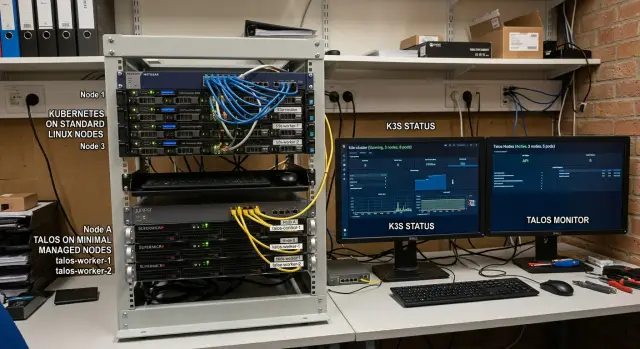
Table of Contents
Why this choice gets hard fast
The hard part in k3s vs Talos on bare metal is not getting a cluster running. Most teams can do that in a day. The hard part starts months later, when the cluster becomes part of normal work and nobody has extra time.
You are not choosing a weekend project. You are choosing the thing your team will patch, reboot, debug, and explain to the next hire for years.
Small teams usually lose time in recovery, not setup. A node drops. An upgrade stalls. Certificates expire. Someone forgets the exact order for draining, rebooting, or bringing services back. A stack that felt familiar during installation can feel very different when one person is tired and production is slow.
Familiar tools often win early because they feel easier. That feeling is real, but it does not always survive pressure. If your cluster depends on manual fixes, undocumented steps, or shell access at the worst moment, the comfort fades fast.
Bare metal makes this sharper. There is no cloud control plane hiding the ugly parts. You deal with real disks, real network quirks, odd BIOS settings, and machines that do not all fail in neat ways. When something breaks, your team needs a short path from problem to recovery.
For a tiny ops team, fewer moving parts usually wins. If a platform asks people to remember too much, they will remember it only until the first rough upgrade window. After that, updates get postponed, and small problems start growing teeth.
A simple test helps. Picture an ordinary bad day: one node dies, another needs a reboot, and the team still has customer work to ship. If the recovery plan involves a pile of manual checks, personal notes, and crossed fingers, the setup is already telling you something.
The best choice is often the one that feels a little boring. Boring is good when the pager goes off.
What bare metal changes
Running Kubernetes on your own servers changes the job in a very practical way. You are not only picking software. You are choosing how much hands on work your team can handle when a machine freezes at 2 a.m. or comes back from a reboot in a strange state.
Cloud platforms hide a lot of pain. They replace failed nodes, keep control plane parts alive, and give you a console when normal access breaks. On bare metal, you own that work. If a disk starts failing, a BIOS setting flips after a firmware update, or a server refuses to boot cleanly, nobody fixes it for you.
That shifts attention to boring things people often skip at first. Remote console access matters. So does remote power control, even if it feels excessive during setup. A spare SSD on a shelf can save more time than a clever cluster design. The same goes for one spare server, or at least a tested way to rebuild a node fast.
Reboots also feel different on bare metal. In cloud setups, teams restart nodes with less fear because replacement is easy. On your own hardware, every reboot carries some risk. Firmware quirks, RAID tools, network card behavior, and boot order mistakes show up at the worst time.
A plain recovery plan beats an ambitious diagram. For a tiny team, the plan should answer four questions:
- How do we reach a dead or half-dead server remotely?
- How do we reset or reinstall one node fast?
- Which spare parts do we keep on site?
- Who decides whether to repair, replace, or leave the cluster degraded for a day?
This is where many small teams get trapped. They spend days designing high availability, then lose a weekend because nobody can open a remote console or find a compatible power supply. Recovery speed matters more than clever architecture.
If your cluster can survive ordinary failures with calm, repeatable steps, you are in good shape. If it depends on perfect hardware and perfect memory, it is too fragile.
How k3s and Talos feel in daily use
k3s feels like Kubernetes with normal Linux habits still intact. You log into a node, check services, read logs, inspect files, and fix a bad setting the same way you would on other servers. For a small team, that familiarity lowers stress. If the person on call already knows Linux well, k3s usually feels easy to live with.
Talos feels different on purpose. You do not treat the node like a general Linux box. You push config, use the Talos API, and expect nodes to behave more like sealed appliances. That removes a lot of casual tinkering, which is good if your team wants the cluster to stay consistent when people are rushed or tired.
That is the practical split.
With k3s, many teams keep shell access as the safety net. When a node acts weird late at night, they want SSH, system logs, and the freedom to inspect the host directly. That can save the day. It can also create drift. One quick fix on one node can turn into a mystery three weeks later.
Talos pushes the team the other way. If a node breaks, the cleaner answer is often "replace it" or "reapply config" instead of editing the machine by hand. That can feel strict at first. It also makes rebuilds far more repeatable. Tiny ops teams often benefit from rules like that, especially when the same people handle infrastructure, deploys, and random app issues.
There is also a training difference. A new engineer can learn a k3s cluster by looking directly at the hosts. In Talos, they need to learn the control path first: where config lives, how changes roll out, and how nodes return after a rebuild. Neither path is wrong. They reward different habits.
This is why the daily experience matters more than feature lists. If your team trusts experienced admins to diagnose live systems, k3s often fits better. If your team wants tighter node rules, fewer one off fixes, and more predictable rebuilds, Talos often feels calmer. Both can run production workloads well. The better choice is the one your team will still use properly six months from now.
Upgrade habits matter more than install day
Most small teams do not get stuck on installation day. They get stuck months later, when somebody has to patch the OS, rotate certificates, reboot a node, and remember why nobody touched the cluster for eleven weeks.
Start with a blunt question: who will actually do upgrades? Not who should do them. Not who built the first version. Write down the name of the person who will patch nodes on a busy Wednesday. If the answer is "whoever is awake," you need the simpler path.
Then look at your recent maintenance habits. How often do you postpone updates now? If your team already delays routine work on servers, databases, or CI runners, that pattern will not improve just because the cluster is new. Teams repeat their habits.
This is where the choice becomes less about features and more about behavior. Talos works best when the team accepts a stricter model: planned changes, repeatable rebuilds, and less editing on live machines. k3s is usually easier for teams that still want a normal Linux box underneath and a familiar way to inspect or fix things.
A few honest questions make the choice clearer. Do you usually repair nodes in place, or replace them and rejoin them? Are upgrade steps written down, or does one person remember them? When something breaks late at night, does the team stay calm in the terminal, or guess until it works? Can you handle a platform that demands more discipline than you use today?
If you usually repair servers in place, k3s will feel more natural. You can keep more of your current habits and debug with tools the team already knows. It is not glamorous, but it is honest.
If you already treat machines as replaceable, Talos may save you trouble over time. It removes a lot of the "just SSH in and patch it" behavior that slowly turns clusters messy.
Calm systems come from repeatable habits, not wishful thinking. Pick the platform your team will maintain when they are tired, short on time, and trying not to break production.
A three node example
Picture one engineer running a small SaaS product on three servers in a rack. The app is not huge, but it is real: an API for customer traffic, background jobs for slow tasks, PostgreSQL for state, and a monitoring stack so problems show up before users complain.
A sensible layout stays simple. All three machines can run control plane duties so the cluster does not depend on one box. The engineer spreads the API and workers across the nodes, keeps PostgreSQL on fast local storage or a carefully chosen storage setup, and runs monitoring in the cluster so alerts stay close to the system.
That setup sounds modest, but the pressure is real. The engineer wants upgrades to fit into a short weeknight window, not a long Saturday. They also want rollback steps they can follow when they are tired at 11 p.m.
In a setup like this, k3s fits best when the engineer already feels at home on Linux. If they are used to SSH, systemd, log files, and fixing host issues directly, k3s feels natural. They can inspect the machine, patch something by hand, and move fast when a small host problem appears.
That same direct access is also the trap. One quick host change turns into five. Six months later, node 2 behaves a little differently from node 3, and upgrades start feeling tense.
Talos fits a different habit. If the engineer wants each server to stay close to a declared config, Talos is usually calmer. They rebuild and reapply instead of tweaking hosts over time. That often makes upgrades easier to repeat: drain one node, upgrade it, confirm workloads recover, then move to the next. If something breaks, they roll back through the known config and image path, not through a pile of shell history.
For this three node SaaS, neither option is wrong. Pick k3s if you trust your Linux skills and want full host access. Pick Talos if you want fewer host changes, stricter routines, and a cluster that behaves the same next month as it does today.
What failures and upgrades actually feel like
Most teams do not notice the real difference until a node fails or an upgrade lands during a busy week.
With k3s, the host is still a normal Linux box. If something looks odd, you can SSH in, read logs with familiar tools, check disks, inspect services, and look at the network stack directly. That often feels faster in the moment, especially for a small team that already knows Linux well.
The trade off shows up later. Two nodes drift in small ways over time, and the fix that works on one host may not match the others. During an upgrade, you can end up debugging the cluster and the operating system at the same time.
Talos pushes more of the work into managed commands and declared state, so you spend less time treating nodes like pets. When a node acts up, you usually work through the Talos API and the cluster definition instead of logging into the box and trying things until one sticks.
That can feel slower on day one. You cannot wander around the host and improvise. But it often feels calmer later because every node is supposed to behave the same way. Upgrades also tend to be more predictable when the team sticks to that model.
A planned failure drill tells you more than a week of reading docs. Restore cluster state and secrets into a clean test setup. Replace one failed node from zero and measure the full time. Run a control plane upgrade on a normal weekday, including prep, drain, reboot, health checks, and rollback decisions. Then ask someone other than the main admin to follow the runbook. If they get stuck after ten minutes, the runbook is not done.
Those tests expose the real difference between the two paths. Does the team move faster with direct host access, or do they burn time on manual fixes? Do managed workflows feel restrictive, or do they keep everyone calm?
Mistakes that waste weekends
Most lost weekends start with a false sense of safety. A cluster works in a lab for a few days, so the team treats that as proof that production will be fine. Then a real problem shows up: a node hangs during reboot, a disk fills up, a switch port flaps, or a backup turns out to be incomplete.
Another common mistake is piling on add ons before the basics work. Teams install ingress, monitoring, local storage, secret tools, and extra controllers before they can restore the control plane or rebuild a failed node. That feels productive for a week, then turns ugly when the first recovery test fails.
A small team should get a few boring jobs right first. Backups and restore tests need to be part of setup, not a future task. Every server needs separate remote console or power access. Rebuild steps need to be written down so another person can follow them. And it is much safer to change one major layer at a time.
Remote power control matters more than many people expect. If a server freezes after an upgrade and nobody can reboot it from home, the cluster stops being a software problem. It becomes a trip to the office.
Teams also waste weekends by letting one person become the memory of the cluster. That person knows the kubeconfig path, the reset order, the strange storage fix, and the firewall rule nobody documented. When that person is asleep, on a flight, or simply burned out, everyone else guesses.
The most expensive mistake is changing the control plane and the storage stack in the same maintenance window. If you move to Talos and replace storage on the same weekend, you create two fresh failure paths at once. When pods fail or volumes disappear, you no longer know where to look first.
A slower plan is safer. Keep storage steady while you change the control plane, or keep the control plane steady while you change storage. Small teams do better when they can isolate one problem, fix it fast, and go back to sleep.
Which one fits a tiny team
Most teams do not need a perfect answer. They need a cluster they can fix at 2 a.m. with the people they already have.
If your team works comfortably in SSH, shell scripts, Linux logs, and service restarts, k3s is often the calmer choice. If they prefer tighter node controls and are willing to learn a defined config and API flow instead of logging into machines, Talos may fit better.
The deciding factor is not the feature matrix. It is recovery without guesswork.
A boring recovery that takes twelve calm minutes is better than one that takes seven minutes but only works when your most experienced person is awake. That is the standard worth using.
If you want a second opinion before you buy hardware or lock in your cluster design, Oleg Sotnikov at oleg.is works with startups and small businesses as a Fractional CTO on infrastructure design, bare metal operations, and practical upgrade planning. A short review of your backup plan, node replacement steps, and upgrade routine can catch the weak spots before they cost you a weekend.
Frequently Asked Questions
Which is easier for a small team, k3s or Talos?
For most small teams, pick the one you can recover under pressure without guessing. Choose k3s if your team already lives in SSH and Linux tools. Choose Talos if you want stricter node rules and repeatable rebuilds.
When should I choose k3s?
Pick k3s when your team feels comfortable fixing Linux hosts directly. It fits people who want shell access, system logs, and the freedom to inspect a server when something breaks at night.
When does Talos make more sense?
Talos works well when you want nodes to stay close to declared config instead of drifting over time. It suits teams that prefer reapplying config or rebuilding a node instead of logging in and patching by hand.
Is bare metal really harder than cloud Kubernetes?
Yes, because you own the ugly parts on bare metal. Disks fail, firmware acts weird, boot order changes, and remote access matters a lot more when no cloud control plane steps in.
What should I prepare before I install either option?
Start with recovery, not install commands. Make sure you have remote console access, remote power control, tested backups, written rebuild steps, and at least a simple plan for spare disks or one spare server.
How do upgrades feel in k3s compared with Talos?
With k3s, upgrades often feel familiar because you work through normal Linux tools. With Talos, upgrades usually feel more controlled because you follow the config and API path, which can reduce host drift if the team sticks to it.
What mistakes usually turn a small cluster into a weekend problem?
Small teams lose weekends when they skip restore tests, pile on add-ons too early, or let one person keep the whole cluster in their head. Trouble also grows fast when you change the control plane and storage in the same window.
Can a three-node bare metal cluster run a real product?
Yes, if you keep the design plain and test failure recovery before you trust it. Three nodes can handle a small SaaS setup, but only if you know how to replace one node fast and keep the app running during upgrades.
Should I repair a broken node or replace it?
For a tiny team, replacing or rebuilding a node often works better over time than hand-fixing every odd issue. Repair in place only when the fix is clear and you can document it right away.
When should I get a second opinion on my cluster design?
Ask for help before you buy hardware, pick storage, or lock in your upgrade routine. A short review from an experienced CTO can catch weak recovery steps early and save a lot of time later.


