k3s vs managed Kubernetes for small software teams
k3s vs managed Kubernetes affects upgrade chores, networking surprises, and team hours. Use this framework to pick the right cluster for a lean platform.
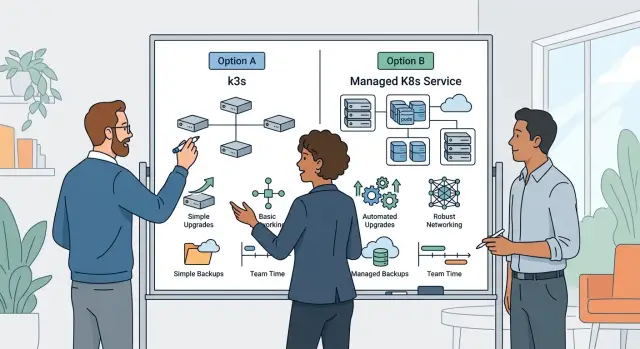
Table of Contents
Why this choice takes more time than it looks
Picking a cluster is easy on paper. Living with it every week is where the cost shows up.
Getting the first app online is rarely the hard part. Most teams can do that in a day or two. The drag starts later, when someone has to patch nodes, rotate backups, check certificates, and figure out why one worker stopped talking to the control plane at 2 a.m.
On a big platform team, that work gets spread around. On a team of three or four engineers, it lands on the same people who also ship features, answer customer issues, and clean up old code. One hour here, ninety minutes there, and soon the "cheap" option eats a full day every sprint.
That is why sticker price fools people. A cluster that saves a few hundred dollars a month can cost far more in team time. If one senior engineer spends five hours a week on upgrades, failed restarts, storage issues, and backup drills, you are no longer comparing hosting bills. You are comparing hosting plus attention.
The practical question is simple: who owns upgrades, restore tests, node replacement, and the weird DNS or network issue that shows up after setup? If the answer is "whoever is free," the work will interrupt product development. Small teams feel that pain fast because they have no spare operator in the background.
Early success can hide the problem. A lean cluster often looks fine for the first month, when traffic is low and nobody has touched the base config. Then the first upgrade window arrives, a disk fills up, or a node dies, and the setup turns from "done" into a standing chore.
Teams that admit this early usually make better calls. They stop asking which option is cheaper to start and ask which one they can keep healthy without burning out their engineers.
What k3s changes on a lean team
k3s cuts setup work on day one. A small team can get a cluster running quickly on a cheap cloud VM, a few edge boxes, or bare metal in a lab.
That speed is real, but it can create the wrong expectation. It does not reduce ownership very much. Your team still patches nodes, tests upgrades, backs up cluster state, and writes a recovery plan that someone can follow half asleep during an incident.
That is the main shift for a lean team. k3s removes some weight from Kubernetes, but it does not remove the job. It shortens the first mile. The rest of the road is still yours.
The built-in defaults help early on. Networking, ingress, and a few other basics often work with less ceremony, which matters when a tiny team needs to ship product work instead of wiring every cluster component by hand.
Those same defaults shape later choices. If you outgrow the bundled setup, you may need to swap parts carefully and retest things you assumed were settled. Teams that start with k3s for speed should write down which defaults they accept, which ones they might replace later, and who will handle that work.
k3s often fits best when the environment is small and clear: edge deployments, internal tools, small SaaS backends, or cost-sensitive cloud setups where every extra service hits the bill. Skill matters more than cluster size. A strong engineer with calm operational habits can run k3s well for a surprisingly busy product. A larger team without upgrade discipline can still make a mess of it.
That is also why k3s comes up in discussions about lean, AI-augmented operations. Oleg Sotnikov has written about running production systems with very small teams, and this is the kind of environment where k3s can make sense. Not because it is magic, but because the team keeps the hidden work small, documented, and boring.
What managed Kubernetes changes
Managed Kubernetes removes a chunk of cluster work that small teams often underestimate. The cloud provider runs the control plane, replaces failed parts there, and usually gives you a cleaner upgrade path. For a lean team, that can mean fewer late-night surprises and less time spent reading cluster docs before every change.
That does not mean the cluster runs itself. You still own the apps, node sizing, security rules, storage choices, and most of the things users notice when something breaks. The trade is usually straightforward: less low-level cluster care, more dependence on provider defaults.
Those defaults matter more than people expect. Providers choose which Kubernetes versions they support, how long they keep them, and which add-ons they support for networking, ingress, and storage. If your team wants a very specific setup, you may hit limits sooner than expected. You can work around them, but then the "easy" option starts to look less simple.
There is still regular work to do. You have to plan upgrades around the provider schedule, review node costs and autoscaling behavior, manage access and secrets, check backups, and watch the extra charges for load balancers, storage, logs, and cross-zone traffic.
That last part catches teams off guard. The base cluster may look affordable at first, then traffic grows and each managed extra adds another line to the bill. A public load balancer, more persistent volumes, managed logging, and cross-zone traffic can turn a modest monthly cost into something much larger.
For a team of two or three engineers, managed Kubernetes often makes sense when time is tighter than budget. If your product changes every week, saving even four or five hours a month on cluster care is real money. If you need very tight control, unusual networking, or aggressive cost cutting, provider limits can feel expensive in a different way.
Managed Kubernetes lowers the floor for operations. It does not remove the need to make clear choices about upgrades, add-ons, and spending.
How to compare the real work
If you only compare the monthly bill, you miss the cost that hits a small team first: time. A cheaper cluster can turn expensive fast when one person handles upgrades, networking fixes, certificate renewals, and late alerts.
Start with a plain inventory. Write down every service you plan to run, every environment you need, and the traffic you expect on a normal day and at peak times. Four internal apps on one cluster is one kind of job. Eight customer apps across dev, staging, and production is another.
Then assign names, not job titles. Who handles upgrades outside office hours? Who checks rollback steps if a node fails or an add-on breaks? If the answer is "whoever is around," you already have a risk, and that risk belongs in the cost table.
A short checklist helps keep this honest:
- Count services, environments, and rough traffic.
- Name the person who owns upgrades and recovery.
- Run one minor version upgrade on staging.
- Trace ingress, load balancer, DNS, and TLS end to end.
- Add team hours to the budget, not only hosting costs.
That staging upgrade test matters more than most spreadsheet work. Time the prep, the upgrade itself, the checks after, and the cleanup. On paper, k3s upgrades may look simple. In practice, the work often spreads into app checks, add-on compatibility, and small surprises that eat half a day.
Networking deserves its own pass. Follow one request from the internet to your app and back again. Check ingress behavior, DNS updates, TLS renewal, service discovery, and any rules around internal services or databases. If your app uses WebSockets, long requests, or private network access, test those too. Simple HTTP traffic rarely tells the full story.
A small example makes this clearer. Say a team of two runs six services. Managed Kubernetes costs more each month, but the provider handles more cluster plumbing. k3s looks cheaper until one engineer spends five or six hours a month on upgrades, ingress issues, and odd network behavior.
That is the real comparison. Count the cloud bill, then count the hours your team gives up to keep the cluster stable and boring.
Where networking trips teams up
Networking is where two clusters that look similar on paper start to behave very differently. k3s keeps the starting point simple, which is great for a lean team, but simple defaults do not match the network shape you get in a cloud-managed cluster.
In managed Kubernetes, public IPs, load balancers, private subnets, routing tables, and firewall controls already exist around the cluster. In k3s on VPS nodes or bare metal, you usually assemble more of that yourself. A Service with type LoadBalancer is the clearest example. In a managed cluster, it often gives you a working endpoint. In k3s, you usually need MetalLB or another layer before that same manifest does anything useful.
Ingress also fails in different places. A small team might put nginx in front of one app and call it done. Then the second app needs TLS rules, internal callbacks, WebSocket support, or IP allowlists, and the setup stops feeling small. Service IP ranges, DNS, and egress controls often fail as annoying edge cases, not loud outages. One webhook cannot reach the app. One worker cannot call an external API. One admin route works from the office but not from a job running inside the cluster.
A few questions save time later. How will public traffic enter the cluster? Who will manage internal DNS and service discovery? Where will outbound traffic leave, and what will block it? Which NetworkPolicy rules do you expect to enforce?
That last point surprises teams a lot. People assume NetworkPolicy works the same everywhere. It does not. Enforcement depends on the CNI and the cluster setup. If your team writes strict policies for production, test them early. Do not assume a policy that worked in one cluster will behave the same way in another.
Storage adds another wrinkle because storage traffic is still network traffic. On k3s, shared storage or replicated volumes can add extra ports, extra latency, and more node-to-node chatter. On managed Kubernetes, cloud storage removes some setup work, but zone placement and cross-zone traffic still matter.
A lean team can handle any of this. The problem is hidden time. If one person owns the platform, every custom rule around ingress, egress, load balancing, and storage becomes part of that person's weekly job.
A simple example from a lean platform
Picture a SaaS with two engineers and a founder who still handles operations at night. The product has a staging cluster, one production region, and daily deploys. The team is small, but the cluster still shapes how much time they spend building versus babysitting.
If they choose k3s, the setup stays lean and cheap. One engineer can understand most of it, and that feels good early on. The team keeps more control over upgrades, node setup, backups, and recovery.
That control has a price. Someone has to schedule k3s upgrades, test rollback steps, replace failed nodes, and make sure backups actually restore. If nobody owns those jobs, they slip for weeks and then show up all at once during an outage.
Networking is where this usually gets annoying. Staging may work fine, but production can still fail because ingress rules, load balancer behavior, DNS, or certificate renewal act a little differently than expected. On a small team, even one odd networking issue can eat the better part of a day.
Managed Kubernetes changes the trade-off. The monthly bill is higher, and the team gives up some low-level control. In return, routine cluster work shrinks. Upgrades often take less planning, node replacement is less hands-on, and the team spends more time on releases, bugs, and customer requests.
For this kind of company, the choice is not really a feature contest. It is a staffing question.
Ask who owns the ugly jobs when things go wrong: cluster upgrades and rollback checks, ingress or DNS issues that only happen in production, restoring the cluster after a bad node failure, and weekend alerts after a routine deploy. If the answer is "one engineer, plus the founder if needed," managed Kubernetes often fits better. It costs more, but it protects release speed.
If one engineer likes infrastructure work and the team accepts regular recovery drills, k3s can still be the right pick. It works well when the company wants tight control and treats cluster care as real engineering work, not background noise.
Small teams usually make the wrong choice when they price servers and ignore people time. A cheaper cluster stops looking cheap when it steals half a day every week and most of a weekend after one messy upgrade.
Mistakes that make the wrong choice feel cheaper
The cheapest option on paper often costs more in team hours. That happens a lot when a small team decides too early and then spends months working around an old guess.
One common mistake is standardizing before the product has settled. Teams pick a cluster while traffic is still simple, deploy patterns are still changing, and nobody knows how many background jobs, internal services, or customer environments they will need six months later. A cluster that felt fine for one API and one web app can feel awkward once you add workers, preview environments, or stricter access rules.
Another mistake is treating control plane work as free because no vendor bills for it. Someone still does that work. On k3s, your engineers handle upgrades, backup checks, node replacement, certificate issues, and the random failure that lands on a Tuesday morning. Managed Kubernetes does not remove all effort, but it does cut a chunk of that routine work. If two developers lose half a day every month to cluster chores, that is real cost.
Copying enterprise patterns makes this worse. A lean team often adds extra tooling because the stack looks familiar: too many ingress layers, a service mesh nobody really needs, a complicated GitOps chain, separate monitoring systems, and environment splits that only add friction. Each extra tool adds one more upgrade path and one more place for a quiet failure.
The same thing happens with resilience work that exists only on paper. Teams say they have backups, rollback plans, and staging tests, but nobody has run them end to end. Then a real incident turns basic recovery into live debugging.
The cluster choice rarely fails because of one dramatic mistake. It usually fails through steady friction: a few manual steps, a few weird network rules, a few upgrades people postpone, and a few recovery tasks nobody owns.
Quick checks before you standardize
Standardizing too early locks your team into repeated work. This choice often looks like a cost question, but it usually turns into a time question.
Start with a plain test: can one person upgrade the cluster on a normal weekday without turning it into an incident? If upgrades need a maintenance window, manual node babysitting, or a pile of one-off notes, your setup is already asking too much from a small team. A good cluster is boring to patch.
Backups deserve the same treatment. Do not stop at "we take snapshots." Pick a bad-day scenario and run it. Restore the control plane data, bring workloads back, and check whether secrets, volumes, and DNS records return cleanly. If the team has never done that end to end, the backup plan is only half real.
These checks are worth doing before you commit:
- Test one upgrade with the person who will actually do it.
- Restore from backup into a separate environment.
- Confirm ingress, DNS, and TLS match staging and production.
- Replace a node and measure the real cost in money and time.
- Ask whether the team wants cluster work or product work.
Networking problems waste more hours than teams expect. Staging often looks fine because traffic is light and shortcuts slip by unnoticed. Then production exposes the strange behavior: TLS renewals fail, DNS caches stale records, or ingress rules behave differently across environments. If staging does not behave the same way, it is not a useful dress rehearsal.
Node replacement is another quiet budget trap. Cheap hosts can look smart until a failed node forces manual rebuilds, custom networking fixes, or long data resync times. Managed Kubernetes costs more on paper, but self-managed clusters often charge you in interrupted afternoons.
The last check is the most honest one. Does your team want to spend its limited energy on cluster work? Some teams do, and that can be a good choice if infrastructure is part of the product. Most small software teams just want reliable deploys, clear logs, and fewer surprises.
If you answer these questions with evidence instead of hope, the standard you pick is more likely to hold up when the cluster has a bad week.
What to do next
Make the choice with a small, boring trial. Do not use a toy app that only returns "hello world." Pick one real service your team already understands, with actual ingress, logs, secrets, and at least one background job or dependency.
That test should be long enough to expose the daily work. A cluster can look cheap and simple on day one, then eat hours every month in upgrades, alert cleanup, and odd network behavior. That is the part most teams miss.
A good trial is simple:
- Deploy one real service on the cluster you want to test.
- Write down every upgrade step, even the boring ones.
- Track alert noise, DNS issues, ingress edge cases, and traffic oddities.
- Run one restore test and one version bump before you decide.
The notes matter more than the final uptime number. If one option needs three manual fixes after a minor version change, that cost is real. If another hides more control plane work and gives you cleaner upgrades, that matters too. Team time is part of the bill.
Be strict about the restore test. Backups are easy to feel good about until you actually need them. Restore the service, check that it starts cleanly, and confirm that traffic, secrets, and storage behave the way you expect.
Watch networking with extra care. A cluster can seem fine until you hit an ingress rule that behaves differently, a service that fails through a load balancer, or internal DNS that adds random delay. Small quirks turn into recurring support work.
If your team is split, getting an outside review can save a bad standard. Oleg Sotnikov at oleg.is works with startups and small businesses as a Fractional CTO and advisor, and this kind of trade-off review fits that work well. A short review of team load, infrastructure choices, and recovery ownership can reveal whether the cheaper option will quietly cost more in maintenance.
Pick the setup your team can upgrade, restore, and operate without drama. That usually saves more time than chasing the lowest monthly invoice.
Frequently Asked Questions
Which option fits a team of two to four engineers better?
For most small teams, managed Kubernetes fits better when product work already fills the week. It costs more each month, but it cuts cluster chores and usually gives you calmer upgrades. Pick k3s if one person truly wants to own the cluster and your team accepts regular recovery drills.
Is k3s really cheaper for a small team?
Often, no. k3s can lower the hosting bill, but your team still handles upgrades, backups, node replacement, and odd network issues. If a senior engineer spends a few hours each month on that work, the savings can disappear fast.
When does k3s make sense?
k3s works well when the setup stays small and clear, like internal tools, edge deployments, or a modest SaaS backend. It also fits teams that want tight control and already have solid operational habits.
What work does managed Kubernetes actually remove?
The provider runs the control plane and usually makes upgrades and failed control plane parts less painful. You still own your apps, nodes, storage, access rules, and most issues your users will notice.
Where do teams hit the biggest surprises?
Networking usually trips teams first. Load balancers, ingress rules, DNS, TLS renewal, outbound access, and NetworkPolicy behavior often differ more than people expect. A setup that looks fine in staging can still fail in production under real traffic.
How should we test before we standardize on one cluster?
Run a boring trial with one real service, not a toy app. Deploy it, upgrade the cluster once, restore from backup once, and write down every manual step, alert, and network issue you hit. That gives you a better answer than a pricing sheet.
Do restore tests matter that much?
Because backups feel fine until you try to restore. A restore test shows whether secrets, volumes, DNS, and app startup all come back cleanly. If your team has never run that drill, you do not really know your recovery time.
Is a staging cluster enough to predict production issues?
Not by itself. Staging often hides problems because traffic stays light and people allow shortcuts there. Make staging match production for ingress, DNS, TLS, and access rules, or your test will miss the bugs that steal a whole afternoon later.
What mistakes make the cheaper option look better than it is?
Teams usually decide too early, copy too much enterprise tooling, or treat cluster work as free. Extra ingress layers, unused mesh tools, and messy GitOps chains add work every month, even when the product does not need them.
When should we bring in outside help for this choice?
Ask for help when nobody clearly owns upgrades, recovery, and networking decisions. A short review from an experienced CTO can save weeks of repeated mistakes and show whether your team should spend its energy on infrastructure or product work.


