Joiner mover leaver workflows for cleaner access control
Joiner mover leaver workflows keep HR updates and account changes in sync, so former staff, contractors, and role changes do not leave risky access behind.
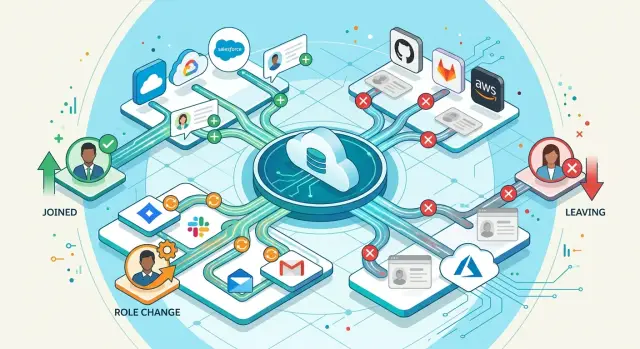
Table of Contents
Why access gaps appear after HR changes
Access drifts because people change roles faster than systems change permissions. HR records a start date, role move, or resignation right away. The tools people use every day do not update themselves unless someone owns that job and does it on time.
Most teams handle the visible items first. Someone remembers the laptop, badge, payroll, and desk. The less visible access stays open: the project board, billing dashboard, Git group, cloud console, password vault, or old Slack workspace.
The problem grows when one person touches many systems. A new hire might need email, a CRM seat, a support tool, a repo, a staging server, and a cloud account. If each tool has a different owner, nobody sees the full picture. One admin removes two accounts, another plans to do it later, and one app gets forgotten for months.
Internal moves are often messier than exits. When someone changes teams, managers focus on what the person needs next. They spend less time on what that person should lose now. Repo access shows this clearly. An engineer moves to a new product area, keeps write access to the old repos, and still sees deployment settings or secrets that no longer match the job.
Shared admin accounts create an even bigger blind spot. If five people know the same root password, removing one named user changes nothing. The account still works, and nobody can say who used it last.
These gaps usually come from ordinary habits. HR updates status first, while app owners work from email or memory later. Managers track hardware better than SaaS tools. Team moves add new permissions but rarely remove old ones. Shared credentials hide who still has real access.
Joiner mover leaver workflows fix this only when they connect the HR event to every access change that follows. If that connection is loose, old permissions pile up quietly until an audit, an incident, or a billing surprise exposes them.
Make one inventory of access
Most teams think about only the obvious accounts. Email and single sign-on matter, but they are only the front door. Old access often survives in side doors such as VPN profiles, device logins, or browser sessions nobody revoked.
Put every system a person can touch into one simple inventory. If HR, IT, and engineering each keep separate notes, people will miss something during a role change or exit.
That inventory should cover identity systems such as email, SSO, VPN, password managers, and domain admin accounts. It should also include business tools like payroll, CRM, support software, docs, chat, calendars, and file sharing. Engineering tools belong there too: Git hosting, package registries, CI pipelines, deployment tools, cloud consoles, monitoring, and error tracking. Do not forget shared resources like team folders, dashboards, shared inboxes, project boards, and internal wikis.
The last category is the one teams miss most often: non-human access. That includes service accounts, API tokens, SSH keys, secrets managers, bot users, and automation accounts that one person created and still controls. A developer may leave, but their token still publishes packages, their SSH key still reaches a server, or their cloud user still owns a service account. That is common in growing teams.
For each system, answer two plain questions: how does a person get in, and how do you remove that access fast? If you cannot answer both, the system is not really under control.
This is where joiner mover leaver workflows become practical. A mover event is not just a new job title. It can mean removing payroll access from a manager, taking production rights away from a contractor, or closing repo write access when someone shifts into support.
Keep the list in one place and review it every few months. New tools appear quietly. Someone adds a second cloud account, a new package registry, or a finance folder, and nobody adds it to the offboarding checklist. That is how stale permissions stay around for months.
Set owners and deadlines
Access work breaks down when everyone assumes someone else will handle it. HR updates the employee record, a manager sends a chat message, IT changes two tools, and the old repo access stays in place.
Every joiner, mover, and leaver request should start from one trigger. That can be an HR system, a ticket form, or a shared workflow tool. What matters is that the event starts in one place, not through scattered messages in email and chat.
Each system also needs a named owner. Not just "IT" or "engineering," but one person for Google Workspace, one for AWS, one for GitHub or GitLab, one for Slack, and so on. That person does not need to click every button forever, but they do need to make sure the change happens and the record stays correct.
A growing team should write down three decisions: who approves standard access for a new starter, who approves exceptions such as admin rights, and who grants and removes temporary access. If nobody owns exceptions, they turn into permanent permissions. A contractor gets admin access for "just this week" and still has it six months later.
Deadlines should be just as clear. A planned new hire is not the same as an urgent departure. New starter access should be ready before the first working hour. Role changes should be updated on the same day the role changes. Leaver access should be removed at the stated time, or immediately in urgent cases. Temporary access should have an end date, not a vague reminder.
Once these rules are clear, the process stops feeling like a vague policy. Managers know who to ask. HR knows how to trigger the change. System owners know their deadline.
If you run a small company, keep this visible and simple. One page with systems, owners, backups, approvers, and response times is usually enough.
Build the workflow step by step
Good joiner mover leaver workflows start with a clear trigger. HR opens the request, names the manager, and sets the dates that matter: start date, effective date for the role change, or end date for departure. If those details arrive late, access changes arrive late too.
Keep separate checklists for joiners, movers, and leavers. A joiner needs accounts, baseline groups, and the tools required on day one. A mover needs cleanup first, because old access is what usually lingers. A leaver needs a timed shutdown tied to the exact exit date.
Use role templates instead of memory. If someone joins as a support lead, finance analyst, or backend engineer, the team should already know which groups, SaaS apps, and repo permissions that role gets. Managers can ask for extra access, but those exceptions should stay visible so someone can review them later.
The order matters. Remove old group memberships before adding new ones. If you skip that step, people collect access over time and nobody notices until a review or an incident.
A simple flow looks like this:
- HR creates the event with dates and manager details.
- The manager confirms the role and any approved exceptions.
- IT or the system applies the role template and removes old access first for movers.
- On the exit date, the owner closes accounts, ends sessions, and revokes tokens.
- The team marks every task complete in one shared record.
That last step matters more than it sounds. If completion lives in email, chat, and sticky notes, nobody has a full picture. Put it in one ticket, one admin panel, or one tracker where HR, IT, and the manager can all see status.
For leavers, do not stop at disabling the main login. Close SaaS accounts, revoke personal access tokens, remove SSH keys, end active sessions, and check repo memberships. One missed token can keep a door open long after someone leaves.
When this process works, it feels boring. That is a good sign. Boring means the team does the same safe thing every time.
Review cloud, SaaS, and repos together
Many teams split access into separate buckets. HR updates one system, IT removes a few app accounts, and engineering cleans up repo access later. That gap is where trouble starts.
Treat Git orgs, cloud roles, and SaaS seats as one access problem. If someone joins, changes teams, or leaves, every system should change from the same trigger. Good joiner mover leaver workflows do not stop at email and payroll. They reach cloud accounts, repo hosts, project tools, support tools, and internal dashboards.
A role change shows why this matters. Say a developer moves from backend work to product operations. If the team updates only SaaS apps, that person may still keep old production repo rights, cloud permissions, and deployment access for months. No one notices because each system has a different owner.
The risky parts are often not user accounts at all. They are the extra credentials people create while working: personal access tokens used for scripts, SSH keys added to Git hosting or servers, deploy keys attached to repos, CI runners, bot users, and shared credentials left in old docs or team chats.
These items stay behind because they do not always sit under a person's name. A closed SaaS seat can look clean while an old token still pulls code or a bot account still deploys to production.
Do not stop at production systems. Test environments often have weaker controls and older copies of data. People forget staging servers, sandbox cloud accounts, trial workspaces, and demo repos because they feel less serious. In practice, leftovers pile up there.
One question catches a lot: "What can this person or credential still reach across cloud, SaaS, and code?" That works better than checking one tool at a time.
A simple example from a growing team
A team grows to 18 people, adds more tools, and starts moving faster than its admin habits. That is when small access gaps turn into real risk.
One person starts in support and helps with refunds, so she gets access to the billing system and a finance dashboard. A few months later, she becomes the product lead. Her manager updates her title in HR, and everyone treats the move as finished.
It is not finished. She still has finance access because nobody owns the removal step.
At the same time, a contractor finishes a short project on the customer portal. HR marks the contract as ended. His email account gets disabled, but his account still sits inside the Git organization, and nobody checks whether he still has access tokens or old repo permissions.
The cloud side slips through too. HR records both changes, but no one reviews IAM roles, shared credentials, or project-level permissions. The new product lead can still see finance data she no longer needs. The contractor can still view code until someone notices.
This is how access drift happens in normal companies. Nobody makes one giant mistake. People just assume the next person handled it.
A short routine fixes the gap. HR logs the role change and contract end date in one place. The manager confirms what access each person still needs. The system owner removes old SaaS, cloud, and repo permissions on the same day. Then someone checks the changes and marks the task complete.
That is enough to fix more than most teams expect. The product lead keeps the tools she needs and loses finance access. The contractor leaves the Git org, loses repo access, and stops appearing in the next review.
Mistakes that keep old permissions alive
Most lingering access starts with ordinary habits, not a dramatic breach. People move fast, teams grow, and someone assumes they will clean it up later. Later rarely comes.
One common mistake is trusting a manager to remember every tool a person used. That sounds fine in a team of five. It breaks once people touch cloud accounts, chat tools, CRM seats, Git repos, support systems, and a handful of side apps that nobody remembers until billing day.
Another mistake is adding new access before removing old access and then never circling back. This happens all the time during internal moves. The person can start work right away, which feels efficient, but permissions pile up with every change.
Teams also focus too much on SSO and ignore everything outside it. Old permissions survive in small SaaS tools with separate logins, local admin accounts on laptops or servers, shared repo access outside the main identity system, emergency admin passwords known by former staff, and contractor or intern accounts that nobody reviews after the project ends.
Emergency passwords deserve extra attention. If several people knew a break-glass admin password and nobody changed it for months, you do not really know who can still get in. The same problem shows up with shared SSH keys, old VPN accounts, and service users created in a rush.
Temporary workers get skipped for a simpler reason: people think of them as already temporary. In practice, interns and contractors often keep access longer than full-time staff because nobody owns the last step.
The fix is simple, even if the discipline is not. Remove old access first, grant what the new role needs second, and check the systems outside your main login system every time.
Quick checks that catch leftovers
Leftover access usually hides in boring places. A simple routine catches most of it before old accounts turn into real risk.
A weekly check works better than a huge cleanup every few months. Start with the HR roster and your SSO directory. Compare who is active, who changed teams, and who left. If someone is inactive in HR but still active in SSO, treat that as a miss and fix it the same day.
Then check for disabled email accounts that still have live SaaS access. This happens more often than teams expect. The mailbox is gone, but the person still has a valid session, API token, or mobile app login.
Repos need their own check. Compare repo members and team permissions against the current team list, not last month's org chart. One former engineer left in a private repo is enough to show the process is too loose.
Once a month, review admin, owner, and billing roles by hand. These accounts can add users, change settings, or lock everyone else out. Teams often remove normal access and forget the small number of high-power accounts that matter most.
It also helps to test one recent offboarding case from start to finish. Pick a real person who left, then verify each step: HR status changed, SSO account blocked, SaaS sessions revoked, repo access removed, and shared credentials rotated if needed.
This is where user access reviews become useful instead of turning into paperwork. You are not checking every account from scratch. You are checking the places where leftovers usually survive.
If one check fails more than once, automate that part first. The weekly match between HR and SSO is often the fastest win.
What to do next
Do not try to fix every app at once. Start with the three systems that create the most risk or the most confusion. For many teams, that means one cloud account, one SaaS admin area, and one repo host. A small fix this week is better than a big plan that slips for months.
Write one clear path for each HR change: new hire, role change, and exit. Note who requests access, who approves it, who makes the change, and who confirms it happened. Then build a few plain role templates. A support agent might need two SaaS tools and no repo access. A backend engineer might need one cloud role, two repos, and read-only access to logs. Templates cut down one-off requests and make user access reviews much faster.
You also need one person to own exceptions, reminders, and follow-up. When access cleanup belongs to "everyone," old permissions stay open.
If you want outside help, keep it practical. Oleg Sotnikov at oleg.is works with startups and small businesses as a fractional CTO and advisor, helping teams tighten cloud, SaaS, and repo access without turning it into a heavy project. That kind of outside review is often enough to spot where permissions linger and put a simple process in place that people will actually use.
Frequently Asked Questions
What is a joiner mover leaver workflow?
It ties an HR change to the access work that follows. When someone joins, changes roles, or leaves, the workflow tells HR, the manager, and each system owner what to change and when to do it.
Why do internal moves create more access risk than exits?
Role changes often leave old rights behind because managers focus on new tools, not what the person should lose. That is why repo write access, cloud roles, and finance dashboards often stay open after an internal move.
What should I include in an access inventory?
Put every system in one place: email, SSO, VPN, payroll, CRM, chat, docs, cloud accounts, Git hosting, CI, monitoring, shared folders, and dashboards. Include non-human access too, such as API tokens, SSH keys, bot users, and service accounts.
Who should own access changes?
Give each system a named owner. One person should own Google Workspace, another AWS, another GitHub or GitLab, and so on. That owner makes sure the change happens on time and the record stays correct.
How fast should we add or remove access?
Set clear times for each case. Give new hires access before their first hour, update movers on the same day the role changes, and cut off leavers at the exact exit time or right away in urgent cases.
Should we review cloud, SaaS, and repos together?
Yes. Treat cloud roles, SaaS seats, and repo permissions as one access problem. One HR event should trigger every change, or people will keep old rights in the systems nobody checked.
What do teams forget during offboarding?
Teams often stop after they disable email or SSO. They forget active sessions, personal access tokens, SSH keys, deploy keys, bot users, shared passwords, and old memberships in private repos or trial tools.
How often should we check for leftover access?
Run a weekly match between the HR roster and your SSO directory. Then check disabled users against SaaS apps and repo memberships. Once a month, review admin, owner, and billing roles by hand.
What is the easiest automation to start with?
Start with the HR-to-SSO match. If HR marks someone inactive or moves them to a new role, your system should open a task or remove access right away. That catches a lot of misses with very little effort.
Can a small company do this without a big IAM project?
Yes. A small team can start with one shared page, one trigger, and simple role templates. You do not need a heavy IAM project first. If you want outside help, a fractional CTO can review your cloud, SaaS, and repo access and help you tighten the process without slowing the team down.


