IP allowlists vs VPNs for internal tools: risk, cost, tradeoffs
IP allowlists vs VPNs can cut access risk, but each adds support work. Learn when they help, when they slow teams down, and what to check first.
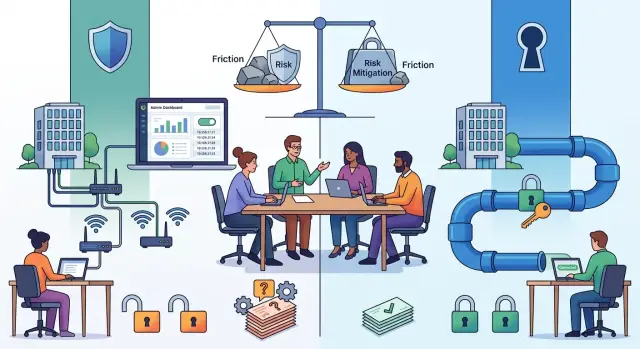
Table of Contents
Why one rule for every tool causes trouble
Teams often choose one access rule and paste it across every internal tool. It sounds tidy. It is easy to explain. It is easy to audit. In practice, the tools do not carry the same risk.
A payroll system, a production admin panel, and an internal wiki are not equal. If someone gets into payroll or production, the damage can be immediate and expensive. If someone opens a low-risk dashboard with old project notes, the harm is usually much smaller. Yet many teams put the same gate in front of all three.
That is where friction starts. Every extra step stops some legitimate users before it stops a bad one. People get locked out when their home IP changes, when a phone hotspot takes over, when the VPN client breaks after an update, or when a contractor needs short-term access in a hurry. One extra prompt sounds small. Ten people losing 20 minutes each week is not.
The cost also shows up in behavior. When access feels slow or brittle, people look for shortcuts. They keep old sessions open, share accounts, copy data into weaker tools, or ask someone else to "just pull it for me." A rule that looks strict on paper can push the team into worse habits.
The usual mistake is starting with the control instead of the risk. Someone already knows how to set up a VPN, so every tool goes behind it. Or someone trusts office IPs, so they add an allowlist everywhere. That is backwards. Start with a simple question: what could go wrong if the wrong person gets into this tool for one hour?
If the answer is "money can move," "customer data can leak," or "production can break," stronger friction makes sense. If the answer is closer to "someone sees routine internal notes," the same friction may cost more than it saves.
Access rules work best when they match the tool, the users, and the likely damage. When they do not, security turns into a steady stream of tickets, exceptions, and quiet workarounds.
What an IP allowlist can and cannot do
An IP allowlist is a front gate. If a request comes from an approved office or home network, the tool responds. If it comes from anywhere else, the tool blocks the traffic before the login page matters.
That helps because it cuts off a lot of random internet noise. Port scans, password guessing, and casual probing from unknown networks never reach the app. For a small team that works from one office and a few fixed home connections, this can be a simple layer with very little setup.
A startup often starts there for one reason: the rule is easy to understand. The finance dashboard accepts traffic only from the office and the founder's home internet. Everyone else gets denied. If the team rarely travels and their internet providers keep the same public IPs, this can work well enough.
The trouble starts when people move around. A hotel network, a coworking space, a phone hotspot, or a home ISP that rotates IP addresses can lock out legitimate staff in seconds. The control does its job, but it cannot tell the difference between a new network and a bad actor. That is why allowlists fit stable work patterns much better than mobile teams.
An allowlist also checks only one thing: where the traffic came from. It does not check who is sitting at the keyboard. It does not check whether the laptop has malware, whether the browser is managed, or whether the person logging in should still have access that day.
That gap matters more than many teams expect. If someone steals a password and uses it from an approved office network, the allowlist does not help. If a contractor uses a shared machine on an allowed connection, the allowlist does not know. If a compromised device sits inside the approved network, the app still sees trusted traffic.
So an IP allowlist is good at narrowing exposure. It is weak at judging identity, device health, and context. Use it when locations stay predictable and the cost of lockouts stays low. Do not treat it as proof that the right person on a safe device is using the tool.
What a VPN can and cannot do
A VPN gives your team a private path into systems that should not sit on the open internet. That matters when people need to reach an admin panel, a staging app, a database console, and a logging tool from different places. Instead of exposing each service one by one, you put one gate in front of the whole group.
That setup often makes sense for companies with several internal tools. A developer signs in once, opens the VPN, and then reaches the tools over private addresses. For a small team, that is usually cleaner than managing separate public access rules for every service.
Where a VPN helps most
A VPN works well when the same people need regular access to multiple private services. It is especially useful if those services were built for internal use and do not have polished internet-facing login flows.
It can also reduce accidental exposure. If a tool is reachable only through the VPN, random internet traffic cannot even see the login page. That is a real security gain.
Still, a VPN is not the same as safe access. If an attacker steals a user account or gets onto an infected laptop, the VPN may open the door to everything behind it. You still need per-user accounts, tight permissions, and a second login step such as MFA on the tool itself or on the identity layer in front of it.
The support cost is where teams often miss the tradeoff. Users need a client on each device. The client needs updates. Certificates expire. Profiles break after OS updates. Phones switch networks and drop sessions. New hires need setup help, and former staff need clean removal.
A simple example shows the limit. If your finance team uses one web dashboard a few times a month, a VPN may feel heavy and annoying. If your engineers use six private tools all day, one VPN gate may save time despite the support load.
A VPN is best when it hides a group of private services and the same users need them often. It is a poor substitute for identity checks, access rules, and basic account hygiene.
Where the support cost shows up
When teams compare IP allowlists and VPNs, they often price the tool and forget the support queue. The money rarely disappears in one big bill. It leaks out through small interruptions, repeated setup calls, and people waiting to do routine work.
New hires feel this on day one. A person joins, opens the wiki, staging app, or admin panel, and hits a wall. Then someone from engineering or IT stops their own work to install a client, approve a device, test login, and explain what to do when it breaks. For a small team, that can burn half a morning for two people.
Travel turns minor controls into daily friction. An IP allowlist may block hotel Wi-Fi, airport networks, or a phone on roaming because the source IP changed again. A VPN can fail for different reasons: captive portals, weak mobile data, expired profiles, or device conflicts. The employee does not care which part failed. They just see "access denied" and a task they cannot finish.
Contractors create another steady source of exceptions. They often need access for a short window and from networks you do not know in advance. If your process cannot grant and revoke access quickly, people start borrowing someone else's session or asking teammates to pull data for them. That saves a few minutes and creates a bigger problem.
This is easy to miss because each interruption looks minor. Put them together and the cost is obvious. A few blocked logins, a couple of travel exceptions, and one broken client update can eat more time than the control saves on a low-risk tool.
How to choose the right control
Start with a plain inventory. Write down every internal tool, who uses it, and how often they touch it. A tool used by two people once a month needs a different setup than one that ten people open all day.
Then rate the harm in three separate ways: if someone reads the data, if someone changes the data, and if the tool goes down. Those risks are not equal. A dashboard with low-sensitivity metrics can often live with lighter protection, while payroll, customer records, or production controls usually need more.
A short worksheet is enough. Note who uses the tool, including contractors, what happens if someone reads, changes, or breaks it, where people work from, whether they need phone access, and how often you expect exceptions such as hotel Wi-Fi or a new device.
Work patterns matter more than teams expect. Office-only staff on fixed networks are easier to protect with IP rules. Remote employees, frequent travelers, and contractors create more edge cases. Phone access makes strict network controls even harder because mobile networks change all the time.
This turns the choice into a practical one, not a theory debate. If a tool has low to medium risk and people use it from a small number of stable locations, an IP allowlist may be enough. If the tool has high impact, people work remotely, and you need one clear gate in front of it, a VPN usually fits better.
Pick the lightest control that still matches the real risk. Heavy controls on low-risk tools create tickets, workarounds, and quiet rule-breaking. Light controls on high-risk tools save time right up to the day they do not.
Test the plan with one team for two weeks before you roll it out wider. Count support issues, failed logins, travel exceptions, and time lost getting people back in. That small pilot tells you more than a long policy document.
A simple example with three internal tools
A small company often has three very different kinds of internal tools, even if they all sit behind the same SSO screen. This is where the choice stops being abstract and becomes a daily operations decision.
Take a team with a payroll tool, a staging dashboard, and a simple staff directory. They do not need the same rule, because the damage from a mistake is different and the way people use each tool is different too.
Split the tools by risk
The payroll and finance system belongs in the high-risk group. It may expose salaries, bank details, invoices, tax records, or approval flows. Few people use it, and they usually know when they need it. That makes tighter access reasonable. If the finance admin panel only gets used from one office or a managed desktop, an IP allowlist can work well. If finance staff travel or work from several places, a VPN is usually the better fit because you avoid constant allowlist changes.
The staging dashboard often sits in the middle. It may not hold the most sensitive data, but it can still expose test accounts, internal endpoints, logs, or settings that lead to production trouble. Engineers may open it many times a day from home, the office, and while on call. In that case, a VPN is often less painful than trying to keep a long list of approved IPs current.
The staff directory is different again. If it contains basic contact details and org charts, the risk is lower. Locking it behind the same control as payroll usually adds more friction than safety. Standard SSO with MFA is often enough, especially if people need it from phones or while traveling.
That uneven setup can look messy on paper. In practice, it is usually the sane option. The goal is not to make every tool feel equally locked down. The goal is to match effort to damage.
Mistakes that add pain without much safety
Teams often tighten access in the wrong place. They lock down a low-risk tool, like an internal wiki or a read-only dashboard, because it feels safer than sorting out the harder systems. The result is extra friction for everyday work, while the tool that can change billing, customer data, or production settings still has weak controls.
A common miss is treating office or home IPs as stable. They are not. People work from phones, switch between home and coworking spaces, travel, and lose access when an internet provider changes their address. An IP allowlist can work for a fixed admin tool used by a small team, but it becomes annoying fast when real work happens on the move.
The same thing happens with VPNs. Some teams pick a VPN and assume the problem is solved. It is not. If everyone gets broad network access after one login, a VPN only moves the gate. You still need tight roles inside the app, and sensitive tools should ask for a second login step.
Offboarding is where many companies quietly fail. A contractor leaves, but their VPN profile still works. Or their account stays active in an internal tool because nobody owns the checklist. That is a real risk, and it matters more than blocking a harmless dashboard for a sales rep on hotel Wi-Fi.
Big-bang rollouts cause their own mess. When a company flips every tool behind a VPN or allowlist on the same day, support learns from angry tickets instead of a small test group. That usually means rushed exceptions, shared accounts, and temporary bypasses that stay around for months.
A calmer approach avoids most of this. Start with the tools that can change money, data, or infrastructure. Test access from home internet, a mobile hotspot, and a travel network. Limit each user to the smallest set of systems they need. Make offboarding a named task with one owner. Roll out to a small group first and fix the rough edges.
If a control creates daily pain for many people but blocks little real risk, it is probably on the wrong system.
Quick checks before rollout
A control that looks neat on a diagram can turn into daily friction in a week. Before you lock down an internal tool, test the boring parts first: home internet changes, urgent exceptions, role changes, and blocked users who need to finish work now.
A short pilot tells you more than a long debate. Ask one remote employee to work from home Wi-Fi, a phone hotspot, and a second location. Then ask a manager to approve temporary access. If any normal workday change breaks access and nobody can fix it fast, the rule is too heavy for that tool.
Five checks catch most problems. If a person's home IP changes tonight, they should still have a realistic way to work tomorrow morning. A manager should approve an exception in minutes, not after a ticket sits in a queue for two days. When someone changes roles, your team should remove old access the same day. Support should see who got blocked, when it happened, and which rule caused it. One short document should explain the rule in plain language. If staff need a meeting to decode it, the policy is too complex.
Think about a manager traveling for a customer meeting. They open the admin dashboard from hotel Wi-Fi, get blocked, and miss the window to approve a refund. That is not a security win. It is an operations problem you created yourself.
This question usually gets decided by how people actually work. If the tool controls payroll, production systems, or customer data, extra friction may be worth it. If the tool holds routine internal notes or a low-risk dashboard, a heavy gate can cost more in support than it saves in risk.
Next steps for a lean access plan
Start small. Put your strictest control on the few tools that can cause real damage if the wrong person gets in. That usually means admin panels, production databases, cloud consoles, payroll, or anything that can expose customer data or shut down service.
Leave lower-risk tools on simpler controls for now. A wiki, a read-only dashboard, or an internal request form usually does not need the same friction as a production system. You can tighten access later if the risk changes.
A lean plan is simple. List your internal tools and mark the ones that can change data, move money, or affect uptime. Use stronger controls only for that small group first. Keep access simple for low-risk tools and watch how people actually work. Then set a review date after the first month.
The first month tells you more than any policy draft. Look at blocked logins, VPN reconnect issues, and support tickets. If one tool creates daily access problems but adds little protection, fix that early. If another tool gets frequent access attempts from the wrong place, tighten it.
This is where many teams get stuck. They want one clean rule for every system. Real life is messier. A better approach is uneven by design. Protect the few systems that matter most, and avoid dragging everyone else through extra steps.
Work patterns change, so your rules should change too. A company that starts office-based may move to remote work, use more vendors, or add an on-call rotation. Review access when those shifts happen. Do not wait for an incident to learn that your old setup no longer fits.
If you want a second opinion, Oleg Sotnikov at oleg.is helps startups and small businesses review internal tools, infrastructure, and access controls with a practical Fractional CTO approach. A short review can show where tighter controls are worth the friction and where they are mostly creating support noise.


