Intake forms for cross-team handoffs without re-entry
Intake forms for cross-team handoffs cut repeat typing when one shared record, clean defaults, and clear owners guide sales, ops, and support.
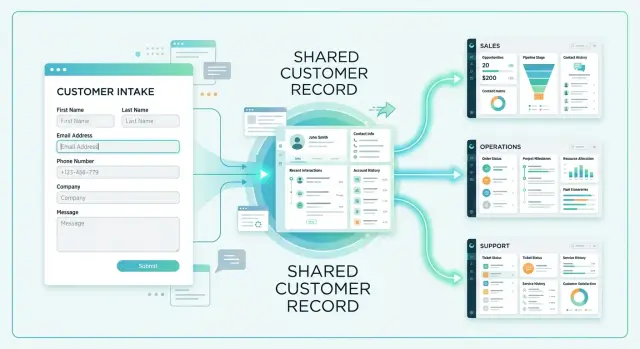
Table of Contents
Why the same customer gets edited three times
The first version of a customer record usually gets created in a hurry. A sales rep adds the company name, one contact, a rough start date, and the plan they think the buyer wants. The deal moves forward, but the record is still a mix of facts and guesses.
Then ops opens the same account and starts fixing it. The contact is missing a last name, the kickoff date changed after the contract call, and the plan in the record does not match what the customer approved. A few days later, support updates it again because the billing contact, the decision-maker, and the daily user are three different people.
Nobody is trying to create extra work. Each team is trying to keep work moving with the information it has. The trouble starts when the process asks for the same facts more than once and lets multiple teams edit the same fields.
The usual problem fields are contact names and titles, start and renewal dates, plan details, and the difference between billing owner and product owner. A small change in one place often triggers two more changes somewhere else. Sales might write "Pro plan, start May 1." Ops later learns the customer bought the annual version, needs access for two departments, and cannot start until May 15 because legal took longer. Support still sees the old plan and date, so the first welcome message sets the wrong expectation.
Each extra round of typing looks minor. It adds up fast. Ops waits for sales to confirm a date. Support emails the wrong person. Finance asks why the contract says one thing and the account says another. Ten small fixes can easily burn 20 minutes on one customer.
Because the errors are small, teams often ignore them. That is why they keep coming back. One system gets updated, another still holds the old value, and the next person copies the stale version.
This is an ordinary operations problem, not a big technical failure. Most of the time it starts with a customer intake process that asks for the same fact twice, gives three teams permission to edit one field, and relies too much on memory.
What one shared customer record should hold
A shared record should keep the facts that must survive every handoff. If sales collects them, ops uses them, and support needs them later, they belong in one place. If a detail helps only one person for a short moment, it probably does not.
Start with one customer ID and keep it from first contact through onboarding and support. People can have different views of the same account, but the customer should still trace back to one record.
Keep that record lean. Good handoff forms do not ask for every possible detail. They keep the fields another team will actually reuse. In most cases, that means the customer ID, legal name, primary contact, billing details, contract status, product or service bought, onboarding status, current owner, support tier, renewal date, and any approved special terms.
It also helps to separate stable facts from temporary notes. A company name, billing contact, or signed plan is a fact. "Asked for faster setup" or "seems unsure about pricing" is a note. Notes still matter, but they should live in a dated comments area with an author attached, not inside permanent fields where they confuse the next team.
Some fields need tighter control. If finance approves billing terms, or legal approves a contract exception, lock those fields or mark them as "approval required." That simple rule prevents quiet changes that later break invoicing or support promises.
Ownership matters even inside one record. Sales can create the first version of company and buyer details. Ops can confirm delivery facts. Support can update issue history. That does not mean every team should edit every field.
A simple test works well: if a field changes all the time, nobody trusts it, and other teams never use it, remove it from the shared record. Keep the record small enough that people will read it, and strict enough that they stop fixing the same customer in three places.
Who owns each field
A shared record only works when each field has one clear owner.
Pick the team that creates the fact, checks it, and feels the pain when it is wrong. That team gets final say. Everyone else can flag a problem, but they should not overwrite the field on their own.
This removes a lot of quiet mess. Sales should not change billing details after finance confirms them. Support should not move a start date because a customer asked in chat. Ops should not rewrite the original contract plan unless the plan change followed the agreed process.
In many teams, the ownership map is simple:
- Sales owns company name, buyer contact, deal terms, and the initial plan sold.
- Finance owns billing contact, legal entity name, tax details, and invoice settings.
- Ops or onboarding owns start date, implementation notes, and delivery status.
- Support owns issue history, product usage notes, and service tags.
Some fields need extra rules because several teams touch them at different times. Plan changes should come from an approved request, not a quick edit. Billing contacts should change only after finance confirms the request with the customer. Start dates should move only when ops checks staffing, scope, and customer readiness.
That can sound strict. It saves time.
Take a customer who upgrades during onboarding. Sales hears the request first. If sales edits the live plan field right away, finance may bill too early and support may prepare the wrong setup. A better flow is simple: sales submits the change, finance confirms the billing impact, ops updates the delivery plan, and then the record changes once.
When the record is wrong
Every field also needs a named fixer. If the billing contact is wrong, finance fixes it. If the contract plan is wrong, sales fixes it or approves the correction. If the start date is wrong, ops fixes it.
Write that down in one place. One short line per field is enough: owner, who can request a change, and who corrects mistakes. Once people know who decides, the same customer record stops bouncing across teams.
How clean defaults cut extra work
A messy form creates cleanup later. People guess, skip fields, or type the same fact in different ways. Then sales, ops, and support each fix the record again, one field at a time.
Clean defaults remove many of those choices before anyone starts typing. If most customers in a region use the same currency, time zone, or billing country, prefill it. People can still change it, but most records will stay correct with one click instead of four.
Fixed choices help even more. A dropdown for plan, region, or handoff status keeps data consistent, which matters when another team filters records or triggers a task from them. "Pro," "pro plan," and "P" may mean the same thing to a person, but your system treats them as three different values.
A simple rule works well: if a field drives reporting, routing, billing, or support priority, do not make it free text. Save open text for context only a human needs, such as "Customer wants launch help next Tuesday" or "Legal review is still pending."
Hiding fields also cuts mistakes. If a field does not belong in the first step, keep it out of view until someone needs it. A new lead does not need ten onboarding fields. Showing them too early slows down entry and invites random guesses just to finish the form.
Short help text fixes another common problem. People guess when labels sound obvious but are not. A note like "Use the customer billing country, not office location" can prevent a surprising number of bad entries. One plain sentence near the field usually works better than a long internal guide nobody reads.
The cleanest setup is usually simple: prefill common facts, use fixed choices for shared operational fields, show extra fields only when a later step needs them, and keep notes separate from customer facts. That is how you stop the record from drifting as it moves from team to team.
How to redesign the intake flow step by step
Most teams should not start by rebuilding the form. They should start by mapping the copying.
If sales enters a company name in the CRM, ops types it again in a setup sheet, and support pastes it into a ticket tool, that is the real problem. Write down every place customer details get copied today. Include forms, spreadsheets, notes, chat messages, and any field someone fills from memory because the first record was incomplete. This quick audit usually shows that the same facts live in three or four places for no good reason.
Build the new form in order
Once you can see the duplicates, cut them before you design anything new. If two fields ask for the same thing in slightly different words, keep one. If a team uses a field once a month, move it out of the main intake flow.
A good draft starts with must-have facts such as legal name, main contact, billing details, product choice, and start date. Nice-to-have fields come later or become conditional. Add defaults where the answer is usually the same, mark who owns each field after submission, and keep notes out unless a structured field clearly will not work.
The order matters. People finish short forms. They abandon long ones or rush through them and type junk. If a field does not help the next team do real work, it should not block intake.
Then test the draft with one person from each team. Sit with someone from sales, ops, and support while they use the form on a real or sample customer. Watch where they pause, guess, or ask, "What goes here?" Those moments tell you more than a long internal meeting.
Keep the test simple. Ask each person to complete the form, then hand the record to the next team. If the next person still has to ask for basics like account owner, contract terms, environment details, or support contacts, the form is still missing something important.
When the new version is ready, close the old paths on the same day. Archive the old form. Lock the side spreadsheet. Remove duplicate templates. If people can still use the old process, many of them will.
That last step feels strict, but it prevents weeks of confusion. One intake flow works only when everyone trusts that the shared record is the place to check and update.
A simple example from sales to support
A sales rep closes a deal with a small business customer, a 14-person accounting firm that needs help getting started quickly. Right after the deal is signed, the rep fills out one intake form. It creates a single customer record with the company name, main contact, chosen plan, account owner, and start date.
That matters more than it sounds. If the company name is "Northfield Tax LLC" in sales, it should stay "Northfield Tax LLC" everywhere else. Billing should not see "Northfield Tax," and support should not create a second record called "Northfield Accounting" just because the customer emailed from a different address.
A good form keeps the first record simple and clean. Sales enters the facts it owns at the moment of close: the primary contact and role, the purchased plan, the internal owner, the agreed start date, and the billing name and terms.
Then ops picks up the same record. The team adds setup details such as workspace status, import notes, the training date, or which systems need integration. It does not rewrite sales facts unless sales confirms a real change with the customer. That one rule prevents a lot of confusion.
A week later, the customer sends the first support request. Support opens the same record and sees the plan, owner, start date, and setup notes from ops. The agent does not need to ask, "Which plan are you on?" or "Who handled your onboarding?" The answer is already there.
Billing uses that same record too. The invoice pulls the same customer name and payment terms that sales captured when the deal closed. No one has to compare three systems to check which version is correct.
This is what one reliable customer record looks like in daily work. One team starts it. The next team adds its part. Nobody retypes the basics, and nobody fixes the same customer in three places before lunch.
Mistakes that bring the work back
The fastest way to break a handoff form is to let each team make its own small exception. One extra question in sales, one renamed field in ops, one copied note in support, and the record starts drifting.
A common mess starts with contact details. Sales asks for a phone number on the first form, ops asks for it again because it does not trust the first answer, and support asks a third time because the number never made it into the shared record. That looks minor, but it teaches people to stop trusting the system.
Free-text fields create the same problem. If one person writes "US," another writes "United States," and a third types "USA," filters break, automations miss, and someone has to clean it up by hand. Fixed choices feel stricter, but they save hours later.
Field names can quietly create rework too. If a team changes "Primary contact" to "Account owner" after people already use reports, automations, and playbooks built around the old name, confusion spreads fast. People start asking what changed, which field is right, and whether old records still match new ones. Renaming a field is not a small wording change. It changes how people work.
Old forms staying open after the new form goes live cause the same trouble. Someone bookmarks the old version, someone else forwards it to a customer, and now two records collect the same facts in different formats.
The worst habit is moving customer facts into chat or email threads. Once a billing contact, deadline, or support note lives in a message instead of the shared record, people start searching inboxes instead of using the system. One person updates the record, another updates the thread, and neither matches by Friday.
If you want one source of customer facts to hold up, treat every side channel as a warning sign. When people keep retyping, renaming, or pasting facts elsewhere, the form is not done yet.
Quick checks before rollout
A form can look neat and still fail on day one. The real test is simple: can people use the record without fixing it later?
Run a short dry test before rollout. Ask a new hire to complete the form using only a sample call note, a signed order, and a customer email. If they get stuck, the form depends on tribal knowledge instead of clear labels and examples.
Review every field and name one owner. One team should create it, one team should keep it current, and the field should exist for one clear reason. If nobody owns it, delete it or move it out of the main record.
Then hand the finished record to ops and support without extra context. If they need to edit plan names, contacts, billing details, or setup notes before they can act, sales did not capture the right facts.
Check your defaults against real buying patterns. If most customers buy the standard package, monthly billing, and one main contact, those should be the starting values. Bad defaults create quiet rework because people accept them and fix the record later.
Also look for gaps that appear only when work begins. Missing start dates, unclear success contacts, no implementation scope, or a blank support tier often stay hidden until someone tries to schedule kickoff or answer the first ticket.
A small example shows the issue. Sales closes a deal and marks the customer as "ready for onboarding," but the record has no approved domain list and no billing owner. Ops cannot start setup, and support does not know who can approve access changes. The handoff looks complete, but the work still stops.
Fixing this early matters more than polishing the form layout. If one record lets a new hire, an onboarding lead, and a support agent do their jobs without edits, you are close.
What to do next
Treat this as a small operations project, not just a form redesign. Start with one customer type, ideally the flow that creates the most cleanup, such as a new paying customer moving from sales to ops and then to support.
Use one shared record for that path and keep the first version plain. Add only the fields another team actually reads or updates. If nobody uses a field during the handoff, it does not belong in the form yet.
A practical first pass is small:
- Start with one handoff path and one customer record.
- Write the owner for each field where teams already look for process rules.
- Add change rules next to field names so people know what stays locked.
- Review edits after two weeks and remove fields nobody uses.
- Expand only after the first workflow stops creating cleanup.
That two-week review tells you more than any planning session. If sales keeps changing the company name after ops starts work, ownership is fuzzy. If support never uses a field that took five minutes to collect, delete it. A form with 12 trusted fields beats a form with 30 fields people keep correcting.
Write the rules down in one place and make them easy to find. Teams should not have to guess whether billing contact, contract start date, or plan type belongs to sales, ops, or support.
If handoffs still break after you simplify the form, an outside review can help. Oleg Sotnikov, through oleg.is, advises startups and smaller companies on technical operations, system design, and AI-first process cleanup. A short consultation can usually show where re-entry starts, which defaults fail, and what to change first.
When one record moves across teams without a trail of fixes in email, chat, and spreadsheets, the process is working.
Frequently Asked Questions
Why do teams end up editing the same customer record more than once?
Teams usually create re-entry when they ask for the same fact more than once and let several teams edit the same field. Sales enters a rough version, ops corrects it, and support updates it again because each team needs the data but nobody owns it clearly.
What belongs in one shared customer record?
Keep only facts that must survive every handoff. A solid shared record usually includes one customer ID, legal name, primary contact, billing details, contract status, plan bought, onboarding status, current owner, support tier, renewal date, and approved special terms.
What should stay out of the shared record?
Leave out details that only help one person for a short time. Put temporary context in dated notes with the author attached, and keep permanent fields for stable facts like the signed plan, billing contact, or renewal date.
Who should own each field?
Give each field one final owner. Pick the team that creates the fact, checks it, and deals with the problem when it is wrong. Other teams can report an issue, but they should not overwrite that field on their own.
Should more than one team edit the same field?
No. Shared visibility helps, but shared editing usually creates drift. If finance owns billing terms or ops owns the start date, let those teams make the change after they verify it.
Which fields should use dropdowns instead of free text?
Use fixed choices for fields that drive billing, routing, reporting, or support priority. Plan name, region, handoff status, and support tier work better as dropdowns because people type the same idea in too many different ways.
How do defaults reduce cleanup work?
Good defaults remove easy mistakes before they happen. If most customers use the same currency, billing country, or plan type, prefill that value so people confirm it instead of guessing or leaving it blank.
What should we do before rebuilding the intake form?
Start by mapping every place people copy customer data today. Check the CRM, spreadsheets, ticket tools, chat, email, and side documents. Once you see where the same facts get retyped, you can remove duplicates before you redesign the form.
How do we test a new handoff form before rollout?
Run a dry test with real work, not just a review meeting. Ask someone from sales to fill the form, then hand the record to ops and support with no extra explanation. If they still need to fix basics before they can act, the form is not ready.
What mistakes usually break a new handoff process?
Small exceptions usually break it first. Old forms stay open, teams rename fields, people paste customer facts into chat, or someone adds free-text versions of shared fields. Shut down the old path on rollout day and make the shared record the only place people update.


