Incident runbook template that new engineers will use
Build an incident runbook template with short steps, the right dashboard at the top, clear decisions, and quick checks for pressure.
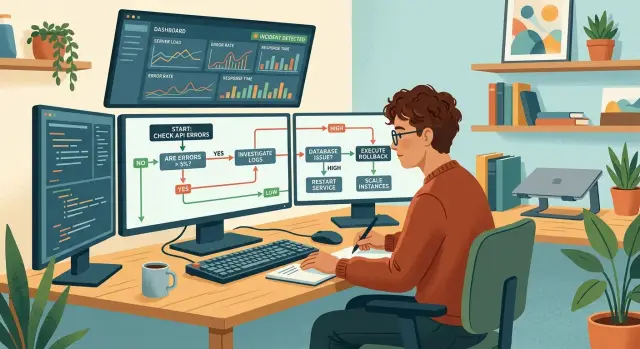
Table of Contents
Why people ignore runbooks
Most runbooks fail for a simple reason: they read like policy documents instead of instructions. When an alert fires, nobody wants a history lesson, a naming guide, or a paragraph about ownership. They want the first safe action, fast.
New engineers feel this most. They are already under pressure, they do not know which details matter yet, and they cannot easily separate useful context from noise. If the page opens with a long intro, they skim, miss the first action, and start asking in chat or guessing.
Big paragraphs make it worse. A wall of text forces people to hunt for verbs: open, check, compare, restart, escalate. That hunt costs time, and time changes behavior. Once an engineer learns that the runbook is slow, they stop trusting it.
Weak runbooks usually break in the same places:
- The first action appears halfway down the page.
- The dashboard or log view is missing.
- Steps use vague words like "investigate" or "verify" without saying how.
- Background notes sit in the middle of urgent actions.
Missing dashboards waste more time than many teams expect. If a runbook says "check system health" but does not point to the exact dashboard, the engineer opens five tabs, asks which one is current, and loses momentum. Under pressure, even a simple search feels harder than it should.
Vague wording causes a different delay. "Look for errors" sounds clear until a new engineer asks which errors count, what time range to use, and what number means trouble. Good runbooks remove that guesswork. They name the signal, the threshold, and the next move.
One test catches this quickly. Give the page to someone who did not write it and ask them to follow it during a mock alert. If they pause to ask where to click, what a phrase means, or whether a number is bad, the runbook is not ready. It may be accurate, but people still will not use it.
What to show in the first minute
When an alert wakes someone up, background is not helpful. They need the first screen, the normal range, and the point where they should call for help. Start with that. Do not open with theory or a long description of the service.
Put the dashboard name in the first line of the runbook. Use the exact name people will search for in the monitoring tool. If the dashboard has a production and staging version, say which one to open. "Check the dashboard" is not enough.
Then name the first graph to open. Pick one graph that answers the first question fast: is this service actually unhealthy right now? For many teams, that is error rate, latency, queue depth, or request volume. Choose one and put it near the top. If people need three tabs and six charts before they can think, the runbook is already too long.
Show what normal looks like in plain numbers. "CPU varies" tells nobody much. "Latency is usually 120 to 250 ms, with short spikes after deploys" gives people something concrete to compare against.
The first-minute block should usually include the exact dashboard name, the first graph to open, the normal range for that graph, the current owner, and the rule for fast escalation. That last part matters. "Escalate if errors stay above 5% for 10 minutes" works. "Escalate for serious issues" does not.
A short example makes the point better than a polished paragraph: "Open Checkout API - Production. Start with 5xx error rate for the last 15 minutes. Normal is under 0.3% outside deploy windows. Owner: Payments team. Escalate immediately if checkout is fully down or if 5xx stays above 2% for 5 minutes." A new engineer can act on that.
How to keep steps short
At 2 a.m., long explanations slow people down. A useful on-call runbook gives one clear move at a time so a tired engineer can act without decoding a wall of text.
Give each line one action. If a step asks someone to open a dashboard, change a filter, run a command, and judge the output, that is four steps, not one. Short lines cut down on missed clicks and skipped checks.
Start each step with a verb. "Open", "check", "run", "compare", and "page" are easy to scan because the eye lands on the action first. Soft openings like "You may want to" or "The next thing is" add words and hide the job.
Do not mix screen clicks and terminal commands in the same sentence. Keep them apart, even if they happen one after the other.
Short example
- Open Grafana.
- Select the Payments API dashboard.
- Set the time range to "Last 15 minutes".
- Run
kubectl get pods -n payments. - Compare pod restarts with the error spike.
It looks plain, and that is the point. In small teams, the person on call often did not build the service. They should not have to guess where one action ends and the next begins.
Background notes still matter, but they should not sit inside the step. Move them below the main action or to the end of the page. "Check recent deploys, which often cause cache issues in one region, and if needed roll back" asks the reader to do too much at once. Split it into two lines: "Open deploy history." Then: "If the latest deploy matches the start of the incident, roll it back." Add the cache note after that.
Stop writing once the reader knows two things: what to do and what result to expect. "Restart the worker. Queue depth should start dropping within 2 minutes." That is enough for the main path. If you need more detail, place it in notes, not in the step.
A strong runbook often feels a little blunt. That is a good sign.
Write the decisions people must make
When someone is tired, new to the team, or under pressure, vague advice falls apart fast. A good runbook names the exact forks in the road so the engineer does not have to guess what happens next.
Write each decision as a simple if/then choice. If error rate is above 5% for 10 minutes, roll back. If CPU is high but requests are normal, check the latest job or deploy before you restart anything. That is much easier to follow than "if things look bad" or "if the system seems slow."
Plain numbers matter. Use thresholds, time windows, and clear signals from the dashboard or logs. New engineers should not have to translate fuzzy words like "large spike," "heavy load," or "serious impact" into action.
A short format works well:
- If checkout errors stay above 3% for 5 minutes, page the incident lead.
- If one node is unhealthy and traffic is stable, remove that node before you restart the service.
- If database replication lag passes 30 seconds, stop failover attempts and call for help.
- If memory use rises after a fresh deploy, roll back before changing scaling rules.
Each choice should point to one signal people can trust. Avoid decisions that depend on five tabs, gut feeling, or tribal knowledge. If the engineer must compare two metrics, name both and say why they matter.
You also need a clear stop point. Say when the on-call engineer should pause and escalate. Good examples are customer data risk, unclear blast radius, repeated failure after one rollback, or any step that could make recovery harder. People wait too long to ask for help when the runbook treats escalation like failure.
Spell out what not to change during triage. Keep diagnosis separate from cleanup. If the team is still figuring out the cause, avoid schema changes, broad config edits, cache wipes, or multiple restarts at once. Those actions can erase evidence and create a second problem.
The best runbooks do not try to cover every edge case. They make the first few decisions obvious, measurable, and safe.
Build the runbook in order
A useful runbook follows the same path a tired engineer takes at 2 a.m. Start with proof that the alert is real and name the service that might be down. If the first step is vague, people lose time before they even know where to look.
Right after that, send them to the dashboard they trust most. Put the dashboard name near the top, not buried halfway down. If your team uses Grafana for service health and Sentry for errors, say that plainly so a new engineer does not guess.
A practical sequence
- Confirm the alert and the affected service.
- Open the main dashboard and compare the current graphs with normal traffic, latency, and error levels.
- Check the last deploy, feature flag change, or config update.
- Choose the branch in the runbook that matches the signal you see.
- Take the smallest safe action first.
The branching step matters. A runbook should not read like one long wall of instructions. It should split when the evidence splits. If errors jumped right after a deploy, follow the deploy branch. If traffic is normal but one dependency is failing, follow the dependency branch. Under pressure, people do better with two or three clear paths than with ten paragraphs of theory.
Small actions beat dramatic ones. Restart one worker before you restart the whole service. Roll back one config change before you disable half the system. A small move limits damage and tells you whether you are even on the right track.
Leave a trail
The runbook should also tell the engineer to write down what they saw and what they changed. Keep that note short: time, symptom, action, result. For example: "02:14, error rate up 18 percent, deploy 884 looked suspicious, rolled back, errors returned to normal in 3 minutes."
That record helps the next person, speeds up handoff, and turns one stressful incident into a better runbook the next day.
A simple incident example
At 9:10 a.m., the payment API starts timing out. Customers can still browse, but checkout stalls, support tickets begin to stack up, and the on-call engineer needs one screen that cuts through the noise.
The runbook should start with the dashboard, not the theory. The first panel should show two things side by side: latency and error rate for the payment API. If both jump at the same time, the engineer knows the problem is live and customer-facing. If latency climbs first and errors follow, that usually points to a slow dependency rather than a full outage.
The opening steps can be this short:
- Open the payment API dashboard.
- Confirm the spike started around 9:10 a.m.
- Check whether a deploy happened in the previous 10 minutes.
- If no deploy lines up, check the database panels next.
Pressure makes people guess. The runbook should remove that guesswork.
If a deploy went out at 9:05 a.m. and the graph turns bad right after, the engineer checks one more signal before acting: did request volume stay normal? If traffic is flat and the new version matches the start of the spike, roll back. Do not make the engineer debate it for 15 minutes.
If no deploy matches, the next branch checks database slowdown. The dashboard should show query latency, connection usage, and failed queries. If query latency doubles first and the API errors rise a minute later, the app is probably waiting on the database. At that point, the engineer escalates to the database owner or infrastructure lead with the evidence already in hand.
The runbook ends with two clean outcomes: roll back the bad deploy, or escalate with timestamps, graphs checked, and the wrong branch already ruled out. That is what makes a runbook usable by a new engineer at 9:12 a.m., not just readable during a calm afternoon.
Mistakes that waste time
Runbooks fail when they try to be history books. Engineers open them during stress, not during a quiet study session. If the page mixes old lessons, edge cases, and long explanations, people stop reading and jump into chat or guess.
One common mistake is turning one page into a dump for every incident the team has ever seen. Keep the runbook for action. Move deep background, odd one-off bugs, and postmortem detail into separate notes. The on-call page should answer one question fast: what do I check, and what do I do next?
Another time sink is hiding commands inside long paragraphs. A sentence like "you may want to inspect logs on the API pods and then perhaps restart the worker if memory looks high" forces people to hunt for the real instruction. Put the command on its own line or in a short code block, and make the result clear too. "If error rate stays above 5% for 10 minutes, restart worker-a" is much better than "if it looks bad, consider a restart."
Fuzzy thresholds cause the same problem. "High latency" means nothing at 3 a.m. Give a number, a time window, and the source of truth. If your team uses Grafana or Sentry, name the chart or alert that decides the step. People should not have to guess whether 400 ms is normal today or a real problem.
Runbooks also get messy when triage steps and postmortem notes live in the same flow. Triage says what to do now. Postmortem notes explain why the bug happened last month. Mixing them breaks focus.
Old names create more trouble than most teams expect. If the service used to be "billing-v2" and now it is "payments-api," a new engineer may open the wrong dashboard, restart the wrong job, or page the wrong owner. This happens often after migrations and team changes.
Before you publish a runbook, ask someone new to use it for a fake alert. Watch where they pause. Those pauses usually show the waste.
Quick checks before the team uses it
A runbook should work for the newest person on call, not just the person who wrote it. Give it to an engineer who knows the product but does not know this failure mode well. If they stall in the first minute, the page needs work.
Start with speed. Ask them to follow only the first three steps while you watch the clock. They should reach the dashboard, confirm whether the issue is real, and take one safe first action in a few minutes. If step two sends them searching through chat, old tickets, or five tabs, trim it.
The safest first action must be obvious. New engineers freeze when every option feels risky. Spell out the low-risk move first, such as checking error rate, pausing a rollout, or switching traffic away from a broken path if that is already approved. If the runbook says "investigate" without saying where to look or what not to touch, rewrite it.
Escalation should feel plain and mechanical. Clear thresholds work better than vague judgment calls. Use direct triggers such as:
- escalate if customer sign-ins fail for more than 5 minutes
- escalate if data loss is possible
- escalate if the first safe action does not change the metric
- escalate if you cannot identify the service owner in 2 minutes
- escalate if the runbook and the dashboard do not match reality
Ownership needs one home. Put the current owner, backup owner, and team name near the top so nobody has to ask around. If ownership changes often, update that source first and pull the same names into the runbook.
Then run a small drill. Ten quiet minutes is enough. Use a harmless test case, ask one engineer to act as on-call, and see where they hesitate, skip, or misread a step. Those pauses tell you more than a tidy review in a document ever will.
A good standard is simple: a new engineer should be able to find the dashboard, make the first safe move, know when to escalate, and know who owns the service without asking anyone. If they cannot, the runbook is still a draft.
What to do next with your runbooks
Runbooks get better after real incidents, not after long document reviews. Each time the team handles an alert, spend ten minutes while details are fresh and ask one plain question: what part of the page helped, and what part got ignored?
Then update the document right away. If nobody used a step, cut it or move it lower. If someone had to ask a senior engineer, dig through chat, or guess which graph to check, add that missing decision point near the top.
Small edits matter more than full rewrites. A runbook stays useful only if the team treats it like working notes, not policy.
A simple review cycle works well. After every incident, the responder marks confusing, skipped, or outdated steps. The service owner updates the runbook within a day or two. A new engineer walks through the page and points out where they would pause. The team keeps the runbook with the people who own the service.
That last point saves time. The people who build and run the service know which alerts are noisy, which dashboard tells the truth, and which steps are stale. If another team owns the document, it usually drifts away from reality.
Testing with a new engineer is worth the effort. Give them the page, the alert, and nothing else. If they stop after step three and ask, "Which dashboard do I open?" or "Who decides if this is customer-facing?", the runbook still has a gap.
For startups and small teams, this work often slips because the same people are shipping features, answering customers, and covering on-call. In that situation, an outside review can help. Oleg Sotnikov at oleg.is reviews incident documents and on-call workflows as part of his fractional CTO advisory, with a practical focus on shorter runbooks, clearer ownership, and fewer wasted steps under pressure.
Keep the rule light: one owner, one review after each incident, and one quick walk-through by someone new every few weeks.
A short page that the team updates often beats a polished page nobody trusts. The real test is simple: at 2 a.m., can a new engineer open it, find the first dashboard, make the next call, and avoid waking the whole company for the wrong reason?


