Incident notes for customer workarounds teams can reuse
Learn incident notes for customer workarounds that record how teams kept payments moving, users informed, and data safe during outages.
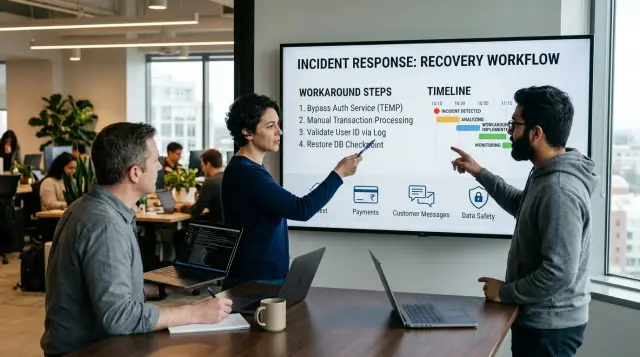
Table of Contents
Why workaround details disappear
During an outage, teams chase the fix. Of course they do. Service is broken, customers are waiting, and every minute costs money. The temporary path becomes a side note, even when it kept payments moving, gave users a safe fallback, or stopped bad data from spreading.
Pressure pushes people to record the final repair and skip the messy middle. Someone in support tells customers to use another payment method. Someone in operations processes a batch by hand. Someone in finance delays settlement until the next run. The system comes back, everyone exhales, and the note ends with "resolved."
Messages make this worse. Facts end up in too many places at once: the incident channel, the support tool, ticket comments, call notes, status updates, and direct messages. Each piece makes sense in the moment, but the full story gets chopped into fragments. Later, when someone tries to write down the customer workaround, they can find the decision but not the reason, or the step but not the result.
Teams also miss one basic detail: who actually used the workaround. A note might say "customers used manual invoicing" or "support advised retry after 30 minutes," but that hides the real shape of the impact. Which customers? Which region? Which account tier? Did only new users need the workaround, or did long-time customers need it too? Without that detail, the next team cannot tell whether the same path still fits.
Risk disappears for the same reason. In the heat of an incident, people accept tradeoffs they would never accept on a normal day. They may delay fraud checks, allow manual edits, send updates less often, or ask staff to handle data outside the usual flow. Those choices may be reasonable. They still need a record.
A short note that skips the workaround usually leaves out four facts:
- what people did instead of the normal path
- who used that temporary path
- what risk the team accepted
- when the workaround should have stopped
That gap shows up later. The next incident starts from scratch, and the team repeats the same confusion under the same pressure.
What a useful workaround note includes
A workaround note helps only if another person can use it under pressure without guessing. Start with the customer problem, not the internal fault. Write one plain sentence that says what the customer could not do, saw, or lost. "Customers could not complete card payments in the mobile app" is clear. "Payment service issue" is not.
Next, name the workaround in exact terms. Say what people actually did, where they did it, and who it applied to. "Support switched affected customers to emailed invoices and finance matched payments by hand" says far more than "used a manual process." Teams often remember the idea and forget the real action.
The note also needs an owner and a time. Record who approved the workaround and when they approved it. That tells future readers the team chose it on purpose. It also gives people a way to check whether the workaround matched policy, risk limits, or customer promises.
Then say what the workaround protected in that moment. Maybe it kept money moving, stopped duplicate charges, gave customers a way to log in, or kept sensitive data out of the wrong system. A later fix should protect the same thing, not just clear the alert.
Last, add the signal that told the team it worked. Use the first proof the team trusted: order volume recovered, queue depth fell, support tickets slowed, or error rates dropped for affected users. If the note does not say how the team knew the workaround helped, people will repeat it next time with no way to judge it.
A short note can cover all of this:
"Customers could not confirm subscription upgrades after checkout. Support created upgrades by hand in the billing admin for affected accounts. Priya Singh approved this at 09:15 UTC. The workaround kept renewals active and avoided double charges. We knew it worked when upgrade-related tickets stopped rising and new upgrades appeared in billing within five minutes."
Capture customer impact first
Start with what customers could not do. Engineers may remember the error code, but future teams need the real effect: who could not pay, who could not log in, who could not sync data, and who only saw delays.
Scope matters more than drama. Write whether the problem hit all users or only one bank, one region, one app version, or one account type. A short line like "Visa card payments from one bank failed for new checkout sessions, while saved subscriptions kept charging" gives the next reader something they can act on.
Support activity belongs near the top of the note too. Record how the team updated users, when those updates went out, and what people were told to do next. "Support told customers to retry in 30 minutes and offered manual invoices for urgent orders" says much more than "support notified users."
Then write what the workaround changed in real terms. Did it cut failed payments by half, keep orders moving with a manual process, or reduce a two-hour delay to 20 minutes? If the workaround only helped a small group, say that clearly. A strong note shows whether the team reduced loss or only bought time.
You should also mark any data that needs a second look later. If customers used a backup path, some records may need cleanup, matching, or fraud review. Name the records when you can: orders without payment confirmation, duplicate login attempts, delayed inventory syncs, or support-approved account changes entered by hand.
A small example makes this concrete. If customers could not log in and support verified identity by phone, note how many accounts used that path, what support told users, and which accounts need an audit check later. That gives the fix team a clear target.
When teams skip this part, the note turns into a server diary. When they capture customer impact first, the next fix protects the part of the business that almost broke.
Write the workaround step by step
When a workaround gets people through an outage, the note should read like a replay, not a summary. Anyone on the next shift should be able to follow it without guessing which screen to open or which message triggered the decision.
Start with the moment the team switched from normal handling to the workaround. Write the trigger in plain words: "Support saw card retries pile up for Bank X after 09:12" or "The checkout job timed out after three runs." That first line tells future responders when to stop trying the usual path.
Then record each action in the same order people took it. Do not compress five clicks into "updated the settings." Say which screen they opened, which field they changed, which command they ran, and who did it if that matters.
A simple format works well:
- Trigger: what alert, customer report, or failed check pushed the team to use the workaround
- Actions: each click, command, or form edit in order
- Timing: how long each step took, plus any wait time before the next check
- Result: the first sign that orders, messages, or logins started moving again
Be exact with names. "Payments > Retry Queue" is better than "the dashboard." "Set bank_route_override = fallback_2" is better than "changed routing." If a step depended on a hidden detail, write that too, such as the need to refresh the page, clear a stuck lock, or save the form before reopening it.
Timing matters more than most teams think. A step that took 20 seconds during the incident might take 8 minutes on a busy day. Put rough times next to the steps so no one abandons the workaround too early or waits too long to move on.
Close with the action that returned normal flow. Name the signal: queue depth dropped, confirmation emails resumed, error rates fell, or customers could submit the form again. The note should end at the point where the team could safely stop the manual path and go back to normal handling.
Record limits, risks, and stop points
A workaround note should do more than list the temporary fix. It should tell the next team where the fix is safe, where it starts to break, and when they need to stop using it.
Start with the people or accounts that should not use the workaround. A manual retry might be fine for low-value card payments, but not for refunds, high-risk transactions, or regulated customers. If the note does not name exclusions, someone will assume the workaround applies to everyone.
Write down what changes when load goes up. A step that works for 20 cases an hour may fail badly at 200. Queues can grow, duplicate messages can appear, staff can miss manual checks, and customers can get mixed signals. Put the expected volume limit in plain words, even if it is only a rough threshold.
A small example helps. If support can push failed payment requests through a backup path for one bank, note how many requests one person can handle, how long each check takes, and what happens if the backlog passes that limit. That gives the next incident lead a real stop line instead of a guess.
Stop points
Every workaround note should name the moment the team must escalate. Keep it concrete:
- Stop if pending payments exceed the agreed queue size.
- Stop if manual checks fall behind by more than a set time.
- Stop if duplicate customer messages start going out.
- Stop if staff cannot verify balances, records, or delivery logs.
Manual checks deserve their own line in the note. If the team handled money, say how they confirmed totals matched. If they sent customer updates by hand, say where they tracked who got a message. If they edited records, say how they checked that nothing was skipped or entered twice.
The note also needs an exit condition. Do not leave a workaround running because it feels safer than change. State the signal that lets the team remove it, such as error rates returning to normal, the upstream provider confirming a fix, or reconciliation checks showing clean results for a full cycle.
That last line tells future teams when to trust the system again and when to keep humans in the loop.
Example: card payments fail for one bank
A release goes out at 10:42 UTC. Ten minutes later, support sees a pattern: card payments from one issuer hang or fail, while other banks still work. Orders start piling up because buyers keep retrying, and each retry makes the situation harder to read.
A useful note does not stop at "payments failed." It captures what the team actually did to protect customers and keep sales moving. In this case, support told affected buyers to stop retrying the same card after one failed attempt and switch to bank transfer instead. That detail matters because it cuts duplicate attempts and gives customers a clear next step.
The note should also show what finance did while the outage was active. Before settlement, finance checked payment records for duplicate charges so a customer would not end up with both a failed card attempt and a completed bank transfer. If someone called in angry, support could answer with facts instead of guesses.
A useful note marks the recovery point in plain words. It should say when the issuer path started working again, how the team confirmed it, and when support stopped offering the workaround. "Recovered" is too vague. "Approvals from the affected issuer succeeded again at 14:20 UTC, confirmed by five clean test and customer transactions" is much better.
You can write the incident note like this:
Trigger: release deployed, then one issuer's card authorizations began timing out.
Customer workaround: after one failed card attempt, support advised buyers to pay by bank transfer.
Finance action: check authorization and settlement records for duplicates before end-of-day settlement.
Recovery marker: issuer path stable again at 14:20 UTC.
Follow-up fix: keep the bank transfer fallback and add alerts for issuer-specific payment failures.
That last line often goes missing. The team fixed the release, but they also kept the retry path that helped customers finish payment. They added alerts for one-bank failure spikes, so next time support can react in minutes instead of learning about it from a pile of stuck orders.
Mistakes that ruin incident notes
A note fails when the next team reads it during an outage and still has to guess. That happens more often than people admit. The point of a workaround note is reuse under stress, not a vague memory of what someone tried.
One common failure is writing "used manual process" and stopping there. That tells nobody who did the work, which tool they used, how they found affected records, or how they confirmed success. If finance had to retry card charges in a dashboard, say which dashboard, which filters they used, and which customers they skipped.
Another mistake is mixing guesses with facts. A sentence like "bank API was probably rate-limiting us" should not sit next to confirmed actions unless you label it clearly as a guess. Future readers may treat it as truth and build the wrong fix.
Where notes usually break
A workaround note also needs an end point. Teams often describe when they started the manual path but forget to record when it stopped helping. Maybe volumes grew too high after 2 p.m. Maybe duplicate retries started to appear. Maybe support could no longer verify accounts fast enough. That stop point matters because it tells future responders when to switch plans.
Support details disappear too. If agents used a phone script, a chat macro, or a short status message for customers, save the exact wording or a close version. Small wording choices can cut repeat contacts and prevent false promises.
A short example shows the gap:
- "Support used a manual process."
- "Support told affected customers that payments were pending, asked them not to retry for 30 minutes, and escalated failed retries older than one hour to finance for manual review."
The second note gives a team something they can actually repeat.
After the incident, many teams close the ticket and move on. That is another bad habit. If anyone entered orders by hand, bypassed a validation rule, or delayed sync jobs, the note should say what data checks happened later. List what the team verified, where they looked, and what they found. Otherwise the outage ends, but the cleanup risk stays hidden.
Quick check before you save the note
A workaround note passes one simple test: a new teammate can use it without asking around. If the note only makes sense to the person who ran the incident, it is still a draft.
Start with repeatability. A teammate who joins the shift later should see the trigger, the exact workaround steps, and the result to expect. They should not need private chat context, memory, or guesses. If one step depends on judgment, write the cue in plain words, such as "use manual approval only when the payment gateway returns code 91."
Then check the customer side of the story. The note should say what customers got back and what they still lost. "Checkout worked again" is not enough. "Customers could place orders, but refunds stayed delayed until the bank batch cleared" gives support, finance, and engineering the same picture.
That shared picture matters. Support needs a sentence they can tell customers. Finance needs to know what money moved, what stayed pending, and what needs cleanup later. Engineering needs to know what changed in the system and what damage the workaround might cause. If all three teams read the same note and tell the same story, the note is doing its job.
Before you save it, read the note once with these checks in mind:
- Could a new person repeat the workaround safely?
- Does the note spell out the customer gain and the remaining loss?
- Would support, finance, and engineering all read the same facts?
- Did you name the open risks, not just the successful part?
- Did one person take follow-up ownership?
Open risks need plain names. Say if data might need backfill, if reports will be wrong until a later job runs, or if the workaround only holds under low traffic. Then name the owner and the next action. "Team will review" is too loose. "Priya checks failed settlements at 9 am and removes the rule after reconciliation" is enough.
A saved note should let the next person act in five minutes and know what still needs care.
Turn notes into safer fixes
A good workaround note should not sit in a folder and age quietly. If the same workaround shows up twice, treat it as part of normal operations until the team removes the root cause. That is when notes start saving time instead of just explaining old pain.
Move the workaround into places people already use under stress. A shared runbook is the first stop. Support, ops, and engineering should all find the same steps, the same stop points, and the same warning signs. If one team keeps a private version in chat, the next outage will drift into guesswork.
The trigger matters too. If this incident started when a queue backed up, a payment provider timed out, or one bank returned a specific error code, add an alert for that condition. You want a warning before customers report the problem, not after the team has already spent 30 minutes confirming what is happening.
A short follow-up routine works well:
- copy the tested workaround into the runbook
- add an alert for the first clear trigger
- run a drill so the team can try the steps cold
- check new releases against the note before shipping
- use the note when training support on what to say and when to escalate
Drills matter more than many teams expect. A workaround that looked clear at 2 p.m. can fall apart at 2 a.m. when a different person is on call. Run the steps in a simple exercise. Time them. Watch where people hesitate. If the workaround depends on one senior engineer remembering a hidden setting, the note is not ready.
Release reviews should use the note too. Ask a plain question: does this change break the current workaround, remove the need for it, or change the trigger? That one check catches a lot of repeat incidents. Support training should do the same. If agents know the approved message, the fallback path, and the stop point, customers get a steady answer instead of five versions of the truth.
If repeat incidents keep exposing the same gaps in architecture, tooling, or team process, outside help can speed up the cleanup. Oleg at oleg.is works as a Fractional CTO and startup advisor for startups and smaller businesses, helping them improve architecture, infrastructure, and AI-driven development operations.


