Incident calendar analysis for recurring release failures
Incident calendar analysis helps teams map failures by business process and release type, spot repeat change patterns, and fix weak release habits.
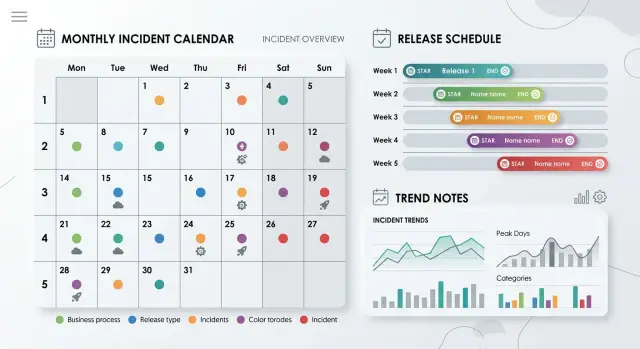
Table of Contents
Why separate retrospectives miss the pattern
A single retrospective explains one outage well. It does a much worse job of showing repetition.
Each incident comes with its own logs, people, timeline, and strange edge case. After the meeting, the team often walks away thinking the failure was unusual. Usually it was not. The details changed, but the same release habit kept causing trouble.
One week, a config edit breaks login. Two weeks later, a permission change blocks checkout. A month later, a data migration delays billing. Different systems fail, but the business feels the same kind of disruption.
Teams also record incidents the way engineers work: by service, database, queue, API, or app. That helps with debugging. It hides the business process that suffered. If signup, invoicing, and order handling all depend on several systems, a system-by-system review turns one recurring problem into several small stories.
Release notes create another blind spot. They often say "backend update" or "minor fix." That is too vague to help later. You need to know what changed: a schema update, feature flag rollout, permission rule edit, pricing logic change, or infrastructure tweak. Those categories repeat, and the failures tied to them repeat too.
A calendar changes the view. Put incidents on actual dates, then tag each one by business process and release type. Clusters appear fast. You may notice that customer-facing issues bunch up after end-of-week auth changes, or that billing outages happen near month-end jobs and rushed patches.
That is why a calendar often tells a clearer story than a stack of meeting notes. A CTO reviewing six weeks of incidents can spot patterns that no single retrospective will show. If three separate outages all follow the same kind of change, the team does not have three unique problems. It has one repeatable mistake.
What belongs on the calendar
A useful calendar entry is short, but it should answer the same questions every time. If one incident has a clean note and the next has three vague lines, the pattern disappears again.
Start with the exact date and time when users first felt the problem. Do not settle for "Tuesday morning" or "after deploy." A release at 09:00 with customer errors at 09:12 tells a different story than errors at 16:40. If you can, note when service recovered too. That helps you separate changes that fail fast from changes that create slow damage.
Then write the business process that broke, not the system name. "Checkout failed" works better than "payments service issue." "Users could not sign in" is clearer than "auth degraded." People buy, sign in, upload files, sync data, and approve invoices. Those actions belong on the calendar because they tie failures to real work.
Release type matters just as much. Split incidents by what changed: code, config, data, or infrastructure. Many teams dump all of that under "deployment" and lose the signal. This single field often exposes the repeat offender. A data migration that breaks billing twice a month is a different problem from an infrastructure change that knocks out logins.
Write customer impact in plain words. Skip internal phrases like "error spike" unless you also explain what users saw. "New customers could not create accounts for 27 minutes" is clear. "Some API calls failed" is not.
Finish each entry with the response that reduced the pain, such as a rollback, hotfix, or manual workaround. Over time, this shows whether the team keeps fixing the same class of problem with the same emergency move.
A simple entry might look like this:
- 14 May, 09:12 UTC
- Business process: customers could not complete checkout
- Release type: config change in payment settings
- Customer impact: orders failed for 38 minutes, browsing still worked
- Response: rolled back config, then added a validation check before release
Keep every entry this plain. If someone outside engineering can read it and understand what went wrong in ten seconds, you are recording the right details.
Group incidents by business process
Most teams tag incidents with system names because alerts, logs, and dashboards use system names. That helps engineers debug faster. It does not show which part of the business keeps getting hit. If five different services fail and every one of them breaks checkout, the repeated problem is checkout, not five separate systems.
Business labels work better than technical labels. People outside engineering can read them, and engineers can still keep service names in the incident notes. The calendar itself should answer a simple question: what customer or staff workflow stopped, slowed down, or produced bad output?
Start with customer and staff flows
Begin with the flows people already mention in meetings and support tickets. Most teams only need a short set of labels, such as signup, checkout, billing, reporting, and account access.
That gives everyone shared language. Support can say "billing was broken again" while engineering says "the queue worker timed out," and both can still tag the incident as billing.
Keep the list short. If you create twenty buckets, people stop tagging consistently and the calendar turns noisy. Five to eight business processes is usually enough at the start. You can keep technical tags somewhere else for root cause work.
Split a bucket only when the failure patterns differ
Do not split a process just because it feels broad. Split it when one label hides two patterns that need different fixes.
Billing is a good example. If one group of incidents comes from subscription renewals and another comes from invoice exports, the single label "billing" may blur the pattern. A simple test helps: ask whether the same owner, same release type, and same fix usually apply. If they do, keep one bucket. If they do not, split it.
This is where many teams go too far into detail. Labels like "checkout-api," "payment-service," and "tax-webhook" look precise, but they push the calendar back into engineering jargon. A better calendar shows that Friday config changes keep breaking checkout, or that monthly reporting fails after database migrations. Those are patterns you can act on.
Track release types separately
A release calendar gets much clearer when you stop calling every change a "release." New app code, a database tweak, and a late-night config edit do not fail in the same way. If you mix them together, repeat problems stay hidden.
The same outage can come from very different kinds of change. A search slowdown after a feature deploy tells a different story from a login failure after someone changed an environment variable.
Keep separate labels for the change types that break systems for different reasons. Product code releases should stay separate from config changes like feature flags, secrets, rate limits, routing rules, and environment variables. Database schema changes deserve their own tag because rollback is harder and the damage often spreads beyond one screen. Manual data fixes should stand alone too. If someone edits records in production, imports data by hand, or runs a backfill, mark it as its own event type. The same goes for dependency and infrastructure updates such as library bumps, base image changes, network rules, cluster settings, or DNS edits.
That split pays off fast. A team may think "checkout breaks after releases," but the calendar may show that checkout only breaks after config edits on promo days. A billing issue may look random until schema changes line up with every incident.
Dependency updates need extra care. Teams often bundle them with normal feature releases because the deploy happens at the same time. That hides a common pattern: the new feature works fine, but a library update changes request timing, memory use, or an API contract.
Infrastructure changes also need a label even when no app code changed. Cache settings, ingress rules, disk limits, and queue tuning can knock over a stable product just as easily as a bad deploy.
After a few weeks, the picture usually gets much simpler. You may find that most customer-facing incidents come from manual fixes and config edits, not feature releases. That tells you where review, automation, or guardrails should go first.
Build the first calendar
Start with a small window, usually the last 60 to 90 days. That is enough to catch repeat trouble without getting buried in old tickets, half-written notes, and staff changes.
Pull every production incident into one place, including the small ones people tend to dismiss. A missed webhook, a broken signup step, and a short billing outage belong on the same calendar if users felt them.
The first version should stay simple. Each incident only needs a few fields: when it started, one business process tag, one release type tag, a short note on what broke, and rough customer impact.
Use one business process tag per incident. Pick the process the customer or internal team actually experienced, such as checkout, billing, login, onboarding, order routing, or reporting.
Do the same for release type. Use one label that describes the change most likely to have introduced the issue, such as backend deploy, database migration, feature flag change, infrastructure change, or manual config edit.
Do not wait for perfect tagging. If two labels both seem right, choose the better fit and move on. You can clean up names later. What you need first is a calendar you can scan.
Put every incident on a shared monthly view. A spreadsheet, wiki page, or plain calendar works fine as long as people can read it quickly. Place the incident on the day it started, then add the two tags directly in the entry so the pattern is visible without opening another document.
Once time, process, and release type sit on one page, repeats become hard to ignore. If three billing incidents follow manual config edits across six weeks, that is not bad luck. If login failures keep appearing after mobile releases, that needs a different fix from a one-off outage.
After the first pass, you should be able to point at a few dates and say, with evidence, which process keeps breaking and what kind of change tends to trigger it.
A simple example from a product team
One product team kept seeing the same ugly Friday problem. Checkout errors started in the early evening, right when orders picked up. Customers could still browse, add items, and apply discounts, but some payments failed or totals came out wrong. Each incident looked small on its own, so the team treated them as separate bugs.
The retrospective notes never looked dramatic. One week, someone changed a discount threshold. Another week, they updated a regional pricing rule. Another time, they adjusted tax settings for a promotion. The code diffs looked harmless, and some incidents did not involve code at all. That made the failures easy to dismiss as bad luck.
Then the team marked every incident by business process and release type. Checkout got one label. Pricing config changes got another. Code deploys, infrastructure work, and content updates each had their own category. After six weeks, the pattern was hard to miss.
Across those Fridays, the same sequence kept appearing:
- a pricing config edit went in late on Friday
- nobody did a second review because the change looked minor
- traffic rose within the next hour
- checkout hit edge cases around discounts, tax, or cart totals
- orders started failing or pricing looked wrong
That changed the conversation. The team stopped asking, "What broke in checkout this time?" and started asking why people kept editing pricing rules right before peak traffic. The calendar exposed a release habit, not a mysterious software flaw.
The first fix was not a rewrite. The team moved pricing updates to earlier windows, blocked non-urgent config edits before the Friday rush, and required a second review for any rule that changed totals, taxes, or discounts. They also tested a small set of real cart scenarios before publishing config changes. Failures dropped quickly because the main problem was rushed change management, not broken checkout code.
Mistakes that hide repeat failures
The calendar stops helping when teams try to track everything at once. A messy record can look detailed, but it blocks comparison. After a few weeks, people stop trusting the labels, and repeat failures slip past because the same problem appears under four different names.
Too many tags cause this quickly. If one incident is tagged "checkout," another "payments," and a third "order flow," nobody knows whether they belong together. Pick a small set of business process labels and keep them stable. If people argue about a label during review, the taxonomy is already too large.
Another common mistake is mixing user impact with technical cause. "Users could not place orders" and "database migration failed" are both useful, but they answer different questions. Keep them in separate fields. If you blend them into one label, you cannot tell whether one business process keeps breaking or one release method keeps causing damage.
Hotfixes need their own lane. Teams often fold them into normal releases because both deploy code. That hides a pattern you probably need to see. Rushed fixes usually skip some checks, happen late, or land under pressure. If the same business process fails after hotfixes again and again, the calendar should show it.
Near misses matter too. If an engineer repairs data by hand at 11 p.m. and customers never notice, record it anyway. Manual repair is a warning, not a win. Many recurring production issues start as quiet repairs that never make it into the incident log.
Changing category names every month also ruins trend data. "Signup" becomes "onboarding," then "new account flow," and the history breaks apart. Rename only when you must, and map old entries to the new term instead of starting over.
A quick smell test helps. If reviewers keep asking what a label means, if one label mixes outage impact and root cause, if hotfixes disappear inside normal releases, or if manual recoveries never appear on the calendar, the tracking is already drifting.
This work depends on boring consistency. Keep labels plain, separate, and stable, and repeat failures become much easier to spot.
Weekly review questions
A weekly review should take fifteen minutes, not half a day. Open the calendar, scan the last four weeks, and look for repeats. The goal is not perfect categorization. The goal is seeing the same pain early.
If one business process keeps failing, treat that as a real pattern. A checkout step, billing run, or login flow that breaks three times in a month needs attention even if each incident had a different technical cause. Customers do not care why it broke. They notice that the same part of the business keeps going down.
A few blunt questions usually work best:
- Which business process failed most often?
- Which release type caused the most customer pain?
- Which workaround keeps coming back?
- Do incidents cluster around a day or hour?
- Did the last process change actually reduce failures?
Those questions are enough to surface most problems. A tiny config change can create more support tickets than a large feature release. Repeated queue clears, job restarts, or flag toggles often mean the workaround has already become part of daily operations. Friday evening releases, Monday morning traffic spikes, and nightly batch jobs often reveal a pattern that release notes never make obvious.
Do not end the review with a vague plan to "monitor it." Pick one pattern, assign an owner, and decide what will change before the next review. Recurring production issues usually stay put until someone changes the release habit behind them.
What to do with the pattern
Start with one repeat problem, not ten. If Friday evening API releases keep breaking order processing, change that habit first. Move that release type to an earlier slot, add a rollback check, or require one extra reviewer. A small rule that people follow beats a thick policy file nobody reads.
Turn the pattern into a plain rule. Write it so an engineer, product manager, or founder can read it in a few seconds. Good rules stay narrow. "Billing releases need a rollback test before approval" is clear. "Be more careful with billing" is useless.
Keep the rule short. Name the release type, name the business process it hurts, state the new habit, and name who can approve an exception.
Then give one person ownership of the calendar. Teams often agree that tracking matters, then nobody updates the record after a busy week. One owner keeps dates, release types, affected business processes, and cause notes consistent. That discipline keeps the pattern visible instead of letting it fade into memory.
Wait long enough to learn from the change. Review the same pattern after two release cycles, not after one quiet release. Look for fewer incidents, smaller outages, faster recovery, or fewer customer errors. If nothing changes, the rule was too weak, too vague, or too easy to ignore.
Sometimes the pattern survives because the release flow itself is messy. Mixed deployments, unclear ownership, and missing rollback steps can hide the real cause for months. In those cases, an outside review helps. Oleg Sotnikov writes and works on this kind of release and operations problem at oleg.is, and a fractional CTO review can be enough to tighten approval rules, release boundaries, and incident tracking without adding more process than the team needs.
If billing still breaks after the next two billing releases, stop bundling billing changes with other work. Split them, track them, and see whether the calendar finally goes quiet.
Frequently Asked Questions
Why does an incident calendar work better than separate retrospectives?
A calendar shows repeats across weeks. Separate retrospectives explain one outage well, but they rarely show that the same kind of config edit, migration, or hotfix keeps hurting the same business flow.
What should every incident entry include?
Keep each entry short and consistent. Record when users first felt the issue, which business process broke, what release type likely triggered it, what customers saw, and what your team did to reduce the damage.
Should I group incidents by service or by business process?
Tag the calendar by business process first. Use labels like checkout, billing, login, reporting, or onboarding so you can see which part of the business keeps failing. Keep service names in the incident notes for debugging.
How many business process labels should we start with?
Start small. Most teams do fine with five to eight labels because people use them more consistently. Split a label only when it hides two different failure patterns that need different fixes.
Which release types should we track separately?
Track release types separately because they fail for different reasons. Keep product code, config changes, database changes, manual data fixes, dependency updates, hotfixes, and infrastructure edits in different buckets when they create different kinds of trouble.
Do near misses and manual fixes belong on the calendar?
Yes. Add near misses, manual repairs, and late-night fixes if users almost felt the problem or the team had to step in fast. Those entries often reveal the pattern before a larger outage hits customers.
How far back should the first calendar go?
Start with the last 60 to 90 days. That window usually gives you enough data to spot repeats without dragging in old tickets, missing context, and outdated team habits.
What tool should we use to build the first calendar?
Use the plainest tool your team will update every week. A shared spreadsheet, wiki page, or basic calendar works fine if everyone can scan it fast and read the tags without opening extra documents.
What should we review each week?
Spend about fifteen minutes a week and scan the last month. Look for the business process that failed most often, the release type that caused the most customer pain, repeated workarounds, and any time cluster like Friday evenings or month-end jobs.
What should we do after we spot a pattern?
Pick one repeat problem and change the release habit behind it. Move the change to a safer time, require another review, add a rollback check, or split risky work from normal releases. Then watch the next two cycles and see whether failures drop.


