Import rollback when customer mapping goes wrong in practice
Import rollback works when you stage rows, tag each source file, and record every write, so you can undo bad customer mapping without manual cleanup.
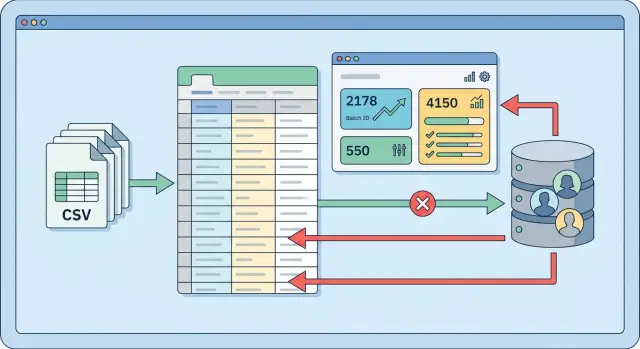
Table of Contents
Why bad customer mapping spreads fast
Import mistakes rarely stay small. One wrong column match can affect every row in a file, and a file with 800 customers can rewrite 800 records in seconds.
The problem is simple: the import job trusts the mapping more than the data. If "owner_email" gets mapped to "customer_email", or "account_manager" lands in the name field, the job does exactly what you told it to do. It doesn't know the file is wrong.
That error spreads in a few predictable ways. The import updates existing records instead of creating new ones. It overwrites names, emails, or account owners with values that still look valid. It can also trigger follow-up jobs such as notifications, syncs, or billing rules. Worst of all, the import may still report "success."
That's what catches teams off guard. The file imported, the row count matches, and nobody notices the damage until sales reps contact the wrong people or support can't find the right account owner.
Cleanup gets slow because the mistake usually mixes good data with bad data. Someone has to compare old and new values, figure out which rows came from the bad file, and reconstruct what the original records looked like. Ten minutes of importing can turn into a full day of repair.
A common example makes the risk obvious. Say a CRM import maps the "company contact" column to "primary email." Every row has text in that column, so a basic validation check lets it pass. The system then overwrites hundreds of customer emails with names like "Maria Chen" or "David Ruiz." If the same import also changes account ownership, two teams may start working the wrong records before anyone spots the issue.
That is why rollback needs batch-level control. When one source file causes the problem, you need one action that can reverse every change tied to that file. Row-by-row cleanup sounds careful, but it usually creates a second mess.
Stage every row before touching live data
Writing straight into live customer tables is how a small mapping mistake turns into a long cleanup job. A staging area gives you a safe place to load the file, inspect it, and reject bad data before your app changes a single customer record.
The rule should be strict: every row lands in a staging table first. At that point, the importer should not update customers, create relationships, or overwrite anything in production. It should only store what came from the file and mark each row for review.
Keep the source values exactly as the file gave them. If a CSV says "000123", store "000123" in a raw column. Don't trim it, cast it to a number, or rewrite the date format in place. You can add separate parsed columns for normalized values, but keep the raw copy untouched.
That raw copy matters later. If a mapping error shows up, you can compare the staged row with the source file and see whether the problem came from the file, the parser, or your matching logic.
A good staging table is usually simple. It keeps the raw source fields, parsed fields in separate columns, a validation status, an error message, the original row number, and the batch reference.
Most checks should happen in staging, not during the live write step. Validate required fields, date and number formats, email shape, duplicate identifiers inside the same file, and any value that must match an existing customer. Rows that fail should stay in staging with a clear error. They should never drift into production as partial updates.
Set a hard stop for the job. If required columns are missing, too many rows fail validation, or matching confidence drops below your threshold, end the run before it touches customer data. That feels strict, but it is far cheaper than cleanup.
Staging also makes rollback easier. If the batch never reached live tables, rollback is just rejecting or deleting staged rows. Even when you continue to later steps, staging gives you a checkpoint where you can inspect counts, sample records, and confirm that the mapping makes sense before you commit anything.
Give every file its own batch ID
A bad import is much easier to undo when every file gets its own batch ID from the start. Don't wait until validation passes. Create the batch record as soon as the file arrives, before you read a single row.
Relying on the file name is a mistake. People reuse names like customers.csv, and some systems rename uploads on their own. A batch ID gives you one clear label for everything that happens next.
Store a few plain facts with that batch record: the original file name, upload time, who started the import, the total rows found in the file, and later the counts for accepted and rejected rows.
That small record does a lot of work. If a customer mapping error shows up two hours after the import, you can pull one batch and see the full story without digging through logs by hand.
Row counts matter more than many teams think. Save the count when the file lands. Save the count again after validation. Then save how many rows you actually imported. If those numbers don't line up, stop and find out why. A missing 200 rows should never be a mystery.
Rejected rows should stay under the same batch, not in a separate cleanup table with no context. Keep the raw row data, the failure reason, and the batch ID together. Then you can answer basic questions quickly: Which rows failed? Did they fail because of a missing customer ID, a bad email, or a broken mapping rule?
Picture a real case. Lisa uploads a file with 12,000 customer updates at 9:14 AM. The system creates batch B-10482 right away. Validation accepts 11,760 rows and rejects 240 because the customer code format is wrong. Later, the team finds that the accepted rows mapped to the wrong account owner. You don't need a manual cleanup project. You inspect batch B-10482, reverse the changes tied to that batch, fix the rule, and run it again.
This structure also helps with audits and support. When someone asks, "Who imported this file, and what happened to the rejected rows?" you should have one place to look.
Tie every database write back to the source row
If an import updates live customer data, every write should point back to the exact staging row that caused it. Without that link, rollback turns into guesswork. Teams start reading CSV files by hand, comparing records one by one, and still miss changes.
The pattern is straightforward: give each staged row its own ID, give each import run a batch ID, and attach both to every insert or update. You can store them on the target record, in a change log, or in both places if the data matters enough.
When the import creates a new customer, log that creation as a new record tied to the staging_row_id and batch_id. When the import updates an existing customer, log the record ID, the fields you changed, and the old values before you write anything new. That one step turns reversal from an hours-long task into a controlled operation.
What the change log should store
A useful log should capture the batch ID, the staging row ID, the target table and record ID, the action type such as create or update, and the old values for changed fields.
Don't mix created records and updated fields into one vague blob. They need different rollback actions. A created record usually gets deleted. An updated record usually gets restored to its previous values.
Say row 184 maps the wrong external ID to the wrong customer. That one row might overwrite a name, billing email, and tax flag. If your log stores the old values for those three fields, rollback is direct. If it only says "customer updated," you still have a mess.
Keep rollback scope tight. One batch should have one rollback target. If batch 2025-04-10-01 goes wrong, you should be able to reverse only that batch, even if another import ran later the same day.
This structure also lets you inspect damage before you undo anything. You can ask one clear question: what did this batch create, and what did it change?
Run imports as a fixed workflow
A safe import should behave like a workflow, not one big "upload and hope" event. Mapping errors cause the most damage when a file moves straight into live tables with no pause points. A fixed sequence gives you places to stop, inspect, and cancel before the problem spreads.
A reliable flow usually looks like this:
- Save the incoming file and assign a unique batch ID.
- Load every row into staging tables first, unchanged from the source.
- Run validation rules on the staged rows and flag anything odd.
- Review a small sample of mapped records before writing to live data.
- Apply changes, then mark the batch as completed or failed.
That first step matters. If a support agent uploads a CSV on Monday and another one arrives on Tuesday, you need to know which rows came from which file. The batch ID should follow the import everywhere: the file record, staged rows, logs, and final database changes.
Staging is where you catch bad assumptions. Maybe the source file says "customer owner" but your system expects "account manager," and the mapper starts attaching customers to the wrong internal users. In staging, you can check for missing customer IDs, duplicate emails, unknown owner names, or values that don't match your rules.
Before you write anything to production, review a small sample by hand. Ten rows is often enough to spot a pattern that automated checks miss. If eight of those rows map to the wrong customer group, stop the batch and fail it. Don't "fix it later" in production. Later usually means cleanup.
After the write step, set one final status for the batch. Completed should mean the batch passed validation and the system applied every planned change. Failed should mean the system wrote nothing, or it rolled everything back. That clarity turns rollback from a rescue job into a normal part of the process.
What rollback looks like in practice
A sales team imports a CSV into the customer table after a trade show. The file has two common columns, email and phone, and the person running the import maps them the wrong way around.
The job doesn't fail. It updates 2,000 customer records in a few minutes, which makes the mistake worse. By the time someone notices, phone numbers sit in email fields, email addresses sit in phone fields, and messages start bouncing.
A safer import flow limits the damage because it never writes straight from the CSV into live records. First, the system stages every row from the file and gives the import a batch ID. Then, before it changes any customer, it saves the current values that will be replaced.
For each changed record, the batch keeps a small audit trail with the customer ID, the source file name and row number, the old email and old phone, and the new email and new phone.
That extra data makes rollback boring, which is exactly what you want. The team doesn't need to search through the database or guess which rows changed. They pick the bad batch, run rollback, and the system writes the old values back to those same 2,000 customers.
The repair finishes quickly because the rollback touches only records linked to that batch. It doesn't rely on memory, screenshots, or spreadsheet cleanup. One script restores the prior state, and the sales team gets back to work.
After that, the team fixes the field mapping in staging and checks a handful of rows before rerunning the same file. Row 14 should show an email in the email column. Row 327 should show a phone number in the phone column. Once the sample looks right, they run the batch again.
Without saved old values, this kind of mistake turns into hours of repair. Someone has to compare backups, trace source files, and hope no one changed those customers after the bad import. A tracked batch with before-and-after values avoids that mess.
Mistakes that make rollback hard
The worst rollback problems usually start before anyone notices the mapping mistake. A bad customer match can touch invoices, contacts, notes, and permissions in minutes. If your importer writes straight into live tables, you lose the clean line between the old state and the new state.
Skipping staging is the first major problem. Without it, every row becomes a real record right away, often with follow-up writes in other tables. By the time someone spots the issue, the original source row is gone, the new records look normal, and people start fixing data by hand. That feels fast for the first ten rows and miserable for the next ten thousand.
Shared batch IDs cause another mess. Some teams reuse one batch ID for several files imported on the same day because it feels simpler. It is simpler at the start and much worse later. If file A is clean and file B has the wrong customer mapping, one shared batch ID blurs the trail. You can't tell which records came from which file, so you either roll back too much or miss some bad rows.
Throwing away rejected rows is another bad habit. Keep them in staging with a clear status and error reason. When you review a failed import, those rejected rows often explain the pattern: a shifted column, a broken customer code format, or an old mapping file reused by mistake.
Logging only errors is another trap. To reverse a bad import, you need a full ledger of what changed: records created, records updated, old values, new values, source file, source row number, and batch ID. If your logs say only "42 mapping errors found," that helps with diagnosis but not with repair.
A simple rule works well here: every imported row should leave footprints, even if the row fails.
Checks before and after each batch
A bad file can look normal until it starts touching live customer records. Five minutes of checking up front often saves hours of repair work.
Before you run the batch, compare the file with the rules your importer expects. Start with the basic counts: total rows, duplicate customer IDs or emails, rows with empty required fields, and rows that fail simple type checks such as a date in a phone column.
Numbers alone are not enough. Open ten sample rows from different parts of the file, not just the first ten, and review them with the final mapped columns. Look at the raw source value and the mapped destination side by side. This is where you catch the ugly stuff: first name in the company field, billing contact mapped as the main customer, or one source column split badly across two target fields.
If the file passes that review, run it in a safe copy first. Use the same import code, the same mapping rules, and the same batch tracking you use in production. Then test the rollback path on that copy. Reverse only the rows from that batch and confirm the database returns to its earlier state. If rollback leaves orphan records, broken counts, or partial updates, fix that before live use.
After the real import, compare what happened with what you expected. Check how many records the batch created and how many it updated. Compare those totals with staged row counts and skipped rows. Review a few changed customer records in the app, not only in SQL. Confirm that the batch ID, source file name, and import time were stored correctly.
One final spot check helps: pick three records that should not have changed and confirm they stayed untouched. That small habit catches bad matching rules quickly. If a batch touches more rows than planned, stop the next import and roll back while the scope is still small.
Building a safer import process
Start with one import path, not all of them. Pick the flow that creates the most cleanup today, such as customer updates from CSV files or partner exports with messy IDs. Fixing the worst one first usually saves more time than trying to redesign every import at once.
Write the process down in plain language. Every batch should have a state such as received, staged, validated, applied, failed, or rolled back. Those states sound basic, but they remove a lot of confusion when someone asks, "Did this file actually change production data, or did it fail before that?"
Your logs need the same clarity. For each batch, record who started it, which file they used, when each step ran, how many rows passed validation, how many failed, and whether rollback touched any records. If the rollback rule isn't written down, people will invent one under pressure.
Keep the operating checklist short. Define batch states before the next import change. Decide which events must go into the log. Write rollback rules for inserts, updates, and merges. Give each import flow one owner.
Make batch history easy for staff to read. A simple internal report is often enough. Show the batch ID, source file name, row counts, current state, error count, and whether the batch is safe to retry. When support or operations can see that history on their own, they stop guessing and stop asking engineers to inspect raw tables.
You don't need a huge rebuild to get safer imports. In many teams, the first win is one report, one batch table, and one rollback script people trust. That alone can cut cleanup work fast.
If your imports already touch several systems, or your mapping rules have grown messy over time, a second opinion can help. Oleg Sotnikov at oleg.is works with startups and smaller companies as a Fractional CTO and advisor, including review of fragile data flows and technical processes. A short review of the import pipeline can often uncover weak rollback points before they turn into a cleanup project.


