Image processing stack for modern apps: what fits where
A simple look at image processing stack choices for uploads, thumbnails, browser work, and heavy batch jobs with Go, Node.js, and PHP.
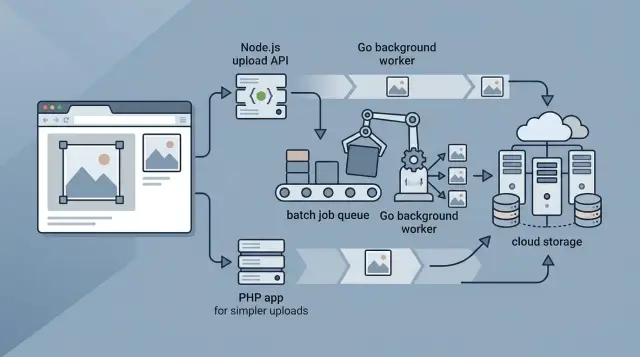
Table of Contents
Why image handling gets messy fast
A single upload rarely stays single. A user picks one photo, but your app often needs an original copy, a thumbnail, a medium preview, a square crop, and sometimes a newer format like WebP or AVIF. One action can turn into four or five files before the form even finishes.
Phone photos make this worse. A photo from a recent phone can be huge, both in file size and pixel count. That slows uploads on weak mobile connections, makes forms feel broken, and fills storage much faster than most teams expect. If people upload images every day, backups and delivery costs climb too.
A simple example shows the problem. Someone lists a product in a marketplace and uploads one 12 MB image. The app may need a small version for search results, a clean square for category cards, a larger one for the product page, and the original for zoom. If you send the same large file to every screen, pages load slower and users burn more data than they should.
Formats add another layer. Some images need transparency, so PNG still matters. Some cameras save files in formats your backend or browser tools do not handle well. Orientation data can flip a photo the wrong way if you ignore it. What looks like "just upload an image" turns into a chain of small decisions.
Then batch work hits. Teams often change image sizes later, switch formats, or fix old compression settings. Reprocessing thousands of images can eat CPU, memory, and disk I/O for hours. If the same servers also handle user requests, uploads slow down, pages lag, and error rates go up.
That is why the image processing stack needs clear boundaries. Live user actions need quick, light work. Heavy resizing, conversion, and cleanup jobs usually belong somewhere else, or they will fight with the part of the app people actually use.
What to do in the browser
The browser should handle the work that helps the user right away and cuts wasted upload time. If someone picks a 12 MB photo on hotel Wi-Fi, sending the full file before any checks is a bad trade.
A quick resize in the browser often fixes that. You can cap huge photos to a sensible width and height before upload, which can shrink transfer time from minutes to seconds on slow networks. For profile photos, listing images, receipts, and support screenshots, that step usually matters more than fancy compression.
Crop boxes, rotation, and previews also belong in the browser. People want to see the result before they commit, and they should not wait for a round trip just to check whether a face is centered or a document is readable. Most browser image libraries are good at this sort of light, visible work.
Compression is worth using only when it stays fast. On a newer laptop, light compression feels instant. On an older phone, heavy compression can freeze the page, drain the battery, and make the app feel broken. A simple rule works well: resize first, compress a little, and stop if the wait gets noticeable.
Keep the original file on the device until the user confirms. That protects image quality and gives people a clean way to recrop or change their mind. If they cancel, you avoid storing files they never meant to send. If they confirm, you can upload the edited version that matches what they saw on screen.
Browser work usually fits into a short list:
- show previews
- crop and rotate images
- resize very large photos before upload
- apply light compression when it finishes quickly
A marketplace app is a good example. A seller snaps five large photos on a phone, crops the cover image, checks the previews, and uploads smaller files instead of raw originals. The app feels faster, mobile data use drops, and the server does less cleanup later.
That is enough for the browser. Once the job gets heavy, repeated, or invisible to the user, move it off the device.
Where Node.js fits best
In an image processing stack, Node.js usually belongs at the front of the request. It is a good place to accept uploads, check auth, validate file type and size, and hand the file off to storage or a worker.
That makes sense for teams that already run most of their app on Node.js. If your product uses Next.js or a Node API, keeping uploads in the same stack cuts down on extra services and odd glue code.
A common flow is simple. The app receives the image, confirms the user can upload it, stores the original file, then sends a job to a queue for anything slow. The user gets a fast response, and the heavy work happens outside the request.
Node.js is less comfortable when one process tries to do everything at once. If the same server handles user traffic and also chews through large image batches, memory climbs, requests slow down, and timeouts start to appear.
Use Node.js for work like this:
- upload endpoints and signed upload flows
- auth and request validation
- light image checks or small resizes
- sending jobs to a queue
- reporting job status back to the app
For slow image work, split it out early. A worker process, separate service, or queue consumer gives you much better control. You can scale workers up during busy periods without touching the API servers that users depend on.
This matters even more when products grow in uneven bursts. A marketing campaign, a new marketplace seller, or a customer importing 40,000 photos can swamp a shared Node.js process faster than most teams expect.
Node.js can still do image processing well, especially for live upload paths and modest transformation work. It just should not carry long-running batch image jobs in the same process that serves the app. Keep Node.js close to the user request, and move the heavy lifting somewhere calmer.
Where Go earns its place
Go makes sense when image work stops being a small helper task and starts taking real server time. If your app needs to resize large uploads, convert formats, strip metadata, and generate several versions at once, Go usually stays calm under that load.
The big win is parallel work without much fuss. A Go worker can process many jobs at the same time and still keep memory use steady. That helps when a user uploads a 20 MB photo, or when your team imports 50,000 product images and needs thumbnails for all of them before the day ends.
Go also fits background queues well. You can run a simple worker pool, pull jobs from Redis, PostgreSQL, or another queue, and keep the main app free for user requests. That split is practical: users get a fast upload response, while the heavier image work happens a few seconds later.
A dedicated Go image service often does best when it has a narrow job:
- create thumbnails in a few fixed sizes
- compress originals to sane limits
- convert files to formats your app actually uses
- run large backfills after imports or migrations
This setup is easy to reason about. It also makes costs easier to predict, because Go workers usually need less memory than many heavier runtime setups doing the same batch image jobs.
There is one catch. Go gives you speed and control, but you may need more setup than in languages that come with image tools baked into the usual web stack. If your team only makes a few PHP thumbnails a day, Go is probably too much. If image processing is now part of your product, not just a side feature, it starts to earn its place.
In a modern image processing stack, Go often works best behind the scenes. Let the main app accept uploads and store files. Let Go chew through the expensive parts in the background, one queue item at a time.
Where PHP still makes sense
PHP still works well when your app already runs on PHP and your image needs are modest. In a modern image processing stack, that is more common than people admit. If users upload one image at a time and you only need a few resized versions, keeping that work close to your existing PHP code is often the simplest choice.
A common example is a store admin uploading a product photo in a Laravel or plain PHP app. PHP can accept the file, check its type and size, save the original, and create a small thumbnail plus a medium image for the product page. That keeps the flow easy to follow and avoids adding another service too early.
When PHP is enough
PHP makes sense when the job is small and predictable. Think profile photos, blog post images, basic product galleries, or a CMS that creates a couple of thumbnails after upload.
A setup like this usually stays manageable when:
- each request handles one image or a small batch
- output sizes are fixed and simple
- users can wait a second or two after upload
- the server already has the image library you need
For many teams, that is enough for quite a while.
Problems start when you ask PHP to do heavy work inside the web request. Large originals eat memory fast. Slow conversions push up request time. Shared hosting and small VPS plans make this worse because they often have strict memory caps, short execution limits, and less predictable CPU time.
If someone uploads 50 product photos, PHP should not sit there converting every version before sending a response. Save the files, return control to the user, and hand the long work to a queue or background worker. That one change cuts failed uploads and awkward timeouts.
PHP also fits well as the front door even when another worker handles the hard part. Let the existing app manage forms, auth, and file storage rules. Then move long conversions, bulk imports, and cleanup jobs out of the request path.
If your business already runs on PHP, replacing it just for thumbnails is usually a bad trade. Keep the simple work where it is. Move the slow, memory-hungry jobs out before they start breaking uploads.
How to split live work from background jobs
Fast uploads depend on one simple rule: do the smallest useful amount of work while the user waits. When someone uploads an image, the main app should accept the file, save it, and return a response quickly. If that request also tries to make six sizes, convert formats, strip metadata, and run face detection, the upload feels slow for no good reason.
Store the original file once. Then save the basic metadata next to it so the rest of your system knows what it is working with. Most apps need only a few fields:
- file path or object storage ID
- width and height
- MIME type
- file size
- checksum or content hash
That gives you a clean source of truth. If you ever need to rebuild thumbnails later, you can start from the same original instead of guessing which derived file is the best one to keep.
If the page needs something right away, create one small preview and stop there. A 200 to 400 pixel preview is often enough for profile photos, product cards, or a gallery grid. Users see progress fast, and your app avoids doing a pile of work in the request path.
Everything else should go to a queue. Extra sizes, WebP or AVIF conversion, watermarking, and quality tuning are background work. The main app records the upload, adds jobs to the queue, and moves on. Workers can process those tasks a few seconds later without blocking anyone.
Large reprocessing jobs need even more separation. If you decide to change thumbnail rules for a million images, do not let that run inside the web app. Put it in a separate worker service with its own limits, retries, and monitoring. That keeps normal uploads stable while the batch job churns through old files.
A simple example helps. A user uploads a restaurant photo. The app stores the original, saves its metadata, makes one tiny preview for the listing page, and queues the rest. The user keeps browsing. The worker handles the heavy lifting in the background.
A realistic setup for a growing app
A growing marketplace usually starts with a simple problem and ends up with five more. Sellers upload phone photos that are huge, rotated oddly, or taken on weak mobile connections. If the app tries to resize, convert, and store every version during the upload request, the whole flow slows down fast.
A better split starts in the browser. When a seller picks a very large photo, the browser can shrink it before upload, fix orientation, and show a preview. That saves bandwidth and makes the app feel quicker on mobile. It also cuts down on cases where someone tries to upload a 15 MB image just to create a small listing card.
The app server should keep the next step boring. Whether the backend uses Node.js or PHP, it should save the original upload, write the database record, and return a response quickly. That matters more than fancy image work at this stage. If the seller gets a fast confirmation, the app feels reliable even if the rest of the image work happens a few seconds later.
Then a Go worker can take over the heavier jobs. It can read a queue, create thumbnails in the sizes the marketplace needs, and generate modern formats such as WebP or AVIF. Go image processing makes sense here because these jobs use real CPU time, and workers are easier to scale when they sit outside the main web app.
This split also helps when the product changes. Imagine the team redesigns listing cards and wants different thumbnail sizes, or sharper product pages for zoomed images. A nightly batch job can rebuild older images from the stored originals. Sellers do not need to upload anything again, and the live app stays responsive while the batch runs in the background.
The only rule I would push hard is priority. New uploads should always go first. Rebuild jobs for old images should run later, with lower priority, so yesterday's design decision does not slow down today's listings.
For many teams, that image processing stack is enough for a long time: browser for lighter prep, Node.js image uploads or PHP thumbnails for fast request handling, and Go workers for the expensive work. It is simple, cheap to run, and flexible when the catalog grows.
Mistakes that cause slow uploads and surprise costs
Most image problems do not start with traffic spikes. They start when one upload triggers too much work at once. A 12 MB phone photo can look harmless, then turn into several CPU-heavy steps before the user even sees a preview.
The first mistake is doing every resize inside the user request. If your app decodes the original, makes five sizes, converts formats, stores each file, and updates the database before it responds, upload time gets ugly fast. Users feel that delay right away, and your servers pay for it on every request.
Another expensive habit is generating lots of sizes before anyone needs them. Teams often create a full set of thumbnails on upload because it feels safe. In practice, many of those files never get used. You still pay for processing, storage, and cache space, even though most screens only need one small preview and maybe one larger version.
Re-encoding the same file more than once wastes money in a quieter way. Say the app converts the upload to JPEG, then a worker reads that JPEG to make thumbnails, then another step converts those thumbnails again. CPU time climbs, and image quality can drop each time. Keep one clean original and create final versions from that source.
Orientation bugs also cost more than people expect. Many phone photos look correct only because the viewer reads EXIF orientation data. If your app ignores that data, previews can appear sideways or upside down. Users then crop the wrong area, re-upload the file, or open support tickets for a problem that should have been fixed at ingest.
The nastiest operational mistake is running batch image jobs on the same workers that handle live traffic. A backfill, import, or catalog refresh can eat memory and CPU for hours. Then regular uploads slow down, time out, or pile up in queues.
A safer default looks like this:
- Return the upload response quickly
- Create only the sizes you need now
- Normalize orientation once
- Keep one original file for future versions
- Run heavy batch work on separate workers
A good image processing stack is often less about picking one language and more about refusing extra work. Users should wait for the upload itself, not for your whole media system to finish every possible task.
Quick checks before you choose
Start with the files you actually get. A photo app that accepts 12 MB phone images needs a different image processing stack than a marketplace where most users upload small product shots. If your usual upload is large, memory use matters early. If files stay small, almost any common setup works for a while.
User expectations matter just as much. If people need an instant preview before they save, do that work in the browser first. Resize the image, fix orientation, and show a compressed preview right away. If users can wait a few seconds after upload, you can keep the browser light and move more work to the server.
Old images often decide the stack, not new ones. Reprocessing ten uploads a day is easy. Reprocessing two million old images after you change thumbnail sizes, add watermarks, or switch formats is a different job. That kind of work pushes you toward queues, workers, and a language that handles long batch runs without wasting memory.
Your team matters more than blog advice. If your app already runs on PHP and the team knows it well, keeping thumbnail generation there may be the fastest path. If your backend team lives in Node.js, use Node for uploads and hand off heavier transforms later. If you already trust Go in production, it often pays off for batch jobs and image services that must stay steady under load.
Look at the place where things hurt today. That tells you what to change first.
- If uploads time out, move heavy processing out of the request path.
- If memory spikes, stop loading full size images where a streamed approach will do.
- If queues drag for hours, your worker setup is too small or your jobs do too much at once.
- If preview generation feels slow, shift more work closer to the user.
A simple test helps. Track one real upload from file pick to final thumbnail. Measure how long each step takes and where memory jumps. Teams often guess wrong. They blame the image library, then find the real problem in network latency, oversized originals, or a queue that runs only a few workers at a time.
Next steps without overbuilding
Pick the stack your team already knows how to run. If your app already lives in Node.js or PHP, that is often good enough for uploads, basic validation, and thumbnail generation at the start. Adding Go too early can create more work than it saves if nobody on the team wants to own another service.
The split that usually ages well is simple: keep live uploads fast, and push heavy image work into the background. Users should not wait while your app creates ten sizes, strips metadata, converts formats, and pushes files to storage. Let the request finish, save the original, and hand the rest to a queue.
A small setup works for many teams:
- The browser handles crop, preview, and light compression.
- The app server handles upload auth, file checks, and storage.
- A background worker creates thumbnails and other sizes.
- Monitoring tracks queue time, error rate, and storage growth.
Those three metrics tell you when the current setup starts to bend. If queue time climbs every week, workers need help. If error rate jumps on large files, your memory limits or timeout settings are too tight. If storage grows faster than expected, you may keep too many versions of the same image.
A realistic path looks like this: start with one app, one queue, and one worker type. When batch jobs get heavy, move them to a separate worker service. When image traffic becomes a real cost center, then Go starts to earn its place for CPU-heavy work and tighter resource use.
One mistake shows up again and again: teams mix user-facing uploads with batch rebuilds in the same process. Then a backfill job slows down every new upload. Split those paths early, even if both still run on the same machine.
If the tradeoffs still feel messy, a short review can save months of drift. Oleg Sotnikov helps startups and small teams choose lean technical setups as a fractional CTO, with a strong focus on AI-first development, infrastructure cost control, and practical architecture. A good review should leave you with a setup your team can run next week, not a diagram you will postpone for six months.


