Hybrid search with filters for B2B knowledge bases
Learn how hybrid search with filters keeps B2B knowledge bases accurate by mixing keywords, embeddings, and tenant rules without leaks.
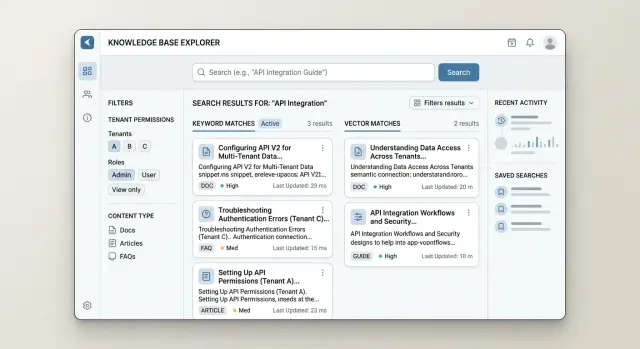
Table of Contents
Why search breaks in shared knowledge bases
Shared knowledge bases usually fail in ordinary, predictable ways. One search box is expected to serve many accounts, teams, and permission levels at once. That is where problems start.
The first problem is account bleed. A user searches for a billing issue, a contract term, or a setup guide, and the system returns a document from the wrong customer account because the records look similar. In a B2B product, that is not a minor bug. One wrong result can expose private notes, pricing details, or internal process documents.
The second problem is language mismatch. People do not search with the same words your writers used. A customer types "how do I add login with Google," but the document says "configure SAML identity provider." Exact term matching misses that question even when the answer already exists.
Then the AI layer can make the whole thing worse. If retrieval ignores enterprise permissions, the model may read a document the user cannot open and quote it anyway. The answer looks confident. The user clicks through and hits an access error. That feels careless fast.
A simple support example shows why this matters. One account has an internal note about failed invoice retries. Another has a public help article about updating payment details. If the search stack mixes tenants or delays filtering until the interface stage, the assistant can answer with the wrong account's note. The text may look relevant, but it is still wrong.
That is why plain lexical search is not enough, and vector search on its own is not enough either. Lexical search catches exact phrases. Embeddings catch plain language and close meaning. Tenant-aware retrieval keeps both inside the user's real access scope.
Trust breaks faster than most teams expect. People usually forgive a slow answer. They do not forgive an answer that leaks data, cites hidden content, or sends them the wrong way. Once that happens, support agents start checking everything by hand, and customers stop using search unless they have no other choice.
The cost of bad B2B knowledge base search is bigger than a few missed documents. It teaches users that the system cannot tell what belongs to them and what does not.
What hybrid search means in practice
A good B2B knowledge base search system does two things at once. It finds the exact words a person typed, and it finds documents that mean the same thing even when the wording is different. That is hybrid search with hard filters.
Lexical search handles the exact match side. If a support agent types an error code, a feature flag name, or a product SKU, term matching usually wins. Those queries are precise, and users expect the top result to contain the same text they entered.
Embeddings cover the other half. People rarely search with the same wording used in the docs. A user might type "can not invite new staff" while the document says "team member provisioning failed." Vector search can connect those ideas even though the words do not line up neatly.
In practice, you do not pick one method. You run both and merge the results into a single ranked list. A simple ranking model is often enough when it blends a few clear signals: lexical score for exact terms, vector score for semantic similarity, document freshness, and small boosts for titles, FAQs, or approved sources.
Filters are not a nice extra. They are rules. If a document belongs to tenant A, users from tenant B should never retrieve it, not even near the bottom of the list. The same applies to role, product tier, region, and internal-only content. When filters run before final ranking, the system only scores documents the user is allowed to read.
That order matters more than many teams think. If you rank first and filter later, the model can lose strong approved candidates and fall back to weak ones. Worse, an answer system may quote or summarize text from a document it should never have touched.
Picture two customers using the same support portal, each with different contract terms and product modules. Lexical search may find the right billing article because it matches the contract term exactly. Embeddings may find a setup guide that uses different wording. Tenant and role filters keep both results inside the user's allowed scope, and ranking decides which result belongs at the top.
Start with the data model
If your data model is messy, search fails before ranking even starts. A retriever cannot enforce rules you never stored, and it cannot guess missing metadata later.
Give every document a tenant ID. Give every chunk the same tenant ID too. Do not rely on the parent file at query time. Most B2B search systems retrieve chunks, not full documents, so each chunk needs enough information to answer one simple question: can this user see it?
The same goes for roles and groups. Pick one format and keep it everywhere. If one source stores roles as "admin" and another stores "Admin," you will get leaks or false misses. If one connector writes comma separated text and another writes arrays, filters become brittle fast. Simple consistency beats clever mapping.
A small set of fields usually covers most cases: tenant_id, document_id, chunk_id, roles_allowed, groups_allowed, source_type, product_area, language, and updated_at.
When you split documents into chunks, copy the source metadata into every chunk. Do not copy only the title. Copy the access fields, the document type, the product or team label, and anything else retrieval needs. If chunk 17 loses its metadata, chunk 17 can bypass your rules or disappear when it should match.
Keep hard access rules separate from ranking hints. Access rules answer yes or no. Ranking hints sort the allowed results. Freshness, document type, and product area can improve relevance, but they should never widen access.
A support example makes the point. Imagine one company stores an internal billing runbook and a public setup guide. Both mention invoice retries. A finance user in that tenant can see both. A regular user should only see the public guide. If your chunk stores only semantic text and not tenant, role, and group data, embeddings may pull the billing runbook into the answer. That is not a ranking bug. It is a data model bug.
Hybrid search works best when the index carries the same permission facts your app already trusts.
Put filters into retrieval, not just the UI
If a user cannot open a document, your retriever should not see it either. Hiding results in the interface is too late. By then, the system may already have scored forbidden chunks, pulled them into context, and let the model answer from data the user should never read.
This is where many teams slip. They build a solid permission check in the app, then forget that search has its own path. The lexical index, vector index, reranker, and answer builder all need the same rules.
Apply hard filters before scoring whenever you can. Tenant ID, account, region, document status, and access group usually cost little to check and remove most bad matches early. That gives you two benefits at once: safer retrieval and cleaner ranking, because the scorer compares only documents the user is allowed to see.
In most systems, the filter object includes the tenant or customer account, the user's role or group membership, document state such as published or archived, and scope such as product, region, or workspace.
Chunk level search adds another trap. Many systems store text in chunks but keep permissions on the parent document. If you filter only chunks, you can miss rules that live on the parent. If you filter only parents, stale chunks can still slip through from an old index. Parent and child need to agree every time.
Keep the same filter object through the whole pipeline. Pass it to lexical retrieval, vector retrieval, reranking, and any fallback search. If you run query expansion or multi step retrieval, pass it there too. One missing step is enough to leak data.
Testing should include queries that almost match forbidden content. Those cases find real bugs. Record why the system rejected each denied match, such as "wrong tenant," "archived parent document," or "chunk inherited no access from parent." That log saves hours when support asks why a result did not appear, and it gives your team proof that permissions worked the way you intended.
Build the pipeline step by step
A good retrieval pipeline has two jobs. It must find the most relevant text, and it must never cross tenant or role boundaries. If either part fails, the answer feels wrong even when the model writes fluent prose.
For hybrid search, order matters. Apply access rules early, keep the candidate set small, and only pass approved text to the model.
-
Start with the user and the query. Parse the question, remove obvious noise, and collect filters from identity, tenant, role, product area, document status, and language. Some filters come from the interface, but most should come from the session or auth layer so users cannot change them by accident.
-
Search only inside the allowed set. Run lexical search for exact terms like product names, ticket IDs, policy labels, and error codes. Run vector search at the same time for meaning, paraphrases, and messy natural language. Both searches should use the same permission rules.
-
Merge the result sets into one ranked pool. Remove duplicates at the chunk or document level, then keep the strongest candidates. A simple method works well at first: give lexical hits extra weight for exact matches, and let vector hits rescue relevant content when wording differs.
-
Rerank with short context the user is allowed to see. This is where teams often make a bad trade. They rerank on raw documents or include hidden fields because it is convenient. Keep the reranker input small and clean: title, short snippet, metadata, and access checked identifiers.
-
Generate the answer from approved snippets only. Do not send the full document store to the model. Pass a limited set of chunks, ask for citations or snippet references, and tell the model to say it does not know when the evidence is thin.
This pipeline is not fancy, but it holds up well. It is also the kind of practical architecture Oleg Sotnikov focuses on in his Fractional CTO work: small moving parts, clear access rules, and enough observability to catch bad retrieval before users do.
A simple B2B support example
A finance manager opens the support assistant and types, "How can I export invoices for last month?" She wants a CSV for accounting, but she does not know the exact product label used in the docs.
The search layer should catch both the exact term and the intent behind it. Lexical search picks up the phrase "invoice export" from the product manual. Vector search adds related pages that use different wording, such as "billing download" or "download monthly charges."
This is where hybrid search earns its keep. In a shared B2B knowledge base, the best scoring document is not always safe to show.
Imagine another customer has an admin guide called "Invoice export for enterprise tenants." It sounds relevant, and the wording may match very well. But that guide belongs to a different tenant and covers settings this finance manager cannot even see.
If the system filters after retrieval, the assistant may already have read the wrong document before it throws it away. That creates bad answers and, in the worst case, permission leaks. The filter needs to run inside retrieval so the model never sees content from the wrong tenant.
The flow should stay simple. Search for exact product words such as "invoice export." Search for related meaning such as "billing download." Apply tenant and role filters before final ranking. Build the answer only from documents the user can open.
Now the answer stays narrow and correct. It may cite the billing guide, the finance FAQ, and a short note about CSV export. It will not cite the other customer's admin guide, because that document never entered the candidate set.
The user gets a short reply: where to click, what file format to expect, and any role limits tied to her account. If she cannot export invoices with her current permissions, the assistant should say that clearly instead of guessing. That kind of answer feels boring, and that is a good sign. In B2B support, boring usually means accurate.
Mistakes that cause wrong or unsafe answers
The fastest way to break search is to treat permissions as cleanup. If your system searches the full index first and filters later, it already touched content the user should never see. That can leak into ranking, snippets, summaries, and cached prompts even if the final screen hides the raw document.
A shared B2B knowledge base makes this worse. Two customers may ask the same question, but one has access to a private runbook and the other does not. If tenant rules run after retrieval, the answer can borrow facts from the wrong tenant and sound correct while exposing private details.
Saving tenant data only on the file is another common mistake. Retrieval does not read whole files. It reads chunks. If chunk metadata does not carry tenant ID, role, document type, and the rest of the access rules, those chunks become hard to filter safely. One bad chunk can outrank the right one.
Cache design causes quieter leaks. Teams often cache embeddings, retrieval results, or final answers to save time and cost. That is fine until cached results cross user sessions. Then a user from Company A gets a fast answer shaped by Company B's documents. This bug is easy to miss in testing because the answer still looks normal.
Loose metadata names create problems too. One service writes tenant_id, another writes accountId, and a third uses org. Now some filters work, some fail open, and nobody notices until support asks why a customer saw the wrong policy. Pick one schema and enforce it everywhere.
The last mistake is trusting the top result too early. Retrieval can return a chunk with a strong semantic match but the wrong access level. Before your model writes a single sentence, check that every cited chunk still passes source access for that user and session.
A simple operating rule helps: filter before ranking when you can, store access metadata on every chunk, scope caches by tenant and user session, use one metadata schema across the stack, and verify access again before answer generation.
Teams that follow those rules usually avoid the most expensive failures: quiet leaks, confident wrong answers, and support incidents that take days to untangle.
Quick checks before launch
A search system can look good in a demo and still fail on day one. The final round of testing should focus on trust. Does the system return the right documents, and does it hide everything a user should not see?
Run the same question in two tenants that should get different answers. A query like "refund policy" or "SSO setup" works well for this. If both users see the same documents, your tenant logic leaks. If neither user sees the expected page, your filters may be too strict or attached at the wrong step.
Then test messy language. Real people do not search with clean phrasing. They type nicknames, product shorthand, short queries, and typos like "logn" instead of "login." Lexical search may catch the typo, while embeddings may catch the meaning. Hybrid search should handle both without drifting into the wrong tenant.
Open the top results one by one. Do not stop at the first hit. Blocked documents often slip into positions two through five, especially when vector search says a page is similar but enterprise permissions say no. One forbidden result in the ranking is enough to break trust.
Your pre launch pass should compare one query across two tenants with different access rules, try aliases and typos, force a case where filters remove every matching document, and match each answer snippet to the exact source chunk and permission rule.
The empty result case needs special care. When filters remove everything, the system should say that clearly. It should not guess, pull a public document from another tenant, or let the model fill gaps from memory.
One final rule should show up in logs and in QA: every answer snippet must map to an allowed source. If support asks why an answer appeared, your team should be able to show the chunk, document ID, tenant tag, and filter set that produced it. That is how B2B knowledge base search stays accurate and safe under real permissions.
What to do next
Start small. Pick one knowledge base that already gets real traffic, usually support docs or internal help content. Add only two hard filters first: tenant_id and a document state such as published or internal. That gives you a clean test setup and keeps the first version easy to debug.
Before you tune embeddings or ranking, clean the metadata. Fix missing tenant IDs, stale tags, duplicate titles, and mixed document states. Search quality often fails long before the model does. If the metadata is messy, lexical and vector search will both return the wrong things, only in different ways.
Bring support and product into the same review. Support teams know which questions users ask when they are stuck. Product teams know which docs are draft only, account specific, or easy to mislabel. A short review of access rules can prevent weeks of quiet mistakes.
Track a small set of numbers from day one: bad answers that cite the wrong document, empty results on queries that should work, slow queries after filters are added, and answers that look correct but still break permissions.
Do not wait for a perfect benchmark. Read failed searches every week and sort them by cause. You will usually find the same few issues again and again: weak metadata, noisy chunks, or filters applied too late in retrieval.
Hybrid search improves when you tighten the boring parts first. Clean data, simple filters, clear rules, then ranking changes. That order saves time.
If you need a second set of eyes, Oleg Sotnikov reviews systems like this as a Fractional CTO. His work on AI-first software and retrieval heavy systems is outlined on oleg.is, which makes it a practical starting point when your team needs safer tenant-aware retrieval or a simpler architecture.
Frequently Asked Questions
What does hybrid search mean for a B2B knowledge base?
Hybrid search runs two methods together. Lexical search finds exact terms like error codes or product names, while embeddings find pages with the same meaning even when the wording differs.
That mix works well in B2B support because users ask in plain language, but docs often use formal product terms.
Why not use vector search by itself?
Vector search is good at meaning, but it can miss exact strings users care about. If someone searches for a SKU, policy name, or error code, plain term matching often gives the best result.
Using both methods keeps search useful for both precise queries and messy natural language.
When should tenant and role filters run?
Run filters inside retrieval, before ranking and before answer generation. If you filter only in the UI, the system may already have scored or quoted content the user should not see.
That is how wrong answers and data leaks happen, even when the final screen hides the source document.
What metadata should each chunk include?
Store access metadata on every chunk, not only on the parent document. At a minimum, keep tenant_id, document status, and any role or group rules the app already trusts.
It also helps to keep fields like document_id, chunk_id, source_type, product_area, language, and updated_at so retrieval and ranking have clean context.
Why do chunk-level permissions matter so much?
Search systems usually retrieve chunks, not full files. If a chunk loses its tenant or role data, it can slip into results or disappear when it should match.
Copy the same permission facts from the source document into every chunk so each one can answer a simple question: can this user see this text?
How do I stop the AI from answering from hidden documents?
Keep the model on a short leash. Send only approved snippets, not the full document store, and ask the model to answer from those snippets only.
If the evidence is weak, let it say it does not know. That is much safer than letting it guess from hidden or unrelated content.
What should the system do when filters remove all matches?
Say so plainly. If filters remove every matching document, return a clear no-result answer instead of filling the gap with a weak guess.
You can suggest a narrower query or tell the user they may need a different role, but do not pull in content from outside their scope.
Can caching cause permission leaks?
Yes. Cached retrieval results or final answers can cross sessions if you scope them too broadly. Then one customer may get an answer shaped by another customer's documents.
Scope caches by tenant and user session, and recheck access before you show or reuse anything.
What should we test before launch?
Test the same query in two tenants that should get different results. Then try typos, aliases, short queries, and cases where filters should remove everything.
Open more than the top result. Forbidden pages often show up lower in the ranking, and one bad result is enough to break trust.
Where should we start if our current search is messy?
Begin with one live knowledge base and add only a couple of hard filters first, such as tenant_id and document state. Then clean missing metadata, stale tags, and mixed field names before you tune ranking.
Most search problems start in the data model, not in the embedding model.


