Human review for risky code changes in AI-assisted teams
Set hard approval lines for billing, auth, and schema edits. Human review for risky code changes helps teams catch costly mistakes early.
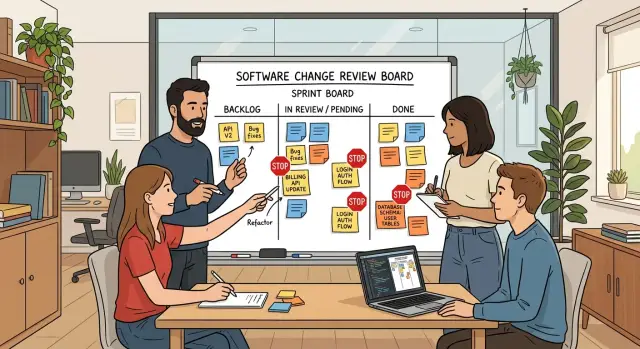
Table of Contents
Why equal treatment fails
Treating every code change the same sounds neat, but it falls apart fast. A typo in a settings label and a change to a billing rule do not carry the same risk. If both get the same light review, the dangerous one can slip through with barely more attention than a cosmetic fix.
This gets worse when an AI assistant is part of the workflow. It can edit ten files in a few minutes, rename fields, move logic, and update tests without pausing to ask whether a small change affects invoices, account access, or old records in the database. The code can look clean while the business outcome is still wrong.
That gap matters because assistants work from patterns, not from full company memory. They do not know that one customer still uses a legacy billing plan, that a login flow supports a partner integration, or that one database column feeds a finance export every night. A human reviewer often knows those odd details. Without that review, fast edits turn into slow incidents.
The cost of one bad change rarely stays small. A billing mistake can charge the wrong amount or stop renewals. An auth mistake can expose data or lock paying users out. A schema edit can corrupt stored records, break old queries, or make rollback painful.
Equal treatment also creates review fatigue. When every diff gets the same checklist, people start skimming. Then the changes that need careful thought get the same shallow pass as a text fix.
Human review works better when the team accepts a simple truth: some edits need a hard stop. The goal is not to slow everything down. It is to put real attention on the few places where one mistake can affect money, access, or stored data.
What needs a hard review line
Some changes need a person to stop, read slowly, and approve them on purpose. Size does not matter much here. A two-line diff can charge the wrong customers, expose private records, or lock users out.
Start with three areas: money, identity, and permanent data.
Money rules need a person every time
Anything tied to billing needs a hard review line. That includes plan limits, trial rules, upgrades, downgrades, refunds, taxes, credits, and invoice logic.
These edits often look small because they live inside condition checks or pricing tables. The damage is not small. One bad comparison can give away paid features, double-charge a customer, or block access right after payment.
Before approval, a reviewer should be able to explain a few plain cases in simple language: what happens to a new customer, an existing paid customer, a refund, a tax rule, or a duplicate event from the payment provider. If the team cannot explain those cases clearly, the change is not ready.
Access and data changes need the same line
Login, roles, passwords, session handling, password reset, and admin permissions belong in the same bucket. Small edits here can leak data or break trust quickly.
The risk is not limited to classic security bugs. An auth change that looks harmless can trap users in a login loop, expire sessions too early, or remove access from the wrong role. That hits support, sales, and customer trust all at once.
Schema edits deserve the same treatment. Migrations, backfills, deletes, column type changes, and cleanup jobs can go wrong even when the code looks tidy. AI tools often generate SQL that works on a sample table but struggles on a large one.
A human should check whether the migration can run safely on real data, whether deletes or backfills can be reversed, whether the app still works during the change, and whether a failed run leaves the database in a bad state.
If a change can expose data, change money flow, or lock people out, it needs a hard human stop. Treating those edits like routine cleanup is how teams get burned.
Pick simple risk levels
Most teams make review rules too fuzzy. A simple color system is easier to follow when work moves fast.
Green work is low risk: copy edits, layout tweaks, visual polish, and cleanup that does not change behavior. If a change cannot charge money, lock someone out, delete data, or alter stored records, it usually belongs here.
Yellow is normal product work. It can change what users see or do, so it still needs review, but not the same hard stop as red. A new settings screen, a search filter, or a small workflow change fits here if it does not touch payments, login, or data structure.
Red is where the rule gets strict. Billing, auth, schema edits, permissions, migrations, and destructive actions belong here every time. If code can change who gets charged, who gets access, how data is stored, or whether data can be removed, a person must approve it before merge and before deploy.
A short version is enough:
- Green: copy, layout, safe cleanup, and refactors with no behavior change
- Yellow: normal feature work with user impact
- Red: billing, auth, schema changes, permissions, migrations, and deletes
Do not waste time debating edge cases. If one change touches two colors, use the higher one. A mostly yellow feature with one schema migration is red. A green cleanup that changes permission checks is red too.
Each red area should also have one named human owner. One person owns billing review. Another owns auth. Another owns schema and data changes. They do not need to write every line, but they should know the common failure points and give a clear sign-off.
This works well for small SaaS teams because it removes guesswork. People know who reviews what, and the assistant stops treating a typo fix and a payment change like the same class of work.
Set the checkpoint rule step by step
Most review rules fail because they try to cover every file with the same language. You need a short rule that only fires when a change can charge money, lock users out, break data, or trigger background work at the wrong time.
Write the rule on one page. If a new engineer cannot explain it in a minute, it is too long.
-
Define the red scope. List the exact files, services, database tables, migrations, queues, cron jobs, and webhooks that can affect billing, auth, permissions, customer data, or schema changes. Be concrete. "Anything related to payments" is too vague. "billing/, invoice_worker, subscriptions table, auth middleware, user_roles table" is clear.
-
Add one approval rule for everything in that red scope. A change cannot merge or deploy until a named person approves it. Do not leave this as "someone from engineering." Use real names or roles, such as the tech lead for billing or the engineer who owns authentication.
-
Make the assistant label risk on every proposed change. Keep the tag simple: green, yellow, or red. If the assistant edits a red-scope file, it should say so in plain text and explain why.
-
Turn off auto-apply for red changes. The assistant can draft the patch, tests, and notes, but a person should decide whether to apply it. This matters most for schema edits, permission checks, and billing logic, where one quiet diff can create a loud outage.
-
Keep the reviewer prompt short. Ask the approver to confirm four things: the change matches the ticket, the failure case is understood, tests cover the risky path, and rollback is possible.
That process is strict in the right places and light everywhere else. You do not slow down the whole team. You draw a bright line around the few areas where speed gets expensive.
What a reviewer should inspect
Good review starts with comparison, not trust. Put the old rule and the new rule next to each other and read them line by line. Small wording changes in billing logic, login checks, or schema constraints can change who gets access, who gets charged, or which records stop saving.
Then run a small test set yourself. One happy path is not enough. If a user can upgrade a plan, also try a declined card and a user with an expired session.
For auth changes, test the role that should pass, a role that should fail, and a session that should time out. For schema edits, try valid data, missing required data, and data that worked before the change.
A reviewer should confirm a few basic points:
- The old rule and the new rule behave the way the team expects.
- One normal path works, and failure paths fail cleanly.
- Roles, permissions, and session expiry still match the product rules.
- Database changes run in the right order, with a backup and a rollback plan.
- Logs or dry-run output show no surprise writes, deletes, or permission errors.
Migration order needs extra care. Teams often break production by shipping app code before the new column exists, or by removing a field before background jobs stop using it. Ask for the exact order: migration, code deploy, data backfill, cleanup.
If the answer feels fuzzy, stop the release. The reviewer should also check that the backup is recent and that someone has tested the rollback steps instead of only writing them down.
Logs help because they show how the change behaves under real conditions. A dry run might reveal that a script will touch 240 rows instead of 24. Auth logs can show repeated token refresh failures after a session rule change.
Billing changes need the same care. Reviewers should look for duplicate charges, skipped invoices, and retries that might hit the same customer twice. Those are small diffs with expensive results.
The reviewer does not need to reread the whole project. They need to inspect the few spots that can hurt users or money fast. A careful 15-minute check on those lines can save days of repair work.
A simple example from a small SaaS team
A five-person SaaS team asks its assistant to prepare a pricing test. The task sounds small: raise the project limit on a trial plan and add a new cap for the mid-tier plan.
The patch looks harmless at first. Then someone notices the assistant also changed login middleware because the pricing code reads plan data during sign-in. In the same branch, it generated a database migration that renames user.plan to user.subscription_plan.
That is exactly the sort of patch that should never slide through on a green test run alone. Billing, auth, and user schema changes each carry their own risk. When one diff combines all three, the team should stop and treat it as a manual approval case.
They pause the deploy. The reviewer does not read every line with equal weight. She starts where money and access can break: how the app decides who gets premium limits, what happens when a customer downgrades, and whether old sessions still work after the column rename.
The migration itself looks clean. The pricing logic mostly works. The problem hides in the refund path. If a customer upgrades, hits the new plan limit, and then asks for a same-day refund, the changed middleware still reads the new plan name from the session cache. The billing code, though, checks the old column name when it decides whether to remove paid features. That mismatch can leave refunded users with paid access for hours.
Tests missed it because they covered new purchases, not refunds after a schema change. The reviewer catches it before release, sends the patch back, and asks for one extra test around rollback and cached sessions.
That is what careful review looks like in practice. The team did not block the assistant because it used AI. They blocked a mixed change that touched revenue, identity, and customer data at the same time.
Mistakes that weaken the process
This process breaks down when teams turn it into a late ritual. If someone reviews a billing, auth, or schema change only after the release is queued, the review becomes a race. People skim, approve under pressure, and hope the tests caught enough.
The problem gets worse when the real rules live in one person's head. Maybe one senior engineer knows which billing flags can trigger double charges, or which auth change can lock out admins. Everyone else guesses. Reviews feel inconsistent, the team moves slower, and that one person becomes a bottleneck.
Another common mistake is painting too much in red. If every config edit, copy update, and small refactor gets the same warning label as a payment flow change, people stop taking the label seriously. Hard review lines should stay narrow. Use them for edits that can charge the wrong amount, change who gets access, or alter stored data in ways that are hard to undo.
Tests help, but they do not replace a person for money and access logic. A test suite confirms the cases your team expected. It can still miss a failed retry that bills twice, a role check that grants access through an old permission path, or a webhook that arrives out of order. Billing and auth bugs often look fine in staging and hurt real users later.
Schema work has its own trap. Teams often write the migration and stop there. Then production behaves differently, or the new shape breaks an older job, and nobody wrote rollback notes. For schema edits, the reviewer should see how the team will back out, what data might get stuck, and whether old and new code can run safely during the deploy.
A weak process usually feels busy but not careful. People approve too late, trust memory, overuse the highest risk label, lean on tests alone, and treat database changes like one-way doors.
Quick checks before approval
Tests can all pass and you can still ship a bad billing or access change. A short checklist catches the mistakes that hurt users fastest: wrong charges, broken login, and data changes that are hard to undo.
Before anyone deploys a billing, auth, or schema edit, approval should answer a few plain questions:
- Which users can pay, sign in, upgrade, cancel, or lose access after this release?
- Which table, field, enum, or permission changed shape, and do older records still work?
- How do you roll back within ten minutes, and who does it if the release goes wrong?
- What real account or staging case did the team test, and what happened step by step?
- Who approved the change, and where did the team record that approval?
These questions force clear thinking. If a developer changes a billing rule, the reviewer should know whether existing subscribers keep access, move to a new plan, or hit an error on the next renewal. If the team edits auth logic, the reviewer should ask about normal users, admins, invited users, and locked accounts. One missed case can turn support into a mess by lunch.
Schema edits need extra care. If you rename a field or split one column into two, ask whether old code still reads the data during rollout. Ask whether the migration can be reversed cleanly, not just in theory. "We can restore from backup" is too slow for many products if users have already started writing new data.
The test evidence should be real, not vague. "Tried login on staging with an expired subscription and then reactivated it" is useful. "Looks good" is not. The approval record can live in a pull request comment, ticket, or release note. The place matters less than consistency.
That habit takes a few extra minutes. It can save a day of cleanup.
Next steps for your team
If you want this to stick, keep the first version small. Most teams fail when they write a giant policy nobody reads and then ignore it a week later.
Start with one page. Write plain rules that answer one question: what changes can never ship without a person checking them?
For many teams, the first red lines are easy to name: billing logic, pricing, refunds, invoices, authentication, roles, permissions, session handling, database schema edits, migrations, data deletion, customer data exports, and account access.
Keep the wording blunt. If a diff touches one of those areas, the assistant must flag it and a reviewer must approve it before merge or deploy. No exceptions for small edits. A tiny schema change can still break production.
Then teach your assistant to spot those edits early. File paths help, but they are not enough. Add simple triggers like migration files, auth middleware, payment service code, role checks, and terms such as "refund", "invoice", "token", "permission", or "ALTER TABLE". You do not need a perfect detector on day one. You need one that catches the obvious cases.
Set a short review habit around real incidents. Look back at the last few bugs, near misses, or late-night fixes. If one came from an area your rules missed, add that pattern. If the assistant flags too much noise, tighten the rule. Ten minutes once a month is enough to keep the process honest.
Make one person own the list. Without an owner, rules drift.
If the line still feels fuzzy, outside help can save time. Oleg Sotnikov at oleg.is works as a Fractional CTO and startup advisor, helping teams put practical guardrails around AI-assisted delivery, product architecture, and risky changes in billing, auth, and data flows. The useful output is not a thick policy. It is a short set of rules your team will actually follow next Monday.
Frequently Asked Questions
Why can’t we review every code change the same way?
Because a typo and a billing rule do not carry the same risk. If you give both the same quick review, a small-looking change can charge users wrong, break login, or damage stored data.
Which changes always need manual approval?
Start with billing, authentication, permissions, schema changes, migrations, deletes, and customer data exports. If a diff can change money flow, access, or stored records, a person needs to approve it on purpose.
Can a tiny diff still be high risk?
Yes. A two-line change in a condition, a role check, or a column rename can cause real damage fast. Risk comes from what the code touches, not from how many lines changed.
How should we label green, yellow, and red changes?
Use a simple rule: green for copy or layout work with no behavior change, yellow for normal feature work, and red for billing, auth, permissions, schema edits, migrations, and deletes. If one change touches more than one level, pick the higher one.
Who should approve red changes?
Give each red area one named owner. One person reviews billing, another reviews auth, and another reviews schema and data work so nobody has to guess who signs off.
Should AI auto-apply billing, auth, or schema changes?
No. Let the assistant draft the patch, tests, and notes, but keep auto-apply off for red work. A person needs to decide whether the change can merge and deploy.
What should a reviewer check in billing changes?
For billing work, compare the old rule and the new rule side by side, then test a normal purchase, a failed payment, a refund, and duplicate payment events. The reviewer should explain what happens to new users and existing subscribers in plain language.
What should a reviewer check before a schema change goes live?
Before a migration ships, confirm the deploy order, the rollback steps, and how old and new code handle the data during rollout. Then test with real-looking records so you catch bad writes, broken queries, or a backfill that touches more rows than expected.
Aren’t tests enough for billing and auth work?
Tests catch the cases your team expected, but they miss odd paths like retries, stale sessions, old permissions, or out-of-order webhooks. Billing and auth bugs often look fine in staging and still hurt real users later, so a person needs to think through the business outcome.
How do we start this process without slowing the team down?
Keep the first version small and blunt. Write one page that names the red files, tables, services, and triggers, then require a named reviewer before merge or deploy. That gives you a clear rule without slowing down low-risk work.


