Human review in federated AI flows: where to step in
Learn how to place human review in federated AI flows at the points where models disagree, before wrong outputs spread across tools and teams.
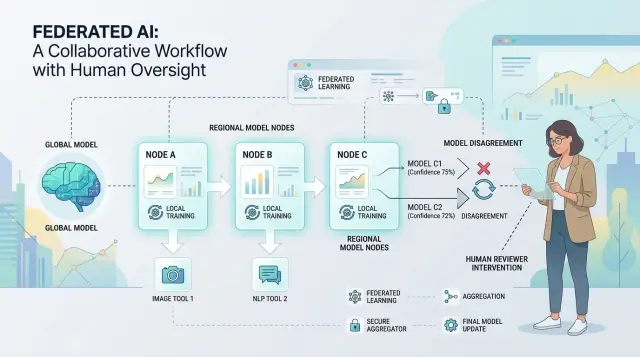
Table of Contents
Why late review fails
Many teams put a person at the very end of the process. Someone reads the final message, approves it, and assumes that is enough. In federated AI workflows, that is often too late.
A federated flow has several steps. One model sorts the request, another pulls data, another writes a reply, and another updates a record or triggers an action. If the first step goes wrong, everything after it can look tidy while still being wrong.
Take customer support. A ticket says, "I was charged twice and need a refund." The routing model sends it to general billing instead of urgent payments. The reply model writes a polite but useless answer. The CRM update marks the case as solved. By the time a person reviews the final reply, the customer has already waited, the record is wrong, and the team has to reopen the case.
The same thing happens in document routing. If a model sends a contract to the wrong approval lane, people comment on the wrong version, store it in the wrong folder, and miss a deadline. A late reviewer might catch the final error, but they still have to clean up the mess around it.
Pricing is even riskier. If one model picks the wrong customer tier, the next step can generate the wrong quote, log the wrong margin, and send bad numbers to sales. One bad decision spreads because later steps trust earlier ones.
That is why late review costs more than a simple fix. Teams redo work that already moved through the system. Customers get mixed messages. Internal records stop matching reality. Managers spend time untangling cases instead of improving the process.
Review works best before bad assumptions turn into actions, records, and customer-facing messages. Once the error spreads, end-stage approval turns into cleanup.
What a federated AI flow looks like
A federated AI flow is a chain of small decisions. One model reads the input, another decides where it should go, another drafts a response, and a tool or rule engine checks whether the result is safe to use. Instead of one system doing everything, several models and tools share the work.
That setup is common because real work needs more than text generation. Teams need routing, data lookup, checks, and some final action such as sending a message, opening a ticket, or updating a record.
A simple flow usually has five parts: input, routing, drafting, checking, and action. On paper, each step looks harmless. The weak spot is the handoff. When one tool passes work to the next, it can trim context, shift the meaning, or add a bad assumption.
A routing model might label a billing issue as fraud. A drafting model then writes the wrong kind of reply. A checker may only verify tone and format, so the bad decision slips through and becomes action.
Think about an email that says, "We paid twice. Can you refund one invoice?" The first model might tag it as a general finance request. The next model drafts a polite answer but misses that the sender asked for a refund, not a receipt copy. A final automation creates a low-priority task instead of sending it to someone who can verify payment records.
It helps to think of the flow as a relay race. Each runner can do one part well, but every baton pass is a place where the message can drift. If you only watch the finish line, you miss where the error entered the chain.
Where disagreement starts
Disagreement usually shows up earlier than teams expect. It starts when one model reads the same input and sees a different path than another model, long before anyone notices a bad final answer.
That is easy to miss in a federated flow. One model classifies a request, another pulls context, and a third drafts the reply. If the first two already disagree, the last model can still produce a polished answer built on the wrong base.
You can usually spot the problem in a few places. Two models rank the next action differently. One model shows low confidence while another sounds certain. Labels conflict, such as "billing issue" versus "account security." Or one model asks for context that another model ignored.
The ranking example matters most. If Model A ranks "refund" first and Model B ranks "fraud review" first, the system is not dealing with a wording problem. It is choosing between different business actions.
This is why disagreement often matters more than average accuracy. A model can score well in testing and still fail on the cases that cost money, trust, or time. Accuracy tells you how often a model got labels right in hindsight. Disagreement tells you the system is unsure right now, on a real case, before damage spreads.
Missing context makes it worse. One model may infer intent from the latest message only, while another looks at customer history and reaches a different conclusion. That conflict is useful. It tells you the workflow does not have a stable view of the case yet.
A support example makes this plain. A user writes, "I was charged twice and now I can't log in." One model treats it as a payment issue. Another treats it as a possible account takeover. If you wait until the final reply stage, the system may send a neat refund message and miss a security risk.
People add the most value at these fault lines. When models disagree on ranking, labels, or needed context, a person can make one clean decision and unblock the rest of the flow. That takes less time than reviewing every final answer, and it catches trouble while the system can still change course.
How to place review points
Start with a plain map of the workflow. Put every step on one page from first input to final action: intake, classification, retrieval, drafting, scoring, routing, approval, and execution. This simple map usually shows the problem quickly. Teams often watch the final answer and ignore the earlier step that sent the work down the wrong path.
Next, mark the steps that can change something real. A rough summary usually does not need a person. Charging money, editing a record, sending a customer message, or moving an item into a higher-priority queue often does.
Then look for disagreement that changes the branch. Not every difference matters. If two models disagree on wording but choose the same route, you probably do not need a checkpoint. If one says "fraud risk" and another says "normal refund," you do.
A simple test helps:
- Will this step change money?
- Will it update data people rely on?
- Will a customer see it?
- Will it change urgency, ownership, or the next workflow?
If the answer is yes, ask one more question: can model disagreement change what happens next? If it can, that step deserves a checkpoint.
A support flow makes this easy to see. One model reads the message, another checks account history, and a third drafts the reply. The review point should not sit only on the final draft. It should sit earlier, where the system decides between "refund," "technical issue," and "possible abuse." That branch decides the message, the queue, and the record update.
Keep the rollout small. Add one checkpoint, measure what it catches, and see whether it changes the next branch often enough to justify the delay. If it does not, remove it. Teams that review everything create slow work and tired reviewers. Teams that review branch points catch the mistakes that actually cost money, trust, or time.
Signals that should trigger a person
The best review points come from clear signals, not gut feel. A person should step in when the system shows doubt, when two parts of the flow disagree, or when the action could cause real harm.
Four signals work well in most teams:
- A small score gap between options, where the top choice barely beats the next one
- Low confidence on the final label, summary, or decision
- A rule conflict, such as the model saying "approve" while a policy rule says "block"
- Missing data, like no account history, no source document, or fields that do not match
These signals matter more for actions than for drafts. If the system is writing an internal note or a first-pass summary, you can often let it continue with a warning flag. If it is about to send a legal message, issue a refund, change account access, or publish something customer-facing, send it to a person first.
Keep thresholds simple at the start. You might review anything below 0.70 confidence, any case where two models differ by less than 5 percent, or any output that breaks a business rule. Those numbers do not need to be perfect on day one. They just need to be clear enough to test, then adjust after a few weeks of real use.
Write down the review path in plain language. Name who reviews each type of case, how fast they need to respond, and what they can override. A support lead might clear low-risk customer replies within 30 minutes. A finance manager might have to approve payment changes before anything goes out.
Ownership matters. If nobody owns the queue, review turns into delay. If reviewers cannot override a bad model call, review turns into theater.
A simple example from customer support
A customer writes in after seeing what looks like a double charge. In a federated support flow, one model handles triage, another writes a short summary, a third drafts the reply, and a fourth prepares the CRM update. That chain saves time, but it also creates a point where a small mistake can spread fast.
The triage model reads "charged twice" and moves the case toward a refund. It has seen many tickets like this and wants to solve the issue quickly. A second model checks policy and flags a problem: one charge is likely a preauthorization hold, not a settled payment, so the support team should verify billing status before offering money back.
If nobody steps in here, the rest of the flow keeps moving. The reply draft may tell the customer that a refund is on the way. The CRM update may record "refund approved." Another system may queue the finance action. At that point, one wrong guess has turned into three bad records and a promise the team may need to undo.
This is where human review makes sense. Put the reviewer between the disagreement and the actions that change money or customer history.
A person can often clear this up in under a minute. They check the payment status, confirm whether the second charge is real, then choose one path: approve the refund, ask for a billing check, or send a different reply.
That short pause prevents a much longer cleanup later. Without it, the team may need to correct the CRM, cancel a refund request, send a follow-up apology, and explain the mixed message to the customer. One review at the disagreement point is far cheaper than fixing four downstream errors.
That is the pattern worth copying. Review before the refund and before the record update, not after the customer and your internal systems already believe the wrong thing.
Mistakes teams make
The most common mistake is reviewing every output. It sounds safe, but it creates a bottleneck fast. Reviewers get bored with easy cases, click through them too quickly, and miss the cases that need judgment.
Another mistake is placing review at the very end. If one model drafts an email, another updates a CRM record, and a third triggers a refund, a late check is no longer preventing harm. It is cleaning up after it.
That cleanup gets messy quickly. A wrong message may already be in the customer's inbox. Bad data may already sit in two systems. Fixing one bad decision can take far longer than stopping it before the first action.
Vague rules cause the next problem. Teams often say, "send unusual cases to a human," but no one defines what "unusual" means. A reviewer cannot work from a fuzzy rule, and a workflow cannot route cases well without a threshold.
Clear triggers work better than broad labels. A case should go to a person when two models disagree on the next action, confidence drops below a set score, the action changes customer data, the case carries a large refund or legal risk, or required context is missing.
Another mistake is treating review as a dead end. Reviewers correct outputs, but the team never turns those corrections into better prompts, routing rules, or guardrails. Then the same error shows up again next week, and the review queue keeps growing.
You can spot that early. Reviewers keep fixing the same wording, the same field mapping, or the same escalation choice. That is not reviewer work. That is system work.
Good review points stay small, early, and precise. If a team cannot explain why a case reached a person in one sentence, the rule is probably too loose.
How to keep review small and useful
Review gets expensive when people read too much and decide too little. The screen should answer one question quickly: does this case need a human choice, and if so, which one?
Most review queues get bloated because teams dump the full trace into the tool. That slows people down. A reviewer usually does not need prompt history, token counts, or every branch in the workflow. They need the customer input, the competing outputs, and a short reason the system stopped.
A lean review screen usually needs only the fields tied to the decision, the disagreement signal in plain language, the model outputs side by side, and the action the reviewer can take.
That is enough for most cases. If two models disagree on refund eligibility, show the order details, the relevant policy snippet, and the two answers. Do not make the reviewer dig through the whole system log just to learn why the case landed there.
Grouping helps too. If ten cases share the same pattern, let one person review them as a batch. People stay faster and more consistent when they make the same type of call several times in a row. In support and operations work, repeated edge cases can easily eat half a day.
This is one place where lean AI operations matter. Small teams do better when review looks like triage, not an investigation. The average case should take seconds, not minutes.
You also need a weekly check on review load. Count how many cases each checkpoint sends to humans, how long each case takes, and how often the reviewer changes the result. If a checkpoint sends many cases but reviewers almost never override the system, trim it or remove it. If a small checkpoint catches expensive mistakes, keep it.
If you are building this kind of process from scratch, an outside review can help. Oleg Sotnikov at oleg.is works with startups and smaller businesses on AI-first development and workflow design, including where to place human checkpoints so teams stay fast without letting risky decisions slip through.
A quick check before launch
A good launch check is simple: can the system pause before a bad decision turns into a real action? If the flow can still send a message, update a record, charge a customer, or escalate a case while people are "reviewing" it, the review is too late.
Reviewers also need context, not a mystery queue. A flag should show the reason in plain language, such as "intent classifier says refund, policy model says fraud risk" or "address parser and billing model disagree on customer identity." If a person has to open five tools to guess what happened, they will rush or skip the check.
A short pre-launch checklist catches most weak spots:
- The flow can stop high-impact actions until a person approves them
- The review screen shows why the case was flagged and what each model said
- Logs show which model disagreed, on which field, and at what step
- Thresholds match the cost of being wrong, not the team's wish for a smaller queue
That last point matters more than many teams expect. A low-risk typo in a product tag may not need review at all. A possible duplicate charge, account lock, or legal escalation should stop quickly, even if the models disagree only a little.
Run a few ugly test cases before launch. Use examples with mixed signals, missing data, and edge cases from real work. Then ask one plain question: if this goes wrong, how far can it go before a person sees it?
If the answer is "it reaches the customer first," the setup still needs work.
What to do next
Start small. Pick one branch where a wrong decision causes real cost, such as refund approval, document classification, or ticket escalation. Then set one review trigger, like model disagreement above a threshold or a low confidence score on a high-risk case.
Do not spread review across the whole flow on day one. One branch is enough to learn what breaks, what slows down, and what people can fix faster than the models.
Track a short set of numbers for the first couple of weeks: false alarms, missed cases, average review time per case, and total review volume per day. Those numbers tell you whether the checkpoint earns its place.
If review time climbs but missed cases stay flat, the trigger is probably too broad. If reviewers catch the same issue again and again, the system is telling you where to make a permanent fix.
Do not leave repeated decisions in human hands forever. Turn stable reviewer choices into routing rules, prompt edits, threshold changes, or a simple validation step. Human review works best when people teach the flow what to catch next time.
Give reviewers one short note field for overrides. A sentence like "wrong intent, route to billing" or "customer asked for cancellation, not refund" is often enough to spot a pattern after a few days.
And if you need a second pair of eyes before adding more models, more branches, or more automation, Oleg Sotnikov can audit the workflow, find the risky decision points, and help tighten the system without turning review into a bottleneck.


