Human review for AI before the enterprise security call
Prepare a plain answer on review lanes, approvals, and escalation ownership so buyers understand human review for AI before the security call.
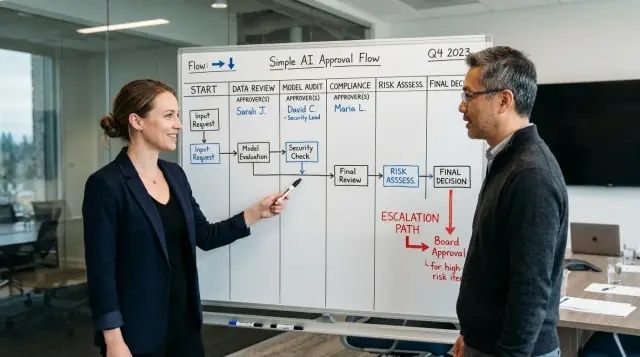
Table of Contents
Why buyers ask this early
Enterprise buyers often ask about human review before they ask about model quality. The reason is simple: if something goes wrong, they need to know who owns the decision.
An AI system can draft, classify, suggest, or rank. A person still needs to accept the risk, approve the output, or stop it. Security and procurement teams listen for one clear checkpoint. They want to hear where a human steps in, what that person checks, and when the system must wait.
You do not need a long policy to answer that well. Buyers are usually testing whether your team has a real working habit. A short explanation works better than a speech full of general claims: the AI handles a limited task, a named person reviews anything sensitive, and unclear or risky cases move to a manager or specialist.
That tells buyers two things right away. A human can stop a bad result before it reaches customers, staff, or production systems. Responsibility does not disappear into "the system."
This matters most when AI touches customer messages, security alerts, contracts, code changes, or internal knowledge. Buyers picture the failure first. They imagine a wrong approval, a leaked detail, or an answer no one can defend later. Clear human review lowers that fear fast.
A vague answer makes the whole setup sound risky, even if your controls are decent. A short answer with named roles sounds much stronger: "The support lead approves customer-facing replies above a set risk level. Security owns incidents. Product owns policy changes."
When you can name the checkpoint, the approver, and the owner of escalations, the security call usually gets more direct. Buyers stop guessing how your process works and start asking useful follow-up questions.
What buyers want to hear
When buyers ask who checks the machine, they want names, not principles. They want to know what happens after the AI produces an answer, recommendation, or draft. Who reads it? Who approves it? Who can stop it?
Start with one simple split. Quality review checks whether the output is correct, clear, and useful. Risk review checks whether it could cause security, privacy, legal, financial, or customer harm. In a small team, one person might do both. Still, describe them as two separate jobs.
Do not say, "the team checks it." Name the role. Say who reads the output before it reaches a customer or changes a business record. That role might be a support lead, operations analyst, compliance reviewer, or engineer on call. Real job titles make the process sound real because they are.
Manager approval should follow a rule, not instinct. Explain when a reviewer has to hand the decision upward. That usually happens when the AI suggests an exception to policy, changes money or access, touches sensitive data, or produces a result the reviewer does not trust. The same applies when two reviewers disagree.
Buyers also want to know who has stop authority. A reviewer should be able to send work back. A manager should be able to block release. One named owner should take the final escalation, such as the head of operations, product owner, or security lead.
If you can explain those parts in plain language, the answer feels solid. One path checks quality. One path checks risk. Named roles review the output. Managers approve higher-risk decisions. A specific owner can stop the process.
Four review lanes most teams can explain quickly
Buyers do not want theory. They want to hear which AI outputs move fast, which ones stop for review, and who has the final say. Four lanes are enough for most teams.
The first lane covers low-risk drafts such as meeting notes, ticket summaries, early research, or an internal draft of a spec. A person still checks the output, but the review is light because nobody is sending it outside the company and nobody is changing live systems from it.
The second lane covers anything a customer, partner, or prospect will see. That includes emails, proposals, help center text, support replies, and public copy. In this lane, a named business owner reviews the content before it goes out.
The third lane covers actions that can change software, systems, or records. That includes code, infrastructure settings, database updates, access rules, and config changes. AI can suggest the work, but an engineer or admin reviews it, tests it, and approves the change before anyone applies it.
The fourth lane is the stop sign. Some cases should always go to a person, even if the AI looks right. Legal terms, refunds above a set amount, security incident responses, privacy requests, permission changes, and deleting production data usually belong here. AI can draft options, but a human decides.
If you need a short script for a call, keep it this simple:
- Low-risk drafts get a light human check.
- Customer-visible content gets business approval.
- Code, config, and data changes get technical review and testing.
- Legal, financial, privacy, and security-sensitive cases always go to a person.
Skip internal slang when you explain this. "Ops pod" or "tiger team" means nothing to a buyer. "Engineering manager," "security lead," "finance approver," and "on-call engineer" are much easier to picture.
Approvals and limits
Buyers do not want to hear that "the team" approves changes. They want names and limits. Each review lane needs one clear owner, so anyone on the call can answer a basic question fast: who says yes, who says no, and who gets called when something looks wrong?
A small approval map usually works better than a committee. Split decisions by lane, then set limits by risk. Low-risk items can move with a team lead. Higher-risk items need sign-off from the person who owns data, security, or business impact.
For example, support or operations can approve routine customer-facing AI replies. Product or engineering can approve automation rules and product behavior. Security or the data owner should approve access, retention, and model permissions. Billing, legal, or policy exceptions usually need an executive owner.
Keep the limits plain. If a change only affects wording or internal drafts, the lane owner can often approve it alone. If it changes what data the AI can read, what actions it can take, or what customers will see without review, move it up one level. If money, contracts, regulated data, or account access are involved, a senior owner should sign off before release.
One part gets missed a lot: rule changes need their own owner. Prompts, filters, confidence thresholds, auto-send rules, and escalation triggers can change behavior just as much as code does. Pick one person to approve those updates, and make that rule visible inside the company.
Backup approvers matter too. A clean process fails the first time the main approver is on vacation or it is Saturday night. Name a backup for every lane. If both are away, state the next person in line. Do not leave approvals sitting in a shared inbox with no owner.
A support example is easy to explain on a security call. The support lead approves changes to answer style and canned responses. The engineering manager approves automation that updates tickets or sends replies. The security owner approves any change that exposes customer data to a model. Buyers understand that right away.
Who owns escalation
When something goes wrong, buyers want one clear chain of ownership. Someone must spot the issue fast, someone must respond first, and one named person must make the final call.
Start by defining the events that trigger escalation. Keep the list short enough that nobody has to guess in the middle of a problem. Escalation should happen when the system exposes or requests data it should not touch, acts outside its allowed scope, fails review more than once on the same task, produces harmful output, or starts behaving differently after a prompt, model, or workflow change.
The first responder is usually the person already watching that lane. In customer support, that may be the support lead. In internal automation, it may be the engineering lead. Their job is straightforward: confirm the issue, stop further impact, and alert the final owner.
The final owner should be one person, not a group chat. In a small company, that is often the CTO, head of engineering, or a Fractional CTO. If the issue touches security or private data, that owner should pull in the security contact immediately, but ownership should still stay with one named person.
Set response times before the call. A practical version might look like this: urgent cases get a human response within 15 minutes, the final owner joins within 1 hour, and non-urgent cases get reviewed the same business day. If you cannot meet those numbers, say what you can meet and why.
It also helps to say when the team pauses the system. Pause automated actions if the AI touches restricted data, makes repeated wrong decisions, crosses a policy boundary, or cannot show enough evidence for a human to verify the result.
Simple answers win here. Buyers trust a plain escalation path more than a clever one.
How to prepare your answer
Start with the work, not the policy. Buyers want to hear that you know exactly where AI touches real output, who checks it, and what happens when something looks wrong.
Write down every workflow where AI does more than draft a rough idea. Include customer replies, code changes, support summaries, contract edits, internal reports, and anything that can affect money, security, or a customer decision. If a person might act on it, put it on the list.
Then sort those workflows by impact and data sensitivity. A typo in an internal summary is one level. A model suggesting a production code change or handling customer data is another. That ranking helps you explain why some work can move quickly while other work needs tighter checks.
A prep sheet can be very simple:
- Name the workflow in plain words.
- Note what the AI does.
- Mark the risk level and the data involved.
- Assign the review lane.
- Add one approver and one escalation owner.
Keep the approval rule short. "AI can draft support replies, but an agent sends them." Or: "AI can suggest code, but an engineer reviews it, and the tech lead decides if there is doubt." That sounds much better than "the team monitors it."
Do not stop at naming roles. Put a real owner on each path. Someone approves normal cases. Someone else takes over when the output looks risky, unusual, or unclear. In small teams, one person may wear both hats. If so, say that directly.
Practice the answer out loud until it sounds like normal speech. Aim for 30 to 60 seconds. Buyers are not asking for a giant framework. They want to know that a machine does not make the final call on its own.
A simple support team example
A support inbox is one of the easiest places to explain this because the roles stay clear. The AI can draft a reply, but a person still decides what goes to the customer.
Picture a customer asking for a refund after receiving the wrong item. The AI reads the ticket, checks the order status, and suggests a polite reply using the usual policy language. That can save the agent time, but it should not send anything on its own.
The support agent reviews the draft before it leaves the queue. The check is simple: confirm the order facts, confirm the customer identity, check the tone, and make sure the reply does not promise something the company should not promise.
If the case stays within normal policy, the process ends there. If the refund is above a set amount, it moves to a team lead. For example, an agent may approve refunds up to $50, while anything above that goes upward. That keeps money decisions with a named person, not with the model and not with a frontline agent who lacks approval rights.
Security ownership also needs a name. If the system pulls the wrong account, mixes two customer records, or exposes data the agent should not see, the agent stops the workflow and alerts the security owner or incident owner. That person decides whether the issue is a one-off mistake, a permissions problem, or a wider system fault that needs a temporary shutdown.
On a short enterprise security call, the answer can sound like this:
"In support, AI only drafts replies. An agent checks the facts, tone, and account details before sending anything. Refunds above our limit go to a team lead for approval. If the system shows the wrong customer data or anything looks unsafe, the agent stops and sends it to our security owner, who owns the escalation and the next decision."
That works because it names the lane, the approver, and the person who takes control when something goes wrong.
Mistakes that slow the call
Buyers get nervous when your answer sounds shared, vague, or too polished. They want to know who notices a risky result, who decides, and who acts.
The first bad answer is "everyone reviews it." That sounds safe, but it usually means nobody owns the decision. Name the lane instead. A support manager might review customer-facing replies, a security lead might approve policy exceptions, and an on-call engineer might handle urgent failures.
Another common mistake is mixing product quality with security ownership. A product manager can judge whether an answer helps the user. That does not mean the same person should approve access changes, data handling exceptions, or anything that could create security trouble.
Teams also lose trust when they claim full automation even though a person still makes the final call. If the system drafts, scores, or flags, say that plainly. If human review only happens for refunds above a limit, account changes, or sensitive data requests, say that rule in one clean sentence.
After-hours coverage gets missed all the time. If a high-risk event happens at 11 p.m., buyers do not want to hear, "the team will review it tomorrow." They want to hear who is on call, what that person can approve, and when the issue moves to a director, founder, or security lead.
Edge cases matter too. A plan that works for normal support tickets may fail on account recovery, billing disputes, legal requests, or requests that involve private data. If your workflow skips those cases, say so. If it pauses them for review, say who handles them.
A plain answer beats a big answer. Clear roles, clear approvals, and a real escalation path will move the call faster than a long pitch.
Final checks before the call
If a buyer asks who checks the machine, you want a short answer with names, limits, and a simple path for exceptions.
Start with risky actions. For each one, name a person or role who can approve it. That usually includes customer-facing messages, changes to production systems, access to private data, refunds, contract language, and anything that can affect security or money. If two people share the job, say who decides when they disagree.
State the hard boundary in plain words. The AI can draft, summarize, classify, or suggest next steps. It does not send final legal text, change permissions, deploy to production, approve payments, or close a serious incident by itself. That sentence clears up a lot.
Then walk through one escalation path from start to finish. Keep it concrete. For example: the AI flags a support ticket that looks like a data access issue, the support lead reviews it, security joins if the case involves sensitive records, and the CTO or founder makes the final call if the team may need customer notice or a system change.
A short checklist helps:
- Match every risky action to one approver.
- Name one backup approver.
- Rehearse one escalation example in 30 seconds.
- Show where reviews and decisions are logged.
The log matters more than teams expect. You do not need a heavy system. A ticket, an internal note, or a short approval record is often enough if it shows who reviewed the case, what they decided, and when.
One last test is useful: hand the answer to your least technical leader. If they cannot explain it clearly without jargon, the buyer probably will not trust it either. Tighten the wording until anyone on the team can repeat the same answer without changing the meaning.
If the process is still fuzzy
If your answer still sounds vague, do not work on the wording first. Fix the process behind it. Buyers notice quickly when "a person reviews it" really means no one owns the decision.
Start with a one-page map. Keep it simple enough that sales, ops, and engineering can all use the same document. The page should show where AI can act alone, where human review is required, who can approve the next action, and who takes over if something looks risky.
A short format works well: lane or task, human approver, escalation owner, backup owner, and response time. Use names where you can, not just team labels. "Engineering" is too loose. "Priya reviews production-impacting changes" is much easier to defend on a security call.
Then rehearse the answer with the people who will be around the call. Put sales, ops, and engineering in one room for 30 minutes. Ask direct questions out loud. Who stops an automated action? Who approves a restart? Who speaks to the customer if the model gives a bad result? Who takes over after hours?
This is where gaps usually show up. Sales may promise a review lane that ops never agreed to. Engineering may own failures during the day, but nobody may own urgent escalations at night. A manager may approve exceptions, but nobody may know what counts as an exception. Fix those issues before the buyer finds them.
If you need outside help, Oleg Sotnikov at oleg.is works as a Fractional CTO and startup advisor and helps teams turn loose AI habits into clear approval and escalation paths. That kind of cleanup is especially useful when a company adopted AI quickly and the process never got written down.
When the one-page map exists, the team rehearses it, and each lane has an owner, the answer becomes easy to trust.
Frequently Asked Questions
What do buyers mean when they ask who checks the machine?
They want to know where a human makes the final decision. Say who reviews the AI output, who can stop it, and who owns the next step if something looks wrong.
Who should review AI output before it reaches customers?
Name the role, not the team. For customer-facing content, that is often a support lead, operations lead, or another business owner who reads the output before anyone sends it.
What is the difference between quality review and risk review?
Quality review asks, "Is this correct and useful?" Risk review asks, "Could this cause security, privacy, legal, money, or customer harm?"
One person can do both in a small team, but you should still describe them as two separate checks.
When should a manager step in?
Bring in a manager when the AI suggests a policy exception, touches sensitive data, changes money or access, or gives an answer the reviewer does not trust. Escalate when two reviewers disagree too.
Which AI tasks should always go to a human?
Always route legal terms, refunds above your limit, security incidents, privacy requests, permission changes, and production data deletion to a person. AI can draft options, but a human should decide.
Can AI send customer replies on its own?
No. Let AI draft the reply, then have an agent check the facts, account details, and tone before sending it.
If the case goes beyond normal policy, move it to the team lead or another named approver.
Who should own escalation when something goes wrong?
Pick one final owner for each lane. In many small companies, that is the CTO, head of engineering, or security lead, depending on the issue.
That person should have stop authority and make the final call if the team needs to pause the system or change the workflow.
What response times should we mention on a security call?
Use numbers you can actually meet. A simple answer might be: urgent issues get a human response within 15 minutes, the final owner joins within 1 hour, and lower-risk cases get reviewed the same business day.
How should we explain approvals in a small team?
Keep it simple. One person can review normal cases and also handle escalations if you say that plainly.
You still need named backups, clear approval limits, and a rule for after-hours coverage so work does not sit with no owner.
What should we do if our review process still feels vague?
Stop polishing the wording and fix the process. Make a one-page map that shows each AI workflow, the approver, the escalation owner, the backup, and when the team pauses automation.
Then rehearse the answer out loud until sales, ops, and engineering all describe it the same way.


