Hot, warm, and cold storage for lower backup costs
Hot, warm, and cold storage affect backup cost, restore speed, and risk. This guide helps finance and engineering choose the right mix.
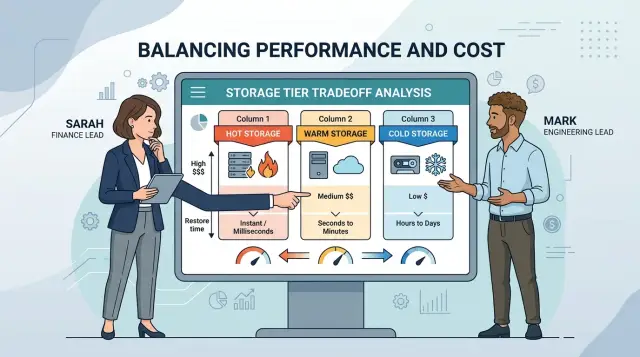
Table of Contents
Why storage bills keep climbing
Storage bills rarely jump because one team made a bad choice. They rise because data multiplies in quiet, ordinary ways. Every app creates backups. Every database keeps snapshots. Shared folders grow. Logs pile up. Teams keep extra copies because deleting old data feels risky.
A simple backup setup can turn into several layers before anyone notices: daily database backups, file snapshots for shared documents, copied logs for troubleshooting, backups for both test and production systems, and extra retention for legal or customer needs.
The per-GB price often looks harmless, and that is where teams get caught. A storage class may seem cheap on paper, but the bill can also include retrieval charges, request fees, minimum storage periods, and transfer costs. Finance sees the monthly spend first. Engineering feels the problem later, usually during a restore, when the cheaper tier is slow or expensive to pull from.
That mismatch creates friction. Finance asks why backups cost so much when storage prices keep falling. Engineering asks why a restore that used to take minutes now takes hours, or why a recovery test suddenly adds a surprise fee. They are looking at the same problem from different angles.
Costs also rise because one rule rarely fits every type of data. Yesterday's production database is not the same as last year's audit logs. A customer file share that people open every week should not live in the same class as old system images that nobody touches unless something goes badly wrong.
That is why blanket policies age badly.
What hot, warm, and cold really mean
Storage classes mostly describe two things: how quickly you can use your data again, and how much you pay to keep it there. The cheaper the class, the more limits usually appear when you need that data back.
Hot storage is the simplest. Files stay ready for immediate use, so backups, logs, and active app data can be read almost at once. You pay more per gigabyte because the system keeps that data close at hand.
Warm storage sits in the middle. It costs less than hot storage, but reads may be slower, throughput may be lower, or the provider may limit how often you can pull data back. For many teams, warm storage fits data they might need this week or this month, but not every hour.
Cold storage drops the monthly price more sharply. That sounds great until someone needs a restore during an outage or audit. Access often takes longer, and some providers charge extra when you retrieve large amounts. A cheap monthly bill can turn into an expensive recovery day.
Archive tiers go one step further. Data is not sitting there ready to download. You often have to request a restore first, wait for the provider to prepare the data, and only then start reading it. If a team does not plan for that delay, the restore window will surprise them.
Naming makes this harder than it should be. One vendor may call a class "standard," another may call a similar class "frequent access," and a third may split it into several archive options. The labels change, but the real questions stay the same:
- How fast can we read it?
- Is there a restore step first?
- Are there retrieval or minimum retention fees?
- How often do we expect to need it?
You are not only choosing a price tier. You are choosing how much waiting, friction, and recovery cost you can accept when the data matters.
Why restore time matters more than the sticker price
Cheap storage can look smart on a monthly invoice. Then a system goes down, the team needs last night's backup, and the waiting starts. If revenue stops while data sits in a restore queue, the savings disappear fast.
Restore time changes the real cost of storage. The class affects more than the price per gigabyte. It also decides how quickly people can get data back and get work moving again.
Not all data has the same urgency. Old legal records, closed project files, and audit logs often work fine in slower tiers. If nobody needs them today, waiting hours or even a day may be fine.
Production data is different. If an online store cannot load orders, or a SaaS product cannot recover customer data after a bad deploy, every hour hurts. Sales drop, support gets flooded, and engineers stop planned work to deal with the incident.
Finance and engineering should name restore targets in plain numbers. Words like "fast" and "slow" are too loose. A restore target in hours or days gives both teams something they can price and plan.
A simple sort often works well:
- Customer-facing databases: minutes to 1 hour
- Internal tools used every day: a few hours
- Team documents and older project data: same day
- Compliance records and old logs: 24 to 72 hours
A small example makes the point. Say cold storage saves $800 a month on backups. That sounds good until one failed restore leaves a sales system down for half a day and costs $6,000 in lost orders and recovery work. One bad incident can erase many months of savings.
Start with one question: how long can this data stay unavailable before the business feels it? Once that number is clear, the right class gets much easier to choose.
What the bill actually includes
A low price per gigabyte can fool you. The monthly storage line is only the starting point. The full bill depends on how often you read data back, how long you keep it there, and how many restore operations your team runs.
Cold tiers look cheap because they push part of the cost into later actions. If you need a large restore after an outage, retrieval charges can rise fast. Finance may see months of savings, while engineering sees a painful restore bill on the worst possible day.
A proper comparison should include stored data each month, retrieval fees when you restore or read archived data, minimum retention rules such as 30, 90, or 180 days, early deletion charges if you move or delete data too soon, and request or transfer fees for API calls and moving data out.
Minimum retention trips people up all the time. If you archive backups for 90 days but your policy rotates them every 30, you still pay for the full minimum period. On paper the archive class looks cheaper. In practice, storage costs can rise because the retention policy does not match the class.
Early deletion charges hurt in the same way. Teams move data between classes to chase a lower rate, then undo the move when restore needs change. That back-and-forth can cost more than leaving the data in a warmer tier from the start.
Request and transfer fees are easy to miss because they look small. They add up when jobs create thousands of objects, run frequent lifecycle moves, or restore data across regions. One test restore may cost little. Ten test restores, plus egress, can become a line item finance did not expect.
A good rule is simple: price the quiet month and the bad month. If the archive restore is slow and the restore bill is high, the cheapest class may not be the cheapest choice.
How finance and engineering can rate the tradeoff
Most storage fights start because each team measures a different risk. Finance sees a monthly bill. Engineering sees the day a restore fails or takes too long. They need one shared way to score both.
When you compare classes, stop talking about terabytes first. Start with plain business groups such as customer uploads, accounting records, security logs, test backups, and old project files. If the label sounds like a billing code, people guess. If it sounds like work they know, they decide faster.
For each group, put five things on one sheet:
- What the data is, in plain language.
- How fast the team needs it back.
- What one hour or one day of delay would cost the business.
- How much the cheaper class saves each month or year.
- Who can approve an exception.
That third line changes the conversation. A finance backup needed for an audit next week has a real delay cost. Old product screenshots from a launch three years ago probably do not. Once you price the delay, cheap storage stops looking cheap when restore pain is high.
A simple rule helps. If the yearly savings are small and the restore delay would hurt sales, support, compliance, or payroll, keep that data in a faster class. If the savings are large and the restore deadline is measured in days, colder storage usually makes sense.
Use rough numbers. They do not need to be perfect. If a delayed restore would keep five support staff idle for half a day, that is enough to estimate. If pulling an archive takes 12 hours and adds retrieval fees, include that too.
You also need an owner for exceptions. Without one, teams quietly keep everything hot because nobody wants blame. Pick a clear approver, often the engineering lead for technical risk and the finance owner for cost. If they disagree, escalate once, decide, and write it down.
That small habit saves money twice: lower storage bills now, and fewer arguments during the next restore.
How to place each dataset
Start with a plain inventory. List every backup and archive set you pay for: production database backups, file uploads, logs, old project exports, finance records, customer support attachments, and anything copied for compliance. One sheet is enough if it shows size, monthly growth, owner, retention period, and the last time someone asked for a restore.
Then group data by real access patterns, not by department names. If people need a copy within hours and ask for it often, keep it hot. If restores happen a few times a quarter, warm usually fits. If nobody expects to read it unless there is an audit, lawsuit, or rare recovery, cold is usually the cheaper home.
A practical grouping often looks like this:
- Recent production backups for fast recovery
- Monthly backups kept for a few months
- Year-end finance and tax records
- Audit and contract records with long retention
- Old logs or exports people rarely touch
Retention rules can override convenience. Finance may want the lowest monthly price, but legal or contract terms may require data to stay available for a set number of years or within a certain restore window. Mark those rules beside each group before anyone changes classes.
After that, pick one default class for each group and write down the exceptions. For example, keep the last 30 days of database backups hot, move the next 60 days to warm, and send annual snapshots to cold. Rules like that are easy to automate and easy to explain when the bill arrives.
Then run one restore test from every group. Restore a recent database backup, an older file set, and one cold archive item. Measure how long the request takes, what extra charges appear, and whether the restored data is actually usable. Archive restore time matters more than many teams expect, especially when monthly storage stays low but retrieval costs jump.
After the first billing cycle, compare the new invoice with the old one. Check whether storage spend dropped, whether retrieval fees rose, and whether anyone complained about slower restores. If the savings look good on paper but recovery feels painful, move one group back up a class.
A simple example with real backup types
Picture a small software company with a live app, a finance team, and years of media files. It does not need every backup in the fastest tier. It needs the right copy in the right place, based on how often people ask for it and how long they can wait.
A practical split often looks like this:
- Customer database backups stay in hot or warm storage. If the app fails on Monday morning, the team needs recent data back fast. The newest backups may stay hot, while older daily copies move to warm after a few days.
- Monthly finance exports usually fit warm storage. Accounting may need them during month-end, an audit, or tax prep, but nobody pulls them ten times a day.
- Old product images, source videos, and other large media files often belong in cold storage. They take up a lot of space, and most sit untouched for months.
- Compliance logs can move to archive storage if the company can wait for the restore time. A legal hold or audit request may be rare enough that slower access is fine.
- One faster copy should cover urgent cases. That copy might hold the last 7 to 30 days of database backups, the latest finance package, and the newest logs.
This keeps recovery realistic for engineering and gives finance a clearer reason for the bill. You pay more only for the data that truly needs quick access.
The trap is easy to miss: cheap storage can turn expensive during an emergency. Cold storage fees and long archive restore times can hurt if the team pulls data often or needs it the same day. That is why the fast copy matters. It works like insurance.
Two questions usually cut through the noise: "How often do we restore this?" and "How long can we wait?" If the honest answer is "almost never" and "a day is fine," colder storage usually makes sense. If the answer is "we may need it today," keep at least one recent copy in a faster class.
Mistakes that cost money later
Most storage waste comes from fear. Teams keep years of backups in the fastest tier because nobody wants blame for a slow restore, and the bill grows every month.
The opposite mistake costs money too. Some teams move data to cold storage before they run a real restore test, so they only learn the limits during an outage. Finance sees a lower monthly bill, but engineering finds out too late that a restore takes hours, needs manual approval, or pulls data back in chunks that slow recovery.
Pricing rules trip people up more than the storage rate itself. Cold classes often have minimum duration rules, so short-lived data can become more expensive after early delete charges. If you archive backups that rotate every 30 days into a class with a 90-day minimum, you pay for time you never use.
Recovery costs also surprise people. A cheap archive tier can turn expensive fast when you need to pull back many terabytes at once, especially during an incident when speed matters more than perfect efficiency.
A few warning signs show up again and again:
- Backups stay in hot storage for years with no retention review.
- Nobody tests a restore before moving data to a colder class.
- Teams ignore minimum duration, retrieval, and transfer fees.
- Multiple copies live in different places, and no one owns the policy.
That last one is common. One copy sits in the backup tool, another lands in object storage, and a third copy goes to archive "just in case." If nobody owns retention, none of those copies gets deleted.
A simple fix helps: assign one owner for each dataset, set a restore time target, and test one real recovery before changing classes. That takes a few hours now and can prevent a painful invoice later.
Quick checks before you change classes
Cheap storage often gets expensive the first time someone needs data back in a hurry. A lower monthly rate only helps if the restore time, retrieval fees, and retention rules still fit how the business works.
Start with the restore deadline for each dataset. Someone should say, in plain language, how long the business can wait. Production database backups might need recovery within hours. Old project files may be fine for a day or two. If nobody can name that deadline, the team is guessing.
Testing matters just as much as pricing. Teams often check that a backup job finished and stop there. That is not enough. Run one small restore for a single file and one larger restore for a full system or full dataset. Those two tests expose very different problems, especially when cold storage adds queue time, retrieval steps, or extra handling.
A quick review should cover five points:
- Put a restore deadline next to every backup set.
- Test a file restore and a full restore.
- Compare retention settings with actual legal or contract needs.
- Show finance where retrieval and early deletion fees will appear.
- Give one person clear ownership of the storage policy.
Retention rules deserve a blunt look. Many teams keep data far longer than any law, audit rule, or customer agreement requires. That feels safe, but it raises storage bills month after month. The fix is not aggressive deletion. The fix is matching policy to real obligations.
Finance also needs a view of the next bill, not just the storage rate. Cold tiers often look cheap until retrieval charges land after a test restore, an audit request, or an incident. If finance expects a flat drop in spend and engineering triggers restore fees next month, trust disappears fast.
One owner should make the final call and keep the policy current. Without that, storage classes drift over time. New datasets land in the wrong tier, old rules stay in place, and no one notices until a restore takes too long or the bill jumps again.
Next steps for a smaller bill
Start with one change, not a full migration. Pick a single backup job or one archive set that your team already understands, such as month-old database snapshots or compliance logs that almost nobody restores. One small move gives you a clean test and keeps a billing mistake from spreading across every dataset.
A shared table helps more than a long meeting. Keep it simple enough that finance and engineering can both read it and update it quickly.
| Data set | Current class | Proposed class | Restore target | Cost risk to watch |
|---|---|---|---|---|
| Monthly backups | Hot | Warm | Same day | Retrieval charges |
| Old project archives | Warm | Cold | 24 to 48 hours | Early deletion fees |
| Compliance logs | Hot | Cold | Rare restore | Minimum retention |
This table does one useful job: it makes the tradeoff visible. You can see what the data is, how fast you need it back, and what might raise the bill after a move. That is usually enough to stop vague arguments and force a real decision.
Then wait for the next invoice and read the details, not just the total. Lower storage charges can hide new costs somewhere else. Look for retrieval fees, API request charges, minimum storage duration, and any sudden spike in restores. If something looks odd, fix it fast and update the table so the same surprise does not happen again.
If the tradeoff still feels unclear, a short outside review can help. Oleg Sotnikov at oleg.is works as a Fractional CTO and advisor, and this sort of storage, recovery, and infrastructure check is the kind of practical review that can save time before costs drift further.
Frequently Asked Questions
What is the real difference between hot, warm, and cold storage?
Hot storage keeps data ready right away, so restores start fast but cost more each month. Warm storage costs less and fits data you may need soon, while cold storage drops the monthly price further but often adds slower access and extra restore fees.
Is the cheapest storage class usually the best choice for backups?
No. Cheap storage can turn expensive during an outage if you wait too long for a restore or pay high retrieval charges. Use the lower tier only when the business can handle the delay.
Which backups should stay in hot storage?
Keep recent production backups in a faster tier. If your app, store, or customer system fails, you want the newest copy available in minutes or a few hours, not after a long archive process.
When does warm storage make sense?
Warm storage works well for data you may need this week or this month but not every day. Monthly finance exports, older daily backups, and shared files with occasional restores often fit there.
What hidden fees make cold storage more expensive than it looks?
Watch for retrieval charges, API request fees, transfer costs, minimum storage periods, and early deletion charges. The per-GB rate looks low, but those extra costs often show up when you move or restore data.
How do I set a restore time target for each dataset?
Start with one plain question: how long can this data stay unavailable before the business feels it? Turn that answer into a number, such as 1 hour, same day, or 72 hours, and pick the class that fits that window.
Should I test restores before moving data to a colder tier?
Yes. Run a small file restore and a larger full restore before you move anything. Those tests show real wait times, extra charges, and whether the backup is usable when you need it.
Can cold storage work for logs, media files, and compliance records?
Usually yes, if people almost never read that data and can wait. Old media, audit records, long-term logs, and year-end documents often belong in colder storage as long as your retention rules and restore window still fit.
Why do backup and archive bills keep rising over time?
Bills grow when backups pile up in several places, logs never expire, snapshots stay forever, and nobody owns retention. Teams also keep extra copies because deleting old data feels risky, so storage keeps expanding quietly.
How can finance and engineering make the storage tradeoff together?
Use one shared table with the dataset name, current class, proposed class, restore target, expected savings, and cost risk. That gives finance a clear spend view and gives engineering a clear recovery view, so both sides can approve the same tradeoff.


