Hidden cost of AI work: review time erases savings
Measure the hidden cost of AI work in review queues, exception cleanup, and rework before small delays wipe out the savings.
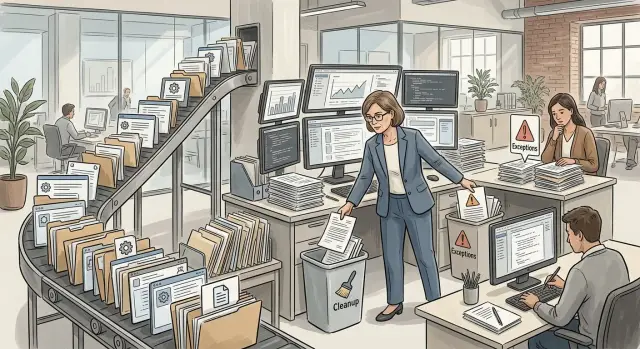
Table of Contents
Why AI savings disappear in daily work
Teams usually count the visible part first. They see more drafts, more replies, and more tickets touched per day. What they miss is the human time wrapped around each AI output. A reply that takes 20 seconds to generate can still cost 3 or 4 minutes to read, compare, fix, and approve.
That math gets ugly fast. If a team reviews 120 AI drafted messages a day and spends even 2 minutes on each, that is 4 hours of reviewer time. The output looks cheap. The day does not.
Small queues make this worse. Many managers assume review is a quick stop before work moves on. In practice, quick checks sit in line. A support agent may wait 15 minutes for a lead to approve a reply that needs 30 seconds of attention. The task is short, but the queue is slow, and the delay spills into the next step.
Bad answers also create work in ways teams rarely log. One wrong refund message can trigger a second customer reply, an internal support note, and a manual correction in the billing system. That is not one mistake. It is a chain of small jobs landing in different inboxes.
This is where AI savings often disappear. The work does not vanish. It moves into review, waiting, and repair.
A simple support example shows the pattern. A startup uses AI to draft customer replies, and the team feels faster in week one because the inbox moves. By week three, one senior agent spends half the morning checking drafts, rewriting risky promises, and pulling out messages the model should never have answered alone. The inbox still moves, but one person now does cleanup full time.
The costs teams usually miss
Model cost is easy to track. The hidden cost usually lands somewhere else: reviewer time, waiting between steps, and messy cases that never fit the prompt.
A team may think an AI draft saves five minutes. Then a reviewer spends two minutes reading the original request, another minute checking facts, and another minute fixing tone, format, or missing details. The draft was cheap. The labor around it was not.
Review work also expands once trust drops. When people know AI makes mistakes on odd inputs, they stop trusting the first answer. They compare more carefully, open extra tabs, and check details they used to skip. Even when the output is mostly right, that caution eats the time the team hoped to save.
Queue design adds a quieter cost. If the system creates drafts fast but approvals happen in batches, work sits idle. A person returns later, reloads the context, and spends mental effort just remembering what the item was about. Ten minutes of queue delay can turn a 30 second review into a 3 minute interruption.
Then there are exceptions. A missing field sends an item to manual review. An unusual customer request breaks the prompt. A policy exception needs a manager. A half correct answer creates rework instead of a clean handoff. These cases look minor on a dashboard, but they are where payroll hours disappear.
Managers pay a tax too. Someone has to write the rules, decide what needs approval, handle escalations, and keep changing the process after new mistakes appear. That time rarely sits next to the AI bill, so teams miss it.
A good rule of thumb is simple: count every human touch, not just generation time. If three people each spend one minute on an item, the automation already costs more than the model price suggests.
How to measure one workflow
Pick one task with a clear start and end. Good examples are a support ticket from arrival to final reply, an invoice from upload to approval, or a sales email from brief to send. Avoid broad labels like support or operations. You need one unit you can count.
Then split the time into three buckets. Draft time is how long the AI takes to make a first pass. Review time is how long a person spends reading, fixing, approving, or rejecting it. Wait time is the gap between those steps, when the item sits in a queue untouched.
If you blend those buckets together, the real cost stays hidden. A model can write a draft in 20 seconds, but that does not mean the job took 20 seconds. If the item waits 2 hours for review and then needs 5 minutes of edits, most of the cost sits with people and process, not the model.
Use one plain tracking sheet for one week. For each item, record:
- whether the draft was accepted, edited, or retried
- how many minutes review took
- how long the item waited before review
- what exception happened, if any
The exception log will tell you more than the tool dashboard. Write down the exact type for seven days: missing data, wrong tone, duplicate answer, broken format, bad escalation, policy mismatch. In most teams, one or two exception types eat most of the cleanup time.
A small support example makes this obvious. Say the model cost is 3 cents per reply. That looks cheap. But if 40 percent of replies need edits, reviewers spend 4 minutes per item, and 10 percent need a second pass, labor cost wipes out the savings fast.
Compare the AI bill with the full labor cost, not the tool price alone. Include reviewer pay, manager checks, queue delays, retries, and exception cleanup. Once you measure one workflow this way, weak automation becomes hard to ignore.
A customer support example
A small support team gets 200 emails a day in one shared inbox. An AI tool drafts every reply before a person sends it. It sounds efficient. One reviewer still has to check every draft for tone, basic facts, and anything risky like refunds or billing mistakes.
The first 140 tickets are straightforward. Password resets, order status questions, and basic how to requests only need a quick scan. If the reviewer spends about 35 seconds on each one, that part takes roughly 82 minutes.
The next 40 are less clean. The AI draft is close, but something is off. A date is wrong, a policy detail is missing, or the customer sounds upset and needs a softer reply. At 2 minutes each, that adds 80 minutes.
Then come 20 refund or dispute cases. These rarely stay in the main queue. The reviewer pulls them out, adds a note, checks the account, asks finance or a manager, and puts them back later. When they return, the reviewer reads the thread again because the context is gone. At 4 minutes each, that is another 80 minutes.
Now the team has spent about 4 hours just reviewing and cleaning up AI output.
The reply itself is only part of the work. Each finished ticket may still need the right tag, an internal note, a follow up task, or a refund approval. Those steps look small, but they stack up fast across 200 tickets.
This is where the promise starts to break. If a person could write a routine reply from scratch in 90 seconds, AI only wins when review stays very short. Once drafts trigger rechecks, queue exits, and cleanup work, the gap gets small.
That is why some teams feel busy even after automation goes live. The tool wrote 200 replies, but the reviewer still carried the real load.
Why queue design changes the bill
A bad queue can turn a low cost AI step into paid waiting time. Many teams look at model cost and ignore the human line that forms after the model finishes. That line is often where labor cost starts to grow.
One shared queue is a common problem. Safe, routine items sit next to messy, urgent, or risky ones, and reviewers naturally pick the easy work first. The queue looks busy and productive, but the items that need fast action keep sliding down the list.
That hurts twice. Urgent work waits longer, and reviewers keep switching context when they finally return to it. A five minute check can become a twenty minute interruption when someone has to reload the whole case.
Batch review adds another cost. Teams often collect AI output and review it once or twice a day because it feels efficient. That only works when volume stays flat. When volume jumps, the batch becomes backlog, and backlog turns into late replies, rework, and overtime.
A better design uses separate lanes. Straightforward work should move through a short review path with a short checklist. Risky cases should go to a smaller lane where people expect to spend more time.
A few rules keep this under control:
- Put low risk items in a fast lane.
- Send unusual or high impact cases to a separate lane.
- Give one person or one role ownership of stuck items.
- Set a hard cap on queue size and slow intake when the queue crosses it.
Ownership matters more than most teams expect. When an item sits for hours, people assume someone else will handle it. Then the same case gets opened, closed, and reopened by three different people.
Queue caps can feel annoying, but they save money. If backlog grows without a limit, the team pays later in evening cleanup, rushed decisions, and avoidable mistakes. A short queue is easier to manage and cheaper to review.
This kind of operational design matters as much as the prompt itself. If a team needs a second set of eyes on that process, Oleg Sotnikov at oleg.is works on AI first operations and Fractional CTO problems like queue design, handoffs, and workflow cost.
Why exception cleanup grows faster than teams expect
Most teams treat exceptions like a rounding error. They assume the AI handles 95 percent of the work, so the last 5 percent will stay small. That math breaks fast.
Rare cases do not disappear. They pile up in a side queue, sit for days, and then land on the desk of whoever feels responsible. If nobody owns that queue, the mess grows quietly until it starts eating hours every week.
Each exception also takes more thought than people expect. A reviewer cannot just glance at the output and click approve. They need the customer history, the original request, the policy rule, and often a guess about what the AI tried to do. One odd case can take ten minutes. Twenty odd cases can swallow half a day.
The first draft may cost pennies. The cleanup costs payroll.
Tool hopping makes this worse. The AI writes a reply in one system. The reviewer checks notes in another. Then someone copies order details from a spreadsheet, pastes the final answer into a ticket, and logs the exception in a chat thread. That is slow, and people make small mistakes when they repeat the same steps all day.
Old exceptions also come back when rules stay fuzzy. A team patches one case but never writes a clear rule for the next one. Two weeks later, the same issue returns in a slightly different form, and someone solves it from scratch again. That is why exception work often grows instead of shrinking.
A few warning signs show up early:
- the same edge case appears every week
- senior staff keep stepping in to fix odd tickets
- reviewers need three or four tools to finish one task
- nobody can say how many exceptions are still open
If cleanup costs more than the first draft, the workflow is not cheap. It is just hiding the bill in a different column.
Mistakes that turn cheap automation into expensive work
The biggest mistake is measuring the machine and ignoring the humans around it. If an AI step costs a few cents but adds 45 seconds of review time to every item, the labor bill can erase the savings fast. This gets worse when senior staff do the checking. A manager spending two hours a day on review is often more expensive than the tool itself.
Another mistake is reviewing every item with the same level of care. That feels safe, but it turns automation into a slower version of manual work. Simple cases need a light check. Risky cases need a deeper one. If the queue does not separate those paths, people end up treating everything like a possible failure.
Teams also bolt AI onto a process that already has duplicate steps, unclear ownership, and bad handoffs. The mess stays. Now it moves faster and spreads wider. If support agents already copy the same customer details into three places, adding AI to write replies will not fix the waste. It may add one more step to confirm that the model used the right details.
Low confidence output needs stop rules. Without them, the system keeps pushing weak answers forward and leaves people to catch mistakes later. That creates exception work, and it grows faster than most teams expect. Ten bad cases a day sounds manageable. Fifty bad cases a day can eat a whole person week.
The last mistake is scaling volume before one workflow works cleanly. More traffic does not smooth out a broken setup. It multiplies the weak spots.
A better approach is plain:
- track labor minutes per item, not just token spend
- set different review depth for low risk and high risk cases
- fix the process before you automate it
- route weak output to a clear stop point
- prove one workflow saves time before you expand it
That is how teams protect their return on automation instead of talking themselves into savings that never reach the budget.
Quick checks before you scale
A pilot can look cheap because the mess stays small. Scale changes that fast. Ten odd cases a day feel manageable. A hundred a day can eat the time the team thought AI would save.
Start with the review rule. If one reviewer cannot explain it in a single plain sentence, the team will apply it five different ways. That creates rework, arguments, and slow approvals.
Before adding volume, ask:
- Can one person explain the pass or fail rule in one short sentence?
- Do you track how long each item waits before a human opens it?
- Does every exception have one owner and a clear due date?
- Do reviewers keep fixing the same error pattern every day?
- After review and cleanup, do you still save net time?
Queue time is easy to ignore because nobody feels it at first. The work still gets done, just later. But delay has a cost. A support reply that waits 40 minutes for review may miss a service target. A sales lead that waits until the next shift may go cold.
Repeated fixes are another warning sign. If reviewers keep correcting the same tone issue, wrong field, or bad classification, the system is not improving enough to justify the extra labor. Write down the top repeat mistakes for one week. You will usually find two or three issues causing most of the cleanup.
Every exception needs an owner. If nobody owns it, it drifts until a senior person finally cleans it up.
What to do next with your team
Pick one workflow and track it for one normal week. Use a job that happens often enough to give you real numbers, like support replies, invoice checks, or lead routing. Count total items, reviewer minutes, wait time in queues, and cleanup time after exceptions. That baseline will tell you whether the process is actually saving time or just moving the work around.
Before adding another model, trim the path each item takes. Many teams stack steps because each one looks cheap on its own. The bill grows when a task waits in three queues, gets touched by two people, and still needs a manual fix at the end. Fewer handoffs usually beat smarter prompts.
When the same exception shows up again and again, stop treating it like a surprise. Turn it into a rule, a template, or a small form that forces cleaner input. If agents keep rewriting the same AI answer, save the approved version and reuse it. Ten small fixes like this can save more than a new model subscription.
A short monthly review keeps the system honest. Do not check only output volume. Look at four numbers:
- minutes spent reviewing each item
- items stuck in queues longer than your target
- repeat exceptions by type
- rework that happens after the AI step
If those numbers rise while output stays flat, the process is getting more expensive even if the model cost stays low.
Team habits matter too. Give one person ownership of the workflow for 30 days. That person should collect examples, remove extra steps, and decide which exceptions deserve a rule. Shared ownership sounds nice, but it often means nobody closes the loop.
Sometimes an outside view helps because internal teams get used to bad process. Oleg Sotnikov does this kind of work as a Fractional CTO. For teams that feel busy but cannot prove where the time goes, a review of queue rules, review load, and exception handling can make the leak obvious.
Start small, measure for a month, and fix the repeat mess first. If the numbers improve, scale the same way. If they do not, change the workflow before you buy more AI.
Frequently Asked Questions
How can AI still cost a lot if the model is cheap?
AI only saves time when review stays very short. If people spend minutes reading, checking facts, fixing tone, and approving each draft, labor eats the savings fast. Count the full human time around the output, not just the seconds the model needs to write it.
What should I measure besides token or model cost?
Track three things for each item: draft time, review time, and wait time. Then add retries, manager checks, and cleanup after mistakes. Those numbers show the real cost far better than the AI bill alone.
How do I know if AI is actually cheaper than doing the work manually?
Pick one workflow and compare total labor minutes before and after AI. Include every touch from arrival to final completion, plus queue delays and rework. If people still spend about the same time or more, the workflow is not saving money yet.
Why does queue design change the cost so much?
Queues create paid waiting and force people to reload context later. A short approval step can turn into a longer interruption when work sits for 20 or 40 minutes before someone opens it. That delay hurts speed and raises labor cost at the same time.
Which workflow should I track first?
Start with one repeated task that has a clear start and end, like a support ticket, invoice approval, or lead routing step. A narrow workflow gives you clean numbers and shows where review or cleanup really grows. Broad areas like "support" hide too much.
What kinds of exceptions should my team log?
Write down the exact problem each time the AI needs help. Common examples are missing data, wrong tone, bad escalation, broken format, duplicate replies, and policy mismatches. After a week, you will usually see one or two patterns causing most of the extra work.
Should every AI draft get the same level of review?
No. Give low risk work a light check and send risky or unusual cases to a stricter path. When reviewers treat every item like a possible disaster, AI becomes a slower version of manual work.
When does AI work well in customer support?
AI helps most when routine cases follow clear rules and people can approve them quickly. Password resets, order status updates, and simple FAQs often fit that pattern. It helps less when the work needs judgment, policy exceptions, or account-specific decisions.
What are the early signs that cleanup is getting out of hand?
Watch for repeat fixes, rising review minutes, stuck side queues, and senior staff stepping in every day. Another red flag shows up when reviewers need several tools to finish one item. Those signs mean cleanup is growing faster than the team expected.
What should my team do next if AI feels busy but not cheaper?
Pick one normal week and track every item from start to finish. Measure reviewer minutes, wait time, retries, and exception cleanup, then fix the most common repeat problem before you add more volume. If your team still feels busy but cannot see why, an outside review from someone like Oleg Sotnikov can help expose the leak.