gRPC error codes for frontend teams that reduce guesswork
Use gRPC error codes for frontend teams to turn backend failures into clear retry, sign-in, form-fix, or support actions in web and mobile apps.
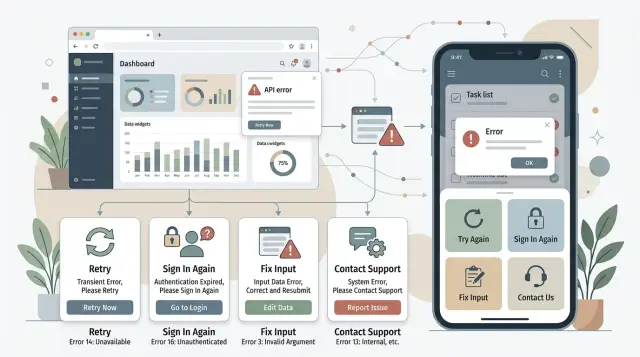
Table of Contents
Why API failures confuse frontend teams
A failed request rarely tells the UI team what happened in plain terms. The app gets a status code, maybe a backend message, maybe a vague error string, and someone has to guess what the user should do next.
The problem with gRPC errors is not the code list. It is the gap between backend language and user actions. A backend engineer might return FAILED_PRECONDITION or ABORTED for a real business case like "cart item is out of stock" or "payment session expired." Those labels can make sense on the server, but they do not tell the screen whether it should retry, ask for new input, refresh the session, or stop the user.
Teams usually fill that gap on their own. The web app retries one error automatically. The iPhone app shows a short toast. Android sends users back a step. One failure ends up with three different behaviors because each team guessed differently.
That inconsistency spreads fast. One developer treats every server problem as "Try again." Another ships the raw backend text because the release is due. A third catches the error and leaves the button spinning. Users feel all of it. They tap again, wonder if they submitted twice, or give up because the app offers no clear next step.
A few common cases show why this gets messy:
- "Permission denied" might mean the user needs a different role, or that the session expired.
- "Unavailable" might mean a short outage, or a weak mobile connection.
- "Invalid argument" might point to a bad promo code, a broken form rule, or a bug in the app.
Backend names describe what failed. The UI needs to know what happens next. If that mapping is missing, every app invents its own rules, and users get mixed messages, repeated taps, and dead ends.
The four client actions that keep things simple
Most apps do not need a separate frontend response for every gRPC status. Start the other way around. Pick a very small set of client actions first, then map backend failures into those actions.
This cuts guesswork fast. Web and mobile teams can share the same rules, designers can write consistent copy, and support gets fewer vague bug reports.
The four actions are usually enough:
- Retry when the problem is temporary, like a short network drop or a service that is briefly unavailable.
- Fix input when the user can correct something, such as a missing field, invalid date, or choice that breaks a business rule.
- Sign in again when auth is missing, expired, or no longer valid.
- Stop and support when the app cannot recover and the user cannot fix the problem.
These actions work because they match what users can actually do next. Most people do not care which server status came back. They care whether they should wait, edit, log in, or stop.
That is the better way to think about these errors. The process should end in a small action set, not a long table of special cases. Two different backend failures can still lead to the same screen behavior and the same message pattern.
A simple rule helps: if the app can recover, retry. If the user can recover, ask for a fix. If auth broke, ask them to sign in. If nobody on the client side can fix it, stop and hand it to support. Once a team agrees on that, error handling gets much easier to build and test.
Which gRPC codes belong in each action
Most frontend bugs around error handling start when every backend failure looks unique. A simpler approach works better: map many codes to a few client actions, then keep the screen logic small and predictable.
A clean default looks like this:
- Retry for temporary network or service problems.
UNAVAILABLEandDEADLINE_EXCEEDEDusually belong here. - Ask the user to sign in again for
UNAUTHENTICATED. Do not retry the same request over and over with the same bad session. - Ask the user to fix what they entered for
INVALID_ARGUMENTandOUT_OF_RANGE. - Ask the user to change the flow for
FAILED_PRECONDITION, such as "verify your email before checkout" or "select a shipping method first." - Stop and show an access message for
PERMISSION_DENIED. The user is signed in, but they still cannot do this action. - Stop and route to support for
INTERNAL,UNKNOWN, andDATA_LOSS. From the user's point of view, these are server failures.
One detail matters a lot: FAILED_PRECONDITION is easy to misuse. If a field is malformed, use INVALID_ARGUMENT. If the user must complete another step first, use FAILED_PRECONDITION. That one distinction makes user-friendly API messages much easier to write.
When backend teams keep this mapping consistent, web and mobile teams stop inventing their own rules. The app either retries, sends the user to sign in, asks for a correction, or stops with a clear message.
How to build the mapping step by step
Start with the failures users already see, not with a long status chart. Pull every error state from the product: toast messages, inline form errors, empty states, forced logouts, and retry prompts. If a user can see it on screen, it belongs on the list.
That gives the team something concrete to work with. Teams usually get stuck when they begin with backend status names instead of user behavior.
A short working sheet is enough:
- screen name
- current user message
- what the app should do next
- current backend error or status
Then group each failure under one client action. Different backend causes can still belong to the same action. An expired session and a revoked token may come from different services, but both should send the user to sign in again. A timeout in one service and a temporary outage in another may both lead to "retry later."
Now pick one gRPC status for each group. Keep it boring and consistent. If the user sent bad input, use INVALID_ARGUMENT. If they need to log in again, use UNAUTHENTICATED. If the app can try later, use UNAVAILABLE or DEADLINE_EXCEEDED when that matches the failure. Do not let each service invent its own meaning for the same user action.
The status alone is not enough, so add a stable app error code in the error details. Codes like auth.session_expired, profile.email_taken, or billing.card_declined give clients something safe to match on. The text message can change. The app error code should not.
Put the final mapping in one shared table for web, iOS, and Android. Keep only what teams need to implement the behavior: app error code, gRPC status, client action, and user message. That single table stops drift across teams.
Before rollout, test one real screen for each action. Force the error, watch the screen, and check the result. If the right behavior is not obvious in a few seconds, the mapping still needs cleanup.
A checkout example from failure to message
Picture a shopper who taps "Pay" with a full cart. The app only needs a small set of reactions, even though several things can go wrong. Each code should lead to one clear client action.
One checkout, five different outcomes
If the shopper enters a card number that is too short, the backend should return INVALID_ARGUMENT with field details. The app should keep the shopper on the form, mark the card field, and show a simple message like "Enter a full card number." A full-screen error would feel silly here. The shopper can fix it right away.
If the login session expires during checkout, return UNAUTHENTICATED. The app should pause payment, keep the cart as it is, and ask the shopper to sign in again. After that, send them back to checkout instead of dropping them on the home screen.
A payment timeout needs a different reaction. If the payment service does not answer in time, return DEADLINE_EXCEEDED, or UNAVAILABLE if the service cannot be reached at all. The app can retry once, show a short "Trying again..." state, and keep the cart and entered data. If the second attempt fails, stop there and make it clear that the order is still incomplete.
An expired coupon is a business rule problem, not a system failure. Return FAILED_PRECONDITION or INVALID_ARGUMENT, depending on how the team defines domain rules. The app should point to the coupon line, explain that the discount has expired, and ask the shopper to remove it before trying again.
INTERNAL is different from all of these. The app should stop, avoid guessing, and show a calm fallback message: "We could not finish your order. Try again later or contact support with this reference code." That gives the shopper a next step and gives your team something to trace.
The pattern stays simple. The app marks bad input, asks for sign-in when the session ends, retries one timeout, asks to remove an expired coupon, and stops on INTERNAL. When every failure maps to one action, checkout feels much less chaotic.
What the app should say and do
When an API call fails, the app should answer two questions fast: what happened, and what should the person do next. Start with one short sentence in plain language. "Payment failed." "Session expired." "You are offline." That first line matters more than any code.
If you need extra detail, put it after the short sentence, not before it. Keep the technical part hidden in logs or a support screen. Most people do not need to see raw backend text like "rpc error: code = FailedPrecondition desc = cart version mismatch." They need a message that helps them move.
Button labels should tell the next action, not repeat the problem. "Try again" is better than "OK." "Sign in again" is better than "Close." Clear labels cut hesitation, especially on mobile where people act fast.
A few labels work well in most apps:
- Try again
- Check connection
- Sign in again
- Update app
- Contact support
Retries need visible control. If the app retries on its own, block repeated taps until that retry finishes. Disable the button, show a spinner, and keep the screen stable. Without that, people tap three times, send three requests, and create a mess for both the user and the backend.
One mapped error should produce one message, one action, and one temporary UI state. If the action is retry, prevent double submits. If the action is re-auth, take the person to login. If the action is wait, say so plainly.
Keep raw server messages out of alerts and toasts. They are often too long, too specific, or just odd. They can also expose internal names that make no sense to customers. Show a clean message in the UI, then store the raw details where developers and support can use them.
Save a request ID every time a call fails in a way the user might report. You can place it in a small "Reference ID" line on an error screen or in a copyable support view. That one detail can save about 20 minutes of back-and-forth because support can trace the exact failure instead of guessing from a screenshot.
Good error handling feels calm. The screen says what happened, the button says what to do, and the app does not panic when the network does.
Mistakes that create noisy error handling
One common mistake is treating every failure as retryable. If the user typed an invalid card number, picked an impossible date, or left out a required field, another request will fail the same way. Retrying INVALID_ARGUMENT wastes battery on mobile, adds extra traffic, and makes the app feel broken.
The client should stop, point to the field, and let the user fix it. The same logic often applies to FAILED_PRECONDITION when the user needs to change something first, like accepting terms before checkout.
Another problem is using the same generic error for every failure. "Something went wrong" is fine for a rare crash. It is a bad default for expired sessions, permission issues, missing input, and validation errors. Users need a message that matches the action they can take.
If the account lost access, say that. If the form is wrong, show what needs to change. If the network is down, tell them to try again. Small differences in wording remove a lot of support pain.
Teams also create noise when web and mobile map codes differently. One app retries UNAVAILABLE three times while the other shows a hard stop on the first failure. One treats PERMISSION_DENIED as a logout, while the other reports a server fault. Shared APIs need one mapping table, not two guesses.
Too many custom error types cause a quieter version of the same mess. You do not need separate client actions for "coupon expired," "coupon disabled," and "coupon belongs to another user" if all three lead to the same UI behavior: show an inline message and do not retry. Keep the detail for logging or display, but keep the client actions small.
A short check catches most of the noise:
- Do not retry user mistakes such as
INVALID_ARGUMENT. - Do not hide
UNAUTHENTICATEDorPERMISSION_DENIEDbehindINTERNAL. - Do not let web and mobile keep separate mapping rules.
- Do not add a new error type unless the client must behave differently.
When teams clean this up, the code gets smaller and the app feels calmer. Users stop seeing vague errors for problems they can actually fix.
A quick review checklist
A review works best when you can finish it in ten minutes. If people need a long debate to decide what one error means, the contract is still too loose.
Start with the user action, not the status name. When someone sees UNAVAILABLE, FAILED_PRECONDITION, or PERMISSION_DENIED, both web and mobile teams should be able to say the right action in a few seconds: retry, ask the user to fix something, ask them to sign in again, or show a support message. If the answer changes by team, the mapping still needs work.
Use one shared table for every client. These rules should not live in separate notes, copied snippets, or half-matching app code. Put the mapping in one place, version it, and make both clients follow the same rules.
Then check the actual behavior:
- Retries stop after a small limit. Two or three attempts is usually enough, with a short backoff between tries.
- User messages use plain language. "Please check your payment details" is better than exposing a raw status.
- Each message tells the user what to do next: sign in again, fix the form, wait a moment, or contact support.
- Logs store the app error code, the gRPC code, and the request ID together.
- Tests cover failures people really hit, such as expired sessions, slow networks, and duplicate checkout taps.
One simple exercise catches a lot of confusion. Ask one backend developer, one web developer, and one mobile developer to read the same five errors and say what the app should do. If you get three different answers, users will get three different experiences too.
The goal is straightforward: the app should react the same way on every client, retries should stop before they become noise, and support should have enough detail in the logs to trace one failed request without guessing.
Next steps for a cleaner error contract
Pick one user flow and clean that up first. Sign-in, checkout, and file upload are good choices because they already produce a mix of retries, auth problems, and user mistakes. If you try to fix every endpoint at once, teams drift back to guesswork.
Write a small mapping table for that flow. Keep it plain: gRPC code, domain reason, client action, user message. Then review it with one backend lead and one frontend lead in the same meeting. A short table that both sides agree on beats a long spec nobody reads.
In most cases, the table only needs a few rows: retry now, ask the user to fix input, refresh auth and try again, or stop and show support or fallback help.
Once the app ships, watch behavior instead of arguing about theory. Track how often clients retry, how often users get signed out or forced to re-auth, and how many errors end with a form fix. Those numbers tell you quickly whether the contract is clear or whether one code still hides too many different failures.
If one screen still throws random messages, trim the mapping again. Retry logic gets noisy when the backend sends technical detail instead of a client action. Mobile error handling gets worse when each team adds its own exception list. A smaller contract is usually the better contract.
If the issue already spans web, mobile, and backend, an outside review can help. Oleg Sotnikov at oleg.is works as a Fractional CTO and startup advisor on API design, AI-augmented development workflows, and production systems, so he can review the contract, client behavior, and delivery process together.
Fix one flow, measure it for a couple of weeks, and then roll out the same contract everywhere else.


