Go libraries for transactional email: what to compare
Go libraries for transactional email differ in template support, error reporting, retries, and test setup. Compare the tradeoffs in plain terms.
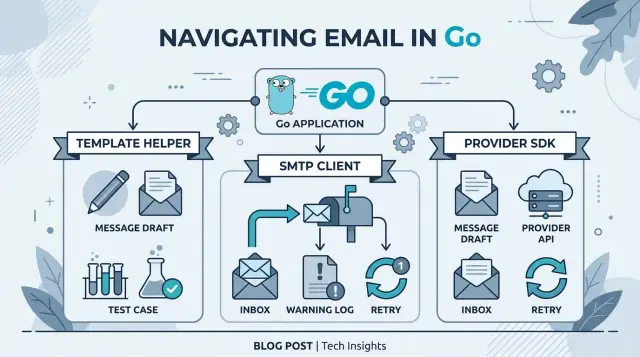
Table of Contents
Why this choice causes trouble later
A lot of teams pick an email package after a quick demo and move on. That feels fine until the app starts sending real receipts, password resets, and alerts. Then the messy part shows up: the user action succeeds, but the email fails a few seconds later.
That gap creates support problems fast. A customer pays, the order is in the database, and your app already showed "success." Then SMTP auth is wrong, the provider rate-limits you, or the message body breaks because a template field is missing. If your Go email library returns only a vague error, you're left guessing.
The library choice matters because each one exposes different details. One package gives you provider message IDs, rejected recipients, and API response codes. Another hides all of that behind a single failure. That sounds minor during a demo, but later it decides whether you can trace one broken email in two minutes or spend an hour digging through logs.
The problem gets worse when templates, sending, retries, and logs live in different tools. One helper builds the HTML, an SMTP client sends it, a queue retries it, and the provider dashboard stores the final status. When something breaks, nobody sees the whole story in one place. You end up asking basic questions too late: did the app build a bad message, did the provider reject it, or did a retry send the same email twice?
Quick tests rarely catch this. A local demo usually sends one clean message with valid credentials to one inbox. It does not show what happens when the provider slows you down after a burst, credentials expire on a Friday night, a malformed header breaks only some messages, or one bad recipient sits inside an otherwise valid batch.
That is why the first library choice tends to stick. It shapes how you see failures, how fast you can test changes, and how much guesswork your team accepts once email becomes part of a real product.
What to compare before you pick a library
Picking a mail library gets expensive later if it hides failures. A package that can send one happy-path email is not enough. You need to see what broke, test the final message, and keep the door open if you switch transport later.
Start with error reporting. Some Go SMTP clients return a generic send error and nothing else. Others expose SMTP reply codes, API status codes, provider request IDs, and timeout details. That difference matters quickly. If a receipt fails because of bad credentials, rate limits, or a rejected attachment, your logs should show the reason in plain language.
Testing is the next filter. Good email testing in Go should let you inspect the final subject, plain-text body, HTML body, headers, and attachments without sending a real message. That catches broken template variables early. If your template expects an order number and prints an empty field instead, a test should fail before a customer sees it.
A few practical questions usually make the choice clearer:
- Can your tests read the fully rendered message, not just the input data?
- Can your code tell network errors apart from permanent delivery errors?
- How much retry logic do you need to write yourself?
- Can you swap SMTP for an API provider without rewriting templates?
Retries and fallback rules deserve a close look because libraries differ a lot here. One package may send mail well but leave all retry behavior to you. Another may wrap provider errors neatly but make fallback awkward. If one service times out, you want a simple rule: retry temporary failures, skip bad requests, and use a second transport only when it actually helps.
The cleanest setup separates message building from message delivery. Templates render the email. A transport layer sends it. That split keeps your app easier to test and much easier to change when pricing, uptime, or delivery reporting stops working for you.
Template helpers fit best when content changes often
A shared header, footer, and reusable content blocks save a lot of cleanup once product copy starts changing every week. If your app sends receipts, password resets, trial reminders, and invoice notices, you do not want four separate HTML files drifting apart.
Template helpers work well when many emails use the same layout but swap a few values like name, order total, due date, or support message. In practice, that means faster edits and fewer copy-paste mistakes. One layout file plus small content blocks is usually easier to manage than building each email by hand.
What matters most is not fancy syntax. It is how safely and easily you can render content.
Check whether the helper supports partials or reusable blocks for headers, footers, and common snippets. Check escaping rules early, especially if user names, comments, or product titles appear in the email. Make sure it can produce plain-text output, not just HTML. And make sure you can render to a string or buffer locally without sending a real email.
That last point saves time. If rendering and sending are tightly glued together, even small template changes become annoying to test. A better setup keeps template rendering separate from transport, so you can inspect the final subject, HTML body, and plain-text body in a unit test.
A receipt email is a simple example. The layout stays the same across every order, while the item list, total, and customer name change each time. With a good helper, you can render the receipt for a test order in memory, compare the output, and catch missing variables before the message goes anywhere.
Be careful with helpers that push you toward one SMTP package or one provider SDK. That feels convenient at first, then gets expensive when you need to switch delivery services or add better failure tracking later. A template layer should care about content. Sending should stay separate.
SMTP clients fit when you want simple transport control
SMTP clients make sense when you want your app to speak the mail protocol itself. You get direct control over the connection, the server, and the failure that comes back. That setup stays simple if you already have SMTP credentials from your mail host.
A small product that sends receipts, password resets, and account alerts often fits this model. The team can swap mail hosts later without rewriting everything around a provider API. If the goal is simple delivery with clear transport behavior, SMTP is a good match.
When you compare Go SMTP clients, look past the basic send call. The real differences show up when something goes wrong or traffic goes up. Some clients let you set connect, read, and write timeouts with very little work. Others make that harder, which hurts when a connection hangs or a server responds slowly.
TLS options matter for the same reason. You may need STARTTLS, strict certificate checks, or custom settings for older servers. Auth matters too. A library that works with plain auth but not the method your server expects can turn a small integration into a tedious fix.
Connection reuse is another detail people miss. Opening a new SMTP session for every message is easy, but it adds delay and extra load. If your app sends batches of receipts or signup emails, a client that can reuse connections safely will save time and reduce noise on the mail server.
Read the error model before you choose. You want SMTP status codes and the raw server message, not one generic error. "Authentication failed," "temporary rate limit," and "mailbox unavailable" should not look the same in logs. If the library hides 4xx and 5xx responses, retry rules get messy fast.
Where SMTP stops
SMTP clients handle transport. They usually do not handle retries, bounce tracking, complaint feedback, or delivery events. You either build those parts yourself or get them from your mail provider through another channel.
That trade-off is fine when you want a thin sending layer and full control over how the app connects. It is a weak fit when the business needs detailed delivery history for support, reporting, or compliance.
Provider SDKs fit when delivery data matters
If you care about what happened after your app sent the email, a provider SDK often gives you more than an SMTP client. You usually get a request ID, a clear rejection reason, and message events such as delivered, bounced, deferred, or opened.
That extra detail helps when support asks, "Did the customer get the receipt?" With plain SMTP, you may only know that your app handed the message off. With a provider API, you can often trace one message from send request to final status.
A good SDK also gives you controls that are hard to bolt on later. Common examples include:
- tags for grouping messages by feature or customer type
- stored templates managed on the provider side
- scheduled sends for reminders or delayed follow-ups
- batch sends for invoices, receipts, or notices sent in bulk
- suppression handling for bounced or unsubscribed addresses
These features can save real work. If your app sends password resets, receipts, and account alerts, tags and event data make failures easier to sort in logs and dashboards. When a provider rejects a send because of a bad sender identity or a blocked recipient, your code can record the exact reason instead of a vague "send failed."
The weak spot is testing. Some SDKs push you toward direct remote calls, and that slows tests down fast. Before you commit, check whether the library lets you mock the send call cleanly, capture payloads locally, and run unit tests without network access. If every test depends on a sandbox account, people will skip them.
Lock-in is the other trap. Some transactional email provider SDKs want you to build emails in their exact model: their template IDs, their personalizations, their tagging rules. That feels fine at first. Six months later, switching providers can mean rewriting half your mail code.
A safer pattern is simple: keep your own email model in Go, then add a small adapter for the provider. Your app should know about subject, recipient, variables, and attachments. Only the adapter should know about provider-only fields. That keeps delivery data where you need it without letting the SDK take over the whole design.
How to test email code step by step
Most email bugs do not start at the send call. They start earlier, in bad template data, missing fields, or retries that hide a failure instead of surfacing it.
When you compare Go libraries for transactional email, testability is one of the first things to check. A library can look clean in sample code and still make it hard to see what actually went out, why it failed, and whether your app tried again.
Start with template tests. Use fixed input data for one realistic message, such as a receipt email with a customer name, order number, total, and date. Keep the data stable so the output stays predictable. Then assert on the exact subject line, text body, and HTML body. If your template uses time or random IDs, pass those values in instead of generating them inside the template.
After that, test the transport layer with a fake sender. Keep your mail code behind a small interface so you can swap the real client for a test double.
- Build a fake sender that records the full payload: recipients, subject, headers, text body, HTML body, and attachments if you use them.
- Call your email function and assert on the recorded payload, not just on a nil error.
- Run one integration test against a sandbox or test account. One is usually enough. Check that the provider accepts the message and returns an ID or status you can log.
- Force common failures on purpose: timeouts, bad credentials, invalid recipient addresses, and missing template fields.
- Assert on logs and retry behavior. Temporary failures should trigger the retry path you expect. Permanent failures should stop fast and leave a clear log entry.
Many teams stop too early here. A returned error tells you only one thing. Good tests also check whether your code logged the provider response, preserved enough context for debugging, and avoided sending the same email twice.
If a library makes these tests awkward, skip it. You will pay for that awkwardness later, usually during the first production incident.
A simple receipt email example
A receipt email looks small until something goes wrong. A customer pays, does not see the message, then writes to support an hour later. At that point, your team needs more than a nice template. They need to know what was sent, when it was sent, and why it failed.
A basic receipt usually includes four parts:
- a clear subject line
- an HTML body for most inboxes
- a plain-text body for fallback and accessibility
- an attachment if you send a PDF invoice or tax document
Imagine a small SaaS product that charges a customer $29 for a monthly plan. The subject might say "Your receipt for April." The HTML version shows the plan name, amount, card ending, and billing date. The plain-text version repeats the same facts without layout. If the business needs formal records, it may attach a PDF invoice.
A template helper makes this easier to manage. You keep one shared layout for receipts, refunds, and failed payment notices, then swap in the right data. That cuts down on messy string building and makes small copy changes safer. If marketing wants a footer update, you change it once instead of editing three email types by hand.
An SMTP client is fine when you already run your own mail server or want direct control over transport. It stays simple, but you may get less delivery insight. If a customer says, "I never got the receipt," your team might only know that your app handed the message to SMTP. That is not always enough for a support dispute.
A provider SDK gives you more delivery detail. You can often check accepted, bounced, deferred, opened, or complained events in one place. That matters when support staff need a timeline for chargeback or refund questions. The trade-off is tighter coupling to one provider.
In practice, Go libraries for transactional email are easiest to compare on a bad day, not a good one. Pick the option your team can test locally, inspect in logs, and debug at 6 p.m. when a paying customer wants proof that the receipt left your system.
Mistakes that hide failures
The easiest way to lose email is to send it inside the main request and hope for the best. A checkout handler writes the order, calls Send(), and returns 200. If the provider times out two seconds later, nobody retries, and the customer never gets the receipt. Put the send job on a queue or an outbox table, store the attempt, and retry with limits.
Another common mistake is to treat "accepted" as "delivered." SMTP clients and provider SDKs often tell you only that they took the message. That says nothing about inbox placement, spam filtering, or a later bounce. If delivery data matters, keep the provider message ID and record later events such as reject, bounce, and complaint.
Logs often make this worse. Teams log "email failed" and drop the response body, SMTP reply, recipient list, and template name. That leaves you with no clue whether the problem came from bad credentials, a blocked domain, malformed HTML, or one invalid address in a batch. Good logs need a few boring fields every time:
- provider or transport name
- message ID
- recipient count or masked recipient
- template or email type
- exact error text and status code
Content bugs can hide for weeks too. If you skip the plain-text part, some clients show a rough fallback or nothing useful at all. If you never test empty names, long invoice numbers, missing optional fields, or broken UTF-8, your template may render fine in the happy path and fail in real use.
Hard-coding one provider deep inside business logic causes a slower kind of failure. Your order code should not know vendor method names or event payload shapes. Wrap sending behind a small interface, then keep provider mapping in one place. That makes it much easier to swap providers, run tests with a fake mailer, or send the same message through SMTP in staging and a provider SDK in production.
If email matters to the product, make failures visible before users report them. Store attempts, keep raw provider details, and separate "we tried to send" from "the message actually arrived."
Quick checks before you commit
A bad email setup often looks fine in staging and then turns into guesswork when a password reset or receipt does not arrive. On a lean team, the safer choice is usually the one you can swap, inspect, and debug without digging through three packages and a provider dashboard.
Start with one practical test: can you change the transport without touching the template code? If your templates depend on a specific provider SDK, every later change gets expensive. A cleaner setup keeps rendering separate from sending, so the same message body can go through SMTP today and an API client next month.
Before you choose among Go libraries for transactional email, check these points:
- Render one real email in a test and inspect the full result, not just the subject or one placeholder. You want headers, text body, HTML body, attachments, and encoding all visible in one place.
- Trigger a failed send and see what your code keeps. Good tools expose provider message IDs, SMTP status codes, and retry counts so your team can trace what happened.
- Reproduce a failure on your laptop in minutes. If local testing needs live credentials, remote logs, and manual setup, fixes will drag.
- Decide who owns bounce handling, complaints, and suppression lists. If nobody owns it, the work lands on whoever notices missing emails first.
- Check how much glue code you need for mocks and fixtures. If tests take longer to write than the send logic, the library is fighting your workflow.
A small example makes this obvious. Say your app sends purchase receipts with Go email templates and later moves from a basic SMTP relay to a provider API for better delivery insight. If the transport sits behind one interface, you keep the template, keep the tests, and replace only the sender. If rendering and delivery logic are tangled together, even a small switch turns into a rewrite.
One last check matters: what do logs look like on a bad day? A plain "send failed" error is not enough. You want logs that show which email you tried to send, which transport handled it, what the remote system returned, and whether your code will retry. That is the difference between a ten-minute fix and a long afternoon.
What to do next
Pick one email people already depend on. A password reset, receipt, or invite works well. Build that flow end to end with one candidate library before you make a wider choice. You will learn more from one real path than from ten README files.
Keep the parts apart. Let one layer render the template, one layer send the message, and one layer decide when to retry or stop. That split makes testing easier, and it keeps future changes small. If you swap providers later, you should not need to rewrite your templates.
Write down the failure details your team needs before you ship anything. Support may need the recipient, template name, send time, and provider response. Engineering usually needs more: the raw error, retry count, message ID, and whether bad data broke the template before the email left your app.
A short decision pass helps:
- Render one real template with test data.
- Force a send failure and inspect the error.
- Save the provider message ID in logs.
- Run one retry case and one duplicate-send case.
- Check how easy local tests feel after the first pass.
Most teams compare Go libraries for transactional email by features first. That is usually the wrong filter. A library that gives clear failures and clean tests will save more time than one with a longer feature list.
If your startup wants a second technical review of email architecture, testing, or delivery visibility, Oleg Sotnikov at oleg.is works with small teams as a fractional CTO and startup advisor. It is a practical way to pressure-test the design before email issues turn into support debt.
Frequently Asked Questions
Should I start with SMTP or a provider SDK?
Start with SMTP if you want a thin transport layer and you already have working mail credentials. It fits small apps that send receipts, resets, and alerts without much delivery reporting.
Pick a provider SDK when support needs message IDs, bounce data, and event history. That extra detail helps when users say they never got an email.
Why should I separate templates from sending?
Keep them separate so you can test content without touching the network. Your app should render the subject, HTML, and plain text in memory, then hand that message to a sender.
That split also makes provider changes much cheaper. You keep the same templates and swap only the transport code.
What should I log when an email fails?
Log the email type, the transport name, the recipient or masked recipient, the exact error text, and any status code or provider message ID. That gives support and engineering enough context to trace one broken send.
Skip vague lines like "send failed." They force your team to guess whether the problem came from bad credentials, rate limits, invalid addresses, or broken template data.
How do I test email code without sending real messages?
Render one real message with fixed test data and assert on the final output. Check the exact subject, plain-text body, HTML body, headers, and attachments if you use them.
After that, use a fake sender that records the payload instead of sending it. That catches missing variables and bad formatting before customers see anything.
When should I retry a failed email?
Retry only temporary failures such as timeouts, connection drops, or provider slowdowns. Stop right away on permanent problems like bad credentials, invalid recipients, or malformed requests.
Put sends on a queue or outbox table so you can store attempts and control retry limits. Sending inside the main request makes lost emails much harder to track.
Does accepted mean the email was delivered?
No. Accepted usually means the remote system took the message, not that the inbox received it.
If delivery status matters, store the provider message ID and track later events like bounce, reject, defer, or complaint. That is the only way to answer support questions with confidence.
How do I avoid sending the same email twice?
Give each email a stable id tied to the business event, such as an order or password reset request. Before you send, check whether that id already has a successful attempt recorded.
This works best with an outbox table or queue worker. It stops simple retry bugs from sending the same receipt twice.
What makes a Go email library hard to live with later?
A library becomes painful when it hides raw errors, mixes rendering with transport, or makes local tests depend on live network calls. Those problems rarely show up in a quick demo.
You feel them later when one message fails in production and your logs tell you almost nothing. Clear errors and easy test hooks matter more than a long feature list.
Do I need a plain-text version of every transactional email?
Yes. Plain text gives you a clean fallback for clients that do not render HTML well, and it helps accessibility.
It also makes testing easier. You can verify the message content without digging through markup and styles.
How do I switch email providers without a rewrite?
Wrap the sender behind a small interface and keep your own email model in Go. Your app should know about recipients, subject, bodies, variables, and attachments, not vendor-specific request shapes.
Then you replace one adapter instead of rewriting business logic and templates. That keeps a provider switch annoying, not painful.


