Go web scraping libraries for scheduled price checks
Go web scraping libraries help with scheduled price checks and internal data collection. Compare fetch tools, parsers, and browser automation.
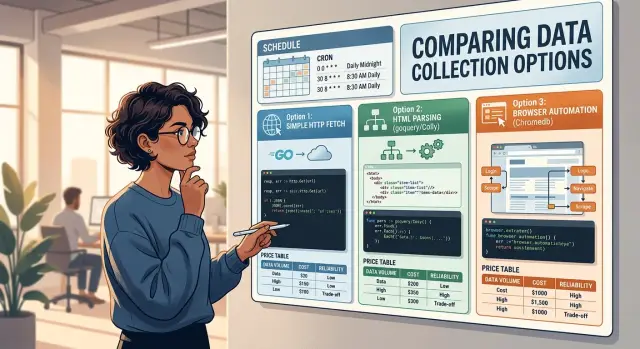
Table of Contents
What problem are you solving
Teams usually collect prices or stock data on a schedule for one reason: they want a small, repeatable signal they can trust. A store checks competitor prices every morning. An operations team tracks supplier stock before placing orders. A product team watches a few public pages to catch changes before customers notice them.
The size of the job changes everything. Checking one page once a day is simple. Checking 200 product pages every hour is not. The second job needs retries, time limits, logging, and a way to spot when the page layout changes. Many scraping problems look technical at first, but the hard part is often scope.
Most teams doing internal data collection do not need wide crawling. They already know which pages matter. They are not indexing a whole site. They are pulling a few fields from a short list of pages, then saving the result for internal reports, alerts, or price checks.
A simple request often solves the job. If the page sends plain HTML and the price is in the response, you may only need to fetch the page, parse one element, and store the result. That is fast, cheap, and easy to run on a schedule.
Use a heavier approach only when the page forces you to. JavaScript-heavy pages, login flows, or anti-bot checks can push you toward browser automation in Go. Still, starting small is usually the better call. Before you compare Go web scraping libraries, define four things:
- how many pages you need to check
- how often the job will run
- which fields you need to save
- what happens when a page fails
That short list tells you more than the library name ever will.
The three approaches in plain words
Most scheduled jobs do not need a full browser. If a site sends normal HTML right away, a basic request with net/http or a crawler like Colly is often enough. That is the simplest branch of Go web scraping libraries, and it usually gives you the fastest runs with the least setup.
Fetching the page is only the first half. You still need to pull out the price, title, SKU, or stock status from the markup. Tools like goquery or htmlquery do that part well. They let you target the exact element you need by selector or XPath and turn a messy page into clean fields your job can store.
Some sites do not put the real content in the first HTML response. They load prices, options, or tables with JavaScript after the page opens. When that happens, a plain request often returns an empty shell or incomplete data. chromedp or Rod solve that by driving a real browser, waiting for the page to render, and then reading the final result.
The tradeoff is practical, not abstract:
net/httpor Colly works best for plain pages, quick setup, and fast scheduled runs.- goquery or htmlquery helps you extract fields after you fetch the HTML.
- chromedp or Rod fits pages that build content in the browser and would fool a simple fetch.
For scheduled price checks or internal data collection, start small. If ten product pages show prices in the initial HTML, use a simple request plus a parser. It will run faster, cost less, and break less often. Save browser automation in Go for pages that truly need it, because browser jobs add more failure points like timeouts, cookie banners, login prompts, and page scripts that change without warning.
Lightweight fetch tools for simple pages
If the page already includes the price in the first HTML response, keep the job small. Among Go web scraping libraries, this is the point where net/http usually wins. It is built in, easy to control, and good enough for many scheduled price checks and internal data collection tasks.
A simple fetcher often needs only a timeout, a user agent, and a clear request schedule. That gives you fewer moving parts, lower memory use, and less to debug at 6 a.m. when one store changes a class name.
When the job grows past a handful of pages, Colly starts to make sense. It handles retries, request limits, and page queues without much setup. If you check 200 product pages every morning, that extra structure can save time and stop your scraper from hammering the same site by accident.
Debugging gets easier if you save the raw response before you parse it. That one habit solves a lot of confusion later.
- Save the HTML with a timestamp
- Log the status code and final URL
- Keep one sample of failed pages for review
When a selector stops matching, you can compare old and new HTML instead of guessing. Small teams often skip this and then waste an hour trying to reproduce a page that already changed.
There is one clear limit. If the real content appears only after JavaScript runs, stop and reassess. Check the page source, not just what the browser renders. If the price is missing there, a lightweight fetch tool will fight the page the whole way. That is the moment to switch approaches instead of piling hacks onto a simple scraper.
HTML parsers that turn pages into fields
HTML parsers help when the page already contains the data in its source and you only need a few values from it. For scheduled price checks, this is often the best middle ground between a simple fetch and full browser automation. Among Go web scraping libraries, parsers usually give you fast runs, low cost, and code that still makes sense later.
goquery works well when CSS selectors match the page cleanly. If the product name sits in .product-name and the price sits in .price, the code stays short and easy to read. That makes goquery a solid default for small jobs that run every day.
htmlquery fits pages where XPath feels clearer. Some sites bury prices inside tables, repeated cards, or long nested blocks. In that case, one XPath can be easier to follow than chaining several CSS selectors together.
Keep the parser narrow. Extract only the fields you need, such as:
- product name
- current price
- stock status
- SKU or page ID
That choice keeps the scraper simpler. It also makes failures easier to spot when the site changes a label, moves a block, or adds extra markup.
Class names often cause trouble because many sites generate them automatically. A safer setup uses a main selector and a backup selector. You might try .price-current first, then fall back to [itemprop='price'] or a selector tied to nearby text.
A small store page is a good example. If the visible price moves from one styled span to another after a redesign, a single hard-coded class can miss the update. A backup selector often keeps the job running until you patch it properly. That matters when the scraper runs on a schedule and no one watches every result by hand.
Browser automation for JavaScript pages
Some pages do not put the price in the first HTML response. They load it later with JavaScript, after a click, or after a request in the background. In that case, simple fetch tools and basic Go HTML parsers often miss the real number.
Browser automation runs a real browser and lets your scraper act like a user. It can open the page, wait for content to appear, click a cookie banner, choose a store location, and then read the final price. That extra power is why many teams use it for scheduled price checks on modern ecommerce sites.
If you want direct control over Chrome through the DevTools protocol, chromedp is a strong fit. It feels close to how the browser actually works, which helps when you need screenshots, network events, console logs, or precise control over page actions.
Rod is often easier to script. The API is friendly, and many small teams get working results faster with it. If your job is simple - open page, wait, read text, save result - Rod can feel less heavy in day to day use.
The biggest mistake is using fixed sleep calls. A page might load in 2 seconds today and 7 tomorrow. If you sleep for 3 seconds, your scraper fails at random. Wait for page state instead: a selector appears, a button becomes enabled, a network request finishes, or the price text changes from a placeholder to a real value.
A good browser job usually checks four things:
- the page finished initial navigation
- the price element exists
- the text is not empty or a placeholder
- popups or banners are closed before reading data
Browser automation costs more than lightweight tools. It uses more CPU, more memory, and usually more time per run. That matters when you schedule dozens or hundreds of checks each day. One browser task that takes 20 seconds is fine. A hundred of them can turn into a real server bill.
Use browser automation when the page truly needs it, not by default. For scheduled jobs, that simple choice saves money and cuts a lot of flaky failures.
How to choose for a scheduled job
Go web scraping libraries cover very different jobs, so the best choice usually starts with one boring question: what does the page actually do? If the price is already in the HTML, use a simple fetch tool and a parser. If the page builds the price with JavaScript after load, you may need browser automation in Go.
Small tools are easier to live with. They use less memory, start faster, and usually fail in simpler ways. For scheduled price checks, that matters more than writing a clever scraper once.
Run frequency changes the decision. A browser that opens fine once a day may feel expensive when it runs every 5 minutes. A daily check on 20 pages is one job. A check on 2,000 pages every hour is a very different one.
Maintenance time often costs more than coding time. A parser-based job may take longer on day one, but it is often easier to fix when a site changes a class name or moves a price block. Browser automation can handle messy pages, but it also gives you more moving parts to babysit.
Separate research from operations. For one-off internal data collection, it is fine to use a heavier setup if it gets the answer quickly. For recurring jobs, pick the tool your team can repair on a sleepy Monday morning.
A short check helps:
- Does the price exist in the first HTML response?
- How often will the job run?
- How many pages will it hit each run?
- How much failure can your team tolerate?
- Who will fix it when the site changes?
That last point is easy to ignore. Small teams, including the kind Oleg often advises, usually do better with the smallest stack that still works. If one missed run is acceptable, stay simple. If the page changes every week and the data matters daily, spend more upfront on retries, alerts, and tests.
A step by step setup for a daily price check
Start with one product page and one number you care about. Most scraping jobs fail because teams try to collect too much on day one. With Go web scraping libraries, the safer start is one URL, one selector, and one run you can inspect by hand.
-
Write down the exact page URL and the field you want, such as the sale price. Also keep one extra field, usually the product title, so you can confirm that the scraper opened the right page.
-
Fetch the page with a normal HTTP client and log the status code, final URL, and response time. If the site returns 403, 429, or a redirect loop, fix that first. Parsing bad responses only wastes time.
-
Parse the HTML and pull three values: the price, the title, and the time of collection. The timestamp matters a lot. Without it, you cannot tell when the price changed.
A small example keeps this grounded. If a store page shows "$49.99" today and "$44.99" tomorrow, your saved row should include the product name, the numeric price, the currency if you can detect it, and the exact time your job saw it.
-
Save each run to a simple table or a CSV file. A CSV is fine for a first test because you can open it fast and spot bad rows. A table is better once you want history, deduplication, or alerts.
-
Add retries and the daily schedule after the first four steps work. Retry once or twice for timeouts, but do not loop forever. Send an alert when the job fails several days in a row or when the parser returns an empty price.
Run the job at the same time every day. That makes comparisons cleaner. If your team already uses cron, Docker, or GitLab CI, that is enough for version one. The hard part is not the schedule. The hard part is leaving a clear trail in logs and saved results.
A simple example from a small team
A small online store team checks three competitor product pages every morning before they adjust their own prices. They do not need a big scraping stack. They need a job that runs at 7:00, reads prices, and stays quiet unless something changed.
Two of the pages are plain HTML. The team uses a simple HTTP fetch, downloads the page, and reads the price from one known element on each site. That is enough for static pages, and it keeps the job fast, cheap, and easy to fix when a selector changes.
The third page builds the price with JavaScript after load. A basic fetch misses it, so the team handles that page differently. They use browser automation in Go, wait for the price element to appear, and then read the final value from the rendered page. It takes more time, but only for that one site.
After each run, the script saves a small snapshot with the product name, the current price, and the date. A CSV file is often enough at this stage. The script then checks yesterday's snapshot and compares the numbers.
If nothing changed, the job exits without a message. If one of the prices moved, it sends a short internal note.
The note only needs a few lines:
- which competitor changed
- the old price and the new price
- when the script saw the change
This is where Go web scraping libraries make sense for scheduled price checks. Use the light option for simple pages, keep browser automation for the one page that really needs it, and avoid noisy alerts that train people to ignore them.
Common mistakes that break scrapers
Most scraper failures are boring. The site still works for people, but your job starts missing fields, hangs for hours, or gets blocked after a few runs.
One common bug is trusting one selector too much. If your code expects ".price > span" and the store changes one wrapper div, your parser returns nothing. Keep a backup selector, and add a small check that rejects empty or impossible values before you save them.
Many teams also hit sites too fast. Scheduled price checks look harmless, but a job that runs every minute across hundreds of pages can trip anti-bot rules fast. Slow your requests, spread them across the day, and respect the site's limits. A scraper that runs a bit slower is better than one that gets banned by noon.
Timeouts matter more than people think. One slow page, one stuck TLS handshake, or one browser tab that never finishes can hold the whole worker. Set request timeouts, page load limits, and a hard cap for the full run so each job ends cleanly.
Price parsing causes quiet data errors. "$1,299.00", "1 299,00 EUR", and "AED 1,299" all mean money, but not in the same format. If you strip symbols and punctuation without rules, you can turn 1,299 into 1.299 or 129900. Store the raw text, parsed amount, and currency code separately.
When a run fails, save evidence. A screenshot helps with browser automation in Go, and saved HTML helps with Go HTML parsers or simple fetch jobs. Without that record, you end up guessing. With it, you can see whether the site changed, blocked you, or returned a half-loaded page.
Even the best Go web scraping libraries cannot fix weak guardrails. Most bad data starts with one tiny shortcut that nobody notices until the numbers look wrong.
Quick checks before you schedule it
A scraper that works once in your terminal can still fail every morning at 6:00. Scheduled price checks punish weak assumptions fast, so it pays to test the boring parts before you add cron or a worker.
Many Go web scraping libraries look fine in a quick demo. The real test is whether the job still works after a small page change, a slow response, or a bad selector.
- Try a plain HTTP request first. If the price and product name already appear in the raw HTML, skip browser automation in Go. A browser takes more memory, starts slower, and gives you more ways to fail.
- Stress your selectors a little. If they depend on a deep chain of divs or random class names, they will break soon. IDs, data attributes, labels, and nearby fixed text usually last longer.
- Measure the whole run, not just the fetch. Parsing, retries, waiting for scripts, and saving results all count. If the job needs 4 minutes and your schedule gives it 5, you have almost no room for delays.
- Keep logs that help you debug tomorrow, not logs that only say "failed". Save the URL, status code, selector used, run time, and a small HTML sample when parsing breaks.
- Pick an owner before you automate anything. Pages change. Cookies expire. Anti bot checks appear. Someone needs to see the alert and fix it next week.
For internal data collection, that last point matters more than people expect. A simple scraper with clear logs and one owner is usually better than a clever setup that nobody wants to touch.
If one of these checks feels shaky, stop there and fix it first. That is usually cheaper than chasing random failures after the job goes live.
Next steps for a reliable setup
Start with one target site, not ten. Run the job on a schedule for a full week and watch what actually breaks. You want real numbers: how often the page loads, how often your selector still finds the price, how long the run takes, and how many false price changes you catch before they hit a report.
A scraper that works once in a test is not ready for scheduled price checks. The first week usually shows the weak spots fast: slow pages, hidden anti-bot checks, missing retries, or selectors that fail when a store tweaks one class name.
Write a short runbook while the setup is still fresh in your head. Keep it boring and specific so anyone on the team can use it at 7 a.m. when a job fails.
- where logs live
- what counts as a failed run
- who updates selectors
- when to retry and when to stop
- what alert should fire after repeated failures
Keep browser automation jobs separate from simple fetch jobs. They fail for different reasons, use more memory, and need different timeouts. If one headless browser job gets stuck, it should not slow down a plain HTTP fetch that could finish in seconds.
A lean setup often looks like this: one small worker for fetch-and-parse jobs, one isolated worker pool for browser jobs, and a simple daily report that shows success rate, changed prices, and pages that need review.
If your team wants to keep the setup small, Oleg can review the job design, infrastructure, and automation choices as a Fractional CTO. That kind of review usually pays off when you want fewer moving parts, cleaner failure handling, and scheduled jobs that stay cheap to run.


